
Your needs, this model
Does it fit your priorities?
Can it make color Letter duplex documents on Ethernet, with PIN release and a 150-sheet normal supply?
Yes, using the native UFR II driver and Secure Print workflow. Canon recommends 200–2,500 pages monthly; choose supported plain paper and release the job with its PIN at the printer.
Explore this need in the finder →Can this printer capture paper originals into computer files?
No. LBP612Cdw is a print-only device. Its USB and network ports support printing rather than a built-in scanner.
Explore this need in the finder →Does it include a normal 250-sheet paper supply?
No. Its included normal drawer is 150 sheets; the one-sheet manual feed is not another full stack.
Explore this need in the finder →Color printing with a modest normal paper supply
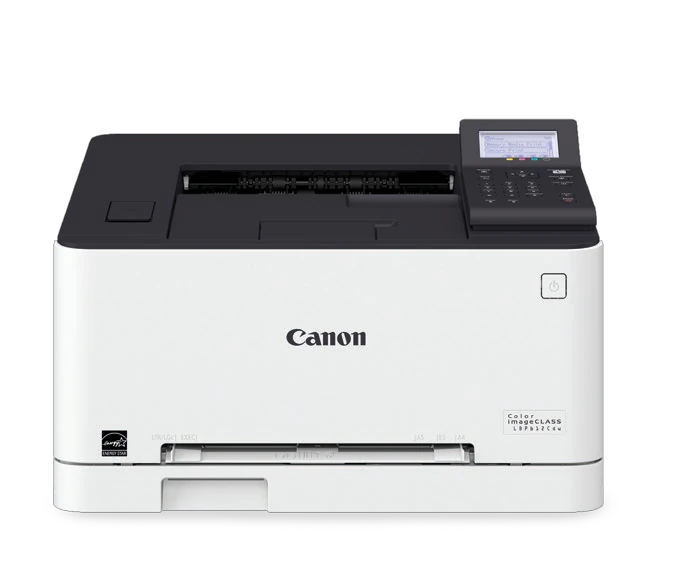
The Canon Color imageCLASS LBP612Cdw is an earlier print-only reference for a home or small office that wants color documents, automatic two-sided output and a choice of USB or network connections. It is most coherent when scanning is already handled elsewhere. The deciding tradeoff is capacity: its normal paper drawer holds 150 sheets, while the alternate feed accepts one sheet at a time. That is useful flexibility for occasional media, but it does not make the machine a large-capacity workgroup printer.
Canon rates both black and color output at up to 19 one-sided Letter pages per minute on plain paper. The separate two-sided rating is 11 ppm. Those declarations are not a measurement of a particular report or a conversion into duplex sheets per minute. The recommended monthly range is 200–2,500 pages; the separate 30,000-page maximum duty cycle should not be substituted for that recommendation when planning regular work.
Actual duplex sizes and the Legal drawer extension
The original U.S. paper table positively marks Letter, Legal and A4 for automatic two-sided printing. It also shows that accepting a size does not necessarily mean duplexing it: A5 is a one-sided option, and envelopes are not automatic duplex media. Select the correct paper size and type in both the machine and the application or driver instead of relying only on what fits between the paper guides.
Legal paper has a physical placement consequence. The drawer extends beyond the front of the printer, and Canon instructs the user to fit the Legal dust cover over the open section. A closed-body depth therefore does not describe the machine while that paper is loaded. The normal drawer capacity is stated at the specified ordinary-paper weights; it is not an envelope or heavy-card stack rating.
The manual feed is genuinely a one-sheet source. Canon requires the paper drawer to remain installed even when printing from that slot. For envelopes, the detailed operating guide recommends the drawer for better alignment and warns that the manual slot may produce skewed output. This is more useful than assuming the support-page one-envelope slot listing is the entire envelope workflow. It is still a separate one-sided routine, with the flap and print face loaded in the prescribed orientation.
Use the native driver for PIN-held documents
The native computer workflow uses the appropriate UFR II printer driver. USB provides a direct connection, while Ethernet or infrastructure Wi-Fi can place the printer on the office network. The USB memory connection is another function: it lets the machine print supported JPEG, TIFF or PDF files from a flash drive. It should not be confused with the USB device connection to a computer.
The actual guide documents Secure Print. Select the secured output method in the computer driver, submit the job and enter its PIN at the printer's control panel when ready to collect it. This holds the document in memory instead of immediately placing it on the output tray. Unreleased jobs expire after the configured period, and queued secured jobs consume memory. Department ID management is separate from that per-document release process.
AirPrint and Mopria provide additional printing routes, with settings controlled by the application involved. The original guide also explicitly supports Mac USB AirPrint, with its stated operating-system requirement, as well as same-network and direct wireless arrangements. Those conveniences do not automatically carry the native driver's Secure Print behavior. A requirement combining mobile printing and PIN release needs positive support in one workflow, rather than combining two unrelated feature names.
Four cartridges and no document scanner
The original box includes black Cartridge 045 rated at approximately 1,400 pages and CMY starter cartridges rated at about 690 pages each. Standard replacement CMY cartridges rise to about 1,300 pages each, while high-capacity 045 H options are rated at 2,800 black and 2,200 pages for each color. The actual guide identifies ISO/IEC 19798 on A4 at default density as the basis. These are supply declarations, not measured costs or a promise that every cartridge lasts the same number of office jobs.
The U.S. original specifies 120–127 V AC at 60 Hz. Allow the documented operating depth beyond the 17 by 16.5 inch closed footprint. The guide and brochure differ slightly on loaded weight, so a strict weight limit should be checked against the actual unit. Choose a color multifunction model if originals must be copied or scanned at this desk; neither a combined print-and-scan app name nor the LBP612Cdw's network ports create document-capture hardware.
Key details at a glance
| Color printing | Yes |
|---|---|
| Scanner | No |
| Copying | No |
| Fax | No |
| Flatbed scanner | No |
| Automatic document feeder | No |
| Automatic two-sided printing | Yes |
| Instructed envelope handling | Yes |
| Apple AirPrint | Yes |
| Mopria printing | Yes |
| Supported PIN-release printing | Yes |
| Recommended monthly minimum | 200 pages |
| Recommended monthly maximum | 2500 pages |
| Maximum monthly duty | 30000 pages |
| Included ordinary-paper capacity | 150 sheets |
| Declared one-sided mono Letter rate | 19 pages/min |
| Declared one-sided color Letter rate | 19 pages/min |
| Unit-body width | 17 in |
| Unit-body depth | 16.5 in |
| Unit-body height | 10.75 in |
| Imaging engine | laser |
Use the exact model’s instructions for operating limits, supplied equipment and version differences.
Paper, software and setup details
Print-rate conditions
Up to 19 one-sided plain-paper Letter pages per minute in color or black. The separate two-sided Letter rating is 11 ppm and is not converted to sheets per minute.
Paper handling
150-sheet normal drawer at the stated 64/80 gsm bases, plus a one-sheet manual feed. Legal extends the drawer and needs the dust cover. Actual paper tables allow automatic Letter, Legal and A4 duplex, but not envelopes. Specific normal-stack capacity is assigned conservatively to Letter only.
Scanning arrangement
Print-only model with no document scanner, copier or telephone fax. A print application containing scanning functions does not add those functions.
Computer and mobile connections
USB device, standard Gigabit Ethernet, infrastructure Wi-Fi and a separate access-point mode. The USB memory port prints supported files directly and is different from the computer USB connection.
Supplies and declared yields
Included 045 cartridges: black approximately 1,400 pages; each CMY starter approximately 690. Standard replacements: black 1,400, each CMY 1,300. High-capacity 045 H: black 2,800, each CMY 2,200. Actual guide uses ISO/IEC 19798 on A4 at default density.
Software and support
Native driver Secure Print holds jobs for PIN entry at the five-line LCD. Department ID management is a separate feature. Older cloud-service references are not treated as a working present-day printing route.
Electrical edition and setup
U.S. original: 120–127 V AC, 60 Hz. Closed body is 17 by 16.5 by 10.75 inches; allow its larger operating depth. Loaded weight differs slightly between original guide (34.2 lb) and brochure (34.1 lb), so the numeric weight remains unassigned.
Sources for this assessment
Find a printer for your routine.
Match color output, scanning, connections and paper handling, then compare the exact models.