
Your needs, this model
Does it fit your priorities?
Can MF644Cdw scan both faces of Legal originals in one pass to a prepared computer folder while supporting native PIN-held duplex Letter output over Ethernet?
Yes. Its exact model has a single-pass duplex feeder. The documented LAN File route uses a registered computer folder, size/color settings and Book/Calendar originals. Native UFR II supplies eligible Letter duplex and secured-job release; standard Letter capacity is 250 sheets.
Explore this need in the finder →Can the glass capture an entire Legal original?
No. The actual platen limit covers Letter/A4; Legal requires the feeder. Single-pass hardware does not enlarge the glass.
Explore this need in the finder →Does the included configuration provide 300 Letter sheets?
No. The exact U.S. Letter headline is 250 sheets, with a separate one-sheet bypass. The shared guide explicitly excludes the optional AF cassette from MF644Cdw.
Explore this need in the finder →Single-pass input in a modest-capacity color machine
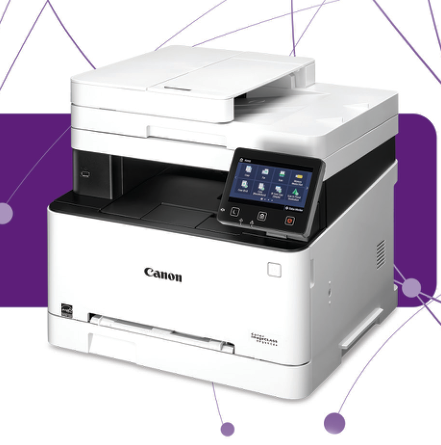
The Canon Color imageCLASS MF644Cdw, U.S. item 3102C005, combines color printing, copying, scanning, analog fax and Send Lite. Its useful distinction is a single-pass duplex document feeder alongside automatic two-sided printing. It can reduce handling of two-sided originals without requiring the larger paper configuration of the MF740 family.
The tradeoff is its 250-sheet standard Letter supply and recommended monthly range of 150–2,500 pages. The shared guide explicitly excludes the optional AF cassette from this model. A buyer expecting to add a large second tray later should resolve that requirement before choosing this machine.
Prepare a real folder destination for unattended capture
The feeder holds 50 Letter originals at 80 gsm and accommodates Legal documents. The glass covers Letter and A4, so a Legal contract belongs in the feeder. Single-pass duplex means both original faces can be captured in one pass; it does not make the glass larger.
The operating guide documents a complete LAN folder routine. Prepare the supported shared folder or FTP location, register its address from the computer and provide valid access credentials. At the printer select Scan, File and the registered destination. Choose the size, color mode and file format, then set Two-Sided Original to Book or Calendar according to the originals’ binding.
Start the scan and confirm the destination if prompted. Only one file destination can be selected for that operation. Feeder completion starts sending automatically; a multipage glass sequence instead uses Scan Next and finally Start Sending. This distinction matters when setting up a repeatable archive routine.
Desktop capture and PIN output use native software
USB, Gigabit Ethernet and infrastructure Wi-Fi support native computer operation. Use the exact supported UFR II and scanner software. Windows network scanning requires registration in MF Network Scanner Selector and uses IPv4; USB avoids that registration but requires the machine to be awake.
For normal computer capture, select Scan, Computer, the destination and an MF Scan Utility preset, or invoke ScanGear MF from a compatible application. The documented folder duplex controls are kept with that folder workflow rather than assumed to appear in every application.
For held output, choose Secured Print in the native driver’s Output Method. At the machine close any Remote Scanner screen, open Secure Print, select the document and Start, then enter its matching PIN. Uncollected jobs occupy memory and expire after the configured deletion period. This is temporary collection, rather than permanent document storage.
Match the media category before choosing duplex
The exact U.S. specification gives 250 Letter sheets at 20 lb Bond, with a separate one-sheet bypass. That slot suits a supported occasional alternate sheet; it does not create another stack supply.
The operating table confirms Letter, Legal and A4 automatic duplex on eligible media. It permits Heavy 1 at 106–120 gsm but excludes Heavy 2 at 121–163 gsm. Coated stock has separate approvals, so the broad supported-weight headline cannot be turned into a promise for every heavy sheet. Labels and envelopes are excluded from automatic duplex.
Canon recommends the drawer for the listed envelopes and coated category where manual-slot feeding may produce skew. Match the driver’s size and type to the actual loaded stock. Allow extra depth for an extended Legal drawer and room above the feeder for access.
Mobile output has application-dependent controls
AirPrint can use a shared LAN, direct wireless or a supported USB-connected Mac. The actual guide requires IPP printing and specifies OS X 10.9 or later for USB output. Available settings and paper sizes depend on the application.
Mopria and Canon PRINT Business are also listed. Those services provide useful alternatives for supported devices, but they do not automatically reproduce native PIN submission or the prepared folder-capture workflow.
Read the cartridge and body figures with their basis
The supplied 054 Black is rated for 1,500 pages, while each supplied color starter is rated for 680. Standard replacement colors rise to 1,200 each; 054 H ratings are 3,100 black and 2,300 for each color. The guide uses ISO/IEC 19798 on A4 at default density and warns that calibration and black-only printing consume color toner.
One-sided Letter output is rated up to 22 ppm in either color or black. The exact operating manual gives a body of 17¾ by 18⅛ by 16¼ inches, differing from the brochure’s dimensions. Its 45.2 lb excludes toner; the brochure’s 48.4 lb includes consumables. Verify physical fit with working clearance before installing it in a tight cabinet.
Key details at a glance
| Color printing | Yes |
|---|---|
| Scanner | Yes |
| Copying | Yes |
| Fax | Yes |
| Flatbed scanner | Yes |
| Automatic document feeder | Yes |
| Automatic two-sided printing | Yes |
| Automatic two-sided scanning | Yes |
| Single-pass two-sided scanning | Yes |
| Color scanning | Yes |
| Instructed envelope handling | Yes |
| Apple AirPrint | Yes |
| Mopria printing | Yes |
| Supported PIN-release printing | Yes |
| Recommended monthly minimum | 150 pages |
| Recommended monthly maximum | 2500 pages |
| Included ordinary-paper capacity | 250 sheets |
| Document-feeder capacity | 50 sheets |
| Declared one-sided mono Letter rate | 22 pages/min |
| Declared one-sided color Letter rate | 22 pages/min |
| Unit-body width | 17.75 in |
| Unit-body depth | 18.12 in |
| Unit-body height | 16.25 in |
| Unit weight | 48.4 lb |
| Imaging engine | laser |
Use the exact model’s instructions for operating limits, supplied equipment and version differences.
Paper, software and setup details
Print-rate conditions
Up to 22 one-sided Letter ppm in color or black, versus 17.9 Legal ppm. Conflicting brochure single-pass scan speed prose is not used as a controlled throughput claim.
Paper handling
250 Letter sheets at 20 lb Bond, plus a separately described one-sheet bypass. The actual function matrix excludes optional AF expansion. Native Letter/Legal/A4 duplex is media-dependent; envelopes and labels do not duplex.
Scanning arrangement
Single-pass automatic duplex feeder holds 50 Letter originals at 80 gsm and reaches Legal; glass is Letter/A4. Actual LAN File operation supports Book/Calendar two-sided originals.
Computer and mobile connections
USB device, Gigabit Ethernet, infrastructure Wi-Fi and direct wireless are documented. Native UFR II output and IPv4 registered computer capture differ from LAN device-to-folder sending and application-dependent mobile output.
Supplies and declared yields
Included 054 Black: 1,500 pages; each C/M/Y starter: 680. Replacement 054 Black: 1,500, each color: 1,200; 054 H Black: 3,100, each color: 2,300. ISO/IEC 19798 A4/default-density basis; calibration and black-only work can consume color toner.
Software and support
Print, copy, scan, analog fax and Send Lite are documented. Native Secure Print retention is configurable. The recommended monthly range is 150–2,500 pages; no maximum duty figure is inferred.
Electrical edition and setup
Exact operating guide body is 17¾ by 18⅛ by 16¼ inches, differing from brochure 16.9 by 16.5 by 16.5. Brochure 48.4 lb includes consumables; manual 45.2 lb excludes toner. U.S. 120–127 V, 60 Hz is confirmed.
Sources for this assessment
Find a printer for your routine.
Match color output, scanning, connections and paper handling, then compare the exact models.