
Your needs, this model
Does it fit your priorities?
Can MF735Cdw print color duplex pages and capture both sides of Legal originals through a wired computer arrangement?
Yes, with the installed native print and capture software. It has a single-pass duplex feeder, a 300-sheet normal base input and native PIN release. Leave paper size flexible for the combined normal-capacity question; exact-size capacity is not inferred from the general stack figure.
Explore this need in the finder →Can I place a full Legal original on its scanner glass?
No. Canon documents the Legal route through the feeder, while the glass is the smaller Letter/A4 class.
Explore this need in the finder →Does the supplied configuration hold 850 normal sheets without an accessory?
No. It includes 300 normal sheets. The 850-sheet maximum requires the optional 550-sheet cassette.
Explore this need in the finder →A color office reference with single-pass document capture
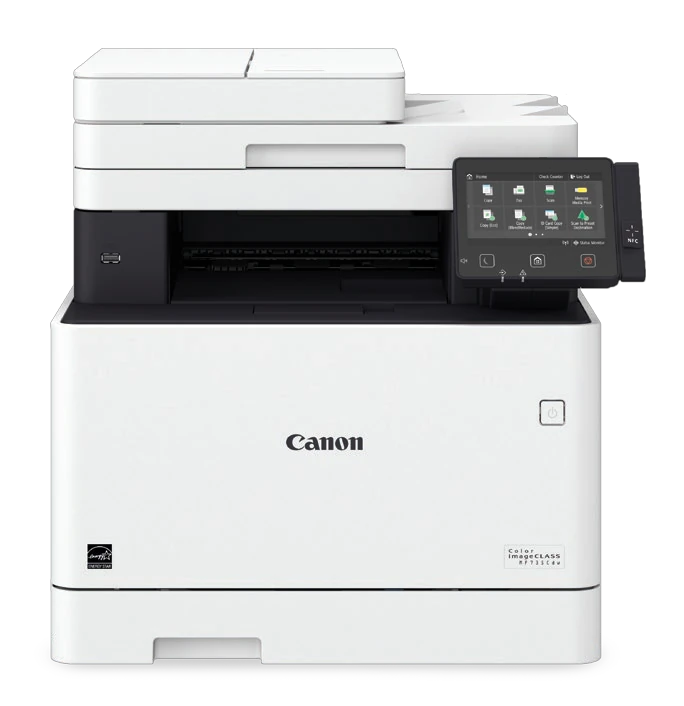
The Canon Color imageCLASS MF735Cdw is an earlier U.S. multifunction reference for an office that needs color printing, copying, scanning and telephone fax in one machine. Its exact brochure identifies item 1474C005. The useful distinction is its single-pass duplex feeder: it reads both sides of suitable originals automatically without using the reversing method of some older office scanners.
The deciding package tradeoff is paper input. The standard machine combines a 250-sheet cassette with a 50-sheet multipurpose tray. Its 850-sheet maximum requires the optional 550-sheet cassette. A brochure photo showing that taller configuration should not be read as a promise that every supplied printer includes the extra drawer.
Match the original to its separate scanning route
The feeder accepts originals up to Legal, with an ordinary 50-sheet capacity at the specified 80 gsm basis. The actual operating guide separately limits a Legal stack to 30 sheets. That size-specific restriction matters when digitizing longer forms: Legal support is not permission to load the same number as the ordinary headline.
The glass is smaller than Legal. Canon's exact brochure describes a Letter platen, while the shared operating table supplies a different A4-area measurement. Those declarations should not be combined into an invented physical dimension. Use the feeder for full Legal originals, and check critical edge coverage on a particular glass-scanning task. The glass remains the appropriate route for suitable books, photographs and fragile items that fit.
Printing and scanning are both color-capable here, but their measurements differ. Canon declares up to 28 one-sided Letter ppm in black or color, with a separate 23 ppm two-sided Letter rating. Feeder scan rates, optical scanner resolution and software-interpolated figures describe other operations. This assessment does not turn those declarations into a hands-on print-quality or timing result.
Install the capture software as well as the printer driver
Native computer use can follow USB, Gigabit Ethernet or the configured wireless LAN. Install the exact print driver, scanner components and MF Scan Utility. Windows network capture requires registration in MF Network Scanner Selector, and the actual preparation chapter excludes IPv6 scanning. Use its supported IPv4 or USB arrangement instead of assuming that successful network printing proves file capture will work.
MF Scan Utility provides computer capture and access to ScanGear MF's detailed settings. Compatible applications can also receive scans directly. Wake the printer when required for USB capture. The five-inch touchscreen helps with local operations, but it does not replace the software and registration needed on the destination computer.
AirPrint and Mopria provide separate mobile paths on a suitable shared network. The brochure specifically requires the mobile device and printer on that network; its mobile AirPrint footnote does not support a printer merely shared from a computer's USB port. Wi-Fi Direct is a distinct hotspot arrangement, and NFC use requires compatible hardware and the applicable app. Available settings depend on the chosen route.
Paper settings and protected output
The actual paper table confirms automatic two-sided Letter, Legal and A4 printing. Envelopes use their supported loading routine and remain outside automatic duplex; A5 is also restricted to simplex in the exact brochure. Set the loaded size and type at the printer and in the driver. Registering a permanent multipurpose default saves steps only while the real paper continues to match it.
Secure Print uses a native-driver job submission followed by PIN release at the printer. Choose the secured output method, then select the stored document and enter the PIN on the panel. Temporary storage has memory and deletion-time limits. A Remote Scanner screen can block release until it is closed. This included routine is distinct from optional uniFLOW fleet deployment, card readers and PDF-security accessories.
Telephone fax also needs a separate configured telephone connection. Its presence is documented for MF735Cdw, rather than borrowed from a generic multifunction-family description. Neither Ethernet nor Wi-Fi supplies the telephone service itself.
Four toner channels and installation space
The original package includes black Cartridge 046 rated at 2,200 pages and starter cyan, magenta and yellow rated at 1,200 each. Standard replacement color cartridges are rated at 2,300 each; high-capacity 046 H declarations are 6,300 black and 5,000 for each color. The actual guide specifies ISO/IEC 19798 on A4 at default density. These are supply declarations, not a measured replacement schedule.
Canon recommends 750–4,000 pages monthly, separately from the 50,000-page maximum duty. The loaded machine weighs approximately 58.4 lb and needs more working room than its closed body. Choose MF735Cdw for its documented color and single-pass workflow; compare larger-glass or more fully equipped paper configurations when those specific requirements drive the purchase.
Key details at a glance
| Color printing | Yes |
|---|---|
| Scanner | Yes |
| Copying | Yes |
| Fax | Yes |
| Flatbed scanner | Yes |
| Automatic document feeder | Yes |
| Automatic two-sided printing | Yes |
| Automatic two-sided scanning | Yes |
| Single-pass two-sided scanning | Yes |
| Color scanning | Yes |
| Instructed envelope handling | Yes |
| Apple AirPrint | Yes |
| Mopria printing | Yes |
| Supported PIN-release printing | Yes |
| Recommended monthly minimum | 750 pages |
| Recommended monthly maximum | 4000 pages |
| Maximum monthly duty | 50000 pages |
| Included ordinary-paper capacity | 300 sheets |
| Document-feeder capacity | 50 sheets |
| Declared one-sided mono Letter rate | 28 pages/min |
| Declared one-sided color Letter rate | 28 pages/min |
| Unit-body width | 18.5 in |
| Unit-body depth | 18.5 in |
| Unit-body height | 18.12 in |
| Unit weight | 58.4 lb |
| Imaging engine | laser |
Use the exact model’s instructions for operating limits, supplied equipment and version differences.
Paper, software and setup details
Print-rate conditions
Up to 28 one-sided Letter ppm in black or color; separately 23 two-sided Letter ppm. Feeder scan ipm and software-interpolated resolution are different measurements.
Paper handling
Standard 250-sheet drawer plus 50-sheet multipurpose tray at the stated 20 lb bond brochure basis, or 300 normal sheets. Optional 550-sheet cassette raises the maximum to 850. Actual table supports Letter, Legal and A4 automatic duplex; envelopes and A5 are not automatic-duplex media.
Scanning arrangement
Exact MF735Cdw has single-pass duplex capture, 50 ordinary originals at 80 gsm and 30 Legal originals. The exact brochure describes an 8.5 by 11 inch Letter platen; the shared operating table gives a different 210 by 297 mm area. Letter/A4 declared routes are retained without inventing a combined physical measurement; Legal remains feeder-only.
Computer and mobile connections
USB computer port, Gigabit Ethernet, infrastructure Wi-Fi, distinct Wi-Fi Direct and NFC for compatible devices and software. Native file capture requires its actual preparation and driver; a network print path alone does not complete scanner registration.
Supplies and declared yields
Included 046 black is rated 2,200 pages; included cyan, magenta and yellow are 1,200 each. Standard replacements are black 2,200 and each color 2,300; 046 H is black 6,300 and each color 5,000. Actual manual basis is ISO/IEC 19798 on A4 at default density.
Software and support
Secure Print is the standard native driver and PIN-release routine. uniFLOW fleet deployment and listed card-reader, barcode and PDF-security accessories are separate configuration choices. No retired cloud service is offered as an operating plan.
Electrical edition and setup
Actual U.S. guide specifies 120–127 V AC at 60 Hz. Closed body is 18.5 by 18.5 by 18.125 inches, approximately 58.4 lb including toner. The operating installation depth is much greater when the drawer and rear cover are open.
Sources for this assessment
- Canon exact U.S. MF735Cdw/MF733Cdw/MF731Cdw/MF634Cdw/MF632Cdw User Guide, April 2018
- Canon U.S. exact Color imageCLASS MF735Cdw brochure with uniFLOW, March 2018
- Canon U.S. exact MF735Cdw technical specifications
- Canon exact U.S. MF735 family manual: Scanner Preparation
- Canon exact U.S. MF735 family manual: Remote Computer Scanning
- Canon exact U.S. MF735 family manual: Secure Print
- Canon exact U.S. MF735 family manual: Available Paper
Find a printer for your routine.
Match color output, scanning, connections and paper handling, then compare the exact models.