
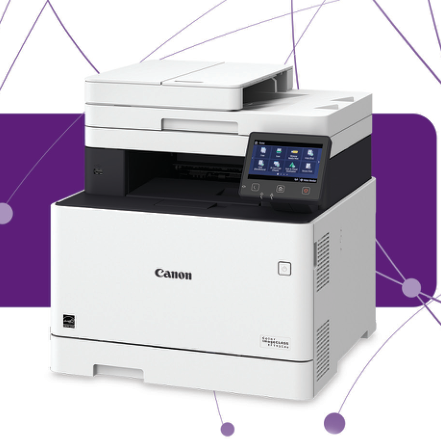
Your needs, this model
Does it fit your priorities?
Can MF741Cdw combine color Legal feeder capture, native PIN-held duplex Letter printing and 300 included Letter sheets on Ethernet?
Yes, on a supported native UFR II and MF Scan Utility arrangement. The 50-sheet feeder captures one face at a time, while the printer can automatically duplex eligible Letter stock. The included cassette and bypass total 300 Letter sheets at 20 lb Bond.
Explore this need in the finder →Can its feeder automatically capture both faces of a document stack?
No. The actual MF741Cdw column specifies a one-sided feeder. Automatic duplex output does not change the scanner’s intake.
Explore this need in the finder →Does this model provide telephone fax along with print, copy and scan?
No. Its exact function matrix explicitly omits fax. Send Lite and internet destinations are different functions.
Explore this need in the finder →Automatic duplex output with one-sided original intake
The Canon Color imageCLASS MF741Cdw, U.S. item 3101C015, is an earlier color laser model for printing, copying and scanning. It also provides Send Lite destinations. Its useful combination is color output, automatic two-sided printing and a 50-sheet document feeder, with an important qualification: that feeder captures only one face of each original.
The actual model matrix explicitly omits telephone fax. A shared Application Library list includes names such as Fax and Store, but that list does not install fax hardware in MF741Cdw. Someone regularly capturing two-sided contracts or sending analog faxes should choose a model whose exact configuration supplies those functions.
Load Legal originals in the feeder
The glass accepts originals up to 8.5 by 11¾ inches, covering Letter and A4. Legal originals require the feeder. Its stated capacity is 50 Letter originals at 80 gsm, rather than a promise for every thick or unusual document.
Fan and align the stack, place it face up and adjust the side guides against its edges. Do not mix original sizes or exceed the load line. Books and suitable fragile material belong on the glass. For a document printed on both faces, plan a manual second capture and careful file ordering; the machine cannot automatically capture the reverse faces.
Prepare the computer scanning route
Supported native operation uses USB, Gigabit Ethernet or infrastructure Wi-Fi. Install the exact printer and scanner software for the intended computer. For Windows network capture, register the machine with MF Network Scanner Selector. The guide supports that capture over IPv4 and explicitly excludes IPv6 scanning.
At the panel, choose Scan, Computer, the destination computer and an appropriate scan preset. MF Scan Utility controls those presets. Alternatively, start MF Scan Utility or a compatible TWAIN/WIA application from the computer and select ScanGear MF for advanced settings.
Wake the printer before USB scanning. If Auto Online is disabled, put it into Remote Scanner mode before starting an application scan. The guide warns that some applications may not advance through a stack correctly; in that case, capture originals one at a time. These are practical software conditions beyond the presence of an Ethernet socket.
Native PIN release needs its own driver setting
MF741Cdw documents actual secured-job printing. Select Secured Print in the native driver, apply the print settings and send the document. It waits in machine memory until released.
At the printer, select Secure Print, choose the job, select Start and enter its matching PIN. An open Remote Scanner screen must be closed first. Unreleased jobs occupy memory and disappear after the configured deletion period, so this is temporary held output rather than permanent document storage.
UFR II is the documented native printer language for this model. The shared series manual also discusses other languages; those sections do not establish PCL or PostScript on MF741Cdw.
Count the included paper, then select eligible duplex media
The base configuration supplies a 250-sheet cassette and 50-sheet bypass, totaling 300 Letter sheets at 20 lb Bond. The advertised 850-sheet maximum requires the optional 550-sheet AF-1 cassette. It is not the included configuration.
The actual operating paper table marks Letter, Legal and A4 for automatic two-sided output on eligible stock. It excludes labels and envelopes from that automatic path. Match the size and type settings to the loaded paper before submitting the native job.
Loading Legal paper extends the drawer beyond the body. The guide provides a Legal dust cover for the exposed section. Allow that working depth, along with feeder opening and supply access, when choosing a location.
Keep mobile printing and desktop controls distinct
AirPrint supports a shared LAN or a supported direct connection, with IPP printing enabled. Select the printer from an AirPrint-capable application and choose the available settings. Canon notes that controls and paper sizes depend on the application.
This review therefore keeps mobile printing separate from native PIN release and desktop capture. Mopria and Canon PRINT Business are also listed, but a mobile-service name does not guarantee every native driver setting.
Supplies and physical fit deserve a close reading
Canon declares up to 28 one-sided Letter ppm in color or monochrome and recommends 750–4,000 pages monthly. The box contains a 2,300-page 055 Black cartridge and 1,200-page CMY starters. Replacement color cartridges have different ratings, while the higher-yield 055 H set is optional. These yields use ISO/IEC 19798 on A4 at default density. Calibration and even black-and-white printing consume some color toner.
The exact operating manual lists a body 17¾ inches wide, 18½ deep and 18⅛ high; the brochure gives different dimensions. Verify the actual unit before fitting it into a tight space. The brochure’s approximately 64 lb includes consumables, whereas the manual’s 54 lb excludes toner. Neither figure includes the additional room needed to operate the machine.
Key details at a glance
| Color printing | Yes |
|---|---|
| Scanner | Yes |
| Copying | Yes |
| Fax | No |
| Flatbed scanner | Yes |
| Automatic document feeder | Yes |
| Automatic two-sided printing | Yes |
| Automatic two-sided scanning | No |
| Single-pass two-sided scanning | No |
| Color scanning | Yes |
| Instructed envelope handling | Yes |
| Apple AirPrint | Yes |
| Mopria printing | Yes |
| Supported PIN-release printing | Yes |
| Recommended monthly minimum | 750 pages |
| Recommended monthly maximum | 4000 pages |
| Included ordinary-paper capacity | 300 sheets |
| Document-feeder capacity | 50 sheets |
| Declared one-sided mono Letter rate | 28 pages/min |
| Declared one-sided color Letter rate | 28 pages/min |
| Unit-body width | 17.75 in |
| Unit-body depth | 18.5 in |
| Unit-body height | 18.12 in |
| Unit weight | 64 lb |
| Imaging engine | laser |
Use the exact model’s instructions for operating limits, supplied equipment and version differences.
Paper, software and setup details
Print-rate conditions
Up to 28 one-sided Letter ppm in monochrome or color; Legal is declared separately at 22.9 ppm. At 300 by 600 dpi, the actual feeder table declares 28 black-and-white or 14 color one-sided Letter pages per minute; scan figures are not print throughput.
Paper handling
Standard 300 Letter sheets at 20 lb Bond, 250 plus 50. The optional 550-sheet cassette raises maximum capacity to 850, but is not included. Actual paper table controls duplex media.
Scanning arrangement
50 Letter originals at 80 gsm; simplex feeder through Legal. The platen supports up to 8.5 by 11¾ inches. Shared series duplex scan rows do not give this model automatic two-sided input.
Computer and mobile connections
USB device port, Gigabit Ethernet, infrastructure Wi-Fi and Wi-Fi Direct are documented. USB host ports serve memory devices and are distinct from the computer cable. Native printer language is UFR II.
Supplies and declared yields
Included 055 Black is rated 2,300 pages; each supplied CMY starter 1,200. Replacement 055 CMY is 2,100 each; 055 H Black 7,600 and CMY 5,900 each. Actual manual basis is ISO/IEC 19798 on A4 at default density. Calibration and black-and-white printing also consume color toner.
Software and support
Print, copy, scan and Send Lite are standard; telephone fax is absent. Application Library’s shared feature names do not add fax. Secure Print is native held-job release; server destinations require separate preparation.
Electrical edition and setup
Exact operating manual gives 17¾ by 18½ by 18⅛ inches; brochure dimensions differ. Brochure’s approximately 64 lb explicitly includes consumables, while the manual’s 54 lb excludes toner. U.S. edition uses 120–127 V, 60 Hz.
Sources for this assessment
Find a printer for your routine.
Match color output, scanning, connections and paper handling, then compare the exact models.