
Your needs, this model
Does it fit your priorities?
Can MF8580Cdw capture both faces of Legal originals and print PIN-held two-sided Letter color jobs over a supported USB connection?
Yes, using the supported native driver and MF Toolbox arrangement. Select the feeder Input Method for both original faces and use the native Secure Print code at the computer and machine. The feeder mechanism is not established as single-pass.
Explore this need in the finder →Can it be chosen specifically for single-pass two-sided original capture?
No. Automatic two-sided feeder capture is documented, but a single-pass mechanism is not established in the read originals.
Explore this need in the finder →Can the scanner glass capture a full Legal page?
No. Legal originals use the feeder; the actual glass is limited to 8.5 by 11¾ inches, covering Letter and A4.
Explore this need in the finder →The duplex and secured-job functions belong to MF8580Cdw
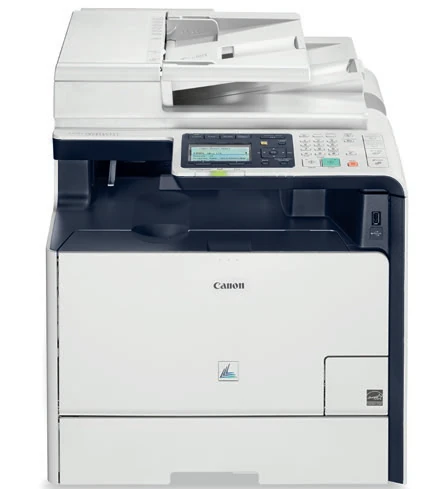
The Canon Color imageCLASS MF8580Cdw, U.S. item 6849B001AA, is an earlier color laser multifunction model. It prints, copies, scans and faxes, with automatic duplex output and automatic two-sided feeder capture. Its shared brochure also covers MF8280Cw, but the model columns contain substantial differences.
For MF8580Cdw, native Secure Print, PCL support, direct e-mail or folder sending and duplex functions are positively documented. Those features should be assessed as operating workflows, with the intended software and connection, rather than merged with a nearby model's configuration.
Legal originals use the feeder
The actual glass supports originals up to 8.5 by 11¾ inches, covering Letter and A4. The feeder reaches 8.5 by 14 inches for Legal originals. Its 50-sheet capacity is specified for Letter at 80 gsm.
Use the glass for suitable books, cards and material that cannot safely feed. For a stack, align the edges, load originals face up and adjust the guides without squeezing the paper. Curled, torn or stapled originals can obstruct the automatic path.
Automatic two-sided intake is confirmed, but the read sources do not name its mechanism as single-pass or reversing. This review keeps that distinction visible. A requirement specifically for single-pass capture needs stronger evidence than a generic duplex feeder label.
MF Toolbox provides actual computer capture controls
Supported native operation uses USB, 10/100 Ethernet or infrastructure Wi-Fi. Install the exact MF Drivers and MF Toolbox for the intended computer. The operating procedure selects Remote Scanner at the machine before starting MF Toolbox on the computer.
Choose a suitable scan mode, set the original source and size, select color and use the MF8580Cdw-only Input Method to choose the feeder faces. The PDF workflow can create a file containing multiple pages or add captured pages to an existing PDF.
MF Toolbox's Mail button prepares an attachment in the computer's mail application. That is different from the printer sending directly to an e-mail server. MF8580Cdw also has direct e-mail and shared-folder sending, but those destinations need their own preparation. A computer utility preset does not supply missing server settings.
PIN-held release is separate from usage authentication
The exact U.S. brochure gives a clear native Secure Print sequence: enter a code on the computer, select the device's Secure Print button, enter the same code and collect the output. This establishes a document waiting for its user's release.
Department ID Management serves another purpose, tracking and controlling usage under registered IDs. Its password does not by itself establish a held-job workflow. MF8580Cdw happens to document both functions, and this review keeps their roles separate.
Automatic output duplex depends on size and medium
The native driver defaults to two-sided printing. Select the intended print style and binding edge so the reverse face opens correctly. The actual paper list marks Letter, Legal and A4 for automatic duplex on eligible stock.
Media-specific footnotes matter. Certain coated papers have a narrower A4-or-Letter duplex condition, while normal supported media follow their own marks. A Legal-size headline does not make every coated or heavy sheet suitable for the duplex path.
Standard normal supply is 250 sheets in the cassette plus 50 in the multipurpose path. The optional 250-sheet Cassette Feeding Unit-V1 is excluded from this base configuration. Actual quantities fall with heavier stock, and envelopes have their own separate loading limits.
AirPrint has an explicit duplex option and application limits
The U.S. AirPrint procedure connects the Apple device and printer to the same wireless LAN. It shows Double-sided on iOS and Two-Sided on Mac for MF8580Cdw, so automatic duplex is positively supported in that arrangement.
The guide also says available paper sizes and controls vary by application. This review therefore does not promise a particular duplex paper size for every AirPrint job. It also keeps native PIN controls and computer capture outside the mobile printing plan.
Distinguish starter supplies, output speed and lifting weight
Canon declares up to 21 one-sided Letter ppm in color or monochrome, versus 10 two-sided Letter ppm. The included supplies are starter Cartridge 118 items; a separate starter yield is unestablished. Replacement 118 Black is rated at about 3,400 pages and each color at about 2,900 on the brochure's stated ISO/IEC basis.
The operating body is 17 inches wide, 19⅛ deep and 18⅞ high, weighing about 68.3 lb with toner cartridges. Leave room to open the feeder, load media and service supplies. The 40,000-page maximum monthly duty is a ceiling declaration, not a recommended routine workload.
Key details at a glance
| Color printing | Yes |
|---|---|
| Scanner | Yes |
| Copying | Yes |
| Fax | Yes |
| Flatbed scanner | Yes |
| Automatic document feeder | Yes |
| Automatic two-sided printing | Yes |
| Automatic two-sided scanning | Yes |
| Color scanning | Yes |
| Instructed envelope handling | Yes |
| Apple AirPrint | Yes |
| Supported PIN-release printing | Yes |
| Maximum monthly duty | 40000 pages |
| Included ordinary-paper capacity | 300 sheets |
| Document-feeder capacity | 50 sheets |
| Declared one-sided mono Letter rate | 21 pages/min |
| Declared one-sided color Letter rate | 21 pages/min |
| Unit-body width | 17 in |
| Unit-body depth | 19.12 in |
| Unit-body height | 18.88 in |
| Unit weight | 68.3 lb |
| Imaging engine | laser |
Use the exact model’s instructions for operating limits, supplied equipment and version differences.
Paper, software and setup details
Print-rate conditions
Up to 21 one-sided Letter ppm in color or monochrome, versus 10 two-sided Letter ppm. Scanning is separately declared in images per minute at its stated resolution; it is not print throughput.
Paper handling
Standard normal sources hold 250 plus 50; an optional 250-sheet feeder is excluded. Actual automatic-duplex marks include Letter, Legal and A4 on eligible stock. Specified coated papers have a narrower A4/Letter duplex condition. Envelopes have separate capacities.
Scanning arrangement
50 Letter originals at 80 gsm; Legal feeder maximum. The glass supports Letter/A4, not Legal. Automatic two-sided feeder capture is confirmed, but its single-pass versus reversing mechanism remains unestablished.
Computer and mobile connections
USB, 10/100 Ethernet and infrastructure Wi-Fi native operation. The actual AirPrint procedure uses the same wireless LAN. Wi-Fi Direct and Mopria are not established by these read U.S. originals.
Supplies and declared yields
The box contains starter Cartridge 118 supplies, whose separate starter yields are unestablished. Replacement 118 Black is rated about 3,400 pages and each color about 2,900 on an ISO/IEC basis without a specific standard number stated in the brochure.
Software and support
Native PIN-held release is distinct from Department ID management. Direct e-mail and network-folder sending are MF8580Cdw functions and need destination/server preparation. MF Toolbox Mail attaches through the computer application, which is a different route. Maximum duty of 40,000 is not a recommended monthly range.
Electrical edition and setup
Actual operating body is 17 by 19⅛ by 18⅞ inches and about 68.3 lb including toner cartridges. The optional feeder raises the body. U.S. power is 120–127 V at 60 Hz.
Sources for this assessment
- Canon U.S. Color imageCLASS MF8580Cdw/MF8280Cw brochure, May 2013
- Canon U.S. MF8580Cdw/MF8280Cw Basic Operation Guide
- Canon U.S. MF8580Cdw e-Manual: Paper
- Canon U.S. MF8580Cdw e-Manual: Machine Specifications
- Canon U.S. MF8580Cdw e-Manual: Using AirPrint
- Canon U.S. Color imageCLASS MF8580Cdw technical specifications
Find a printer for your routine.
Match color output, scanning, connections and paper handling, then compare the exact models.