
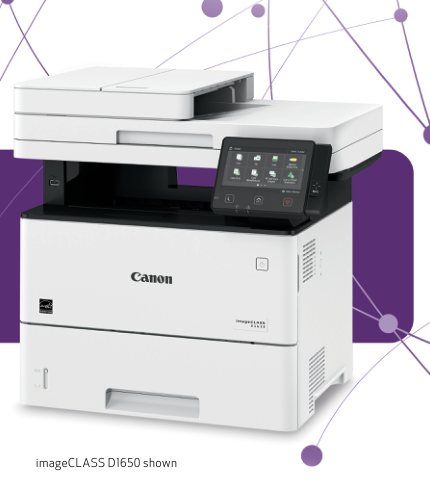
Your needs, this model
Does it fit your priorities?
Can D1650 combine 650 included Letter sheets, native PIN-held duplex output and single-pass Legal color capture to an Ethernet folder?
Yes. The original U.S. brochure explicitly gives 650 Letter 20 lb input and single-pass capture. The native queue and prepared network-folder arrangement support the combined requirements; register the folder, choose Book or Calendar orientation and release native held jobs with the PIN.
Explore this need in the finder →Can it produce the same documents in color?
No. D1650 prints monochrome. Its color scanner and color touchscreen do not add color output.
Explore this need in the finder →Will its body fit a strict 19-inch width limit?
No. Exact D1650 width is 19½ inches. D1620’s narrower body is a different model, and operating clearance is extra.
Explore this need in the finder →A workgroup model with Legal capture and analog fax
The Canon imageCLASS D1650 combines monochrome laser output, a Legal-size glass, a single-pass duplex feeder and analog fax. It suits a supported office workflow that regularly handles long originals and wants substantial included Letter input without immediately adding another cassette.
The exact variant matters. D1650 includes fax and NFC, while D1620 lacks those functions and has a narrower body. The shared guide does not make their packages interchangeable. D1650’s physical width and original-capture functions should be checked against the actual intended installation.
Install the computer and network destinations deliberately
The documented native printer languages include UFR II, PCL and Adobe PostScript. Install the supported driver, register the loaded size and type and choose the queue and settings in the application. Additional physical paper feeders also need recognition in the driver’s Device Settings.
For ordinary computer capture, install the scanner software. Windows network scanning requires IPv4 and registration in MF Network Scanner Selector. USB does not require that registration. At the panel choose Scan, Computer, the destination and preset, then Start.
Close ScanGear before starting the panel procedure. For an eligible multipage glass job, use Scan Next for each subsequent original and Finish when complete. That sequence is different from simply placing a stack in the feeder.
Use the single-pass feeder through a configured folder route
The original U.S. brochure positively identifies a single-pass duplex feeder. The operating guide supplies the practical network-folder sequence: configure and register the shared folder or FTP destination from a computer, including access details, then choose Scan and File at the machine.
Select the registered destination, original size, format and orientation. Two-Sided Original offers Book Type and Calendar Type so the reverse face is oriented correctly. Start the operation after checking those settings. A native printer queue alone does not create a writable shared-folder destination.
The feeder accepts Legal originals, while its fifty-sheet quantity is specifically a Letter figure at the stated weight. Use the Legal glass for bound or unsuitable feeder originals. Do not load mixed sizes, exceed the limit line or add originals while the feeder is scanning.
JPEG from the glass is a one-page operation. PDF and TIFF offer different multipage and file-division choices. Compact PDF reduces file size with an image tradeoff, while optional encryption or signature features should not be assumed part of the standard package.
Included capacity is useful before optional expansion
The original brochure explicitly specifies 650 Letter sheets at twenty-pound bond: a 550-sheet cassette and one-hundred-sheet bypass. The operating guide separately gives a larger drawer quantity for lighter paper, so its weight basis should not silently replace that normal configuration.
Optional PF-C1 sources are extra hardware. Count them only when actually installed and configured. Envelope feeding belongs in the bypass, and its capacity is separate from the normal-sheet total.
The actual paper symbols mark Letter, Legal and A4 for automatic duplex. Eligible plain, bond and heavy categories through 120 gsm can use that route; heavier categories, labels and envelopes cannot. The printer’s broad one-sided weight range is not a blanket duplex promise.
Native PIN collection is a distinct output procedure
Choose Secured Print in the native driver’s Output Method and send the job. At the panel select Secure Print, the job checkbox and Start, then enter the PIN and apply it. Jobs with different PINs need the appropriate separate selection.
Held work consumes memory and expires after the configured retention period. Close a blocking Remote Scanner screen before collecting output. Department authentication, native job release and mobile printing are separate controls; a mobile protocol does not automatically carry the native PIN workflow.
Size and sustained workload complete the decision
Canon’s original brochure rates one-sided Letter output at forty-five pages per minute and recommends 2,000–7,500 pages per month. Its feeder image rates are separate measures, not faster printing claims. Supplied and replacement Cartridge 121 toner are rated for five thousand pages under ISO/IEC 19752 using A4 and default density.
The exact operating-guide body measures 19½ by 18¼ by 17¾ inches. Its 41.9-pound figure excludes toner, so neither that figure nor the boxed weight is presented as loaded weight. Allow additional paper-path and service access, provide the specified U.S. supply and verify software compatibility for the intended computers.
Key details at a glance
| Color printing | No |
|---|---|
| Scanner | Yes |
| Copying | Yes |
| Fax | Yes |
| Flatbed scanner | Yes |
| Automatic document feeder | Yes |
| Automatic two-sided printing | Yes |
| Automatic two-sided scanning | Yes |
| Single-pass two-sided scanning | Yes |
| Color scanning | Yes |
| Instructed envelope handling | Yes |
| Apple AirPrint | Yes |
| Mopria printing | Yes |
| Supported PIN-release printing | Yes |
| Recommended monthly minimum | 2000 pages |
| Recommended monthly maximum | 7500 pages |
| Included ordinary-paper capacity | 650 sheets |
| Document-feeder capacity | 50 sheets |
| Declared one-sided mono Letter rate | 45 pages/min |
| Unit-body width | 19.5 in |
| Unit-body depth | 18.25 in |
| Unit-body height | 17.75 in |
| Imaging engine | laser |
Use the exact model’s instructions for operating limits, supplied equipment and version differences.
Paper, software and setup details
Print-rate conditions
The original brochure rates 45 one-sided Letter pages per minute, separately 36 for Legal. The operating table’s 45.5 continuous Letter figure retains its own test basis. Recommended monthly volume: 2,000–7,500. Scanner images per minute are not print pages per minute.
Paper handling
Included Letter input: 650 sheets at 20 lb, through the 550 + 100 sources. Optional PF-C1 excluded. The manual’s 640-sheet drawer quantity at 64 gsm is a separate basis. Heavy 3/4, labels and envelopes do not duplex; envelopes use bypass.
Scanning arrangement
Legal glass and a single-pass Legal feeder. Fifty Letter originals at 80 gsm; feeder stock is 50–105 gsm. The brochure explicitly identifies the mechanism, and the operating Book/Calendar folder procedure establishes the both-face workflow.
Computer and mobile connections
USB, Gigabit Ethernet and infrastructure Wi-Fi support the documented native registered-computer and folder routes. Exact D1650 has fax and NFC; D1620’s no-fax configuration is separate. Mobile direct mode differs from normal LAN computer access.
Supplies and declared yields
Supplied and replacement Cartridge 121: approximately 5,000 pages under ISO/IEC 19752 using A4 and default density. The 41.9 lb body excludes toner, so loaded weight is unknown; boxed weight is not substituted.
Software and support
Native Secure Print uses the job checkbox, Start, PIN and Apply. Retention is configurable and held jobs occupy memory. Close Remote Scanner before release. PDF encryption/signature kit is optional. No current Google Cloud Print service is promised.
Electrical edition and setup
Exact D1650 body: 19½ × 18¼ × 17¾ inches. D1620’s narrower width is not used. U.S. power: 120–127 V, 60 Hz. The 41.9 lb figure excludes toner. Open paper paths and service access require extra space.
Sources for this assessment
Find a printer for your routine.
Match color output, scanning, connections and paper handling, then compare the exact models.