
Your needs, this model
Does it fit your priorities?
Can LBP6670dn print monochrome Legal documents automatically on both sides through Ethernet?
Yes, with a supported native driver, eligible 60–120 gsm media and the physical size lever set for Letter/Legal. Its Ethernet interface is Gigabit-capable.
Explore this need in the finder →Can it scan paper forms to the computer?
No. LBP6670dn is a print-only model without scanner glass or a document feeder.
Explore this need in the finder →Can it connect through built-in Wi-Fi?
No built-in Wi-Fi route is established. The exact U.S. sources document USB and Ethernet.
Explore this need in the finder →A wired print-only reference with automatic duplex
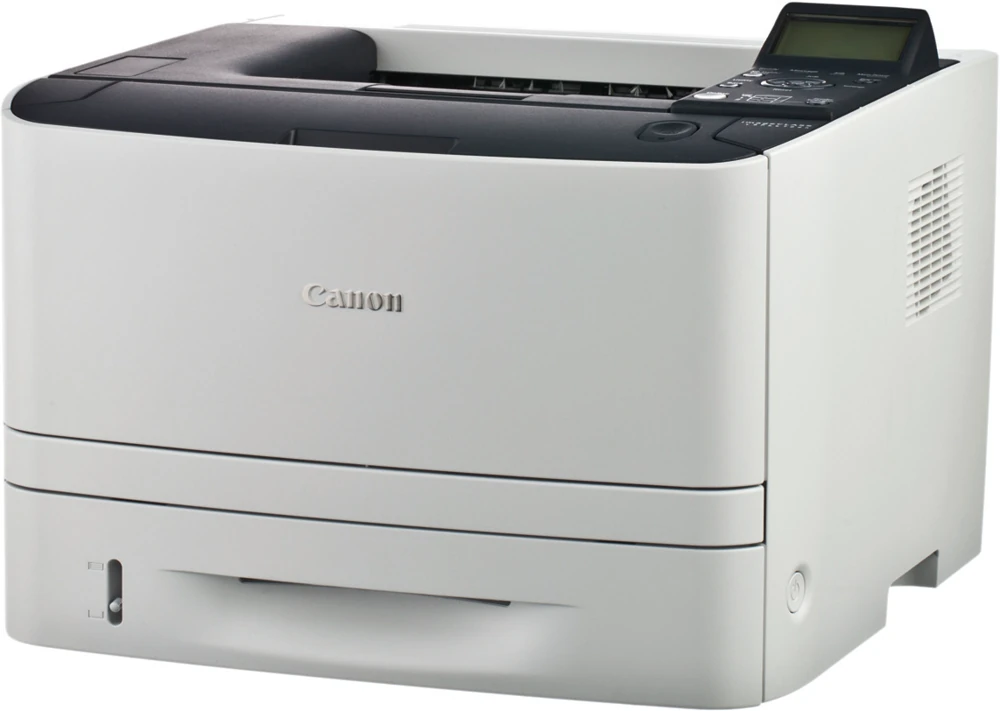
The Canon imageCLASS LBP6670dn is an earlier U.S. monochrome printer, identified as 5152B009AA in its original specification sheet. Its useful role is shared black-and-white printing through Gigabit Ethernet or direct USB, with automatic duplex and several native printer languages.
It has no scanner, copier or telephone fax. A home office that already handles original capture elsewhere can assess it as a dedicated printer; someone needing one machine for paper intake and output should choose a separately verified multifunction model. The specification sheet's generic printer/scanner footnote does not add a scanner to this print-only product.
A physical lever matters when changing duplex size
The operating guide supports automatic two-sided Letter, Legal and A4 output on eligible plain or heavy paper from 60–120 gsm. Unlike a workflow controlled entirely by a print dialog, the Windows procedure also requires a physical paper-size adjustment inside the duplex cover.
Set the blue size-switch lever inward for Letter or Legal and pull it toward you for A4. Canon warns that the wrong position can cause misfeeds or jams. Close the duplex cover, choose the native driver's Finishing settings, select one-sided or two-sided Print Style and set the binding edge. This is a useful check when a printer moves between Letter and A4 offices.
The output selection cover must also be closed for automatic duplex. Paper partly emerges after the first face and feeds back into the machine for the second; do not pull it at that stage. The rear face-up path is useful for media that tends to curl, but it cannot be used simultaneously as the automatic duplex output path.
Keep standard capacity separate from expansion
The standard drawer holds about 250 normal sheets and the multipurpose tray about 50, giving a 300-sheet standard supply. The 800-sheet maximum requires the optional 500-sheet PF-44 feeder. That accessory is excluded from the base configuration reviewed here.
Capacity also changes with the medium. The actual operating table gives approximately 200 drawer sheets and 40 multipurpose sheets at its 120 gsm example. Heavier 163 gsm stock uses the multipurpose tray at a lower quantity. The drawer has another reduced-capacity exception for paper smaller than A5 or Statement, so a normal-paper headline should not stand in for every allowed size.
Envelopes have a separate five-piece multipurpose limit. Use the appropriate media and output path rather than expecting the normal cassette stack or duplex permission to apply. For long Legal output, open the auxiliary support to keep sheets from hanging unsupported.
Install the exact native driver for the actual computer
The U.S. reference lists UFR II, PCL 5e/6 and Adobe PostScript 3 as standard printer languages. Select the supported arrangement that fits the existing computer and application. Its actual Windows workflow uses the chosen printer's Properties, then Page Setup, Finishing, Paper Source and Quality settings before submission.
The Mac instructions provide a separate native print and duplex procedure. Canon says the supplied CD does not contain the Mac printer driver, so obtain the exact supported driver separately. Historical Windows, Mac, Linux and Citrix declarations are not proof that every later workstation can use the same installation.
Automatic duplex is the documented default, which can explain a first job printing on both sides when a user expected single-sided output. Check Print Style deliberately. USB and Ethernet are the established connections; no built-in Wi-Fi arrangement is assigned here.
Network controls are different from held-job release
The brochure names SNMPv 3, IP filtering and MAC address filtering. These are useful network-management controls, but their presence does not establish a confidential job that waits for a release PIN. The read U.S. operating index also describes Remote UI direct printing as a separate method of submitting a supported file.
This review leaves PIN-held release unestablished rather than importing a secured-print feature from an adjacent international model. It similarly does not convert an Ethernet connection into an unverified mobile printing service.
Read Letter toner yield and speed accurately
Canon declares up to 35 one-sided Letter ppm and 17 two-sided Letter ppm. Replacement Cartridge 119 is rated at 2,100 pages and 119 II at 6,400 under ISO/IEC 19752 on Letter at default density. The exact U.S. basis matters: an international Cartridge 719 manual found during research uses a different regional supply reference and should not be substituted.
The body measures 15.8 inches wide, 14.9 deep and 11.4 high, weighing 27.4 lb with Cartridge 119. Allow extra opening and service space. The 50,000-page maximum monthly declaration is not a recommended routine volume. Choose this printer around its supported wired driver workflow and explicit duplex media conditions.
Key details at a glance
| Color printing | No |
|---|---|
| Scanner | No |
| Copying | No |
| Fax | No |
| Flatbed scanner | No |
| Automatic document feeder | No |
| Automatic two-sided printing | Yes |
| Automatic two-sided scanning | No |
| Single-pass two-sided scanning | No |
| Instructed envelope handling | Yes |
| Maximum monthly duty | 50000 pages |
| Included ordinary-paper capacity | 300 sheets |
| Declared one-sided mono Letter rate | 35 pages/min |
| Unit-body width | 15.8 in |
| Unit-body depth | 14.9 in |
| Unit-body height | 11.4 in |
| Unit weight | 27.4 lb |
| Imaging engine | laser |
Use the exact model’s instructions for operating limits, supplied equipment and version differences.
Paper, software and setup details
Print-rate conditions
Up to 35 one-sided Letter ppm or 17 two-sided Letter ppm. These are separately declared output modes. The approximately seven-second first print is not a throughput measurement.
Paper handling
Standard sources hold about 250 plus 50 normal sheets at the stated basis. Optional PF-44 adds 500 to reach 800; it is excluded here. Operating limits change for heavier stock and drawer sizes below A5/Statement. Automatic duplex supports Letter, Legal and A4 on eligible 60–120 gsm media.
Computer and mobile connections
USB and 10/100/1000 Ethernet native printing. No scanner, copier or telephone fax. A built-in wireless or mobile protocol arrangement is not established by the read originals.
Supplies and declared yields
Replacement Cartridge 119 is rated 2,100 pages and 119 II is rated 6,400 under ISO/IEC 19752 on Letter at default density in the exact U.S. manual. Supplied toner yield remains unestablished. International Cartridge 719 information is not substituted.
Software and support
UFR II, PCL 5e/6 and Adobe PostScript 3 are documented standard U.S. languages. IP filtering, MAC filtering and SNMPv 3 are network controls; they do not establish confidential PIN release. Remote UI direct print is a separate file submission workflow.
Electrical edition and setup
The exact U.S. brochure gives a 15.8 by 14.9 by 11.4 inch body and 27.4 lb including Cartridge 119. Allow loading and service room. The U.S. manual requires 120–127 V, 60 Hz and says no interface cable is supplied.
Sources for this assessment
- Canon U.S. imageCLASS LBP6670dn specification sheet, February 2012
- Canon U.S. LBP6670dn User Guide: Printing with the Printer Driver
- Canon U.S. LBP6670dn User Guide: 1-sided and 2-sided Printing
- Canon U.S. LBP6670dn User Guide: Mac 1-sided/2-sided Printing
- Canon U.S. LBP6670dn User Guide: Paper Loading and Output
- Canon U.S. LBP6670dn User Guide: Consumables
- Canon U.S. LBP6670dn User Guide: Accessories and Installation Site
Find a printer for your routine.
Match color output, scanning, connections and paper handling, then compare the exact models.