
Your needs, this model
Does it fit your priorities?
Can the included LBP6780dn print Letter duplex documents on Ethernet with a 600-sheet input?
Yes, using the installed native driver. The exact U.S. specification gives 600 normal Letter sheets, 42 one-sided Letter ppm and an optimum monthly range of 1,000–4,000 prints. Extra cassettes are not required for that 600-sheet configuration.
Explore this need in the finder →Does the base configuration hold a document until I enter a PIN?
No. The actual operating guide requires the optional SD card for Secured Print. The base configuration is assessed without that storage option.
Explore this need in the finder →Can it digitize an incoming paper document to my computer?
No. It is a print-only monochrome printer with no document scanner.
Explore this need in the finder →A paper-focused monochrome workgroup reference
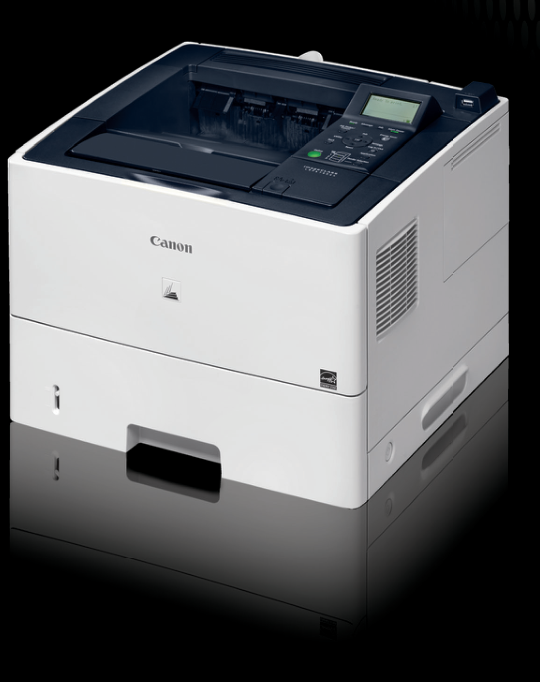
The Canon imageCLASS LBP6780dn is an earlier U.S. monochrome printer for an office that already has another way to scan, copy and fax. Its useful combination is an included 500-sheet cassette, a 100-sheet multipurpose tray, automatic two-sided printing and a wired network connection. The exact U.S. brochure identifies item 6469B006AA. It is a printer rather than a multifunction unit, so no scanner or document feeder is part of this assessment.
The main configuration trap is password printing. Canon's actual operating guide requires an optional SD card for Secured Print. That is a material purchase condition: a base printer does not satisfy a PIN-release requirement just because the manual contains a protected-print chapter. Inspect the installed hardware before relying on that feature in an existing unit.
Use the actual driver for automatic duplex
Native computer printing can use USB or the built-in Gigabit Ethernet interface. Install the exact supported Canon driver, select the printer in the application and use its Finishing controls to choose one-sided or two-sided output. The guide also explains binding-edge and gutter choices. Automatic duplex is positively supported for Letter, Legal and A4, with the stated 60–120 gsm paper restrictions.
The paper path matters during duplex work. Close the rear face-up output route before starting a two-sided job, and leave a partly emerged sheet alone while the printer draws it back for the reverse side. Rear face-up output is a different routine for media that benefit from a straighter path; it cannot be combined with automatic duplex.
Canon declares up to 42 one-sided Letter pages per minute and separately up to 20.5 two-sided Letter pages per minute on plain paper. Those are manufacturer figures, not a hands-on timing result. The published optimum monthly range is 1,000–4,000 prints. Its much larger 100,000-page maximum is not the recommended recurring workload; the original service specification explicitly distinguishes those limits.
Count the supplied trays before the expansion maximum
The included configuration provides 600 normal Letter sheets at the U.S. specification's 20 lb bond basis. Two additional 500-sheet cassettes can raise the maximum to 1,600, but they are accessories. A photograph or secondhand listing showing a taller stack should be checked against the actual supplied configuration.
The operating guide also shows that heavier paper reduces stack capacity. At its stated 75 gsm basis, the ordinary drawer holds approximately 500 sheets and the multipurpose tray approximately 100; at 91 gsm, those figures fall to about 400 and 80. Load within the guides and the correct limit rather than treating the maximum normal-paper number as a capacity for every medium.
Envelopes belong in the multipurpose tray. Flatten and prepare them as instructed, print on the front rather than the glued side, and use the rear face-up output. The declared envelope stack is ten. For Legal output into the normal face-down tray, extend the auxiliary support so the longer sheets do not hang unsupported.
Protected jobs need both storage and software
With the optional SD card installed, the native driver can submit a job through Secured Print and associate it with a user name and password. At the printer, bring it online, open the job menu, select the stored document and enter the PIN. The panel accepts numbers; the more specialized encrypted workflow has separate driver add-in and Remote UI conditions.
Stored documents are temporary. The guide describes deletion after printing, reset, power-off or the configured inactivity period, with one hour as the original default. Card capacity can also prevent a new protected job from being stored. These conditions make hardware verification and the exact driver important for an office replacing an older secure-print setup.
Supplies and room around the printer
The included toner is declared at 6,000 pages. Replacement Cartridge 324 has the same 6,000-page declaration, while Cartridge 324 II is rated at 12,500. The actual consumables section specifies ISO/IEC 19752 on Letter at default density. Those yields support supply planning, but do not predict the result of dense forms or establish a current cost per page.
The U.S. specification gives a loaded weight of approximately 39.7 lb and a closed body measuring 17.9 inches wide, 16.7 deep and 13.6 high. Rear output and maintenance need extra access. Choose this earlier model for its documented wired printing and substantial included paper supply; choose a verified multifunction or standard-PIN alternative when those capabilities are essential.
Key details at a glance
| Color printing | No |
|---|---|
| Scanner | No |
| Copying | No |
| Fax | No |
| Flatbed scanner | No |
| Automatic document feeder | No |
| Automatic two-sided printing | Yes |
| Automatic two-sided scanning | No |
| Single-pass two-sided scanning | No |
| Color scanning | No |
| Instructed envelope handling | Yes |
| Supported PIN-release printing | No |
| Recommended monthly minimum | 1000 pages |
| Recommended monthly maximum | 4000 pages |
| Maximum monthly duty | 100000 pages |
| Included ordinary-paper capacity | 600 sheets |
| Declared one-sided mono Letter rate | 42 pages/min |
| Unit-body width | 17.9 in |
| Unit-body depth | 16.7 in |
| Unit-body height | 13.6 in |
| Unit weight | 39.7 lb |
| Imaging engine | laser |
Use the exact model’s instructions for operating limits, supplied equipment and version differences.
Paper, software and setup details
Print-rate conditions
Maker declaration: up to 42 one-sided Letter ppm and 20.5 two-sided Letter ppm on plain paper. These are separately declared figures and are not converted from one another.
Paper handling
Standard 500-sheet cassette plus 100-sheet multipurpose tray, or 600 Letter sheets at 20 lb bond. Two extra 500-sheet cassettes are optional; 1,600 is the expanded maximum. Actual driver guide supports automatic Letter, Legal and A4 duplex. Envelopes use the multipurpose tray and rear face-up output.
Scanning arrangement
A monochrome print-only unit with no copier, scanner, feeder or fax hardware.
Computer and mobile connections
Standard USB computer connection and 10/100/1000 Ethernet. The original Canon Mobile Printing app reference is historical and does not establish current AirPrint or Mopria availability.
Supplies and declared yields
Included cartridge is rated 6,000 pages. Replacements are Cartridge 324 at 6,000 and Cartridge 324 II at 12,500, using ISO/IEC 19752 on Letter at default density. Actual output varies with document and operating conditions.
Software and support
Secured Print requires the optional SD card. Its driver and panel workflow has job-capacity, timeout, reset and power-off limits; encrypted protected printing also needs the named driver add-in.
Electrical edition and setup
U.S. service specification: 120–127 V AC, 60 Hz, 15 A with a NEMA 5-15 receptacle. Closed base body is 17.9 by 16.7 by 13.6 inches and approximately 39.7 lb with cartridge. Allow rear output access and additional loading/service clearance.
Sources for this assessment
- Canon U.S. imageCLASS LBP6780dn original brochure, December 2012
- Canon U.S. LBP6780dn January 2013 original service specification
- Canon U.S. exact LBP6780dn support specifications
- Canon LBP6780dn exact U.S. eManual: Paper Loading and Output
- Canon LBP6780dn exact U.S. eManual: One-sided and Two-sided Printing
- Canon LBP6780dn exact U.S. eManual: Printing on Envelopes
- Canon LBP6780dn exact U.S. eManual: Password Protected Printing
- Canon LBP6780dn exact U.S. eManual: Protected Job Restrictions
- Canon LBP6780dn exact U.S. eManual: Consumables
- Canon LBP6780dn exact U.S. eManual: Installation Attention
Find a printer for your routine.
Match color output, scanning, connections and paper handling, then compare the exact models.