
Your needs, this model
Does it fit your priorities?
Can MF113w print monochrome Letter pages and capture color Letter originals through supported Ethernet, with 150 included Letter sheets?
Yes. Install the native scanner software and register IPv4 capture. The Letter/A4 glass handles one original at a time. The exact U.S. input declaration is 150 Letter sheets at 20 lb Bond, and 1,000 monthly pages fits the recommendation.
Explore this need in the finder →Can it scan an unattended stack through an automatic feeder?
No. MF113w has a glass cover and no document feeder. The original must be placed on the glass for each capture.
Explore this need in the finder →Will it automatically print both faces of Letter paper?
No. The exact function matrix marks two-sided printing unavailable. A manually reloaded routine is not automatic duplex.
Explore this need in the finder →Small-scale monochrome output and individual color capture
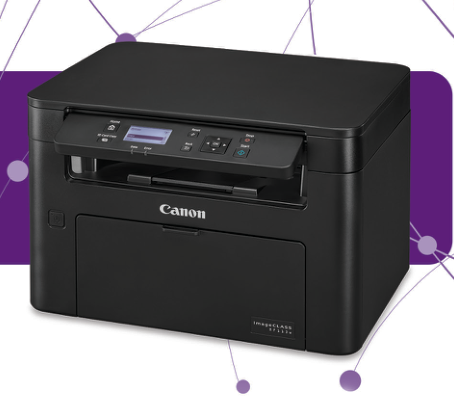
The Canon imageCLASS MF113w, U.S. item 2219C006, combines monochrome printing and copying with color scanning. It fits a small document queue and occasional original capture when a flatbed is sufficient. Canon recommends 150–1,500 monthly pages.
The actual function matrix excludes fax and automatic two-sided printing. The original-placement instructions use a glass cover, with no document feeder. An office routinely processing stacks or two-sided output should resolve those requirements before choosing this compact configuration.
Legal output does not enlarge the glass
The drawer handles Legal paper, but the scanner glass reaches 8.5 by 11¾ inches, covering Letter and A4. A complete Legal original does not fit that capture area. The larger output-size headline therefore describes a different side of the workflow.
Place each original face down, align it to the upper-left corner and close the cover gently. A multipage PDF can be assembled by placing successive pages and finishing the sequence, but the machine does not feed those pages automatically.
Prepare network capture separately from a print queue
The actual functional specification lists USB, Fast Ethernet and infrastructure Wi-Fi. It names UFR II-LT, rather than assigning another family member’s printer language. The brochure’s Gigabit label is not used to broaden that operating specification.
Install the exact supported drivers and MF Scan Utility. Windows LAN capture requires registration in MF Network Scanner Selector and uses IPv4. USB avoids that network registration step. A successful print job alone does not establish that the scanner destination is ready.
At the panel choose Scan, Computer, the intended destination and scan type, then start. Close an open ScanGear MF screen before initiating panel capture. For a glass PDF sequence, place each further page and finally choose Finish Scanning; MF Scan Utility controls the destination folder and preset.
PC1 and PC2 shortcuts can retain a connection type, destination computer and scan type. Alternatively, MF Scan Utility or a compatible TWAIN/WIA application can import an image. If automatic online mode is disabled, first select Remote Scanner at the machine.
Apple scanning uses a documented Mac arrangement
The actual guide supports AirPrint scanning to a Mac on the same LAN or through USB. Its minimum is OS X 10.9, rising to 10.11 for TLS capture. Enable Network Link Scan and put the device online before starting.
Add the device in Printers & Scanners, choose Scan and Open Scanner, set the intended options and scan. Other active operations or settings can block capture. AirPrint output also needs IPP enabled, with paper settings determined by the application.
The direct mobile access-point mode is a separate arrangement. Infrastructure Wi-Fi becomes unavailable while direct communication is active, then can resume according to the chosen switching setting. End the direct connection after use rather than assuming both wireless routes remain active together.
A single drawer and separate consumables
The included Letter capacity is 150 sheets at 20 lb Bond. Legal, A4 and the listed envelopes are supported with their actual loading and media settings. Register the correct size and type before using the native print dialog. There is no second stack tray or automatic duplex mechanism to add to that routine.
The supplied 047 toner is rated for seven hundred pages, compared with 1,600 for replacement 047 under ISO/IEC 19752 on A4 at default density. Drum Cartridge 049 is a separate consumable rated for twelve thousand pages under Canon’s two-sheet intermittent plain-A4 conditions. That drum figure is not another toner yield.
Compare physical and speed figures on the same basis
One-sided plain Letter output is rated up to 23 ppm, versus 17.9 for Legal. The operating guide separately describes 600 by 400 dpi writing at default speed and 600 by 600 at two-thirds speed. Its scanner resolution is a separate 600 by 600 dpi specification.
The actual body is 14⅝ by 12⅝ by ten inches, differing from the brochure’s rounded dimensions. Both sources give 18.5 lb, but one excludes toner and drum while the other says consumables are included; installed weight remains unknown here. Allow additional paper and cover clearance and verify the exact supported computer setup before relying on an earlier unit.
Key details at a glance
| Color printing | No |
|---|---|
| Scanner | Yes |
| Copying | Yes |
| Fax | No |
| Flatbed scanner | Yes |
| Automatic document feeder | No |
| Automatic two-sided printing | No |
| Automatic two-sided scanning | No |
| Single-pass two-sided scanning | No |
| Color scanning | Yes |
| Instructed envelope handling | Yes |
| Apple AirPrint | Yes |
| Mopria printing | Yes |
| Recommended monthly minimum | 150 pages |
| Recommended monthly maximum | 1500 pages |
| Included ordinary-paper capacity | 150 sheets |
| Declared one-sided mono Letter rate | 23 pages/min |
| Unit-body width | 14.62 in |
| Unit-body depth | 12.62 in |
| Unit-body height | 10 in |
| Imaging engine | laser |
Use the exact model’s instructions for operating limits, supplied equipment and version differences.
Paper, software and setup details
Print-rate conditions
Up to 23 one-sided plain Letter pages per minute, versus 17.9 for Legal. The guide separates 600 × 400 dpi default-speed output from 600 × 600 dpi at two-thirds speed. Scanner resolution is separately 600 × 600 dpi.
Paper handling
Included input: 150 Letter sheets at 20 lb Bond. The generic operating quantity also specifies 64/80 gsm. Eligible Letter/Legal/A4 stock and listed envelopes use the drawer; no extra stack source or automatic duplex is assigned.
Scanning arrangement
Glass-only color capture through Letter/A4, one original at a time. The exact function matrix excludes an ADF, fax and automatic print duplex. Legal output does not establish Legal original capture.
Computer and mobile connections
Actual functional chapters list USB, 10/100 Ethernet, infrastructure Wi-Fi and UFR II LT. Brochure Gigabit/UFR II wording is not broadened. Direct access-point mode, AirPrint and Mopria are documented; a generic USB-memory claim is not adopted.
Supplies and declared yields
Supplied 047 toner: 700 pages; replacement 047: 1,600 under ISO/IEC 19752 using A4 and default density. Supplied/replacement 049 drum: 12,000 under the maker’s two-sheet intermittent plain-A4 conditions. Drum yield is separate from toner yield.
Software and support
Three-function monochrome model with color capture and documented native/Mac procedures. Recommended volume: 150–1,500 monthly pages. No PIN function or mandatory replenishment enrollment is inferred.
Electrical edition and setup
Actual body: 14⅝ × 12⅝ × 10 inches, differing from brochure dimensions. Both sources state 18.5 lb, but the guide excludes toner/drum and the brochure includes consumables, so loaded weight remains unknown. U.S. power: 120–127 V, 60 Hz.
Sources for this assessment
Find a printer for your routine.
Match color output, scanning, connections and paper handling, then compare the exact models.