
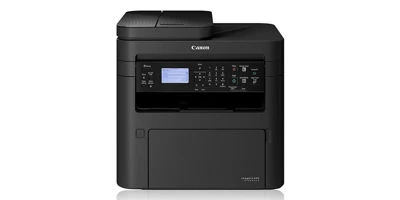
Your needs, this model
Does it fit your priorities?
Can MF264dw II scan single-sided Legal forms to a computer through Ethernet and print Legal sheets automatically on both sides?
Yes, using the supported native computer drivers and MF Scan Utility. Legal originals use its simplex feeder, while automatic output duplex is a separate supported function on eligible media.
Explore this need in the finder →Can it automatically capture both sides of a stack of originals?
No. Its 35-sheet feeder scans one side; the double-pass feeder in this shared guide belongs to MF269dw II and MF269dw VP II.
Explore this need in the finder →Can it produce color printed documents?
No. The scanner can capture color, but the print engine produces monochrome output.
Explore this need in the finder →Choose it for monochrome output and one-sided original intake
The Canon imageCLASS MF264dw II, identified as 5938C020 in Canon's U.S. brochure, provides printing, scanning and copying. It combines automatic two-sided output with a 35-sheet single-sided document feeder. That distinction defines its practical fit: it saves paper when printing, but does not automatically capture both faces of an original stack.
This is a monochrome laser printer with a color scanner. Color capture can preserve highlights or colored marks in a saved document, while the printed result remains black and white. Telephone fax is absent from this exact model.
Legal scanning uses the feeder rather than the glass
The operating specifications give the glass a maximum original size of 8.5 by 11¾ inches, covering Letter and A4. Legal originals use the feeder, whose maximum is 8.5 by 14 inches. A Legal feeder declaration should therefore not be interpreted as a Legal glass.
The 35-sheet quantity is specified for Letter originals at 80 gsm. Align the guides, use originals of the same size in a batch and remove staples or clips. Wrinkled, curled, torn or unsuitable thin material belongs outside the automatic path; the glass is the more appropriate route for books and other originals that cannot safely feed.
The exact model matrix and one-sided feeder chapter both confirm the scanning limitation. The shared guide also contains a two-sided double-pass feeder chapter, but that hardware belongs to MF269dw II and MF269dw VP II. Those instructions do not upgrade MF264dw II.
Install capture software for the actual computer connection
Native operation is documented through USB, 10/100 Ethernet or infrastructure Wi-Fi. For computer scanning, install ScanGear MF and MF Scan Utility. In Windows, register a network destination with Canon MF Network Scanner Selector when the workflow requires it; on macOS, use MF Scan Utility's Network Scanner Settings and add the machine through the appropriate Bonjour or IP method.
To start capture from the computer, select this machine in MF Scan Utility and choose the button suited to the original and purpose. ScanGear provides more detailed controls. Compatible TWAIN or WIA applications offer another documented path with the installed scanner driver.
If scanning does not begin, the guide directs the five-line LCD model to Scan and then Remote Scanner to place it online. The brochure contains a conflicting touch-screen entry, so this review follows the actual operating model controls. Its e-mail and shared-folder sending chapters also have model restrictions: MF264dw II does not receive those direct sender functions simply because it has Ethernet.
Automatic printing duplex has its own media rules
Letter, Legal and A4 are marked for automatic two-sided printing in the operating paper table. Eligible paper type matters as well as size. The guide permits supported thin and plain media under the stated conditions, while envelopes, labels and heavy-paper categories are excluded from automatic duplex.
Use the installed native driver's page size, output size and two-sided controls deliberately. Those settings govern printed sheets; they do not make a one-sided feeder read the back of an original. A workflow can therefore scan a one-sided Legal form and print its resulting document on two-sided Legal output without claiming duplex scanning.
The standard cassette is rated for 250 Letter sheets at 20 lb, with a separate single-sheet bypass for occasional media. Canon's brochure lists no optional cassette. Repeated specialty-paper jobs will require more attention than the normal cassette stack suggests.
Mobile printing is a separate arrangement
Canon documents Wi-Fi Direct, Apple AirPrint and Mopria Print Service. The AirPrint procedure uses a compatible Apple application over LAN or direct connection. The shop's Mopria disclaimer describes the Android device and printer on the same network.
Available settings and paper sizes vary by application, so this review does not transfer the native driver's exact duplex-media controls into every mobile job. Computer scanning software and direct mobile printing should likewise be checked as separate workflows.
Keep toner, drum and volume figures distinct
The box includes Cartridge 051, rated at 1,700 pages, and the separate Drum 051. Replacement 051 H is rated at 4,100 pages under ISO/IEC 19752 on A4 at default density. Drum life uses a different basis: 23,000 sheets under Canon's two-sheet intermittent A4 evaluation.
Canon recommends 250–2,500 pages monthly; the 30,000-page maximum duty figure is not a routine recommendation. Up to 30 one-sided Letter ppm describes output, while feeder scanning has its own resolution-dependent speed. Choose this model around its supported monochrome printing and simplex intake rather than another member's fax or duplex feeder.
Key details at a glance
| Color printing | No |
|---|---|
| Scanner | Yes |
| Copying | Yes |
| Fax | No |
| Flatbed scanner | Yes |
| Automatic document feeder | Yes |
| Automatic two-sided printing | Yes |
| Automatic two-sided scanning | No |
| Single-pass two-sided scanning | No |
| Color scanning | Yes |
| Instructed envelope handling | Yes |
| Apple AirPrint | Yes |
| Mopria printing | Yes |
| Recommended monthly minimum | 250 pages |
| Recommended monthly maximum | 2500 pages |
| Maximum monthly duty | 30000 pages |
| Included ordinary-paper capacity | 250 sheets |
| Document-feeder capacity | 35 sheets |
| Declared one-sided mono Letter rate | 30 pages/min |
| Unit-body width | 15.38 in |
| Unit-body depth | 16 in |
| Unit-body height | 14.75 in |
| Unit weight | 27.3 lb |
| Imaging engine | laser |
Use the exact model’s instructions for operating limits, supplied equipment and version differences.
Paper, software and setup details
Print-rate conditions
Up to 30 one-sided Letter ppm or 24 Legal ppm. The operating guide separately specifies feeder scanning speed and its resolution; these are not print throughput.
Paper handling
250-sheet Letter cassette at 20 lb plus a separate single-sheet bypass; the public capacity remains the conservative 250-sheet stack. The 35-sheet Letter ADF is simplex and accepts Legal originals within its stated size range.
Scanning arrangement
Color capture is supported even though printed output is monochrome. Letter/A4 glass and Letter/Legal/A4 simplex feeder routes are assigned only to the native computer plan. Direct e-mail/SMB sending is excluded by the exact model matrix.
Computer and mobile connections
USB, 10/100 Ethernet and infrastructure Wi-Fi support native operation; Wi-Fi Direct is separately documented for mobile connection. No telephone fax is present.
Supplies and declared yields
Included Cartridge 051 is rated 1,700 pages; replacement 051 H is 4,100 under ISO/IEC 19752 on A4 at default density. Drum 051 is a separate supplied and replacement item rated 23,000 sheets on Canon’s two-sheet intermittent A4 basis.
Software and support
Use the actual five-line LCD model controls. A contradictory six-line touch-screen entry in the brochure is not applied. System Manager or network authentication PINs do not establish confidential held-job release.
Electrical edition and setup
Operating body dimensions are 15⅜ by 16 by 14¾ inches. The brochure’s 27.3 lb footnote includes consumables; the operating guide’s 26.3 lb excludes toner and drum. U.S. power is 110–127 V, 60 Hz. Leave the specified opening and ventilation space.
Sources for this assessment
Find a printer for your routine.
Match color output, scanning, connections and paper handling, then compare the exact models.