
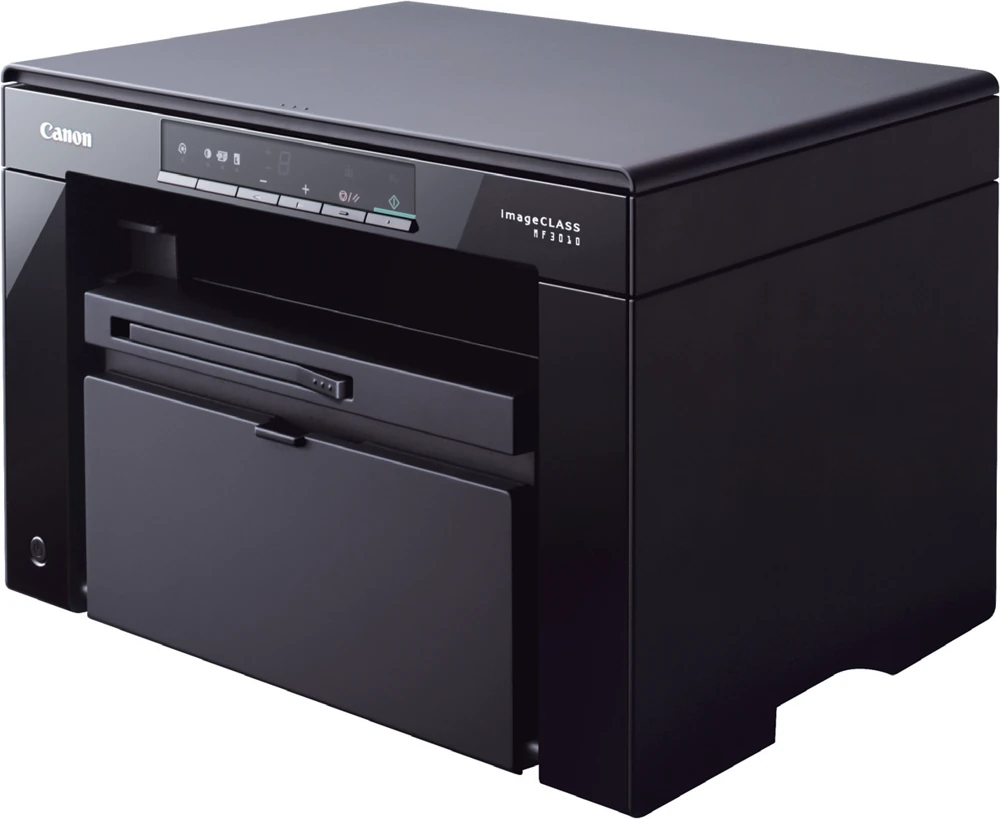
Your needs, this model
Does it fit your priorities?
Can this MF3010 print monochrome documents and scan Letter pages in color through USB in a small space?
Yes, with the supported native Windows print and capture software. It has a flatbed scanner, 150-sheet normal input and a closed body under 15 inches wide, 11 deep and 10 high. Allow additional space for opening and loading it.
Explore this need in the finder →Can it automatically scan a stack of originals through a feeder?
No. This is a flatbed-only machine; add each original to the glass manually.
Explore this need in the finder →Will it print both sides automatically?
No. The named MF3010 hardware has no automatic duplex function. Choose another exact model if automatic two-sided output is essential.
Explore this need in the finder →A compact USB reference for individual documents
The Canon imageCLASS MF3010 is an earlier monochrome multifunction reference for a desk that needs printing, copying and occasional color scanning through USB. This assessment preserves the original U.S. item 5252B001AA from Canon's 2011 brochure. Later MF3010 packaging uses a different item code, so newer box-content lists and Value Pack supplies are not silently assigned to that original package.
The deciding tradeoff is manual document handling. MF3010 has a flatbed scanner and no automatic document feeder. It also lacks automatic two-sided printing. It suits individual pages, identification cards and short sets more naturally than a recurring stack of two-sided office forms.
Printing Legal does not make the scanner Legal-size
The print source accepts Letter, Legal and A4 paper, but the scanner has its own smaller physical area. The actual operating guide gives a maximum document size of 216 by 297 mm, suitable for Letter and A4 placement but not a full Legal sheet. A printer listing that mentions Legal therefore needs to be read in the context of printing, rather than extended to copying or scanning the entire longer original.
Color capture is documented even though printed and copied output is monochrome. The original brochure separately declares 600 by 600 dpi optical scanning and a much larger software-interpolated figure. That enlarged number does not describe additional optical detail. Scan time also differs from print speed; Canon's original one-sided Letter print declaration is up to 19 ppm.
ID Card Copy can place the two sides of a small card on one output page, but the user still turns and positions the card. It is not automatic duplex scanning. The one-digit display and buttons also provide a different control experience from a larger touchscreen; keep the quick-reference instructions nearby for the less obvious copy settings.
Use the installed scanner tools for file capture
The original U.S. brochure explicitly identifies USB printing and scanning. The operating guide describes the actual preparation: check the computer environment, install the scanner driver and use the supported capture software. Its detailed Windows procedures cover MF Toolbox, compatible applications and WIA. They are not evidence for a separate network or mobile-printing arrangement.
MF Toolbox provides purpose-based choices such as saving a scan, producing a PDF, sending an image to an application or handing it to OCR software. Configure the destination and scan settings before starting. When the scanner-driver option is selected, ScanGear MF opens for additional adjustments before the final capture.
A multiple-page PDF is possible through the appropriate Toolbox setting, but each original must still be placed on the glass. The actual instructions distinguish that workflow from a generic application scan that may not support adding multiple glass pages. Check the selected output type rather than assuming that every scan button combines a document automatically.
The guide also uses Windows Fax and Scan as one capture application. That software name does not add a fax modem to MF3010. Its documented core functions are print, scan and copy. Verify the intended operating system and exact driver before relying on an older unit, especially when moving it to a different computer.
One paper source with weight-dependent limits
The normal cassette holds approximately 150 sheets at 60–80 gsm. The operating table reduces that limit to 120 sheets at 80–90 gsm, 100 at 90–105 gsm and 60 at 105–163 gsm. Envelopes have a separate ten-piece limit. A 150-sheet headline should therefore not be interpreted as the capacity for heavier stock or every special medium.
Choose the correct driver paper type and adjust the guides to the loaded size. The printer has no automatic duplex unit, so automatic two-sided output remains an unmet requirement even though it can print on ordinary office paper. If that feature matters regularly, compare an exact duplex model before choosing this small unit on footprint alone.
Keep the supply package and working size clear
The original item uses Cartridge 125, rated at approximately 1,600 pages. The later operating guide confirms that replacement declaration under ISO/IEC 19752 on A4 at default density. Its separately described starter cartridge should not be treated as proof of the contents remaining in an original package or used printer. No current cartridge price or measured cost per page is assumed.
The closed-cassette body measures 14.625 inches wide, 10.875 deep and 10 high, weighing approximately 18.1 lb including toner. Opening the cassette increases depth, and glass access needs more height. Choose MF3010 for its documented local, individual-page workflow; choose a verified feeder, duplex or network model when those capabilities are essential.
Key details at a glance
| Color printing | No |
|---|---|
| Scanner | Yes |
| Copying | Yes |
| Fax | No |
| Flatbed scanner | Yes |
| Automatic document feeder | No |
| Automatic two-sided printing | No |
| Automatic two-sided scanning | No |
| Single-pass two-sided scanning | No |
| Color scanning | Yes |
| Instructed envelope handling | Yes |
| Maximum monthly duty | 8000 pages |
| Included ordinary-paper capacity | 150 sheets |
| Declared one-sided mono Letter rate | 19 pages/min |
| Unit-body width | 14.62 in |
| Unit-body depth | 10.88 in |
| Unit-body height | 10 in |
| Unit weight | 18.1 lb |
| Imaging engine | laser |
Use the exact model’s instructions for operating limits, supplied equipment and version differences.
Paper, software and setup details
Print-rate conditions
The original 5252B001AA brochure declares up to 19 one-sided Letter ppm. Scan seconds per page and interpolated dpi are not printing-speed or optical-resolution claims. The web 24 Legal ppm row is not used.
Paper handling
Normal cassette capacity is approximately 150 sheets at 60–80 gsm. The actual operating table gives 120 at 80–90 gsm, 100 at 90–105 gsm, 60 at 105–163 gsm and ten envelopes. Letter, Legal and A4 print media are supported. Automatic duplex is unavailable.
Scanning arrangement
Flatbed-only original handling, one sheet at a time. The actual guide gives a maximum document area of 216 by 297 mm, covering Letter and A4 but not Legal. It is a color scanner with no automatic feeder or duplex-input mechanism.
Computer and mobile connections
USB computer printing and scanning. No Ethernet, Wi-Fi, AirPrint or Mopria operating route is established. Actual computer capture uses its installed scanner driver and supported software.
Supplies and declared yields
Exact 2011 item uses Cartridge 125, rated 1,600 pages. The later operating guide confirms replacement yield using ISO/IEC 19752 on A4 at default density. That guide describes a 700-page starter, but the exact old item brochure does not establish supplied yield or cable contents, so those package details remain unassigned.
Software and support
MF Toolbox supports save, PDF, OCR and application workflows. Multiple-page PDF capture requires repeated glass scans and the applicable PDF setting. Compatible TWAIN/WIA applications have their own controls. The old brochure restricts searchable and high-compression PDF to its Windows Toolbox arrangement.
Electrical edition and setup
Actual U.S. guide gives 110–127 V at 50/60 Hz, approximately 18.1 lb including toner and a closed cassette body of 14.625 by 10.875 by 10 inches. Opening the cassette increases depth to 14.625 inches; leave additional glass-opening and service space. Later 5252B038 package declarations are kept separate.
Sources for this assessment
Find a printer for your routine.
Match color output, scanning, connections and paper handling, then compare the exact models.