
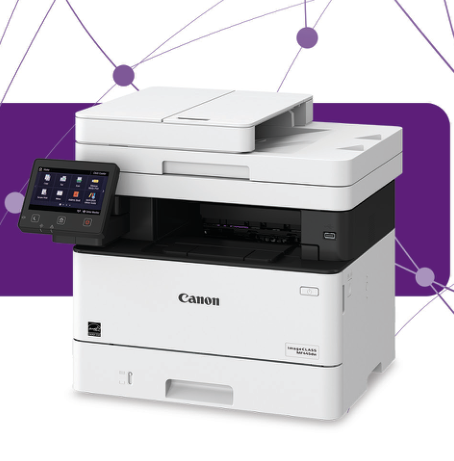
Your needs, this model
Does it fit your priorities?
Can MF445dw combine Letter duplex printing, Legal single-pass capture and PIN release over Ethernet?
Yes, with the installed native print and scan software. The included Letter input is 350 sheets, and Canon recommends 750–4,000 pages monthly. Telephone fax also needs its own line setup.
Explore this need in the finder →Can I capture a full Legal page on the scanner glass?
No. The glass stops at 8.5 by 11.75 inches. The separate feeder provides the Legal input route.
Explore this need in the finder →Will the standard package satisfy a 900-sheet Letter input requirement?
No. It includes 350 Letter sheets. The remaining 550-sheet cassette is an optional accessory.
Explore this need in the finder →An office document workflow with clear package limits
The Canon imageCLASS MF445dw is an earlier U.S. monochrome multifunction reference for an office that needs automatic two-sided printing, single-pass document capture and telephone fax. Its exact U.S. item is 3514C004. It also provides a useful native PIN-release routine for documents that should wait until the sender reaches the printer.
The main purchase distinction is the supplied paper configuration. A 250-sheet cassette and 100-sheet multipurpose tray give 350 normal Letter sheets at Canon's stated weight. The advertised 900-sheet maximum includes an optional 550-sheet cassette. Confirm the actual trays in a particular package before treating that expanded maximum as installed capacity.
Choose the correct input area for longer originals
The single-pass duplex feeder accepts originals up to 8.5 by 14 inches and has a 50-sheet Letter capacity at the specified 80 gsm basis. Its documented input range is 50–105 gsm. Both sides can be captured without manually turning the stack or using a reversing second pass. That makes the mechanism relevant for recurring two-sided paperwork, rather than relying on the word duplex without knowing which operation it describes.
The glass is smaller: its maximum is 8.5 by 11.75 inches. Letter and A4 placement fit that area, but a full Legal original belongs in the feeder. Books and fragile items that cannot travel through the feeder still need to fit the glass. This is a color scanner attached to a monochrome printer, so colored marks can be retained in a digital file without making color output available.
Canon declares up to 40 one-sided Letter ppm and separately 32 Legal ppm. The feeder's scan rates describe different color modes and resolutions and should not be relabeled as printing speed. The recommended monthly range is 750–4,000 pages; no maximum duty figure is substituted for that recurring-workload recommendation here.
Set up computer capture independently of printing
The native computer arrangement supports USB, Gigabit Ethernet or the configured wireless LAN. Install the exact printer driver, scanner components and MF Scan Utility. For Windows network scanning, register the machine in MF Network Scanner Selector. The actual preparation chapter excludes IPv6 computer scanning, directing that task to IPv4 or USB.
MF Scan Utility provides a convenient starting point for file capture. ScanGear MF gives access to more detailed choices, while compatible TWAIN or WIA applications can receive an image directly. Bring Remote Scanner online if the automatic setting is disabled, and wake the machine when required for USB capture. A successful print job alone does not demonstrate that those scanner preparations are complete.
AirPrint and Mopria are separate mobile printing paths on a suitable shared network. Wi-Fi Direct provides another connection through the printer's own hotspot for compatible mobile devices. Application controls vary, so this assessment keeps native paper, PIN and capture functions with their confirmed computer arrangement instead of promising every option through every app.
Automatic paper handling and temporary PIN storage
The actual operating tables confirm automatic two-sided Letter, Legal and A4 printing. Envelopes use the multipurpose tray and remain outside automatic duplex. Set the machine's paper size and type to match the loaded medium, then select the appropriate source and output settings in the driver. If an optional cassette is installed later, update the driver's device configuration so the additional source can be selected correctly.
For Secure Print, submit the document through the native driver's secured output method. At the printer, select the stored job and enter its PIN. Temporary memory and the deletion timer limit how long a document remains available. Close a conflicting Remote Scanner screen before trying to release a job. This is controlled temporary output, not permanent document archiving.
Telephone fax requires its own configured line and receive mode. USB and Ethernet describe the computer connection; neither port itself provides telephone service. Keep the separate phone arrangement in mind when comparing a complete office replacement.
Supplies and working space
The actual U.S. guide rates the supplied Cartridge 057 at 3,100 pages. Standard replacement 057 has the same declaration, while 057 H is rated at 10,000. The stated basis is ISO/IEC 19752 on A4 at default density. Document coverage changes real consumption, and no current cartridge price or measured cost per page is assumed.
The operating manual specifies 120–127 V AC at 60 Hz and a closed body 17.875 inches wide, 18.25 deep and 15.5 high. Allow additional loading and service room. Choose MF445dw for its documented monochrome, single-pass and native release workflow; compare a color or larger-glass model when those particular requirements are essential.
Key details at a glance
| Color printing | No |
|---|---|
| Scanner | Yes |
| Copying | Yes |
| Fax | Yes |
| Flatbed scanner | Yes |
| Automatic document feeder | Yes |
| Automatic two-sided printing | Yes |
| Automatic two-sided scanning | Yes |
| Single-pass two-sided scanning | Yes |
| Color scanning | Yes |
| Instructed envelope handling | Yes |
| Apple AirPrint | Yes |
| Mopria printing | Yes |
| Supported PIN-release printing | Yes |
| Recommended monthly minimum | 750 pages |
| Recommended monthly maximum | 4000 pages |
| Included ordinary-paper capacity | 350 sheets |
| Document-feeder capacity | 50 sheets |
| Declared one-sided mono Letter rate | 40 pages/min |
| Unit-body width | 17.88 in |
| Unit-body depth | 18.25 in |
| Unit-body height | 15.5 in |
| Imaging engine | laser |
Use the exact model’s instructions for operating limits, supplied equipment and version differences.
Paper, software and setup details
Print-rate conditions
Up to 40 one-sided Letter ppm, separately 32 Legal ppm, under maker conditions. Feeder scan rates are distinct input measurements, not print speeds.
Paper handling
350 included normal Letter sheets at the specified 20 lb bond brochure basis: 250-sheet cassette plus 100-sheet multipurpose tray. The extra 550-sheet cassette is optional, giving the 900-sheet expanded maximum. Actual Letter, Legal and A4 automatic duplex is verified; envelopes use the multipurpose path.
Scanning arrangement
50-sheet Letter single-pass duplex feeder accepts originals up to Legal, with 50–105 gsm input. The glass is 8.5 by 11.75 inches and does not accommodate a full Legal original. Color capture does not imply color printing.
Computer and mobile connections
USB computer connection, Gigabit Ethernet, infrastructure Wi-Fi and a distinct Wi-Fi Direct mode. Native file capture needs its own software and Windows network registration.
Supplies and declared yields
Actual operating guide rates supplied Cartridge 057 at 3,100 pages; replacement 057 is 3,100 and 057 H is 10,000, using ISO/IEC 19752 on A4 at default density. These are maker declarations and do not establish a current cost per page.
Software and support
Secure Print is the native driver and panel PIN-release workflow. Stored documents expire and occupy temporary memory. A Remote Scanner screen may need to be closed before release; mobile applications are separate arrangements.
Electrical edition and setup
Actual U.S. guide specifies 120–127 V AC at 60 Hz and a 17.875 by 18.25 by 15.5 inch closed body. Its 35.7 lb weight excludes toner, while the brochure gives 35.8 lb including consumables, so loaded weight remains unassigned. Allow the larger working clearance.
Sources for this assessment
Find a printer for your routine.
Match color output, scanning, connections and paper handling, then compare the exact models.