
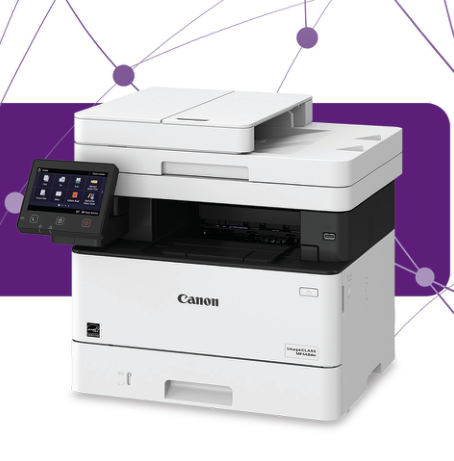
Your needs, this model
Does it fit your priorities?
Can MF448dw scan both sides of Legal originals in one pass and handle PIN-held two-sided Letter jobs through Ethernet with at least 300 standard Letter sheets?
Yes, in the supported native LAN arrangement. The exact model has a single-pass duplex feeder, 350 standard Letter sheets at 20 lb and native secured-job release. Register Windows network capture using IPv4 and configure the intended driver settings.
Explore this need in the finder →Can it make a full-size Legal scan on the glass?
No. Legal originals use the feeder; the actual glass supports Letter and A4 coverage.
Explore this need in the finder →Does its color scanning capability mean that it prints color reports?
No. The scanner captures color, but MF448dw prints monochrome output.
Explore this need in the finder →Single-pass intake is a documented part of this exact model
The Canon imageCLASS MF448dw, U.S. item 3514C003, is an earlier monochrome multifunction laser with printing, copying, color scanning, sending and telephone fax. Its exact brochure positively identifies a single-pass duplex document feeder, making two-sided original capture a meaningful part of its office role.
The five-inch color touchscreen and Application Library offer ways to present frequently used tasks. They do not remove the need to configure the underlying computer, folder or mail destination. Assess a repeatable workflow from the loaded original through to the final saved file or released print.
Use the feeder for Legal originals
The feeder reaches Legal size, while the glass has a maximum original area of 8.5 by 11¾ inches, covering Letter and A4. A full Legal page should therefore use the feeder. The 50-sheet feeder quantity is specified for Letter originals at 80 gsm in the operating guide.
Single-pass duplex captures both original faces without requiring the operator to feed the back again. Canon's brochure gives up to 70 monochrome or 26 color duplex images per minute at 300 dpi. Those image rates are separate from the printer's 40 one-sided Letter ppm or 32 Legal ppm.
Color scanning does not make this a color printer. It is useful for preserving colored annotations in a saved file, but printed and copied output remains monochrome.
Native computer capture has its own preparation
USB, Gigabit Ethernet and infrastructure Wi-Fi are documented for native operation. Install the exact supported printer and scanner software for the computer in use. Windows network capture requires registration in MF Network Scanner Selector, and the actual guide says this arrangement uses IPv4 rather than IPv6.
For a panel-started computer scan, choose Scan, Computer, the destination and scan type. MF Scan Utility controls those presets and can also start capture from the computer. ScanGear MF provides more detailed settings; compatible TWAIN or WIA applications can import an image directly.
Wake the machine before USB scanning. If an open ScanGear screen blocks a panel-started operation, close it before trying again. The guide refers macOS users to the relevant exact driver or software instructions, so historical compatibility should be checked against the actual workstation.
Direct sending requires a real destination
MF448dw also supports direct e-mail, SMB folder and FTP delivery. Mail-server settings or a reachable registered file destination must be prepared first. From Scan, choose the appropriate E-Mail or File route, select the destination and configure the original and file settings.
Application Library can make a prepared task easier to reach, but a shortcut cannot supply missing network credentials. Searchable and compact PDF are documented standard formats. Encrypted PDF and digital signatures appear as optional features; the review does not include their accessory kit in the base machine.
Secure Print is separate from administrator authentication
The actual native driver procedure selects Secured Print as the output method. After submission, the job waits in memory until its user selects it at the machine and enters the matching PIN. This is an established document-release function, beyond an administrator login or network filtering checkbox.
Held jobs occupy memory and expire under the configured deletion time. The guide allows multiple selected jobs with the same PIN, and warns that a displayed Remote Scanner screen must be closed before continuing to release. Check these details when a waiting job appears unavailable.
AirPrint, Mopria and direct mobile connection are separate documented arrangements. Their presence does not establish that native driver PIN controls or every desktop duplex setting appears in each mobile application.
The 900-sheet headline includes an accessory
Standard input is 350 Letter sheets at 20 lb: 250 in the cassette plus 100 in the multipurpose tray. Reaching 900 requires the optional 550-sheet AH1 cassette. The base configuration here excludes it.
Letter, Legal and A4 automatic two-sided output is positively marked in the actual paper table, subject to eligible media. Envelopes use the multipurpose path and are excluded from automatic duplex. Set the loaded size and type to match the native driver rather than relying on a generic paper-capacity headline.
Plan volume and supplies around the stated bases
Canon recommends 750–4,000 pages monthly. The included Cartridge 057 is rated at 3,100 sheets; replacement 057 H at 10,000 under ISO/IEC 19752 on A4 at default density. The larger replacement yield is not the quantity supplied in the box.
The operating body is 17⅞ inches wide, 18¼ deep and 15½ high. The brochure's dimension heading is inconsistent, so the actual operating guide controls that order. Its unloaded-weight declaration also conflicts with the brochure's consumables-inclusive figure; confirm the actual installed machine's lifting requirements instead of treating those figures as equivalent.
Key details at a glance
| Color printing | No |
|---|---|
| Scanner | Yes |
| Copying | Yes |
| Fax | Yes |
| Flatbed scanner | Yes |
| Automatic document feeder | Yes |
| Automatic two-sided printing | Yes |
| Automatic two-sided scanning | Yes |
| Single-pass two-sided scanning | Yes |
| Color scanning | Yes |
| Instructed envelope handling | Yes |
| Apple AirPrint | Yes |
| Mopria printing | Yes |
| Supported PIN-release printing | Yes |
| Recommended monthly minimum | 750 pages |
| Recommended monthly maximum | 4000 pages |
| Included ordinary-paper capacity | 350 sheets |
| Document-feeder capacity | 50 sheets |
| Declared one-sided mono Letter rate | 40 pages/min |
| Unit-body width | 17.88 in |
| Unit-body depth | 18.25 in |
| Unit-body height | 15.5 in |
| Imaging engine | laser |
Use the exact model’s instructions for operating limits, supplied equipment and version differences.
Paper, software and setup details
Print-rate conditions
Up to 40 one-sided Letter ppm or 32 Legal ppm. The brochure’s 70 monochrome or 26 color duplex scan ipm is an original-image rate at 300 dpi, not printed sheet throughput.
Paper handling
Standard 350-sheet Letter supply at 20 lb is 250 plus 100; reaching 900 requires an optional 550-sheet cassette. Operating paper marks support Letter, Legal and A4 automatic duplex on eligible stock, with envelopes restricted to the multipurpose path.
Scanning arrangement
Color capture with a positively documented single-pass duplex ADF. The feeder reaches Legal, but the glass is 8.5 by 11¾ inches. Its 50-sheet capacity is stated for Letter originals at 80 gsm in the operating guide.
Computer and mobile connections
USB, Gigabit Ethernet and infrastructure Wi-Fi native operation; Wi-Fi Direct is a separate mobile arrangement. UFR II and PCL are the exact documented standard languages. Native Windows computer scanning uses IPv4 or USB.
Supplies and declared yields
Included Cartridge 057 is rated 3,100 sheets and replacement 057 H 10,000 under ISO/IEC 19752 on A4 at default print density. The high-capacity replacement is not the included toner quantity.
Software and support
Application Library and direct e-mail/SMB/FTP sending are documented, but destinations and server credentials need preparation. PDF encryption/signature and card-reader accessories are optional. Native PIN-held printing is a separate established standard workflow.
Electrical edition and setup
Actual operating body is 17⅞ by 18¼ by 15½ inches. The manual gives 35.7 lb excluding toner, while the brochure calls approximately 35.8 lb consumables-inclusive; loaded weight remains unestablished because those bases conflict. U.S. power is 120–127 V at 60 Hz.
Sources for this assessment
Find a printer for your routine.
Match color output, scanning, connections and paper handling, then compare the exact models.