
Your needs, this model
Does it fit your priorities?
Can a Windows USB desk scan full Legal originals on the glass and use automatic print duplex with a 600-sheet normal supply?
Yes, with the documented Windows drivers and MF Toolbox, while leaving print paper size flexible. The Legal glass is confirmed. Exact automatic print-duplex paper sizes still need checking in the installed driver.
Explore this need in the finder →Does the standard package include Ethernet for shared scanning?
No. Standard computer connection is USB; the network interface shown in the shared guide belongs to MF6580. An optional external print server is a different arrangement.
Explore this need in the finder →Does MF6530 also provide telephone fax?
No. Its exact scope is print, copy and color scan. Fax functions and the telephone jacks in the shared guide are restricted to the other named fax models.
Explore this need in the finder →A large paper supply and a genuinely Legal glass
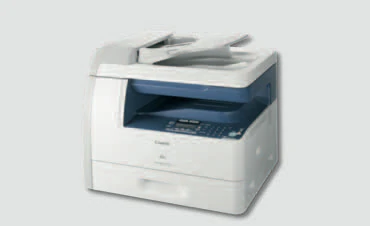
The Canon imageCLASS MF6530 is an earlier monochrome multifunction reference for a directly attached Windows desk that copies and captures documents as well as printing them. Its particularly useful feature is a real Legal-size glass platen, together with automatic two-sided feeder capture and a 500-sheet cassette plus 100-sheet multipurpose tray. The deciding limitation is the computer arrangement: USB is standard, networking needs an optional external device, and the original Mac package is described as print only.
This is a print, copy and color-scan model without telephone fax. The similar MF6560 adds fax and a different printer-language configuration, while the Ethernet port in the shared operating guide belongs to MF6580. Those distinctions matter more than a generic family feature list when deciding whether an older unit can fill a specific office role.
Legal originals fit both routes, with different stack limits
The original guide confirms an 8.5 by 14 inch maximum on both the glass and the feeder. That makes the MF6530 different from smaller multifunction printers whose Legal claim applies only to the feeder. A suitable book page, fragile original or single Legal sheet can use the glass without being forced through rollers, subject to the stated original weight and thickness limits.
The feeder's general capacity is 50 sheets, but the actual guide limits Legal originals to 25. It also gives a larger minimum feeder-original size than the short brochure. The detailed operation limits should control a real batch job. Automatic duplex scanning is positively documented in the exact brochure, but the reviewed sources do not establish single-pass mechanics. Choose a specifically verified single-pass device if that mechanism is essential.
For computer capture, install the scanner driver, enter Scan mode on the machine, start MF Toolbox and choose the format before pressing Start. The guide shows this as an actual scan-to-computer process rather than merely a fax or copy reader. Color scanning is separate from the monochrome print engine. The 9,600 dpi figure in the brochure is enhanced resolution, while the listed optical resolution is 600 dpi; the larger software number is not a claim of additional physical detail.
Keep paper capacity and duplex media separate
The included ordinary-paper supply totals 600 sheets at the actual guide's 80 gsm basis. The multipurpose tray can hold a stack, rather than one occasional sheet, and handles appropriate alternate media such as envelopes. Load envelopes with the prescribed face and flap orientation, extend the tray and match the driver size before printing. That routine replaces part of the ordinary supply; it is not additional envelope capacity on top of a fully loaded normal arrangement.
The guide's cassette size table lists Letter and Legal, while its cassette setting menu also offers A4. The multipurpose size range positively accommodates A4, so that route remains available without assuming every regional cassette behaves identically. Automatic print duplex itself is confirmed, but its exact media-size range is not established in the reviewed driver material. Verify the installed driver's supported duplex sizes before committing to a particular paper requirement.
The maker's one-sided Letter print declaration is up to 23 pages per minute. Neither that speed nor the large paper supply establishes a recommended monthly workload. The reviewed exact documents do not provide a recommendation to use for a sustained-volume requirement.
Check the original software and supply basis
The Windows package uses Canon drivers with MF Toolbox and includes document-conversion software. Its historic compatibility list does not establish present-day operating-system support. The brochure specifically limits the described Mac arrangement to printing, so a Mac scanning requirement needs another positively supported device or independently verified software arrangement. An optional external print server also needs its own compatibility checks instead of being counted as an included Ethernet interface.
The original Cartridge 106 Starter is rated at about 2,500 pages, with the replacement rated at about 5,000. The actual Basic Guide uses ISO/IEC 19752 on A4 at default density; the older brochure describes the replacement with a 5% coverage basis. Keep those source conditions visible rather than treating them as interchangeable tests. The U.S. guide specifies 120–127 V at 50/60 Hz. Allow substantial operating space and check the physical unit for a tight depth or weight limit, since the original sources differ slightly. The MF6530 is most useful when Legal glass capture and its USB office routine are the reasons to choose it.
Key details at a glance
| Color printing | No |
|---|---|
| Scanner | Yes |
| Copying | Yes |
| Fax | No |
| Flatbed scanner | Yes |
| Automatic document feeder | Yes |
| Automatic two-sided printing | Yes |
| Automatic two-sided scanning | Yes |
| Color scanning | Yes |
| Instructed envelope handling | Yes |
| Included ordinary-paper capacity | 600 sheets |
| Document-feeder capacity | 50 sheets |
| Declared one-sided mono Letter rate | 23 pages/min |
| Unit-body width | 20.5 in |
| Unit-body height | 17.88 in |
| Imaging engine | laser |
Use the exact model’s instructions for operating limits, supplied equipment and version differences.
Paper, software and setup details
Print-rate conditions
Up to 23 one-sided Letter print pages per minute in the exact U.S. brochure. Scan interpolation and copy-speed figures are separate.
Paper handling
500-sheet cassette plus 100-sheet multipurpose tray at the original 80 gsm basis. Letter and Legal have 600 included normal sheets. The cassette paper table lists Letter/Legal while the settings also offer A4; A4 numeric capacity is conservatively limited to the 100-sheet multipurpose source. Exact automatic print-duplex media sizes remain unassigned.
Scanning arrangement
Real Legal-size glass and an automatic duplex feeder. Original guide limits Legal originals to 25 sheets versus the general 50-sheet figure and gives a larger minimum original than the brochure. Color USB file capture is documented for the original Windows software; Mac is print only.
Computer and mobile connections
USB is standard. The Ethernet socket in the shared guide is MF6580 only. An optional external print server is not included standard networking.
Supplies and declared yields
Cartridge 106 Starter approximately 2,500 pages; replacement Cartridge 106 approximately 5,000. Actual Basic Guide uses ISO/IEC 19752 on A4 at default density. The older brochure uses a 5% coverage description for replacement yield; those measurement descriptions are kept distinct.
Electrical edition and setup
U.S. Basic Guide: 120–127 V, 50/60 Hz. Body width is 20.5 inches. Brochure and guide differ on depth and slightly on loaded weight, so those numeric limits remain unassigned; the guide height is 17.875 inches. Allow the much larger documented installation area.
Sources for this assessment
Find a printer for your routine.
Match color output, scanning, connections and paper handling, then compare the exact models.