
Your needs, this model
Does it fit your priorities?
Can compatible Ethernet combine monochrome Legal output, 250 bulk sheets and color Legal feeder capture with copying and analog fax?
Yes, with configured network scan software and the appropriate telephone line. The operating guide separately establishes the feeder size and computer capture arrangement.
Explore this need in the finder →Does its two-sided print setting satisfy a required automatic-duplex workflow?
No. The exact original brochure and operating chapter identify manual duplex and instructed paper reloading.
Explore this need in the finder →Can Legal originals use the flatbed because the document feeder supports Legal?
No. The documented flatbed area is Letter/A4 class; Legal belongs to the longer feeder route.
Explore this need in the finder →A compact wired station for monochrome paperwork
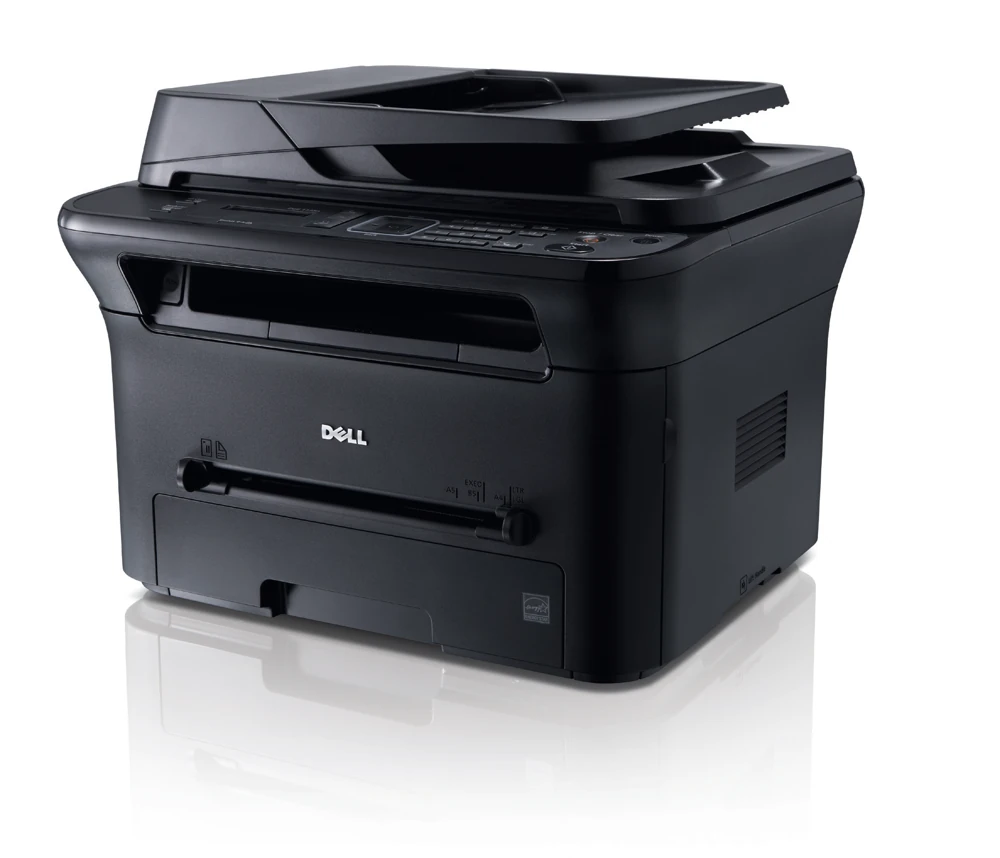
The Dell 1135n is an earlier monochrome laser multifunction printer for a small office that needs printing, scanning, copying and analog fax. Its useful combination is a normal paper drawer, a document feeder and included Ethernet alongside USB. Its deciding limitation is manual two-sided printing, rather than automatic duplex output.
The scanner can capture color into an electronic file, while the printer produces black-and-white pages. Keep those tasks separate when deciding whether this machine can handle the office's documents. Color scanning does not establish color printing.
Set up capture as well as printing
Dell documents computer scanning over USB and the network. On the Windows route, Scan and Fax Manager registers the receiving computer and its destination. TWAIN supports its own local or network capture arrangement, while WIA is specifically a USB procedure.
The guide also distinguishes Macintosh scanning and its network TWAIN interface. Verify the software that works on the actual computer, then scan a representative page into the intended application or folder. Installing a printer queue does not automatically establish that receiving path.
Copying can be performed at the machine. Fax needs its appropriate telephone-line setup; the guide recommends the traditional analog arrangement and does not turn an internet or Ethernet connection into a guaranteed fax line.
Choose the physical route for the original
The document feeder accepts up to 40 suitable ordinary sheets. Its documented range reaches Legal length, as well as accommodating Letter and A4. Use that route for an appropriate loose packet, following the preparation rules for staples, damaged sheets and unsuitable material.
The flatbed has a separate Letter/A4-class area. It is useful for suitable single originals that should not travel through the feeder. The feeder's longer document limit does not expand the glass, so Legal should not be assumed to fit completely on the flatbed.
The software description includes an ADF Duplex control with an explicit warning that unsupported models gray it out. That generic control is insufficient evidence for automatic two-sided feeder hardware. This assessment establishes the documented one-sided feed routine and leaves an automatic duplex-scan requirement unconfirmed.
Bulk paper and a single-sheet exception path
The standard drawer holds 250 ordinary sheets. The manual tray adds one physical position, making the total sometimes appear as 251. That single position is useful for an instructed envelope or alternate sheet, but it is not a second bulk supply between refills.
The operating media table explicitly supports Letter, Legal and A4 in the ordinary drawer. Match size and type settings to the paper actually loaded. Suitable envelopes use the manual path, with their own loading requirements.
Two-sided printing requires the user to follow the driver's manual sequence and reload the printed stack. Plan for someone to attend that job. A booklet layout or long-edge binding choice does not supply an automatic duplex unit.
Keep rated output and workload labels distinct
The original US brochure declares up to 23 one-sided Letter pages per minute. That is a maker declaration rather than a result measured for this review, and it should not be treated as the speed of every short job.
Dell labels its smaller monthly-volume range as typical use. The much larger maximum-duty figure is separate. This review does not convert either label into a stronger recommended-workload promise than the source supplies.
Check the complete earlier setup
Identify the toner actually supplied, confirm the regional electrical rating and inspect the drawer and feeder condition. Allow room for loading, the open scanner lid and service access as well as the closed body.
Choose the 1135n when its proven wired print-and-capture setup meets the document work, and manual two-sided handling is acceptable.
Key details at a glance
| Color printing | No |
|---|---|
| Scanner | Yes |
| Copying | Yes |
| Fax | Yes |
| Flatbed scanner | Yes |
| Automatic document feeder | Yes |
| Automatic two-sided printing | No |
| Color scanning | Yes |
| Instructed envelope handling | Yes |
| Maximum monthly duty | 12000 pages |
| Included ordinary-paper capacity | 251 sheets |
| Document-feeder capacity | 40 sheets |
| Declared one-sided mono Letter rate | 23 pages/min |
| Unit-body width | 16.38 in |
| Unit-body depth | 16.35 in |
| Unit-body height | 12.56 in |
| Unit weight | 25.46 lb |
| Imaging engine | laser |
Use the exact model’s instructions for operating limits, supplied equipment and version differences.
Paper, software and setup details
Print-rate conditions
Dell declares up to 23 one-sided Letter ppm. The 12,000-page figure is maximum monthly duty. The brochure labels 300–1,000 pages as typical monthly print volume, which is not converted into a confirmed maker-recommended interval.
Paper handling
The standard drawer holds 250 ordinary 80 gsm sheets and the manual tray holds one, for 251 physical positions. Bulk refill matching counts 250. The actual operating table explicitly includes Letter, Legal and A4; those sizes share the 250-sheet ordinary-paper capacity. Envelopes use the one-sheet manual path. Print duplex is explicitly manual, with instructed stack handling.
Scanning arrangement
The original guide confirms a 40-sheet document feeder and a separate flatbed for copying, scanning and fax originals. The feeder range reaches 216 × 356 mm, supporting Letter, Legal and A4; the brochure’s flatbed size is 216 × 297 mm, supporting Letter/A4. Color capture and local/network computer scanning are positively documented. A generic software ADF Duplex control is explicitly conditional on model support and is not treated as evidence of automatic duplex hardware.
Computer and mobile connections
Included USB 2.0 and 10/100 Ethernet support compatible computer printing and scan capture. Dell Scan and Fax Manager and TWAIN are separately documented for local and network connections; WIA is USB-only. Analog fax uses a traditional telephone-line setup. Included Wi-Fi, Wi-Fi Direct and native mobile protocols are not established by these sources.
Supplies and declared yields
The exact brochure declares a 700-page shipped black cartridge and 1,500/2,500-page standard/high-capacity replacements under ISO/IEC 19752. These are distinct supply declarations; identify the cartridge actually installed and the remaining condition of an earlier machine.
Software and support
The original print system uses SPL/GDI with compatible software required. Dell Scan and Fax Manager is a Windows arrangement; the guide has a distinct network-TWAIN route for Macintosh. Check current driver and application compatibility. A password for a scan computer and secure fax receive do not establish confidential print jobs held for a collection PIN.
Electrical edition and setup
Assessment covers the documented 110–127 VAC regional edition; a 220–240 VAC edition is separately listed and is not automatically interchangeable. Check the actual label. Operating-guide body dimensions 416 × 415.4 × 318.9 mm are about 16.38 × 16.35 × 12.56 inches; machine-with-consumables weight is 25.46 lb. Leave additional paper, scanner-lid, cable and service access.
Sources for this assessment
Find a printer for your routine.
Match color output, scanning, connections and paper handling, then compare the exact models.