
Your needs, this model
Does it fit your priorities?
Can the included Ethernet setup combine monochrome output, automatic duplex, 650 ordinary-paper positions and a 35,000-page recommended monthly maximum?
Yes when paper size remains flexible and a compatible desktop driver is used. The brochure explicitly confirms those included features and the recommended volume; exact duplex sizes and capacity by size are not established here.
Explore this need in the finder →Can the 5530dn scan incoming paperwork to a computer as well as print?
No. It is a single-function printer without a document scanner.
Explore this need in the finder →Does the wireless setup utility mean a Wi-Fi print server is already included?
No. The brochure identifies wireless networking hardware as optional, so the base reviewed configuration does not qualify for required Wi-Fi.
Explore this need in the finder →A shared monochrome output machine for substantial work
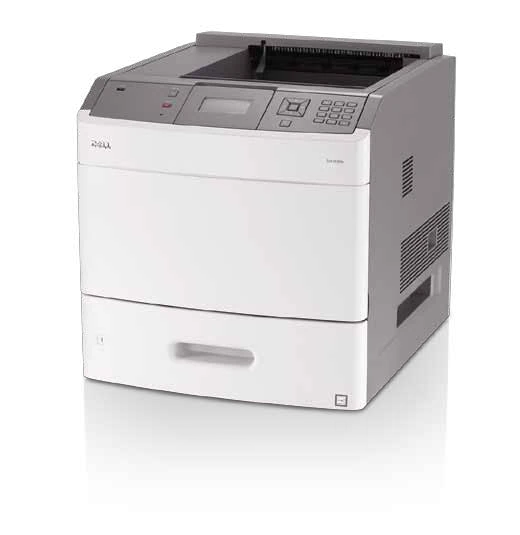
The Dell 5530dn is an earlier single-function laser printer aimed at a shared office with a meaningful black-and-white document workload. Its useful starting point is included automatic duplex, wired Ethernet and a 650-sheet ordinary-paper supply. It provides printing rather than a combined scanning, copying and fax station.
The deciding tradeoff is the complete configuration. Dell describes many paper, storage, connection and finishing options, but those additions are not all included with the ordinary 5530dn. Establish the actual hardware before treating a large expanded-system photograph as the machine being offered.
Start with the recommended monthly range
Dell explicitly recommends 5,000–35,000 pages per month in the model's original US specification. That is the more relevant comparison for a planned recurring workload than its much larger 275,000-page maximum-duty figure. The latter is a different declaration, rather than a promise that the maximum is an appropriate monthly target.
The original one-sided Letter rating is up to 55 pages per minute. A separate Letter duplex rate is also declared. Neither figure represents testing performed for this review, and a short job or complex file can behave differently from a continuous rated run.
For an earlier unit, inspect its accumulated work, maintenance condition and representative output. A high original performance declaration cannot establish the health of rollers, the fuser or the installed cartridge today.
Count included paper before exploring the options
The standard input is a 550-sheet tray plus a 100-sheet multipurpose feed. That is a useful bulk supply for a shared queue, but it is different from the much larger maximum quoted for a fully expanded system.
Extra drawers, a high-capacity feeder and a separate envelope feeder appear in the options list. Finishing and output accessories also change the physical arrangement. Inventory the actual machine and confirm that its driver reports the installed options correctly.
The brochure lists Letter, Legal and A4 among accepted ordinary media. It does not positively allocate the quoted capacity to each exact size or specify the complete automatic-duplex size subset. Those details should be checked in the operating guidance when an exact-size refill or duplex requirement is essential.
Wired printing is the included connection arrangement
The reviewed computer routes are USB and the included 10/100 Ethernet interface. The rear USB-B device connection is different from the printer's host ports. A host socket for peripherals does not replace the documented computer connection.
Gigabit networking and wireless print-server hardware are options. Their appearance in the original software or accessory lists does not make them part of every base machine. Check the actual network interface and working driver before planning how a shared queue will operate.
The language list includes PCL and PostScript emulations. Test the intended application documents with a compatible current setup. Likewise, Bonjour in a network-management list does not independently establish native AirPrint or a phone's full printing controls.
Supplies and physical access affect the practical choice
The shipped toner declaration differs from the standard, high-capacity and extra-high-capacity replacement declarations. Identify the cartridge actually installed and what accompanies the machine. A replacement's larger rated yield is not a claim about the remaining toner in an earlier unit.
Measure the complete printer and its loading and service clearances. The brochure labels its quoted dimensions as without duplex even though this model includes duplex, so this assessment does not use those figures as a certified fit for the complete configuration.
Choose the 5530dn when verified wired monochrome printing and a substantial recommended workload match the office. If routine paper capture or included wireless is central to the job, a different documented configuration is needed.
Key details at a glance
| Color printing | No |
|---|---|
| Scanner | No |
| Copying | No |
| Fax | No |
| Flatbed scanner | No |
| Automatic document feeder | No |
| Automatic two-sided printing | Yes |
| Automatic two-sided scanning | No |
| Single-pass two-sided scanning | No |
| Color scanning | No |
| Instructed envelope handling | Yes |
| Recommended monthly minimum | 5000 pages |
| Recommended monthly maximum | 35000 pages |
| Maximum monthly duty | 275000 pages |
| Included ordinary-paper capacity | 650 sheets |
| Declared one-sided mono Letter rate | 55 pages/min |
| Imaging engine | laser |
Use the exact model’s instructions for operating limits, supplied equipment and version differences.
Paper, software and setup details
Print-rate conditions
The exact US table declares up to 55 one-sided Letter ppm and a separate 37 ppm Letter duplex rate. Actual output varies. Dell explicitly recommends 5,000–35,000 monthly pages; 275,000 is maximum duty and is not used as the recommended-volume ceiling.
Paper handling
Included 650 ordinary-paper positions comprise a 550-sheet tray and 100-sheet multipurpose feed. The 4,300-sheet maximum requires additional options and is excluded. The brochure lists Letter, Legal and A4 among accepted media, but does not positively allocate per-size capacity or exact automatic-duplex sizes; these subsets remain unconfirmed. Included automatic duplex can match paper=any. Envelopes are listed as accepted media; the separate envelope feeder is optional.
Scanning arrangement
Single-function monochrome laser printer without document scanning, copying, fax or an automatic document feeder.
Computer and mobile connections
Standard 10/100 Ethernet and a rear high-speed USB-B computer device port. Front and rear USB host ports serve a different peripheral/file role. Wireless and Gigabit print servers are optional. The base plans cover compatible USB and included Fast Ethernet desktop printing.
Supplies and declared yields
Dell lists a 10,000-page shipped cartridge, 7,000-page standard replacement, 25,000-page high-capacity and 36,000-page extra-high-capacity replacements under ISO/IEC 19752. These are distinct supply declarations, not evidence of what is installed or supplied with an earlier unit. Inspect cartridge identity, remaining toner and maintenance condition.
Software and support
The original brochure lists PCL 5e/PCL 6 and PostScript 3 emulations plus other data streams. Check the compatible driver and intended applications. Bonjour in the management list does not establish AirPrint. Optional storage and encryption cards are not assumed to supply included PIN-release jobs.
Electrical edition and setup
This assessment scopes the brochure’s 120 VAC edition with 100–127 VAC input; a separate 220–240 VAC edition is also listed. Check the actual rating label. The brochure’s printed body dimensions and weight explicitly say without duplex, although 5530dn includes duplex; those measurements are not assigned to the reviewed complete configuration. Measure the actual machine and operating access.
Sources for this assessment
Find a printer for your routine.
Match color output, scanning, connections and paper handling, then compare the exact models.