
Your needs, this model
Does it fit your priorities?
Can a compatible Wi-Fi computer print color Legal pages with 150 included ordinary-sheet positions?
Yes. The original guide documents ordinary wireless computer printing and the 150-sheet feed supporting Legal; the correct driver and paper settings are required.
Explore this need in the finder →Does its two-sided feature meet a requirement for automatic duplex?
No. The C1660w routine requires the user to move and reload the stack.
Explore this need in the finder →Can an Apple device use native AirPrint because the printer has Wi-Fi?
No. The exact Dell family column explicitly marks AirPrint unavailable; separate historical mobile apps are a different route.
Explore this need in the finder →A small color printer with a deliberate workload
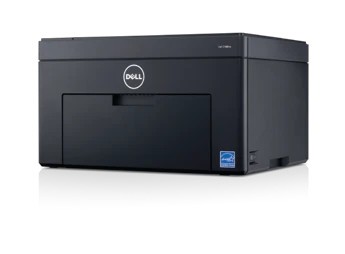
The Dell C1660w is an earlier color LED printer for a desk that wants occasional color documents without adding a scanner or a large paper system. Its useful feature is ordinary wireless computer printing alongside USB. Its main limitation is manual two-sided output: someone must turn and reload the printed stack.
That makes it more suitable for attended reports, correspondence and short color jobs than for a queue that expects unattended duplex packets. Check that this combination matches the actual work before treating its small cabinet as the deciding advantage.
The related C1760nw has features this model does not
Dell uses a shared user guide, and most of its illustrations show the C1760nw. The Ethernet port pictured there belongs only to that model. The C1660w does not gain a wired network socket from the shared illustration.
The same distinction applies to the priority sheet inserter. The C1660w has a cover over its ordinary multipurpose paper feed; the extra ten-sheet inserter belongs to the C1760nw. The included C1660w paper capacity is 150 ordinary sheets, rather than the larger combined figure associated with its sibling.
Manual duplex changes the daily routine
The ordinary feed supports Letter, Legal and A4. Load and identify the actual paper size and type before printing. Suitable envelopes have their own loading and driver instructions; they are not a reason to reuse ordinary-paper settings indiscriminately.
For a two-sided document, the manual describes printing the even pages first, then moving the stack back into the feeder with the correct side facing up. The remaining pages print after the instructed confirmation. Keep the guidance window available and run a short sample to establish the orientation.
This is a real paper-saving option for an attended job, but it is not automatic duplex. Mixed paper sizes and curled output add restrictions. If several people regularly need finished two-sided sets without handling the paper, choose a machine with included automatic duplex instead.
Wireless printing still depends on compatible software
The documented Wi-Fi connection uses the ordinary 2.4GHz router network. USB provides a direct connection to a nearby computer. WPS, where supported by the router, is one way to register the wireless printer; its setup PIN is not a password that holds confidential print jobs for collection.
The user guide identifies a host-based printing system. Check the working driver for the intended operating system and test output from the actual applications. A historical software list cannot establish every present-day computer combination.
Dell's exact-model family table explicitly marks AirPrint as unavailable. Its references to separate mobile apps from that period should not be substituted for native AirPrint or assumed to remain a supported phone workflow.
Read the modest speed declaration in context
The Letter-oriented family table declares up to 12 pages per minute in monochrome and 10 in color for Letter and A4. Those are maker output declarations, not measurements from this assessment or a promise about the first page of a short job.
The maximum monthly duty figure is also distinct from a sensible ongoing workload. The model-specific brochure recommends 200–500 pages per month, while the family table uses a different typical-use label. For an earlier unit, feeding condition and the actual work pattern matter more than treating the maximum-duty number as a monthly target.
Choose it as a complete color-printing setup
There is no document scanner, copier, feeder or fax. Plan those tasks separately. Identify the installed black and color cartridges, since replacement yield declarations do not describe what remains in a particular machine.
Finally, confirm the regional electrical rating and allow room for the open paper feed and output. The C1660w makes sense when its compatible software, short color jobs and attended paper handling form a verified routine.
Key details at a glance
| Color printing | Yes |
|---|---|
| Scanner | No |
| Copying | No |
| Fax | No |
| Flatbed scanner | No |
| Automatic document feeder | No |
| Automatic two-sided printing | No |
| Automatic two-sided scanning | No |
| Single-pass two-sided scanning | No |
| Color scanning | No |
| Instructed envelope handling | Yes |
| Apple AirPrint | No |
| Recommended monthly minimum | 200 pages |
| Recommended monthly maximum | 500 pages |
| Maximum monthly duty | 30000 pages |
| Included ordinary-paper capacity | 150 sheets |
| Declared one-sided mono Letter rate | 12 pages/min |
| Declared one-sided color Letter rate | 10 pages/min |
| Unit-body width | 15.5 in |
| Unit-body depth | 11.8 in |
| Unit-body height | 8.9 in |
| Unit weight | 23.2 lb |
| Imaging engine | led |
Use the exact model’s instructions for operating limits, supplied equipment and version differences.
Paper, software and setup details
Print-rate conditions
The personally read Letter-oriented Dell family table declares up to 12 ppm monochrome and 10 ppm color for Letter/A4. The other preserved brochure labels those rates A4 only. The original model-specific US-oriented brochure explicitly recommends 200–500 pages per month; that differs from the family table’s typical-use wording and is separate from the 30,000-page maximum duty.
Paper handling
The C1660w has a 150-sheet multipurpose feeder with its own paper cover. The 10-sheet priority inserter belongs only to C1760nw. Actual media tables list Letter, Legal and A4 for the 150-sheet ordinary-paper feed, plus an instructed envelope routine. Two-sided output is manual: reinsert the printed stack as directed. No automatic duplex hardware is assigned.
Scanning arrangement
Single-function color printer with no document scanner, ADF, copier or fax.
Computer and mobile connections
USB 2.0 and 2.4GHz 802.11b/g/n wireless printing are included. The Ethernet socket in the shared guide is expressly C1760nw only. Ordinary router Wi-Fi setup and WPS PIN registration do not establish Wi-Fi Direct or confidential-job PIN release.
Supplies and declared yields
The exact family column lists 500-page shipped black and CMY starter cartridges, with replacement declarations of 1,250 pages black and 1,000 pages per color under ISO/IEC 19798. Inspect the actual installed cartridges and their condition; these declarations are not current included-supply or page-cost claims.
Software and support
The original specification identifies a host-based printing system, so verify an actual compatible driver for the intended computer and application. Dell’s exact C1660w family column explicitly says no AirPrint, despite support for separate Dell mobile apps of that period. Availability or operation of those historical apps is not promised here.
Electrical edition and setup
The original user guide documents a 110–127 VAC edition and a separate 220–240 VAC edition. Scope is the low-voltage US unit, verified by its rating label. Body dimensions are 15.5 × 11.8 × 8.9 inches, with exact C1660w loaded weight 23.2 lb. Open and extended paper loading needs more room than the closed body.
Sources for this assessment
Find a printer for your routine.
Match color output, scanning, connections and paper handling, then compare the exact models.