
Your needs, this model
Does it fit your priorities?
Can a wired network computer print Legal-size color documents from a 250-sheet main input?
Qualifies with earlier references enabled and the documented US edition. Use a compatible host-based driver and the included 10/100 Ethernet interface. Extend the cassette for Legal stock and allow it to protrude behind the printer. The single-sheet priority slot and optional lower tray are not added to the 250-sheet reserve.
Explore this need in the finder →Can it automatically print both sides of A4 pages over USB without returning the stack?
Fails. The original two-sided workflow is manual. A compatible driver pauses for the user to return the printed stack and press Select; no automatic duplex unit is included.
Explore this need in the finder →Can I scan and copy Letter documents using the USB connection?
Fails. The 2600n is a dedicated printer with no scanner, glass, original feeder or copying function. Its main cassette holds print paper and is not a document feeder.
Explore this need in the finder →An earlier color printer with a clear computer requirement
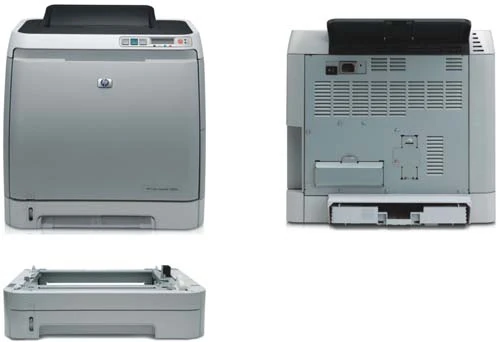
The HP Color LaserJet 2600n suits a small wired office that wants dedicated color printing and can maintain a compatible computer driver. It has a 250-sheet main cassette, a single-sheet priority slot, a computer USB connection and built-in 10/100 Ethernet. There is no scanner, copier, fax, document glass or original feeder.
The exact US Q6455A#ABA listing is discontinued. This review covers the documented 110–127-V, 60-Hz US configuration. The separately documented 220–240-V edition is not another operating setting on the same power supply. Check the actual option code and electrical plate before connecting an earlier unit.
HP recommends 300–1,500 printed pages per month. The 35,000-page maximum monthly duty figure describes a different limit and should not become the normal workload target. The original guide rates one-sided black and color output at up to eight pages per minute on Letter or A4. That is not a speed claim for the complete manual-duplex process.
Use the host-based driver over USB or wired Ethernet
The computer connection is Hi-Speed USB 2.0. For shared printing, use the included 10/100Base-T network interface and configure the printer on the actual office network. Its hardware description does not include Wi-Fi, so a wireless computer would still need a suitable network path to the wired printer.
This is a host-based printer rather than a general PCL or PostScript device. HP explicitly identifies those printer languages as unsupported. Confirm that the intended operating system has an appropriate exact-model driver before buying cables or planning a deployment; a generic language driver is not an established substitute.
The historical software lists do not guarantee compatibility with a current computer. HP also issued a specific advisory about early 2600n installation CDs causing errors under Windows Vista. That advisory concerns the correct software installation, not paper handling, and is no reason to install an obsolete driver today. AirPrint, Mopria and PIN-held printing remain unconfirmed here. Rendezvous network discovery alone does not establish AirPrint.
Count the main cassette separately from the priority slot
The included main input is the 250-sheet Tray 2. Tray 1 takes one sheet at a time and is useful for occasional different stock, but it is not another ordinary stack reserve. The finder therefore records 250 sheets, rather than 251. An additional 250-sheet Tray 3 is optional, and the 125-sheet output bin is not input capacity.
Letter, Legal and A4 are positively documented. The paper path is not a wide-format A3 or 11 × 17-inch Tabloid arrangement. Actual stack capacity varies with stock thickness and conditions; the original table does not clearly attach a basis weight to the full 250-sheet total, so no precise capacity-at-weight promise is added.
For paper longer than Letter or A4, extend the rear of the main cassette. Once inserted, that extension projects from the back of the printer. HP does not provide a separate extension distance in the instructions used here. Leave working space behind the machine rather than treating its closed-body depth as the complete Legal-paper footprint.
Adjust both guides, flatten all four corners, keep the stack below the rear guide limit and do not fan the paper. For one-sided preprinted stock, Tray 2 uses the printable face up with the page top toward the front. The single-sheet slot uses the printable face down, with its short top edge entering first. Match the actual size and media type in the driver.
Two-sided output requires an attended second pass
The 2600n does not include automatic print duplex. Its documented two-sided workflow is manual and depends on the compatible driver and someone returning the first-pass pages to the input.
The original Windows procedure first enables manual duplex in the paper-handling configuration, then selects manual two-sided printing in the finishing settings. HP also documents a manual-duplex choice in its historical Macintosh driver. Those menu names describe the original software rather than a guarantee about every later installation.
Load enough suitable paper in Tray 2, or in the optional lower tray only if it is actually installed. After the first pass, remove unused blank stock, lift the printed stack from the output and return it to the same input without rotating or turning it over. Press Select to continue. Follow that model-specific sequence; refeeding instructions from another LaserJet can reverse the intended orientation. Labels and transparencies are excluded from this two-sided procedure.
Prepare envelopes and supplies for the actual job
The priority slot takes one suitable envelope, while the main cassette can hold up to ten. Use laser-compatible, undamaged envelopes within the documented 90-g/m² limit, without windows, clasps or unsuitable synthetic materials. Print one side only. In Tray 2, HP specifies printable face up, flaps to the right and the short edge toward the printer; a short-edge flap enters first. Select the real envelope size and type in the application or driver rather than leaving an ordinary-paper setting in place.
The four original replacements are Q6000A black, Q6001A cyan, Q6002A yellow and Q6003A magenta. HP declares approximately 2,500 black pages or 2,000 pages for each color using a five-percent-coverage basis. These are not ISO/IEC 19798 yields, and an earlier machine's remaining toner cannot be inferred from them.
The later US brochure lists a body measuring 16.02 inches wide, 17.83 inches deep and 14.6 inches high, weighing 40.5 lb including the cartridges. Allow additional room for the extended Legal cassette, paper loading, front supply access and cables. Check the actual installed accessories and available driver before treating this compact body as a ready-to-use office setup.
Key details at a glance
| Color printing | Yes |
|---|---|
| Scanner | No |
| Copying | No |
| Fax | No |
| Flatbed scanner | No |
| Automatic document feeder | No |
| Automatic two-sided printing | No |
| Automatic two-sided scanning | No |
| Single-pass two-sided scanning | No |
| Color scanning | No |
| Instructed envelope handling | Yes |
| Recommended monthly minimum | 300 pages |
| Recommended monthly maximum | 1500 pages |
| Maximum monthly duty | 35000 pages |
| Included ordinary-paper capacity | 250 sheets |
| Declared one-sided mono Letter rate | 8 pages/min |
| Declared one-sided color Letter rate | 8 pages/min |
| Unit-body width | 16.02 in |
| Unit-body depth | 17.83 in |
| Unit-body height | 14.6 in |
| Unit weight | 40.5 lb |
| Imaging engine | laser |
Use the exact model’s instructions for operating limits, supplied equipment and version differences.
Paper, software and setup details
Print-rate conditions
The original rates one-sided black and color output at up to 8 ppm for both Letter and A4. No manual-duplex throughput is inferred. HP recommends 300–1,500 monthly pages, separate from the 35,000-page maximum duty.
Paper handling
The included main cassette holds 250 ordinary sheets. The one-sheet priority slot is not a second stack reserve; optional 250-sheet Tray 3 and the 125-sheet output bin are excluded. Letter, Legal and A4 are positively documented. Capacity varies with stock and conditions; the original table does not clearly establish the full 250-sheet basis weight. Extend the rear cassette for longer-than-Letter/A4 stock; it protrudes behind the printer, with no separate extension distance established. Adjust guides, flatten corners, do not fan stock and respect the rear height limit. One-sided preprinted stock is face up/top toward the front in Tray 2, and face down/short top edge first in Tray 1. Envelopes use one in the priority slot or up to ten in Tray 2, suitable stock at no more than 90 g/m² and one-sided printing only.
Scanning arrangement
The complete original hardware scope describes a dedicated color printer. It has no scanner, copier, fax, document glass or original feeder. A paper cassette feeds blank print stock and does not provide a computer capture route.
Computer and mobile connections
Included connections are Hi-Speed USB 2.0 computer and 10/100Base-T Ethernet. Wi-Fi is not included in the documented hardware. The printer is host based and does not support PCL or PostScript. Use an appropriate exact-model driver and configure the actual wired network. AirPrint, Mopria and PIN-held printing remain unconfirmed; Rendezvous discovery does not establish AirPrint.
Supplies and declared yields
Original replacements are Q6000A black, Q6001A cyan, Q6002A yellow and Q6003A magenta. Declared yields are approximately 2,500 black pages or 2,000 pages for each color on a five-percent-coverage basis. No ISO/IEC 19798 method, remaining cartridge life, tested yield, current price or mandatory HP+ policy is invented.
Software and support
Manual print duplex requires compatible driver support and an attended second pass, not an automatic duplex unit. Original Windows instructions enable manual duplex in paper handling, then select it in finishing; historical Macintosh software also has a manual-duplex choice. After the first pass, remove unused paper, return the printed stack to the same input without rotating or turning it over, and press Select. Labels and transparencies are excluded. Verify current operating-system support independently. The preserved c01153120 advisory is about early installation CDs and Vista errors, not a paper or duplex manual.
Electrical edition and setup
The exact US Q6455A#ABA is discontinued and requires earlier opt-in. This article covers the documented 110–127-V, 60-Hz US edition, separate from the 220–240-V supply. Check the actual code and plate. Later US brochure body dimensions are 16.02 × 17.83 × 14.6 inches, with 40.5-lb weight including cartridges. Earlier manual weight without supplies is a different basis. The Legal cassette projects behind the body; leave paper, front supply and cable access, and do not add the optional lower cassette to the included configuration.
Sources for this assessment
- HP Color LaserJet 2600n original Spanish User Guide, Q6455-90955 Edition 1 April 2005
- HP exact US Color LaserJet 2600n Q6455A#ABA discontinued identity
- HP exact US 2600n technical specifications
- HP-authored US Color LaserJet 2600n brochure, 5983-0803ENUC May 2007 Rev 2
- HP 1600/2600n early-CD installation errors under Windows Vista advisory, August 27 2007
Find a printer for your routine.
Match color output, scanning, connections and paper handling, then compare the exact models.