
Your needs, this model
Does it fit your priorities?
Can a compatible network computer scan color Legal originals through the feeder and print color Legal pages with 150 ordinary sheets loaded?
Qualifies with earlier references enabled and the documented US edition. Install compatible desktop print-and-scan software over 10/100 Ethernet, extend the feeder support for Legal originals and load suitable Legal print stock. Legal scanning uses the feeder, not the glass.
Explore this need in the finder →Can this USB setup automatically print both sides of an A4 color job?
Fails. The exact-model specification says manual duplex. A compatible driver requires first-pass output to be returned according to its prompts; generic automatic-duplex wording in a shared driver section does not establish hardware support.
Explore this need in the finder →Can I place a full Legal original on the glass for color scanning to my computer?
Fails. The glass is limited to Letter/A4. The Legal-capable feeder is a different capture route and does not enlarge the flatbed.
Explore this need in the finder →A wired color MFP with a useful feeder and photo-card slots
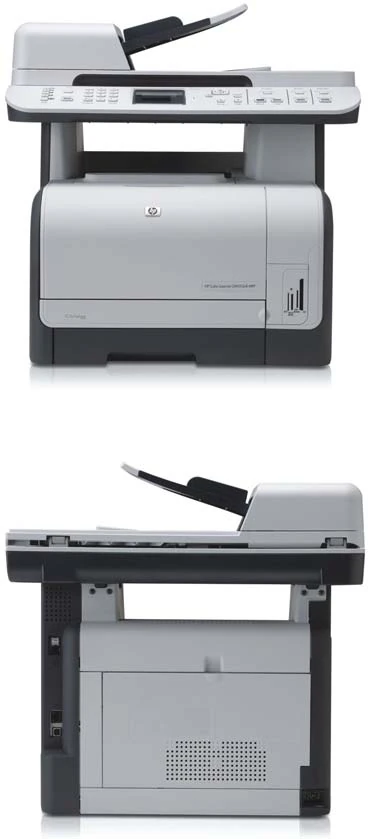
The HP Color LaserJet CM1312nfi combines color printing and copying, color document scanning and an analog fax in one earlier office machine. The nfi configuration includes a 50-sheet automatic document feeder, built-in 10/100 Ethernet and photo memory-card slots. Those additions distinguish it from the simpler CM1312 flatbed model.
HP’s exact US listing identifies CC431A#ABA and explicitly marks the printer discontinued. This review covers the documented low-voltage US configuration: 110–127 V at 60 Hz. The separate 220–240-V edition is not a universal-voltage setting. Check the unit’s actual rating plate before installation.
Its best fit is modest shared color-document work where a compatible computer can still run the required printer and scanner software. HP recommends 250–1,500 printed pages per month. The 30,000-page maximum duty figure describes a different limit; it is not the recommended everyday workload.
Choose the computer connection before choosing scan shortcuts
The rear USB 2.0 computer connection uses an A-to-B cable. HP’s original installation procedure says to leave that cable disconnected until the installer requests it. For Ethernet, connect the network cable before switching on, wait for startup and print a configuration page. Confirm an IP address appears, then select that address or discover the printer during installation.
Compatible desktop scanning uses HP LaserJet Scan on Windows, HP Director on Mac, or supported TWAIN/WIA software. The original network installation table includes print-and-scan configurations, but some listed systems have print-only support. A historic operating-system list does not guarantee full functionality on a current computer; check the exact scanner software as well as the print driver.
The front Scan Menu is a computer-assisted shortcut. It requires a full software installation, HP ToolboxFX running, the destination computer switched on and destinations programmed in advance. The guide separately requires USB for the Start Scan button. Email delivery uses a compatible computer email application, including the documented MAPI requirement on Windows. This is not evidence of an independent SMTP sender that works with every computer switched off.
No Wi-Fi radio is in the documented included configuration. AirPrint, Mopria and held-print PIN release remain unconfirmed. Bonjour device discovery, administrator passwords and private fax reception do not establish those capabilities.
Separate feeder scanning from glass scanning and duplex work
The scanner captures color independently of whether a print job is black or color. HP specifies up to 1,200 ppi from the Letter/A4 glass and 300 ppi from the feeder. The software’s enhanced resolution is a separate figure, not the scanner’s optical detail.
The 50-sheet feeder capacity is stated for 80-g/m² or 20-lb originals. Load originals face up with their top edge first, extend the support for longer pages and move the guides against the stack without restricting it. The documented feeder range reaches 8.5 by 14 inches, allowing Legal originals. Legal does not fit the Letter/A4 glass. For photographs, fragile items, small originals and books, use the glass, clear the feeder and align the original face down with the marked corner.
Automatic two-sided document capture is not established by the exact sources. The guide’s two-sided copy procedure is explicitly manual: enable the multipage flatbed setting and replace each original as prompted. A 2-Sided control therefore does not prove a reversing or single-pass duplex scanner.
Scanning to an inserted memory card is another distinct route. It saves a separate JPEG for each page, uses the feeder when paper is present and otherwise scans one glass page. A writable card with free space is necessary. Do not remove it while the activity light is blinking. For panel photo printing, the documented card limit is 2 GB and the recognized image format is JPEG.
One 150-sheet input means regular paper changes
The included tray holds up to 150 sheets of ordinary 75-g/m², 20-lb paper. Capacity falls with heavier or thicker media and conditions. The 125-sheet output bin and the 50-sheet original feeder are separate from that printing reserve. Letter, Legal and A4 carry positive support marks in the original tray table; the A3 row is unmarked and exceeds the stated 216-mm maximum width.
Set both paper size and type in the driver and configure the tray to match. When replenishing, remove the old stack, straighten the combined supply and adjust the length and width guides. HP’s original capacity table and later loading paragraph disagree about the printable face and top-edge direction. Use the actual unit’s loading marks and verified exact-model instructions for preprinted stock instead of relying on a universal direction here.
Two-sided printing is manual. Select the compatible driver’s manual-duplex setting, return the first-pass output as instructed on the computer and continue when prompted. A generic Mac subsection describing automatic duplex does not override the exact US specification’s manual designation. The documented manual Mac routine also cautions against paper above 105 g/m².
The tray accepts up to ten suitable envelopes. Select the envelope’s actual size and type for one-sided printing, and use flat laser-compatible stock without windows, clasps or unsuitable adhesives.
Budget for four cartridges and accessible working space
The replacements are CB540A black, CB541A cyan, CB542A yellow and CB543A magenta. HP declares continuous replacement yields of 2,200 black pages and 1,400 composite color pages under ISO/IEC 19798; actual yield varies. The original introductory cartridges were rated at 750 pages and do not describe toner remaining in an earlier unit.
The later exact US brochure gives a body approximately 19.6 inches wide, 19.3 deep and 19.1 high, weighing 54.5 lb including the print cartridge. The earlier family guide lists a lower height and slightly different weight; the later exact-model figures are used here. Reserve additional access for the scanner lid, feeder extensions, front cartridge drawer, rear jam door and cables.
HP rates Letter output at up to 12 black or eight color pages per minute. These are declared one-sided rates, not measured duplex throughput. Fax requires its separate analog telephone arrangement and proper setup of the date, time and fax header; an Ethernet cable does not replace the telephone connection.
Key details at a glance
| Color printing | Yes |
|---|---|
| Scanner | Yes |
| Copying | Yes |
| Fax | Yes |
| Flatbed scanner | Yes |
| Automatic document feeder | Yes |
| Automatic two-sided printing | No |
| Color scanning | Yes |
| Instructed envelope handling | Yes |
| Recommended monthly minimum | 250 pages |
| Recommended monthly maximum | 1500 pages |
| Maximum monthly duty | 30000 pages |
| Included ordinary-paper capacity | 150 sheets |
| Document-feeder capacity | 50 sheets |
| Declared one-sided mono Letter rate | 12 pages/min |
| Declared one-sided color Letter rate | 8 pages/min |
| Unit-body width | 19.6 in |
| Unit-body depth | 19.3 in |
| Unit-body height | 19.1 in |
| Unit weight | 54.5 lb |
| Imaging engine | laser |
Use the exact model’s instructions for operating limits, supplied equipment and version differences.
Paper, software and setup details
Print-rate conditions
The exact US brochure declares up to 12 black or eight color ppm for Letter. These are one-sided manufacturer ratings, not measured performance or duplex throughput. Recommended volume is 250–1,500 pages per month, separate from the 30,000-page maximum duty.
Paper handling
The included tray holds 150 ordinary 75-g/m², 20-lb sheets; heavier media and conditions reduce capacity. The 125-sheet output bin and 50-sheet original feeder do not add print input capacity. Letter, Legal and A4 have positive tray support marks; A3 is unmarked and exceeds the 216-mm maximum width. Choose actual size and type in the driver and tray setup. Remove old stock, straighten the stack and adjust guides. Original capacity table says face up/top back, while the loading paragraph says face down/top forward; this conflict is retained rather than converted into a universal loading direction. Confirm the actual unit’s marks for preprinted media. Duplex printing requires manual page return and the compatible driver’s prompts. The manual Mac routine limits paper to 105 g/m². Up to ten suitable envelopes are supported for one-sided printing with the actual size/type selected.
Scanning arrangement
The original exact fax/photo-card configuration has a 50-sheet ADF, rated for 80-g/m² or 20-lb originals. Color scanning is independently explicit: glass up to 1,200 ppi and ADF 300 ppi. Glass fits Letter/A4, not Legal. Exact US brochure reaches 8.5 × 14 inches for document scanning; combined with the explicit glass limit, this establishes Legal via the feeder. Feed originals face up/top first, extend support beyond Letter/A4 and bring guides against the stack. Photos, books, fragile and small originals belong on the glass after clearing the feeder. The two-sided copy routine manually replaces glass originals; automatic duplex file scanning and its mechanism are unconfirmed. Memory-card scanning saves one JPEG per page, favors the loaded ADF and scans one glass page otherwise.
Computer and mobile connections
Included interfaces are rear USB 2.0 computer, built-in 10/100 Base-TX Ethernet, analog fax phone ports and four photo-card slots. No included Wi-Fi radio appears in the complete exact interface scope. USB installation requests an A-to-B cable when prompted. Ethernet setup uses the configuration-page IP address and a compatible network installation. Bonjour is device discovery, not proof of AirPrint. AirPrint and Mopria remain unconfirmed; a supported HP Print Service plugin listing is not substituted for Mopria.
Supplies and declared yields
Original parts and exact US brochure specify CB540A black, CB541A cyan, CB542A yellow and CB543A magenta. Continuous replacement yields are 2,200 black and 1,400 composite color pages under ISO/IEC 19798, with actual yield varying. Original introductory cartridges were rated at 750 pages; no remaining toner is assumed. Replace through the front drawer, avoid the imaging drum and remove orange protection and sealing tape. No price, hands-on yield or mandatory lifetime HP+ requirement is invented.
Software and support
Use compatible exact-model printing and scan software: HP LaserJet Scan, HP Director or supported TWAIN/WIA software. The original network installation table positively includes print-and-scan configurations but also print-only systems; verify current computer support. Panel Scan Menu needs full software, running HP ToolboxFX, a powered destination computer and programmed destinations. The original specifically requires USB for Start Scan. Computer-assisted email depends on a compatible email application, including MAPI on Windows, rather than a proven stand-alone SMTP sender. Security passwords and private fax reception do not establish held-print PIN release, which remains unknown.
Electrical edition and setup
Exact US CC431A#ABA is explicitly discontinued and requires earlier-reference opt-in. This article covers 110–127 V at 60 Hz; the separate high-voltage edition is not a universal setting. Check the actual rating plate and do not convert voltages. Later exact US brochure dimensions are 19.6 W × 19.3 D × 19.1 H inches and 54.5 lb including the print cartridge. The earlier family guide gives 18.4 inches high and 54.2 lb; the later exact brochure controls. Allow scanner lid, ADF extensions, front drawer, rear jam door and cable access. Photo cards are limited to 2 GB, one at a time, and panel photo printing recognizes JPEG. Wait for activity to stop before removal. Fax needs the separate analog telephone arrangement, date, time and header setup.
Sources for this assessment
Find a printer for your routine.
Match color output, scanning, connections and paper handling, then compare the exact models.