
Your needs, this model
Does it fit your priorities?
Can I print color Legal documents from a compatible USB Windows computer with 150 ordinary sheets ready?
Qualifies with earlier references enabled, the documented US edition, the proper host-based driver and ordinary Legal stock. Extend the tray, reserve its extra two-inch front projection and select the actual size in the driver.
Explore this need in the finder →Will it automatically print both sides of A4 without returning to the tray?
Fails. The original driver supports manual duplex only. After side one, remove unused stock, return the straightened printed stack face down with its top at the back and press Resume.
Explore this need in the finder →Can this color LaserJet scan and copy my Letter documents over USB?
Fails. It is a dedicated color printer with no glass, document feeder or capture hardware. Color paper output and the Toolbox status program do not create a scanner or copier.
Explore this need in the finder →A color laser for a compatible USB computer
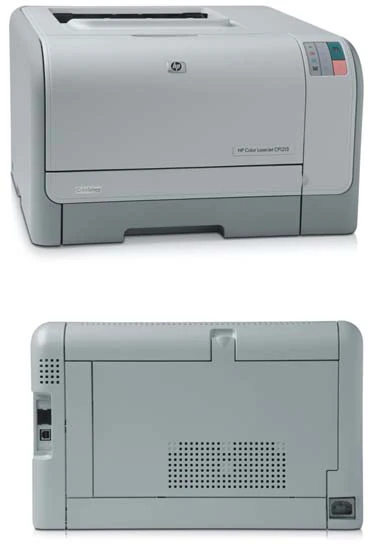
The HP Color LaserJet CP1215 is an earlier desktop color printer for modest document work. It combines one 150-sheet paper input with a direct USB computer connection and driver-assisted manual duplex. It is best considered when the intended computer can still run a compatible host-based driver and the user is comfortable returning pages for second-side printing.
HP's exact US page identifies CC376A#ABA and explicitly marks the printer discontinued. This review concerns the documented US 110–127-V, 60-Hz edition. Separate high-voltage editions are not interchangeable. Check the actual option code and electrical plate before choosing an earlier unit.
The CP1215 has no scanner, copier, document feeder, glass or fax. Its control-panel lights report toner, paper and print status. Color pages are its output capability; they do not establish color scanning or multifunction hardware.
Check the computer arrangement before the paper routine
The original manual and exact-model brochure describe a Hi-Speed USB 2.0 port and host-based printing software for Windows. The original installation sequence asks you to install the software before connecting the A-to-B USB cable, then connect when prompted. The cable is purchased separately.
Historical support for Windows 2000, XP, Server 2003 or Vista is not a guarantee that a current computer has the required driver and controls. Verify the exact printer software and its manual-duplex function on the intended system. This review does not add Mac compatibility from another Color LaserJet.
The included configuration has no Ethernet port or Wi-Fi radio in its actual interface list and front/rear hardware map. A later optional wireless accessory cannot turn those into included features. AirPrint, Mopria and secure PIN release remain unconfirmed for the reviewed USB arrangement, and no computer scanning route exists.
Load the single tray for the actual selected size
Letter, Legal and A4 are positively marked in the original paper table. The normal input capacity is up to 150 sheets of 75-g/m², 20-lb bond paper, and it varies with thickness and conditions. The separate output bin holds up to 125 sheets. Do not add output space to the blank-paper reserve.
Pull the input tray out and remove remaining stock. Adjust its length and width guides, place the paper flat at all four corners and move the guides against the stack. Ordinary paper loads print-side up, with the top at the back of the tray. Keep the stack beneath the paper-limit tabs before reinserting the tray.
Legal paper needs an extra mechanical step. Hold the tray-extension tab while pulling the front of the tray toward you. The original guide says a Legal-loaded tray projects approximately two inches from the front of the machine. That space is additional to the quoted body dimensions.
In the driver, open Paper/Quality and select the correct size and type. The original instructions specifically use the media type for labels or transparencies and the actual size for envelopes. Laser-compatible glossy stock and transparencies are different from products intended only for inkjet printers.
Manual duplex means clearing and returning the stack
The original Windows routine first enables Allow Manual Duplexing under the printer's Configure and Paper Handling settings. For the job, choose Print On Both Sides Manually in the Finishing tab and print the first side.
Remove leftover blank sheets from the input and set them aside. Gather the printed output, straighten the stack and return it with the printed face down and its top edge toward the back of the tray. Press Resume to print the second side. Follow the actual compatible driver's binding choice and prompts.
The booklet feature uses the same manual two-sided principle and explicitly supports Letter, Legal or A4. It does not add an automatic duplexer. If you need unattended two-sided output or several users sharing an included network interface, choose a configuration with those features positively documented.
Use envelopes and supplies according to their separate limits
Up to ten suitable envelopes use the same tray, with the printable face up and stamp end at the back. Choose the actual supported envelope size and a one-sided job. Avoid damaged envelopes, clasps, snaps, windows or coated linings, and use adhesive constructions approved for laser printing.
Exact cartridges are CB540A black, CB541A cyan, CB542A yellow and CB543A magenta. HP declares replacement averages of 2,200 black pages and 1,400 composite color pages under ISO/IEC 19798 continuous-printing conditions. Introductory black and composite color cartridges are separately declared at 750 pages. None of those figures establishes toner remaining in an earlier machine.
To replace a cartridge, open the front door, pull out the cartridge drawer and lift the old cartridge by its handle. Remove the new cartridge's orange protection, avoid touching its imaging drum, install it and completely remove the sealing tape. Close the drawer and door. The printer's grayscale option is a print mode, not a claim that color cartridges may be physically omitted.
The original Toolbox also documents cartridge-out override, which can continue past the recommended replacement point with quality limitations. It does not guarantee an acceptable result or establish the lifetime Original HP restriction used by newer HP+ printers.
Reserve space for operation, not just the closed body
HP rates one-sided Letter and A4 output up to 12 black ppm or eight color ppm. Recommended monthly volume is 250–1,000 pages, distinct from the 25,000-page maximum duty. These are maker declarations, not measured performance or manual-duplex throughput.
The exact US specifications and brochure give a body about 15.7 inches wide, 17.8 deep and 10 high. The brochure explicitly labels 38.9 lb as weight without print cartridges. Allow the Legal tray's extra front projection, USB and power cables, output access and room to open the cartridge drawer and jam doors.
Key details at a glance
| Color printing | Yes |
|---|---|
| Scanner | No |
| Copying | No |
| Fax | No |
| Flatbed scanner | No |
| Automatic document feeder | No |
| Automatic two-sided printing | No |
| Automatic two-sided scanning | No |
| Single-pass two-sided scanning | No |
| Color scanning | No |
| Instructed envelope handling | Yes |
| Recommended monthly minimum | 250 pages |
| Recommended monthly maximum | 1000 pages |
| Maximum monthly duty | 25000 pages |
| Included ordinary-paper capacity | 150 sheets |
| Declared one-sided mono Letter rate | 12 pages/min |
| Declared one-sided color Letter rate | 8 pages/min |
| Unit-body width | 15.7 in |
| Unit-body depth | 17.8 in |
| Unit-body height | 10 in |
| Unit weight | 38.9 lb |
| Imaging engine | laser |
Use the exact model’s instructions for operating limits, supplied equipment and version differences.
Paper, software and setup details
Print-rate conditions
The actual original explicitly declares both Letter and A4 at up to 12 one-sided black ppm and eight color ppm. Recommended monthly volume is 250–1,000 pages, distinct from maximum duty of 25,000. No measured performance, first-page substitution or manual-duplex throughput is claimed.
Paper handling
The actual table positively marks Letter, Legal and A4 in the single included tray; A3 has no support mark and is excluded. Normal capacity is up to 150 sheets of 75-g/m², 20-lb bond paper, varying with thickness and conditions. The separate 125-sheet output is not input reserve. Remove existing stock, set guides, load flat at four corners, print-side up with top at the back and below limit tabs. Legal needs the extension tab and projects about two inches from the front. Select actual type and size in Paper/Quality. Manual duplex first enables Allow Manual Duplexing in Configure/Paper Handling, then Finishing Print On Both Sides Manually; remove blank stock, return straightened printed stack face down/top at back and press Resume. Letter/Legal/A4 booklet support is manual. Up to ten envelopes load face up/stamp end at back, with correct size/type and a one-sided job.
Scanning arrangement
The original complete product scope and front/rear hardware map describe a dedicated print-only color laser. It has no scanner, copier, fax, flatbed or ADF, and no computer document-capture route. Color output and print-status lights do not establish scanning. The brochure phrase all-in-one print cartridges describes supplies, not a multifunction machine.
Computer and mobile connections
The exact included interface is computer USB 2.0, with no Ethernet or Wi-Fi in the original full interface list or actual rear map. Use a separately purchased A-to-B cable and connect when the compatible original installer requests it. Later optional wireless accessories are not included. AirPrint and Mopria remain unconfirmed for the reviewed USB arrangement; no generic support-page links or neighboring models add them. No network or mobile feature is borrowed into the USB plan.
Supplies and declared yields
The exact original parts are CB540A black, CB541A cyan, CB542A yellow and CB543A magenta. HP declares replacement averages of 2,200 black and 1,400 composite color pages under ISO/IEC 19798 continuous printing. Introductory black and composite color yields are separately 750 pages; actual remainder is unknown. Replace through the front cartridge drawer, remove orange protection and complete sealing tape, and avoid touching the drum. The original cartridge-out override continues past the recommended replacement point with quality limitations; no quality guarantee or newer HP+ lifetime policy is inferred.
Software and support
The original host-based print driver and manual-duplex controls are documented for Windows. Historical Windows 2000/XP/Server 2003/Vista lists do not guarantee current compatibility; verify the exact intended computer and required controls. No Mac support is borrowed. Full original Toolbox provides status, settings and configuration/supplies reports, not a scanner. Secure held-job PIN release remains unknown; 16 MB RAM or control-panel buttons do not prove it. Grayscale mode does not establish permission to remove color cartridges.
Electrical edition and setup
Exact HP US CC376A#ABA is explicitly discontinued, requiring earlier opt-in. The original US brochure specifies 110–127 V at 60 Hz; separate 220–240-V editions are not interchangeable. Check actual option code and plate. Exact US body is 15.7 W × 17.8 D × 10 H inches; the brochure explicitly labels 38.9 lb without print cartridges. Legal loading adds about two inches of front projection, beyond body limits. Allow cable, output, cartridge-drawer and jam-door access. The original manual labels its physical table preliminary and its text extraction is damaged; the clear exact US body figures control. No current-stock claim.
Sources for this assessment
Find a printer for your routine.
Match color output, scanning, connections and paper handling, then compare the exact models.