
Your needs, this model
Does it fit your priorities?
Can the US z scan a color Legal original from the glass, provide fax and hold 1,600 Legal input sheets?
Yes, with compatible configured Ethernet folder and fax arrangements. Unconfirmed Legal capacity in the high-capacity cassette is not counted.
Explore this need in the finder →Can it capture two-sided color batches in one pass when no exact original size is specified?
Yes. The 100-sheet single-pass feeder is confirmed; check the actual document stock and instructions before use.
Explore this need in the finder →Does the supplied configuration include Wi-Fi?
No. The appropriate optional Jetdirect hardware and configuration are required.
Explore this need in the finder →Consider the complete z station rather than a bare print engine
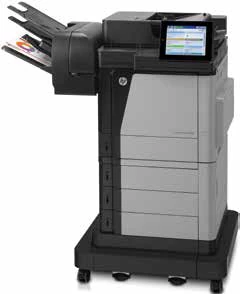
The HP Color LaserJet Enterprise Flow MFP M680z combines color printing, copying, fax and document capture with a large supplied paper package. The exact CZ250A configuration also includes a three-bin stapling mailbox, making finished-document handling part of the comparison.
That equipment can suit a shared office producing and filing multipage documents. It is a more substantial installation than a small color printer beside a desk. Decide whether the paper sources, capture tools and finishing will be used often enough to justify their space and maintenance.
Paper capacity follows the stock loaded
The z package's ordinary input total is 3,100 sheets across the bypass, three smaller cassettes and high-capacity input. The supplied equipment differs from lower family configurations that need additional feeders to reach a similar total.
Do not treat that headline as the capacity for every paper size. For Legal work, the reviewed ranges establish the bypass and three 500-sheet sources, without extending the same assumption to the larger cassette. Check the exact hardware and guides for the stock that dominates the workload.
Automatic two-sided output is included, but supported paper weight, size and software settings still matter. A page fitting a single-sided input does not establish every duplex combination. Check binding, orientation and a complete mixed document before committing to a long run.
Finishing should fit how people collect their work
The stapling mailbox can help organize output, but it also changes how staff use the station. Agree which bins serve which work and test the intended finishing selection from the actual driver. Include staple supplies and access when assessing the installation.
Consider whether separate jobs remain easy to identify during a busy period. A technically capable accessory is less helpful if default settings send work to an unexpected place or someone has to search several bins for each document.
Single-pass color capture is a separate reason to choose it
The 100-sheet feeder supports two-sided scanning in a single pass, and the z package adds EveryPage detection, a pull-out keyboard and enhanced capture features. These can assist repeated filing work while the color print engine handles corresponding paper documents.
Check the precise original size and condition before batching it. The Legal-sized glass provides a documented flatbed path for suitable longer originals, while fragile items may need different handling from ordinary feeder stock. Inspect the saved file for missing pages, edges, orientation and readable text.
OCR can help make documents searchable, but check important information in the actual result. Capturing a file and accurately interpreting every character are separate outcomes, especially with unclear originals or complex layouts.
Configure the network route and required connections
Ethernet folder delivery needs a reachable compatible destination, the correct path and suitable permissions. Set up a clear panel destination and check that staff can retrieve their files. Confirm the route again after changing a server, password or shared computer.
The memory-device USB route should not be confused with direct scanning into an arbitrary computer application over USB. Analog fax also needs a supported telephone setup. The device's function list does not complete those office arrangements on its own.
USB and Ethernet are supplied. Wireless and Direct require optional equipment, so inspect the actual accessories if either is essential. Historical service and operating-system names should be checked against current support rather than assumed to remain available.
Inspect an earlier tower as a complete working system
HP marks the exact US model discontinued. Inspect feeding, glass capture, representative color output, finishing, storage and the condition of supplies. Confirm the regional electrical plate and allow room for the keyboard, scanner lid, paper sources and service covers during use.
Choose the M680z when the complete color output and capture station fits the work. Compare a smaller model when occasional printing is the main need and the larger paper and finishing package would mostly stand idle.
Key details at a glance
| Color printing | Yes |
|---|---|
| Scanner | Yes |
| Copying | Yes |
| Fax | Yes |
| Flatbed scanner | Yes |
| Automatic document feeder | Yes |
| Automatic two-sided printing | Yes |
| Automatic two-sided scanning | Yes |
| Single-pass two-sided scanning | Yes |
| Color scanning | Yes |
| Instructed envelope handling | Yes |
| Recommended monthly minimum | 3000 pages |
| Recommended monthly maximum | 17000 pages |
| Maximum monthly duty | 120000 pages |
| Included ordinary-paper capacity | 3100 sheets |
| Document-feeder capacity | 100 sheets |
| Declared one-sided mono Letter rate | 45 pages/min |
| Declared one-sided color Letter rate | 45 pages/min |
| Unit-body width | 40.2 in |
| Unit-body depth | 26.8 in |
| Unit-body height | 46.5 in |
| Unit weight | 191.3 lb |
| Imaging engine | laser |
Use the exact model’s instructions for operating limits, supplied equipment and version differences.
Paper, software and setup details
Print-rate conditions
HP declares 45 Letter or 42 A4 pages per minute in monochrome and color. Recommended monthly output is 3,000–17,000 pages, distinct from the 120,000-page duty ceiling. Scanner rates are separate.
Paper handling
The supplied z package totals 3,100 ordinary sheets and includes the three-bin stapling mailbox. Reviewed Legal capacity is 1,600 sheets through the bypass and three 500-sheet sources; unconfirmed Legal capacity in the larger cassette is not counted. A4 aggregate capacity and paper-specific duplex limits remain unconfirmed.
Scanning arrangement
The 100-sheet feeder supports single-pass two-sided color capture with EveryPage. Its exact size-to-method range is unconfirmed here. The glass supports ordinary Letter, Legal and A4. Ethernet folder delivery needs a reachable compatible share and valid access; USB memory scanning is a different route.
Computer and mobile connections
USB and Gigabit Ethernet are supplied. Analog fax needs its supported telephone setup. The explicit model matrix and footnotes identify Wi-Fi, Direct and NFC equipment as optional despite contradictory generic family wording.
Supplies and declared yields
Original references include 652A/653X black and 653A color cartridges. Transfer, fuser, waste and staple supplies are equipment-specific. Check actual condition and regional compatibility; no running-cost or remaining-life estimate is implied.
Software and support
The original sheet lists 2 GB DDR2 memory and an encrypted disk. A security-feature list does not establish the exact private-job procedure here. Confirm current driver, folder and service compatibility before depending on a workflow.
Electrical edition and setup
Earlier CZ250A, marked discontinued by HP US. Full body: 40.2 × 26.8 × 46.5 inches, 191.3 lb. Allow keyboard, tray, lid, output and service access. Regional voltage editions differ; check the actual plate.
Sources for this assessment
Find a printer for your routine.
Match color output, scanning, connections and paper handling, then compare the exact models.