
Your needs, this model
Does it fit your priorities?
Can it automatically duplex color Legal reports over Ethernet with 600 sheets?
Yes, under the documented ordinary-media conditions and compatible software.
Explore this need in the finder →Does the base dn include 3,100-sheet capacity?
No. That maximum needs optional paper handling.
Explore this need in the finder →Can its touchscreen scan paper originals?
No. The exact model is print-only.
Explore this need in the finder →The dn version adds the automatic report routine
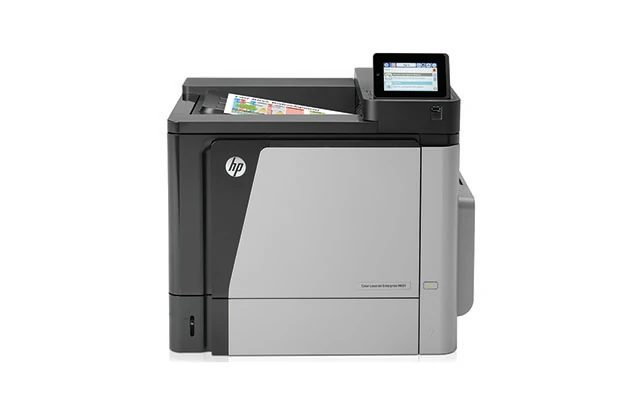
The HP Color LaserJet Enterprise M651dn is an earlier color printer with automatic two-sided output. That is the useful difference from the M651n when reports routinely need both sides without someone turning and refeeding the paper.
The original family includes a much larger xh package as well. Check the exact configuration rather than assuming that every tray, storage feature or connection shown in a family image is part of the dn.
Start with the supplied cassette and multipurpose tray
The base setup includes a 500-sheet cassette and a 100-sheet multipurpose tray. That is a useful ordinary-paper supply, while optional feeders change both capacity and the practical installation. Verify the accessories included in an offer and how consistently they feed.
Different sources can keep suitable office papers ready. Decide which sizes and types people use repeatedly, then agree the tray and software settings. Reducing stock changes may matter more than maximizing a single headline total.
Letter, Legal and A4 are documented for ordinary printing and automatic duplex on the equipped dn. Set the correct binding and inspect a short complete report, including any mixed orientations or covers, before a large batch.
Specialty media have their own instructions. An envelope that fits a multipurpose feed should not be treated as ordinary duplex paper. Check the actual material and use a small trial quantity before planning repeated stationery work.
Wired connections define the base placement
USB and Ethernet are supplied. Wireless and older Direct or NFC arrangements need the appropriate optional hardware and supported setup. Confirm an installed accessory if avoiding a network cable is an essential requirement.
For a shared queue, verify the compatible driver on the computers that will send the work. Include representative text, charts and layout, and check reconnection after a restart. A printer being discoverable does not independently establish correct paper and document settings.
The memory-device port is separate from computer USB and may be controlled by an administrator. Confirm the supported file and enablement for walk-up work rather than assuming every desktop function applies to that route.
Keep output and paper capture separate
The touchscreen controls printer functions, but this exact model cannot scan, copy or fax a paper original. An office that receives signed documents still needs a separate capture arrangement or a multifunction alternative.
Likewise, the xh model’s included hard drive is not a standard dn component. Check the installed configuration and actual software if a particular held-job or wider authentication process is central to the office. A general security feature list is only a starting point for that workflow check.
Read speed alongside the monthly routine
The declared US Letter rate is up to 45 pages per minute for monochrome and color. It is a manufacturer figure rather than our measured completion time. Short jobs, waking and complex pages affect the practical experience.
The recommended monthly range is intended for recurring workload planning; the larger duty ceiling is a different limit. Include peak batches, refills and collecting output in your assessment. Neither declaration predicts the remaining service life of a specific older machine.
Inspect supplies and access before choosing
Black and the three colors have separate replacement references, while toner collection and other service parts are additional checks. Declared yields cannot reveal remaining installed toner or provide current running cost. Inspect representative color output and feeding.
Confirm the exact model, electrical plate and regional supplies, then leave space to load trays, open covers and reach cables. Choose the M651dn for compatible wired color reports when the supplied capacity and automatic paper routine fit; compare another configuration when included wireless, scanning or a different storage workflow is essential.
Key details at a glance
| Color printing | Yes |
|---|---|
| Scanner | No |
| Copying | No |
| Fax | No |
| Flatbed scanner | No |
| Automatic document feeder | No |
| Automatic two-sided printing | Yes |
| Automatic two-sided scanning | No |
| Single-pass two-sided scanning | No |
| Color scanning | No |
| Instructed envelope handling | Yes |
| Recommended monthly minimum | 2000 pages |
| Recommended monthly maximum | 17000 pages |
| Maximum monthly duty | 120000 pages |
| Included ordinary-paper capacity | 600 sheets |
| Declared one-sided mono Letter rate | 45 pages/min |
| Declared one-sided color Letter rate | 45 pages/min |
| Unit-body width | 21.65 in |
| Unit-body depth | 20.47 in |
| Unit-body height | 17.91 in |
| Unit weight | 86.2 lb |
| Imaging engine | laser |
Use the exact model’s instructions for operating limits, supplied equipment and version differences.
Paper, software and setup details
Print-rate conditions
HP declares 45 Letter pages per minute in monochrome and color; 42 A4 uses a different paper basis. Recommended monthly output is 2,000–17,000 pages, distinct from 120,000 maximum duty.
Paper handling
Supplied input is 100 + 500 ordinary sheets for Letter, Legal and A4. The dn includes automatic duplex for documented suitable media. Extra feeders and the xh expanded package are separate. Envelopes use their instructed Tray 1 routine.
Scanning arrangement
Print-only equipment, without a scanner, copying glass, document feeder or fax.
Computer and mobile connections
USB and Gigabit Ethernet are supplied. Wireless, legacy Wireless Direct and NFC require optional equipment. A host socket may require administrator enablement and is separate from computer USB. Check compatible current drivers.
Supplies and declared yields
Match exact regional 652A/654X black and 654A color references, plus collection, transfer and fuser parts. Full-cartridge yield does not establish remaining toner or current cost.
Software and support
The touchscreen controls a print-only machine. The xh hard disk is not included on the dn. Exact private-job operating conditions are unconfirmed here.
Electrical edition and setup
Earlier US configuration. Original body is approximately 21.65 × 20.47 × 17.91 inches and 86.2 lb. Allow tray, cover and cable access. Check the actual regional option and electrical plate; voltage editions are not dual voltage.
Sources for this assessment
Find a printer for your routine.
Match color output, scanning, connections and paper handling, then compare the exact models.