
Your needs, this model
Does it fit your priorities?
Can I print Legal color pages on both sides and deliver single-pass two-sided Legal color scans to a computer folder over Ethernet, with 300 ordinary sheets loaded?
Qualifies for the documented US configuration when the administrator has enabled and tested the shared-folder destination. The 50-page dual-head feeder handles Legal originals; use a reachable computer share with valid permissions and credentials. Letter/A4 glass limits do not restrict this feeder route. Included inputs total 300 ordinary 75-g/m² sheets, and Legal automatic print duplex is positively documented.
Explore this need in the finder →Can I scan a complete Legal-size original on the glass through the wired network?
Fails. The glass is 8.5 × 11.7 inches. Full Legal capture belongs in the feeder; a configured network destination does not enlarge the glass.
Explore this need in the finder →Can the included configuration connect directly to my phone through Wi-Fi Direct?
Fails for the included hardware. Wi-Fi Direct depends on the optional Jetdirect wireless accessory. AirPrint or Mopria over an existing office network is a different arrangement.
Explore this need in the finder →A wired office MFP with separate print and scan duplex hardware
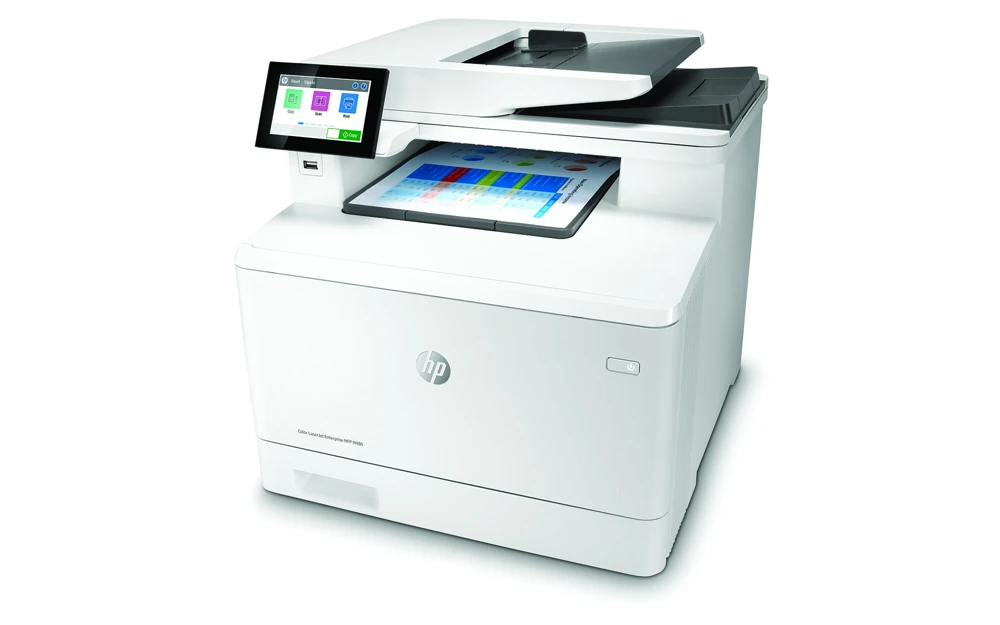
The HP Color LaserJet Enterprise MFP M480f combines color printing, copying, scanning and fax in a configuration intended for a managed office. The included arrangement has automatic print duplex, a 50-page dual-head document feeder, a 50-sheet multipurpose tray and a 250-sheet cassette. Its 4.3-inch touchscreen provides local access to copying and configured digital destinations.
This review covers the exact US 3QA55A#BGJ configuration and its documented 100–127-V, 60-Hz supply. The separate 200–240-V, 50-Hz edition is not a voltage setting to change. HP also specifies Class A emissions for a commercial environment. The surviving exact US product reference establishes the configuration, not a promise of current stock or price.
Recommended printed volume is 900–4,800 pages per month, distinct from the 55,000-page maximum duty figure. Declared one-sided black and color speed is up to 29 ppm for Letter or 27 ppm for A4. The North American sheet separately rates two-sided output at 25 images per minute for Letter and 24 for A4; those are image counts rather than the same number of completed two-sided sheets.
Start with USB or Gigabit Ethernet, not an assumed wireless radio
Included computer interfaces are Hi-Speed USB 2.0 and 10/100/1000 Ethernet. The walk-up USB host port serves different purposes, including flash-drive jobs, and requires administrator enablement. HP lists the computer USB cable as a separate purchase.
Wi-Fi, Wi-Fi Direct, Bluetooth Low Energy and NFC depend on an optional supported Jetdirect accessory. A menu or compatibility reference to those features does not put the accessory in the box. The base finder plans therefore use USB or wired Ethernet.
AirPrint is documented for an Apple device on the same network subnet as the printer. A phone can use the office wireless network while the M480f remains connected by Ethernet. Mopria certification is also documented. Those mobile plans do not automatically inherit the paper selection, duplex, PIN or capture capabilities of a full desktop driver. Use a compatible exact-model driver when those controls are essential.
The 300-sheet reserve needs correct tray and media settings
The two included inputs total 300 sheets of ordinary 75-g/m², 20-lb paper. The optional 550-sheet lower cassette raises a different, upgraded configuration to 850; neither it nor the 150-sheet output bin is included in the base reserve.
HP's exact supported-paper table positively lists Letter, Legal and A4 in both included trays and in the automatic duplexer. Suitable automatic-duplex stock is 60–163 g/m². Larger A3 and 11 × 17-inch Tabloid sheets are outside this arrangement. Transparencies, labels, envelopes and opaque film are excluded from two-sided printing in the paper compatibility instructions.
For Legal, release the front cassette latch and extend the tray. It projects approximately two inches, or 51 mm, from the printer's front and does not close flush. Keep the stack flat, below the fill indicator and between properly adjusted guides. Select the actual size and type in the driver and accept or correct the panel's tray setting.
One-sided preprinted stock loads face up with the top toward the printer; automatic two-sided stock loads face down with the top away. Alternative Letterhead Mode deliberately uses the duplex orientation for both job types, so check whether an administrator enabled it. Envelopes should use the supported Tray 1 route, face up with the short postage end first, with the correct envelope size/type and two-sided printing cleared.
Legal scanning belongs in the single-pass feeder
The glass is 8.5 × 11.7 inches, suitable for Letter or A4 originals rather than a complete Legal page. The 50-page feeder supports originals up to 8.5 × 14 inches. Its two scanning heads capture both sides in one pass for copying and scanning, including color; this is separately established from the printer's automatic duplex unit.
For delivery to a computer, the verified finder routes use configured network destinations. A shared-folder setup needs an active network, administrator access, a reachable folder path and appropriate credentials and permissions. Use the Embedded Web Server to enable the feature, configure a Quick Set where useful and verify access. The computer hosting the folder must remain available.
Email delivery instead requires the correct SMTP server, port, authentication and applicable security settings. It sends an attachment to an address; it is not a USB pull scan. For either destination, place loose originals face up in the feeder or a suitable original face down on the glass, select the destination and set Original Sides, file type and resolution before sending. Computer capture over the USB cable remains unconfirmed in these plans.
Choose a private job deliberately and check supply policy
The exact model includes 16-GB eMMC storage and private printing. With a compatible driver, choose Personal Job, enable the PIN option and submit the document. At the touchscreen, open Print from Job Storage, select the folder and job, enter its PIN and release it. Ordinary printing does not become PIN-protected merely because the printer supports the feature. Generic flash-drive wording in the job-storage chapter should prompt checking the installed setup, rather than assuming a separate disk or licensed pull-print service is included.
US replacements are the 414A W2020A black cartridge, rated at approximately 2,400 pages, and W2021A cyan, W2022A yellow and W2023A magenta, approximately 2,100 each. The corresponding X versions are rated at 7,500 black or 6,000 per color. HP uses continuous-printing ISO/IEC 19798 declarations. Dynamic security checks for a new or reused HP chip; administrator Cartridge Policy and permanent Supply Protection are separate controls. These are not an invented lifetime HP+ requirement.
The newer guide lists a closed body of 16.35 × 18.59 × 15.74 inches and 51.37 lb with cartridges. Its open-access dimensions differ from the North American brochure, so check actual working clearance, including the scanner lid, extended cassette, cartridge drawer and cables.
Key details at a glance
| Color printing | Yes |
|---|---|
| Scanner | Yes |
| Copying | Yes |
| Fax | Yes |
| Flatbed scanner | Yes |
| Automatic document feeder | Yes |
| Automatic two-sided printing | Yes |
| Automatic two-sided scanning | Yes |
| Single-pass two-sided scanning | Yes |
| Color scanning | Yes |
| Instructed envelope handling | Yes |
| Apple AirPrint | Yes |
| Mopria printing | Yes |
| Supported PIN-release printing | Yes |
| Recommended monthly minimum | 900 pages |
| Recommended monthly maximum | 4800 pages |
| Maximum monthly duty | 55000 pages |
| Included ordinary-paper capacity | 300 sheets |
| Document-feeder capacity | 50 sheets |
| Declared one-sided mono Letter rate | 29 pages/min |
| Declared one-sided color Letter rate | 29 pages/min |
| Unit-body width | 16.35 in |
| Unit-body depth | 18.59 in |
| Unit-body height | 15.74 in |
| Unit weight | 51.37 lb |
| Imaging engine | laser |
Use the exact model’s instructions for operating limits, supplied equipment and version differences.
Paper, software and setup details
Print-rate conditions
One-sided black/color output is up to 29 ppm for Letter or 27 ppm for A4. The North American sheet separately rates two-sided output at 25 ipm for Letter or 24 ipm for A4; image counts are not completed two-sided sheets. Recommended print volume is 900–4,800 monthly pages, distinct from 55,000 maximum duty.
Paper handling
Included inputs are 50 plus 250 sheets, both rated at 75 g/m², 20 lb, for a real 300-sheet reserve. Optional 550-sheet Tray 3 and 150-sheet output are excluded. The exact supported-paper table explicitly confirms Letter, Legal and A4 in Trays 1/2 and automatic duplex. Use supported 60–163-g/m² duplex media. Legal requires extending the cassette front by approximately 2 inches/51 mm. Adjust guides, flatten corners, respect fill marks and match actual driver/panel size and type. Normal one-sided preprinted stock is face up/top toward printer; automatic duplex is face down/top away. Alternative Letterhead Mode uses duplex orientation for both. Use supported Tray 1 for envelopes, face up/short postage end first and one-sided. The generic manual also shows envelope orientation for Tray 2, but the exact size-compatibility table lists envelopes only in Tray 1; the narrower confirmed route controls.
Scanning arrangement
The 50-page feeder has dual scanning heads for single-pass two-sided color copying and scanning. It supports originals up to Legal, while the 8.5 × 11.7-inch glass supports Letter/A4 rather than full Legal. Network-folder and SMTP-email procedures explicitly allow glass or feeder and an Original Sides setting. Folder delivery needs an enabled destination, reachable computer folder, permissions and credentials; email needs configured SMTP and mailbox access. Direct computer capture over USB remains unconfirmed. A USB flash-drive destination is different from the computer USB connection.
Computer and mobile connections
Included computer connections are Hi-Speed USB 2.0 and Gigabit Ethernet; the computer USB cable is purchased separately. Walk-up host USB has separate use and administrator enablement. Wi-Fi, Wi-Fi Direct, BLE and NFC need the optional Jetdirect 3100w accessory and are not included. AirPrint uses the same subnet as the Apple device, which can connect through the office wireless network while the printer uses Ethernet. Mopria is documented. Mobile plans do not borrow desktop duplex, PIN, size, capacity or capture capabilities.
Supplies and declared yields
US 414A replacements are W2020A black at approximately 2,400 pages and W2021A cyan, W2022A yellow, W2023A magenta at approximately 2,100 each. Corresponding X cartridges rate 7,500 black or 6,000 per color. The original declares continuous-printing ISO/IEC 19798 yields, not remaining toner or tested results. Dynamic security requires a new or reused HP chip. Administrator Cartridge Policy and permanent Supply Protection are separate controls; disabling protection does not unlock cartridges already protected. No mandatory lifetime HP+ policy is invented.
Software and support
Use a compatible exact-model print driver and actual tray settings. Private printing is explicitly included together with 16-GB eMMC. Select Personal Job, assign a PIN, then use Print from Job Storage at the panel to enter the PIN and release the named job. Generic USB-flash-drive wording in the job-storage procedure is preserved as a setup verification note, not converted into an unsupported separate-disk requirement. Licensed HP Secure Print and optional card readers are different services. Network scanning requires administrator configuration and the actual SMTP or shared-folder delivery route.
Electrical edition and setup
The surviving exact US 3QA55A#BGJ reference and 100–127-V, 60-Hz configuration establish US scope, without a current stock promise or an exact discontinued notice. The separate 200–240-V, 50-Hz model is not dual voltage. HP specifies a Class A commercial environment. Newer guide body dimensions are 16.35 × 18.59 × 15.74 inches and 51.37 lb with cartridges, excluding optional lower tray. The North American brochure rounds body values and gives a different fully-open depth; check actual working clearance for the scanner lid, front cassette/drawer and cables.
Sources for this assessment
Find a printer for your routine.
Match color output, scanning, connections and paper handling, then compare the exact models.