
Your needs, this model
Does it fit your priorities?
Can my Ethernet office scan one-sided Legal color originals into a configured computer folder and keep 150 ordinary Legal sheets loaded for printing?
Qualifies with earlier models enabled and a configured reachable shared destination. The 35-sheet color feeder accepts Legal originals, and the print input holds 150 ordinary 75-g/m² sheets. Keep the destination computer available and select its saved network folder at the panel; this is not a Legal flatbed or automatic two-sided scanner.
Explore this need in the finder →Can a USB-connected computer automatically print Letter on both sides without reloading the output?
Fails. This model provides driver-assisted manual duplex, requiring the user to return the printed stack. Windows and old Mac instructions differ, so follow the applicable driver prompts; neither route is automatic duplex.
Explore this need in the finder →Can it scan a two-sided Letter stack automatically in one pass over office Wi-Fi?
Fails. Infrastructure Wi-Fi does not change the 35-sheet feeder into a duplex scanner. The exact source specifies no duplex ADF scanning, so two-sided records require attended handling.
Explore this need in the finder →Color office work with manual two-sided handling
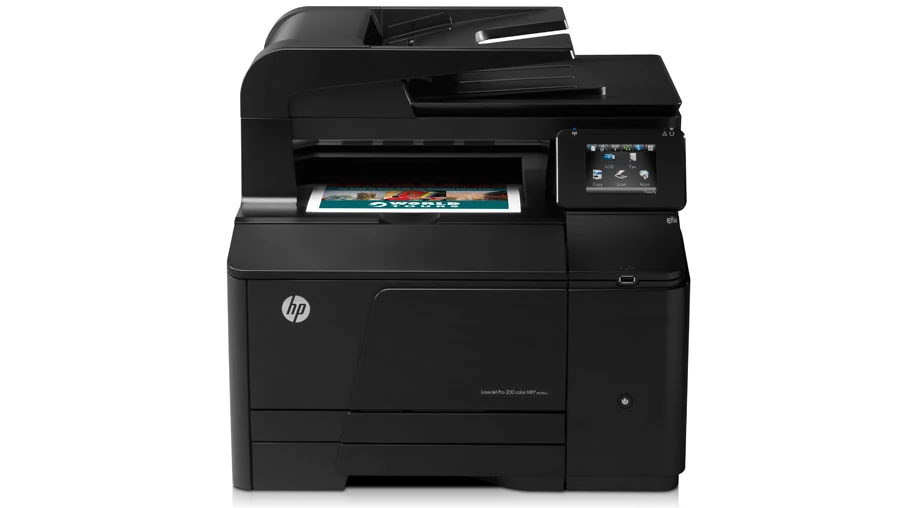
The HP LaserJet Pro 200 color MFP M276nw combines color printing, copying, scanning and analog fax with a 35-sheet original feeder. Its useful role is a small shared office producing occasional color handouts and digitizing one-sided documents. It does not automatically turn printed sheets or read both sides of an original.
This review covers the discontinued US CF145A#BGJ configuration, documented for 110–127 V at 60 Hz. European 220–240-V versions are separate electrical configurations. The exact US reference explicitly marks this model discontinued, so assess any surviving unit's condition, supplies and compatible software before treating its historical specification as a buying promise.
HP rates black and color printing at up to 14 ppm for Letter; the original regional family sheet also specifies 14 ppm for A4. Recommended monthly printing is 250–1,500 pages. The 30,000-page maximum duty figure is not the suggested regular workload. Those are manufacturer declarations, not measurements from this review.
Choose the actual computer or network route
The included connections are computer Hi-Speed USB 2.0, 10/100 Ethernet and 802.11b/g/n infrastructure Wi-Fi. The separate front host USB port prints supported files from a flash drive and saves scans to one; it is not the computer connection. The original US box list includes a USB cable, although a used printer's contents require checking.
The documented full computer installation includes HP Scan and Windows TWAIN/WIA scan drivers, with USB or a network port specified for the software arrangement. In HP Scan, select a shortcut and its settings before scanning. The Mac procedure selects the printer, scans pages, then saves the collected images to a chosen computer folder. A print-only driver does not establish that the complete scanning package is installed, and historical OS lists do not guarantee support on a present computer.
For panel delivery to a computer, configure a reachable shared network folder, keep its host available and choose Scan to Network Folder on the touchscreen. Select the saved destination, check settings and start the scan. The exact procedure accepts either the glass or document feeder. Scan to Email likewise needs network connectivity and a configured working mail destination. Neither route becomes local USB scanning by plugging in a cable.
Separate Legal feeder pages from the smaller glass
Color scanning is independently documented. The 35-sheet feeder accepts originals up to 8.5 × 14 inches, while the flatbed is 216 × 297 mm for Letter or A4. Use the feeder for Legal originals. A broad US marketing tile describing a Legal flatbed conflicts with HP's detailed original scanner table; this review retains the smaller, specifically documented glass limit.
The feeder scans one side automatically. A stack of two-sided records needs an attended process to capture the other sides and arrange the files. The manual's two-sided copying instructions similarly require handling pages and output by hand. Neither a duplex copy heading nor a color print specification creates automatic two-sided scanning.
For a scan without a computer destination, the panel can save PDF or JPEG to a front flash drive, creating an HP folder. That removable-file workflow is useful but distinct from live delivery into computer scanning software or a configured network folder.
A single 150-sheet input sets the printing rhythm
The ordinary paper reserve is 150 sheets at 75 g/m², 20 lb. Letter, Legal and A4 are supported. The 35-sheet original feeder and 125-sheet output bin do not add printing input capacity, and no second paper cassette is included. This is not an A3 or 11 × 17-inch Tabloid engine.
Pull out the input, adjust length and width guides, load ordinary stock with the printable face up and top toward the back, and keep the stack beneath the limit tabs. For Legal, release the extension tab and pull the tray's front outward. It projects about two inches from the front when extended, affecting placement on a shallow desk.
Envelopes use the same input, up to ten of supported weight, printable side up with the stamp end toward the back. Set their actual size and type in the driver. Letter or A4 label sheets have a separate up-to-50-sheet declaration. Do not apply ordinary-paper capacity to thicker special media.
Follow the operating system's manual duplex sequence
Automatic print duplex is absent. The Windows procedure selects Print on Both Sides Manually, prints the first pass, then returns the output in the same orientation with its printed face down before pressing OK at the printer.
The old Mac procedure instead selects Manual Duplex and binding, follows its computer prompts, removes blank stock, and returns the printed stack face up with its bottom edge feeding first. These published sequences differ. Follow the applicable installed driver and its prompts rather than treating one reloading direction as universal.
AirPrint works with the Apple device and printer on the same local network; later exact HP technical fields also list Mopria. Mobile jobs have their own plan without inherited desktop size, capacity, duplex or PIN promises. The legacy HP Wireless Direct feature is kept distinct from Wi-Fi Direct. Private Receive refers to incoming faxes and does not establish PIN-held printing.
Check four supplies and access around the body
US replacements are 131A CF210A black at approximately 1,600 pages, CF211A cyan, CF212A yellow and CF213A magenta at approximately 1,800 pages each, or 131X CF210X black at approximately 2,400. HP's model-specific 2014 report confirms the standard cartridges' continuous-printing ISO/IEC 19798 basis; these are declared yields, not remaining toner or independent tests. The supplied introductory set has a separate approximately 700-page black and color-composite declaration.
The closed body measures 17.7 × 18.7 × 16.3 inches and weighs 52 lb, without a stated cartridge-weight basis. Allow additional space for the extended Legal input, open scanner lid, original support, cables and maintenance. The combination makes sense when modest paper capacity and attended two-sided work suit the office.
Key details at a glance
| Color printing | Yes |
|---|---|
| Scanner | Yes |
| Copying | Yes |
| Fax | Yes |
| Flatbed scanner | Yes |
| Automatic document feeder | Yes |
| Automatic two-sided printing | No |
| Automatic two-sided scanning | No |
| Single-pass two-sided scanning | No |
| Color scanning | Yes |
| Instructed envelope handling | Yes |
| Apple AirPrint | Yes |
| Mopria printing | Yes |
| Recommended monthly minimum | 250 pages |
| Recommended monthly maximum | 1500 pages |
| Maximum monthly duty | 30000 pages |
| Included ordinary-paper capacity | 150 sheets |
| Document-feeder capacity | 35 sheets |
| Declared one-sided mono Letter rate | 14 pages/min |
| Declared one-sided color Letter rate | 14 pages/min |
| Unit-body width | 17.7 in |
| Unit-body depth | 18.7 in |
| Unit-body height | 16.3 in |
| Unit weight | 52 lb |
| Imaging engine | laser |
Use the exact model’s instructions for operating limits, supplied equipment and version differences.
Paper, software and setup details
Print-rate conditions
Manufacturer rates black and color Letter printing at up to 14 ppm; the original regional family table separately rates A4 at 14 ppm. Recommended monthly printing is 250–1,500 pages, distinct from the 30,000-page maximum duty figure. These are published declarations, not hands-on measurements.
Paper handling
One included input holds 150 ordinary 75-g/m², 20-lb sheets for Letter, Legal or A4. The 35-sheet original feeder and 125-sheet output are not additional print input. Legal extends the tray approximately 51 mm, 2 inches, from the FRONT. Ordinary stock loads printable face up/top back, guides adjusted and stack below limit tabs. Up to ten supported envelopes load printable face up/stamp end back; label sheets have a separate up-to-50 Letter/A4 declaration. Match driver size/type and special-media weight. Print duplex is manual: the Windows first-pass output returns in the same orientation, printed face down, then press OK. The old Mac sequence instead follows Manual Duplex/binding prompts, removes blank stock and returns output face up/bottom first; do not universalize either OS sequence.
Scanning arrangement
The 35-sheet feeder is simplex, with maximum originals 216 × 356 mm for Letter, Legal or A4. Flatbed maximum is 216 × 297 mm for Letter/A4, not Legal. An imprecise US feature tile says Legal flatbed; the detailed HP-authored scanner table controls the glass limit. Color scanning is independently established. Full HP Scan/TWAIN/WIA software is documented with USB or network system requirements; exact guide supplies actual HP Scan and file-saving steps. Panel network-folder/email procedures accept glass or feeder and explicitly require network connectivity. Configure a reachable shared destination and keep its host available; email requires a configured working mail destination. Front USB scan saves PDF/JPEG to a flash drive and is distinct from computer capture. Manual two-sided copying is not automatic duplex scanning.
Computer and mobile connections
Included computer USB 2.0, Ethernet 10/100 and infrastructure Wi-Fi 802.11b/g/n are separate from front flash-drive host USB. Original US box list includes a USB cable; surviving-unit contents need checking. AirPrint uses the same local network as the Apple device; later exact maker fields also list Mopria. A mobile device can use the access point while the printer uses Ethernet. Legacy HP secure Wireless Direct is not relabeled Wi-Fi Direct and has a separate flexible-connection print plan without inherited desktop capabilities.
Supplies and declared yields
US 131A CF210A black is approximately 1,600 pages; CF211A cyan, CF212A yellow and CF213A magenta approximately 1,800 each; 131X CF210X black approximately 2,400. HP model-specific July 25, 2014 ISO/IEC 19798 continuous-printing report confirms standard black and CMY composite figures. The 2012 US brochure body agrees but its older yield footnote differs; the later model-specific report and exact cartridge declarations control. Supplied introductory cartridges separately declare approximately 700 black and 700 color-composite pages. No current price, remaining toner, tested yield or lifetime HP+ condition is invented.
Software and support
A complete compatible computer installation, not a print-only driver, supplies HP Scan and documented TWAIN/WIA capture. Windows uses a selected scanning shortcut; Mac chooses the actual scanner and saves collected images to the computer. Historical Windows/Mac versions are not a promise for current operating systems. Shared-folder delivery requires a configured accessible network destination; panel email likewise requires a working configured network mail arrangement. Private Receive is an incoming-fax function, and WPS PIN concerns network setup; neither establishes PIN-held print release.
Electrical edition and setup
Exact US model is CF145A#BGJ, explicitly discontinued, with documented 110–127 V, 60 Hz configuration. Regional 220–240-V, 50-Hz sheets do not establish US mains. Closed dimensions are 17.7 W × 18.7 D × 16.3 H inches and weight 52 lb, with cartridge-weight basis unspecified. Maximum published depth is 21 inches, but actual lid, feeder support, front Legal extension, cable and service clearance still need checking. Analog fax requires its separate telephone-line arrangement. Historical web apps and software-install marketing are not present-service availability promises.
Sources for this assessment
- HP original M276 User Guide, CF144-90936 Edition 1 April 2012, preserved maker document
- HP exact US M276nw CF145A#BGJ discontinued product and technical record
- HP US M276nw CF145A data sheet, August 2012 R1, preserved original
- HP original EMEA M276 data sheet, 4AA4-2277EEE August 2012, indexed document transcription
- HP exact M276nw detailed scanner specifications
- HP M276 CF210A–CF213A ISO/IEC 19798 standard-cartridge yield report, July 25 2014
Find a printer for your routine.
Match color output, scanning, connections and paper handling, then compare the exact models.