
Your needs, this model
Does it fit your priorities?
Can my office Wi-Fi computer scan single-sided color Legal originals, copy and fax, while printing Legal automatically on both sides with 250 sheets ready?
Qualifies in the documented low-voltage US configuration with compatible full computer software, suitable stock and a separately configured analog fax line. Legal originals use the simplex ADF; Legal output uses the actual automatic duplexer. The flatbed is not Legal-size.
Explore this need in the finder →Will the feeder scan both sides of a Legal original automatically?
Fails. Exact maker specifications explicitly say no duplex ADF scanning. Automatic two-sided print or copy output does not give the original feeder two-sided capture.
Explore this need in the finder →Can I choose AirPrint and also rely on the computer-driver automatic duplex promise?
Fails the combined requirement in this reviewed evidence. AirPrint on the same subnet is supported, but the original Mac instructions warn that its duplex control may be unavailable through AirPrint. The separate compatible-driver duplex plan cannot supply that missing mobile-route evidence.
Explore this need in the finder →A color multifunction model that really includes fax
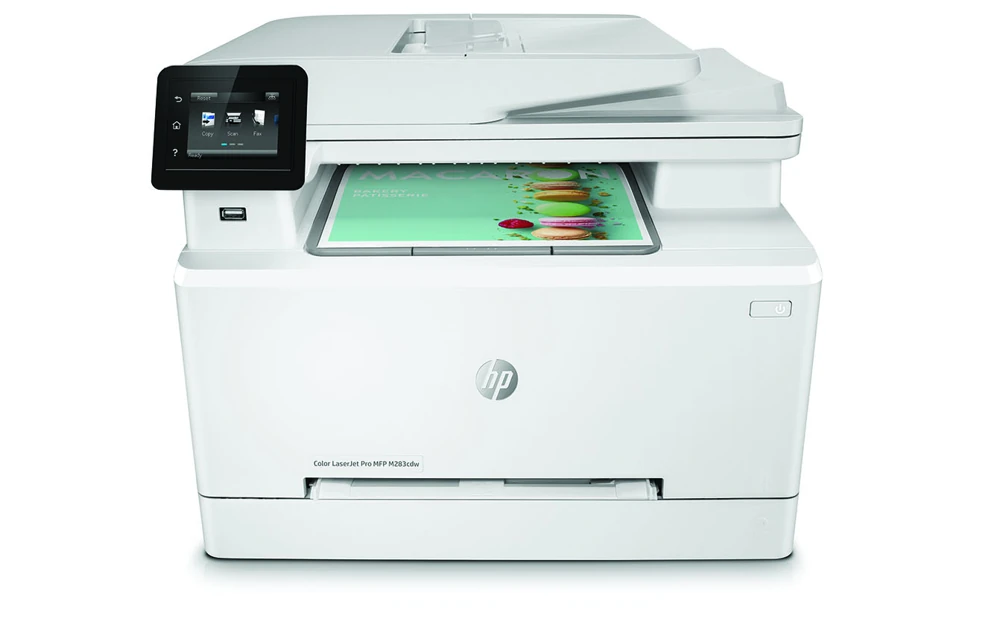
The HP Color LaserJet Pro MFP M283cdw combines color printing, copying, color scanning and analog fax. Its name does not spell out an f, but HP's exact 7KW73A configuration and original model table both confirm fax hardware. It suits an office that wants automatic duplex output, a 50-sheet original feeder and several ordinary computer connection choices.
The important compromise is the scanner: its feeder reads one side of an original at a time. Automatic two-sided printing and two-sided copy output do not create automatic two-sided capture. If a stack of double-sided contracts must be digitized without turning and reordering pages, choose a device with positively documented duplex scanning.
This is a documented US low-voltage reference configuration of 7KW73A, not a current-stock promise. HP lists separate 110–127-V and 220–240-V editions at 50/60 Hz and warns that they are not dual voltage. Check the actual option code and power plate rather than treating every M283cdw as electrically identical.
Use the 250-sheet tray as the ordinary reserve
The later original technical guide specifies a 250-sheet main Tray 2. Its Letter, Legal and A4 size marks support a 250-sheet selected-size reserve with ordinary 75-g/m² paper. The one-sheet priority slot is useful for a separate form or envelope, but is not another normal stack of paper. The output bin separately holds 100 sheets.
Remove and straighten the old stack before loading, avoid fanning it, set the guides to the actual paper and keep them lightly against the edges. For Legal, release the blue latch and extend the front of Tray 2. It projects about 2.2 inches farther forward, which matters on a shallow desk.
Preprinted portrait forms load face up with their top toward the back for one-sided Tray 2 work; for duplex output they load face down with the same top-edge direction. In the priority slot, one-sided forms face up and duplex forms face down, both top first. Match size and paper type in software rather than relying on the physical guides alone.
Print both sides through the compatible computer driver
The exact cdw column includes an automatic duplexer, and the original size table explicitly supports ordinary Letter, Legal and A4 duplex. In Windows, select Print on both sides under Finishing. The original Mac driver uses Layout and a Two-Sided binding choice.
HP warns that the driver's Mac duplex feature might be unavailable when using AirPrint. The recommendation consequently keeps a compatible computer driver separate from mobile protocol printing. A selected AirPrint-plus-duplex requirement is not satisfied by combining those two descriptions without evidence for the actual route.
Envelopes have their own routine: one suitable envelope through Tray 1 or up to five through Tray 2, face up with the short postage end entering first. Select the exact envelope size, Envelope paper type and appropriate manual-feed source. Do not carry the ordinary duplex setting over to envelopes or other restricted stock.
Give the original the right scanning route
The flatbed accommodates Letter and A4 originals, up to about 8.5 by 11.7 inches. Legal originals instead fit the feeder's 8.5-by-14-inch maximum. The 50-sheet ADF uses suitable ordinary originals; the exact maker specifications limit its stock to 60–90 g/m² and expressly say duplex ADF scanning is unavailable.
For a basic Windows computer capture, install the exact compatible full software, open HP Printer Assistant, choose Scan and then Scan a Document or Photo, adjust settings and scan to a file. The original Mac workflow uses HP Smart to scan the feeder or glass and save the pages. Verify the current software and its applicable account terms; historical instructions do not guarantee today's package or an account-free app.
Copies can produce two-sided output from separately captured original faces. The original glass routine prompts for the next original and finishes with Done. Read that as a document-handling procedure, not proof that the feeder can see both faces automatically.
Choose USB, the office network or direct mobile printing
The cdw includes rear computer USB, Ethernet and dual-band 2.4/5-GHz Wi-Fi. Its front flash-drive port is different from computer USB. Compatible computer print-and-scan software uses the chosen actual USB or network setup; a cable alone is not the complete scanning application.
AirPrint uses the same network subnet as the Apple device. Mopria and Wi-Fi Direct are also documented. Direct printing requires joining the printer's signal and may require returning the mobile device to the office network afterward. These mobile plans do not borrow desktop scanning, paper settings or automatic-duplex controls.
Panel scan-to-folder needs an actual configured reachable share, and scan-to-email needs configured SMTP information and authentication. Neither is ready just because Wi-Fi is connected. Analog fax separately needs the correct telephone lead, line arrangement, answer settings and header; an Ethernet cable does not replace a phone line or guarantee VoIP operation.
Budget for the exact supplies and working footprint
HP recommends 150–2,500 monthly pages. Its exact October 2019 cdw brochure separately declares a 45,000-page maximum duty, which is not a recommended working volume. The stated one-sided engine rating is up to 22 Letter ppm in black or color, separately 21 on A4.
US replacements are W2110A/X black and W2111A/X, W2112A/X and W2113A/X cyan, yellow and magenta. Declared ISO/IEC 19798 replacement averages are 1,350/3,150 black and 1,250/2,450 composite color pages. Original box text and footnotes disagree about 800 versus 1,350 introductory black pages; verify the actual pack. Dynamic security also matters when choosing chipped cartridges, and is not an HP+ lifetime subscription claim.
The closed body is about 16.5 by 16.6 by 13.2 inches and 41.2 lb with cartridges. The manual's fully open envelope reaches approximately 17.8 inches wide, 39.7 deep and 23.2 high. Leave that access for originals, trays, cables and cartridge service.
Key details at a glance
| Color printing | Yes |
|---|---|
| Scanner | Yes |
| Copying | Yes |
| Fax | Yes |
| Flatbed scanner | Yes |
| Automatic document feeder | Yes |
| Automatic two-sided printing | Yes |
| Automatic two-sided scanning | No |
| Single-pass two-sided scanning | No |
| Color scanning | Yes |
| Instructed envelope handling | Yes |
| Apple AirPrint | Yes |
| Mopria printing | Yes |
| Recommended monthly minimum | 150 pages |
| Recommended monthly maximum | 2500 pages |
| Maximum monthly duty | 45000 pages |
| Included ordinary-paper capacity | 250 sheets |
| Document-feeder capacity | 50 sheets |
| Declared one-sided mono Letter rate | 22 pages/min |
| Declared one-sided color Letter rate | 22 pages/min |
| Unit-body width | 16.5 in |
| Unit-body depth | 16.6 in |
| Unit-body height | 13.2 in |
| Unit weight | 41.2 lb |
| Imaging engine | laser |
Use the exact model’s instructions for operating limits, supplied equipment and version differences.
Paper, software and setup details
Print-rate conditions
Exact cdw original brochure gives up to 22 one-sided Letter ppm in black and color. Later exact-column technical guide separately confirms 21 A4 ppm. Recommended 150–2,500 monthly pages differs from the exact October 2019 cdw brochure maximum 45,000 Letter pages; the fdw 40,000 figure is not substituted. No measured speed or print rating inferred from scan ppm.
Paper handling
Exact later February 2020 cdw column confirms 250-sheet Tray 2; user guide states 250 at 75 g/m². Letter/Legal/A4 fit that tray and its automatic duplexer. One-sheet priority slot is not added to the normal reserve; output 100 is separate. Earlier cdw brochure 260-sheet statement is superseded by the actual later technical table and guide, with original bytes preserved. Legal tray front extends 57.5 mm/2.2 inches. Straighten stock, do not fan, avoid loading during use and lightly touch guides without bending. Tray 2 portrait forms load face up/top back for simplex or face down/top back for duplex; priority forms load face up simplex or face down duplex, top first. Exact size/type and driver binding are required. Envelopes use one in Tray 1 or up to five in Tray 2, face up and short postage end first, with actual envelope settings; no automatic envelope duplex.
Scanning arrangement
Exact cdw supports color scanning, copying, physical flatbed and 50-sheet single-sided ADF. Exact original brochure maximums are flatbed 8.5×11.7 inches (Letter/A4) and ADF 8.5×14 inches (Letter/Legal/A4), with exact maker ADF specifications 60–90 g/m² and duplex scanning explicitly No. Automatic two-sided copy output does not establish duplex ADF input. HP Scan through compatible Windows full software provides computer file capture; original Mac workflow uses HP Smart and saving the scan file. No direct mobile scanning route is borrowed into AirPrint/Mopria print plans. Configured network folder and SMTP email are separate optional workflows, not automatic consequences of a connected cable.
Computer and mobile connections
Exact cdw 7KW73A column includes rear computer USB 2.0, Ethernet, wireless LAN and Wi-Fi Direct; original brochure specifies dual-band 2.4/5-GHz Wi-Fi. Front host port is separate from computer USB. Actual compatible computer software is required for USB or network scan/print setup. AirPrint requires the same subnet; Mopria is positively documented. Original Direct section explicitly permits Android with Mopria plugin and joining printer signal; returning to office Internet may require reconnecting to the normal network. Direct mobile plans establish printing only. Compatible-driver automatic duplex is not borrowed into mobile plans because the Mac original explicitly warns it may be unavailable through AirPrint.
Supplies and declared yields
US exact cdw brochure identifies 206A/206X W2110A/X black, W2111A/X cyan, W2112A/X yellow and W2113A/X magenta. Replacement averages under ISO/IEC 19798 and continuous printing are 1,350/3,150 black and 1,250/2,450 composite color pages. Original box black yield around 800 conflicts with footnote/current exact US body around 1,350; introductory black is not promoted as a settled figure. Introductory composite color around 700 is separately declared; no installed remainder inferred. Original describes dynamic security and HP-chip requirements; no HP+ lifetime/account policy borrowed or present cartridge guarantee made.
Software and support
Windows Print/Properties/Finishing/Print on both sides and original Mac Layout/Two-Sided establish compatible-driver duplex. Original Mac scanning uses HP Smart and save-file workflow, Windows uses HP Printer Assistant/HP Scan. Verify current exact software and applicable account terms; historical app names do not promise every current feature or account-free operation. Original JetAdvantage Secure Print is optional and does not establish included local PIN release. WPS/Direct or SMTP-profile PIN is not a held-print PIN. Retired cloud names in an old list are not guaranteed current services.
Electrical edition and setup
The actual HP US exact M283cdw page identifies 7KW73A, and the original technical guide confirms the exact model code. This review covers the documented US 110–127-V, 50/60-Hz low-voltage configuration; separate 220–240-V editions are not dual voltage. No unverified #BGJ code is invented. Surviving exact US documentation supports current_reference without a stock promise; community claims are excluded from lifecycle decisions. The exact cdw/fdn/fdw dimension table gives a closed body of 16.5×16.6×13.2 inches and 41.2 lb with cartridges, with fully open dimensions of 17.8×39.7×23.2 inches. The brochure’s smaller maximum is not used as full service clearance. Fax requires a suitable analog telephone line, phone lead and configured answer/header settings; no Ethernet fax or universal VoIP promise.
Sources for this assessment
- HP original English M282-M285 User Guide, Edition 3 August 2019
- HP original English M282-M285 Technical Specification Guide, Edition 2 February 2020
- HP exact US M283cdw 7KW73A specifications, actual indexed maker technical body
- HP original exact M283cdw US brochure, October 2019, distributor-hosted original
Find a printer for your routine.
Match color output, scanning, connections and paper handling, then compare the exact models.