
Your needs, this model
Does it fit your priorities?
Can compatible desktop software use Wi-Fi for single-pass color scanning of two-sided Legal originals and ordinary Legal printing with 300 sheets loaded?
Qualifies with earlier references enabled and the documented US edition. Use compatible desktop print-and-scan software over infrastructure Wi-Fi and its two-sided ADF controls. Legal originals fit the feeder, while print stock uses the included 50- and 250-sheet inputs with the cassette extended.
Explore this need in the finder →Can the nw automatically print both sides of my A4 color job through Ethernet?
Fails. The exact nw column has no automatic print duplexer. Use compatible manual duplex with page return to Tray 1; the automatic dn/dw capability is not part of this configuration.
Explore this need in the finder →Can I scan a whole Legal original on the flatbed to a USB-connected computer?
Fails. The original explicit flatbed maximum is 8.5 × 11.7 inches. Legal requires the ADF; the shop page Legal-flatbed headline conflicts with the original and does not enlarge the glass.
Explore this need in the finder →The nw configuration favors scanning and wireless sharing
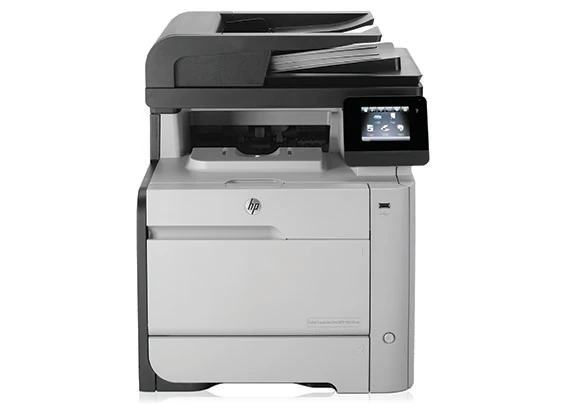
The HP Color LaserJet Pro MFP M476nw combines color printing, color scanning, copying and analog fax with Ethernet and Wi-Fi. Its distinctive convenience is the 50-sheet feeder with single-pass, dual-head document scanning. It can acquire both sides of suitable originals without a reversing pass, although the printer itself requires manual page return for two-sided output.
The exact US configuration is CF385A#BGJ, which HP marks discontinued. This review covers its documented 110–127-V, 60-Hz edition. The separately listed 220–240-V supply is not a selectable universal-voltage mode. Confirm the actual rating plate, installed software and required cables when considering an earlier unit.
HP recommends 1,000–2,500 printed pages per month. The 40,000-page maximum duty figure is a separate limit. The declared print rates are up to 21 black or color pages per minute for Letter and 20 for A4; these are manufacturer ratings rather than hands-on measurements.
Use the feeder for Legal originals and the glass for smaller items
The original model comparison positively includes electronic duplex scanning on M476nw. The exact specification also identifies single-pass duplex ADF scanning. This is separate from print duplex and does not add an automatic print duplexer.
The feeder accepts originals up to 8.5 by 14 inches, while the flatbed is 8.5 by 11.7 inches. Letter and A4 fit the glass; a full Legal page needs the feeder. The US shop page's Legal-size flatbed headline conflicts with HP's explicit original scan-size table and is not used here.
Place suitable feeder originals face up, top edge first, and adjust the guides. The exact support specification lists 60–90-g/m² ADF media. On the glass, follow the marked alignment indicators. HP advises loading Letter/A4 or smaller pages with their long edge along the left side for the illustrated desktop scanning routine.
Compatible computer scanning uses HP Scan or supported TWAIN/WIA software. The included software scope covers USB, network and wireless computer connections, but historical full-software support differs from print-only driver support. Confirm the actual scanner controls and two-sided ADF option on your intended computer. Independent color capture is documented at up to 300 × 300 dpi from the feeder and up to 1,200 × 1,200 dpi from the glass.
Configure network delivery before using the touchscreen shortcut
Scan to Network Folder requires a network connection and a shared destination. Configure its display name, network path and any required username and password through the setup wizard or embedded web server. Use Save and Test to verify access. An optional folder PIN restricts use of that destination; it is not a held-print release code.
Direct Scan to Email needs a configured outgoing profile, SMTP server and port, and the authentication or SSL/TLS settings required by the server. Test the profile before relying on it. The optional four-digit profile PIN likewise protects the sending profile. It does not prove secure PIN printing, which remains unconfirmed.
The specific original panel procedures for email and network folders load the glass. Those documented Letter/A4 routes are kept separate here from desktop feeder scanning; a general scanner specification does not silently extend every delivery routine. The front USB host port also supports scan files saved as PDF or JPG in an HPSCANS folder. That flash-drive port is distinct from the rear USB computer connection.
Distinguish ordinary Wi-Fi from legacy Wireless Direct
The included connections are USB 2.0, Fast Ethernet 10/100 and 802.11b/g/n Wi-Fi. AirPrint and Mopria are explicitly supported. For the documented local mobile arrangement, place the compatible device and printer on the same wireless network. This mobile plan does not inherit desktop scanning controls or a confirmed paper-size and input-capacity combination.
HP also positively lists legacy HP Wireless Direct for M476nw. A mobile device connects to the printer's own wireless network, with a compatible application or driver where necessary. That named legacy arrangement is kept distinct from Wi-Fi Direct in the finder. NFC touch-to-print belongs to M476dw and is not included on M476nw.
Old cloud-service names in the guide are not a promise that those services remain available. The historical ePrint setup requires network Internet access, enabled Web Services and account registration. Evaluate the actual local printing route you need instead of depending on an old cloud workflow.
Keep the 300-sheet printing reserve separate from originals
The included inputs are a genuine 50-sheet multipurpose tray and a 250-sheet cassette, totaling 300 ordinary print sheets. Letter, Legal and A4 are positively supported. An additional 250-sheet tray is optional and is not counted as standard. Neither the 50-sheet original feeder nor the 150-sheet output bin adds print input capacity.
For Legal paper in the cassette, hold the extension tab while pulling its front outward. HP says the loaded tray projects approximately 64 mm, or 2.5 inches, from the printer's front. Keep paper flat at all corners and below the limit tabs, then match the panel's paper size and type to the load.
Envelopes and labels use Tray 1 according to the original loading caution, even though a broad current media list also mentions envelopes for other trays. Up to ten envelopes are specified. Select the correct envelope size and type for a one-sided job. For manual Windows duplex, choose Print on both sides manually, return the first-pass stack to Tray 1 and continue when prompted.
Check supplies and the space around the body
Black replacements are CF380A, approximately 2,400 pages, or CF380X, approximately 4,400. The CF381A cyan, CF382A yellow and CF383A magenta cartridges are rated around 2,700 pages each. These are declared continuous-print ISO/IEC 19798 yields, with actual results varying; the original introductory set's roughly 1,200 pages is different.
The exact nw body is approximately 16.5 inches wide, 18.4 deep and 19.7 high, weighing 61.2 lb with toner cartridges. Allow more working space for open trays, the scanner lid, the front cartridge drawer, rear access and cables. Fax requires a separate suitable analog telephone arrangement; configure its date, time and header and run the original fax test before use.
Key details at a glance
| Color printing | Yes |
|---|---|
| Scanner | Yes |
| Copying | Yes |
| Fax | Yes |
| Flatbed scanner | Yes |
| Automatic document feeder | Yes |
| Automatic two-sided printing | No |
| Automatic two-sided scanning | Yes |
| Single-pass two-sided scanning | Yes |
| Color scanning | Yes |
| Instructed envelope handling | Yes |
| Apple AirPrint | Yes |
| Mopria printing | Yes |
| Recommended monthly minimum | 1000 pages |
| Recommended monthly maximum | 2500 pages |
| Maximum monthly duty | 40000 pages |
| Included ordinary-paper capacity | 300 sheets |
| Document-feeder capacity | 50 sheets |
| Declared one-sided mono Letter rate | 21 pages/min |
| Declared one-sided color Letter rate | 21 pages/min |
| Unit-body width | 16.5 in |
| Unit-body depth | 18.4 in |
| Unit-body height | 19.7 in |
| Unit weight | 61.2 lb |
| Imaging engine | laser |
Use the exact model’s instructions for operating limits, supplied equipment and version differences.
Paper, software and setup details
Print-rate conditions
Declared one-sided printing is up to 21 black/color ppm for Letter and 20 ppm for A4. Recommended volume is 1,000–2,500 pages per month, distinct from the 40,000-page maximum duty. Scan ppm/ipm and manual print duplex are separate; no measured throughput is claimed.
Paper handling
Included inputs are 50-sheet Tray 1 plus 250-sheet Tray 2, totaling 300 ordinary sheets. Basis weight for that total is not established here. Optional 250-sheet Tray 3 is excluded; the 50-sheet original feeder and 150-sheet output bin do not add print reserve. Letter, Legal and A4 are positively supported. For Legal stock, extend the cassette front by holding its extension tab; the loaded tray projects approximately 64 mm or 2.5 inches. Keep stock flat and below limit tabs, adjust guides and match actual panel/driver size and type. The original directs envelopes and labels to Tray 1; broader current tray-envelope listings are not adopted for cassette loading. Up to ten envelopes use a one-sided job. Manual Windows duplex requires Print on both sides manually, first-pass return to Tray 1 and panel continuation if prompted. No dn/dw automatic print duplexer is included.
Scanning arrangement
The M476nw column positively includes a 50-page electronic duplex ADF; exact support specifications and original HP brochure establish single-pass dual-head capture. ADF maximum is 8.5 × 14 inches, with Letter/Legal/A4 supported; glass is 8.5 × 11.7 inches for Letter/A4, not Legal. The shop Legal-size flatbed headline conflicts with the explicit original table and is not adopted. ADF media are 60–90 g/m² in the exact support specification. Load suitable originals face up/top first and adjust guides. Color is independently supported: ADF up to 300 × 300 dpi, glass up to 1,200 × 1,200 dpi. Panel SMTP and shared-folder procedures specifically load glass, so these plans retain only Letter/A4 glass capture rather than borrowing desktop ADF routes.
Computer and mobile connections
Included USB 2.0 computer, Fast Ethernet 10/100 and 802.11b/g/n Wi-Fi are explicit. The front USB host is a flash-drive route, not the rear computer connection. Exact US specifications and HP brochure positively include legacy HP Wireless Direct on nw; it is not labeled Wi-Fi Direct. NFC touch-to-print is dw-only despite an erroneous NFC token in the nw wireless row of the brochure; its exact series table and explicit footnotes control. AirPrint and Mopria local mobile use requires the compatible device and printer on the same wireless network, or the separately configured legacy direct arrangement.
Supplies and declared yields
HP 312A/312X black replacements are CF380A at about 2,400 pages or CF380X at about 4,400. CF381A cyan, CF382A yellow and CF383A magenta are about 2,700 pages each. Exact US declared yield is continuous printing under ISO/IEC 19798; actual yield varies. Original introductory cartridges were about 1,200 pages, not replacement yield or remaining toner. Front drawer replacement requires removing protection and sealing tape and avoiding the imaging drum. No mandatory lifetime HP+ policy, price or hands-on yield is invented.
Software and support
Compatible HP Scan and TWAIN/WIA software provide desktop capture; the exact full-software system requirements positively include USB, network and wireless connections. Check actual present-day driver and scanner support, especially two-sided feeder controls; historical print-only support is not full scanning support. Shared-folder delivery requires an accessible shared path and credentials/permissions, configured and tested through the wizard or EWS. Email delivery requires configured SMTP server, port, authentication and SSL/TLS when required, plus Save and Test. Destination/profile PINs, LDAP sign-on and administrator passwords do not establish secure held-print release, which remains unknown. Mobile plans do not inherit desktop scan, size or capacity guarantees.
Electrical edition and setup
Exact CF385A#BGJ is explicitly discontinued and requires earlier opt-in. This review covers 110–127 V at 60 Hz; the separate high-voltage edition is not dual voltage. Check the actual plate and required cables. Exact nw dimensions without extended trays/covers are 16.5 W × 18.4 D × 19.7 H inches and 61.2 lb with toner cartridges. The dn/dw 19.1-inch depth and 63.8-lb weight are not borrowed. Allow additional tray, scanner-lid, drawer, rear-door and cable access. Fax needs its separate analog telephone setup; digital services need the correct filters/settings. Configure date/time/header and run the fax test. Historical ePrint/cloud names are not present-day service guarantees.
Sources for this assessment
Find a printer for your routine.
Match color output, scanning, connections and paper handling, then compare the exact models.