
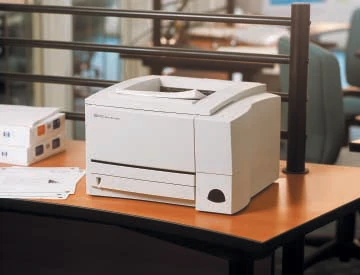
Your needs, this model
Does it fit your priorities?
Can a compatible USB computer print Legal documents automatically on both sides with 350 ordinary sheets?
Qualifies with earlier references enabled. The actual 2200d includes automatic duplex and both inputs support ordinary Legal paper; close the rear output and select Print on Both Sides in the compatible driver.
Explore this need in the finder →Does the included 2200d package connect directly to an Ethernet network?
Fails an included Ethernet requirement. Its JetDirect server is optional; the network-equipped dn is a separate configuration.
Explore this need in the finder →Can it scan and copy originals over the USB cable?
Fails scanning and copying. The documented 2200d is a monochrome print-only machine without a scanner, flatbed or document feeder.
Explore this need in the finder →An earlier USB printer with included automatic duplex
The HP LaserJet 2200d suits a prepared computer installation that needs ordinary monochrome documents, a 350-sheet input and automatic two-sided printing. The d configuration includes the duplex mechanism. Its important limit is connection hardware: USB and parallel are standard, while the JetDirect Ethernet server belongs to an optional upgrade for this package.
HP's current US product identity names C7058A and marks the printer discontinued. This review covers the documented US low-voltage configuration, without inventing a regional option code or promising current stock. The original guide distinguishes the 2200d from a plain 2200 with manual duplex, a dt with another tray and network-equipped dn or dtn packages. Those additions are not included here.
Prepare the actual USB host and driver
The normal arrangement uses the printer's USB computer interface, the correct cable and an actually compatible printer driver. The original guide does not establish a USB protocol version, so none is assigned. Its Windows USB instructions exclude Windows 3.1x, 95 and NT 4.0; period parallel support does not make those same systems USB-compatible.
Included optical Fast Infrared is a separate legacy arrangement. It needs compatible infrared hardware, a port driver and a printer driver, with the ports facing within one metre and a 15-degree angle. It is not Wi-Fi or Wi-Fi Direct. AirPrint and Mopria remain unconfirmed, and an optional JetDirect card cannot satisfy a requirement for included Ethernet.
The original PCL and PostScript language support likewise requires working computer software. Historic operating-system lists do not guarantee installation on a present computer. Check that installation before committing to this earlier machine, especially when automatic duplex depends on controls in the compatible driver.
Use both included inputs for ordinary paper
The normal front Tray 1 holds 100 ordinary sheets and the lower Tray 2 holds 250, giving 350 at the documented 20-lb/80-g/m² basis. The lower table names Letter, Legal and A4, and each lies within the front tray's supported range. No optional third tray contributes to the published capacity.
For ordinary one-sided letterhead, the guide puts the print face up and top toward the printer in Tray 1. In the lower tray it puts the face down and top toward the user. Set the guides to the actual size, keep the stack below its tabs, and lock the lower metal lift plate down before reinserting the tray. Match the driver's size, source and type to the paper loaded.
Supported envelopes use Tray 1, up to ten at a time. Open the rear output and fully extend its support, load face up with the stamp end first, and feed a short-edge flap first when present. Adjust the guides and envelope settings. This instructed one-sided route does not make envelopes suitable for the duplex mechanism.
Close the rear path before automatic two-sided work
The included duplexer positively supports ordinary Letter, Legal and A4 within its 60–105-g/m² range. Close the rear output, select Print on Both Sides in the compatible driver's Finishing controls and choose the intended binding. Straight Paper Path conflicts with this automatic route. Do not grab a sheet that partly exits while the mechanism turns it.
Labels, transparencies, envelopes and other unsupported media need their separate handling. The manual also has a distinct manual-duplex section; its loading instructions are not presented here as an automatic letterhead promise. The useful match is unattended turning of the documented ordinary sizes, with the included mechanism and correct job settings.
Read the ratings and physical limits conservatively
The original guide declares up to 19 one-sided Letter pages per minute and separately 18 A4. These are manufacturer figures, not measurements here or duplex speeds. The original US technical data gives a 40,000-page maximum monthly duty, while a recommended monthly range remains unconfirmed. The higher duty figure is not a routine workload recommendation.
This is print-only hardware: no scanner, feeder, flatbed, copy function or fax is included. Management passwords and panel buttons do not establish PIN-held job release. The historical C4096A declaration is approximately 5,000 pages at 5% text coverage, density three and EconoMode off; no ISO yield, installed toner remainder or current running cost is inferred.
The corroborated unit body is 16 inches wide, 17.1 deep and 10 high. The original 14.0-kg/29-lb weight pair conflicts internally, so strict weight remains unknown. Allow loading, rear output, cables and cartridge access beyond the body. Check the individual plate for the documented 100–127-V, 50/60-Hz edition; do not convert operating voltage.
Key details at a glance
| Color printing | No |
|---|---|
| Scanner | No |
| Copying | No |
| Fax | No |
| Flatbed scanner | No |
| Automatic document feeder | No |
| Automatic two-sided printing | Yes |
| Automatic two-sided scanning | No |
| Single-pass two-sided scanning | No |
| Color scanning | No |
| Instructed envelope handling | Yes |
| Maximum monthly duty | 40000 pages |
| Included ordinary-paper capacity | 350 sheets |
| Declared one-sided mono Letter rate | 19 pages/min |
| Unit-body width | 16 in |
| Unit-body depth | 17.1 in |
| Unit-body height | 10 in |
| Imaging engine | laser |
Use the exact model’s instructions for operating limits, supplied equipment and version differences.
Paper, software and setup details
Print-rate conditions
Original guide explicitly declares up to 19 one-sided Letter ppm, separately 18 A4. These are maker figures, not measurements here or duplex speed. Exact US original technical data declares up to 40,000 pages maximum monthly duty. No recommended monthly range is established, and maximum duty is not substituted for it.
Paper handling
Included normal front Tray 1 holds 100 plus lower Tray 2 holds 250, total 350 ordinary 20-lb/80-g/m² sheets. Exact ordinary tables positively establish Letter, Legal and A4 in the lower tray and front supported range. Optional third trays excluded; optional 500-sheet tray supports only Letter/A4. Ordinary one-sided letterhead goes face up/top toward printer in Tray 1 and face down/top toward user in the lower tray. Match guides, size, source and type; keep below tabs and lock the lower lift plate down when loading. Up to ten supported envelopes use Tray 1 face up/stamp end first, short-edge flap first when present, rear output open and fully extended. Included automatic duplex supports Letter, Legal and A4 at 60–105 g/m², with rear output closed and compatible driver Print on Both Sides enabled. Do not select Straight Paper Path for automatic duplex, grab partially exiting sheets or treat envelopes, labels or transparencies as automatic-duplex media.
Scanning arrangement
Actual original monochrome print-only hardware has no document scanner, flatbed, automatic document feeder, copier or fax. Infrared communication, PostScript and printer-management software do not add document capture.
Computer and mobile connections
Included USB, IEEE 1284B parallel and optical Fast Infrared interfaces; JetDirect Ethernet server is optional for the reviewed d/dse package and included only in separately documented network variants. The normal plan uses the correct USB cable and an actually compatible computer printer driver. Original Windows USB instructions exclude Windows 3.1x, 95 and NT 4.0; historic parallel support is not borrowed into USB. The original IrDA routine needs compatible optical hardware and port/printer drivers, facing ports within one metre and a 15-degree angle. Infrared is not Wi-Fi or Wi-Fi Direct; AirPrint and Mopria remain unconfirmed.
Supplies and declared yields
Exact original ordering row identifies C4096A. Maker declaration is approximately 5,000 pages at historical 5% text coverage, print density three and EconoMode disabled. No ISO basis, current installed cartridge remainder or supplied full-yield promise inferred. No current price or cost per page calculated.
Software and support
Original PCL 6, PCL 5e and PostScript Level 2 emulation require an actually compatible computer driver. Exact US original says PostScript is standard in every listed d/dse/dt/dn/dtn package. Period operating-system lists do not guarantee present compatibility. Automatic duplex requires the actual included mechanism, supported ordinary size/weight, rear bin closed and Print on Both Sides selected in the compatible driver. Straight Paper Path or unsupported media needs manual handling instead; the manual-duplex page is not assigned as an automatic loading promise. Go/Job Cancel buttons, watermarks and management passwords do not establish PIN-held release.
Electrical edition and setup
Exact US model identity plus original 100–127-V, 50/60-Hz low-voltage configuration, separate from 220–240-V hardware. Check the individual plate and do not convert operating voltage. The exact US body row gives 16 W × 17.1 D × 10 H inches, corroborated by the original guide metric/inch body table. The original 14.0-kg/29-lb weight pair is inconsistent, so strict weight remains unknown. Optional additional-tray dimensions and shipping measurements are excluded. Allow front loading, rear output, cables and cartridge access beyond the body.
Sources for this assessment
Find a printer for your routine.
Match color output, scanning, connections and paper handling, then compare the exact models.