
Your needs, this model
Does it fit your priorities?
Can this Flow model scan both Legal-document sides in one pass while providing wired monochrome duplex printing, fax and driver PIN release?
Yes, in the documented US Ethernet and administrator-configured shared-folder arrangement, with compatible driver controls and the required telephone setup.
Explore this need in the finder →Does the z include a peer direct-wireless printing route without buying the f/dn accessory?
Yes. The exact z hardware column and footnotes establish its included direct-print capability, subject to supported device/software and radio setup.
Explore this need in the finder →Does that direct-print radio also establish scanning files to my computer over the peer connection?
No. The reviewed computer-folder capture route needs a configured network destination; the documented direct route is printing.
Explore this need in the finder →The z adds Flow capture and a distinct direct-print option
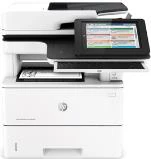
The HP LaserJet Enterprise Flow MFP M527z is the M527 configuration for an office that wants more than basic duplex document capture. It combines monochrome printing with a 100-page single-pass color scanner, embedded optical character recognition, EveryPage multi-feed detection and a pull-out keyboard. It also includes the direct-wireless and NFC printing hardware that is optional on the dn, f and c versions.
Those additions solve different problems. The Flow tools help prepare and describe scanned documents. The radio provides supported peer printing. Neither should be treated as proof that every scanning, networking and mobile function works through one universal wireless connection.
Use the Flow scanner for the document work it supports
The feeder has two scanning heads, allowing both sides of an original to be captured in one pass. Letter, Legal and A4 originals are documented, and the flatbed accommodates originals up to 8.5 by 14 inches. Color capture is available although printed output remains black and white.
The z adds the Flow processing functions, including embedded OCR and ultrasonic multi-feed detection, rather than requiring you to infer them from the feeder’s appearance. The keyboard can make destination and job information easier to enter. These features still require suitable settings and documents; the specification is not a promise that every damaged original will feed correctly or every recognition result will be error-free.
Keep shared-folder capture separate from direct printing
For the reviewed scan-to-computer workflow, the printer saves a file to a shared computer or server folder. An administrator must enable the feature, identify a reachable path and configure the required credentials and permissions. A Quick Set can then provide a convenient destination shortcut at the printer panel.
The user selects the original sides and other capture settings for the job. This arrangement is established on the office network, rather than by simply discovering a nearby radio. Direct USB pull-scanning and peer-wireless delivery into a computer folder are not established by the reviewed instructions.
Understand what the included radio actually changes
The original hardware table specifically gives the z included direct-wireless and NFC capability. A supported mobile device can use the documented peer-printing arrangement without the printer being attached to a router. The radio must be enabled and the device still needs a compatible printing route, which may involve appropriate software.
Joining an existing infrastructure Wi-Fi network is a different function. HP lists a separate network accessory for that purpose. The z’s included peer-printing hardware should therefore not be advertised as proof that it can replace the wired office connection for every function. NFC capability also depends on a supported device; it is not a universal phone-to-printer shortcut.
AirPrint and Mopria are documented printing options on the supported shared network. Their presence does not establish the same job-storage controls as a desktop driver or turn the mobile print route into a scanner connection. Choose the route needed for the actual job before adding more requirements.
Allow for ordinary paper loads and an office workload
The standard inputs hold 100 plus 550 ordinary sheets, totaling 650. Extra feeders and the cabinet are optional. Letter, Legal and A4 are documented for the ordinary inputs and automatic print duplexing. Legal loading extends the cassette behind the closed body, while envelopes use a separate Tray 1 procedure and ten-envelope limit.
HP recommends 2,000–7,500 printed pages per month. Its 150,000-page maximum duty is a separate figure. Declared print speed is up to 45 Letter pages per minute simplex, with a lower duplex rate; the Flow scanner’s image-per-minute figures describe capture, not printed-page output. Match each number to the task it actually measures.
Check configuration, supplies and compatibility before choosing
The z includes analog fax, a secure disk and a walk-up convenience stapler. Fax needs the appropriate telephone setup. The stapler handles a small prepared paper stack rather than automatically finishing every job. Compatible driver controls provide the documented PIN-release workflow; disk encryption alone is not the same feature.
This assessment covers the documented US low-voltage configuration. Verify the offered unit’s electrical plate, current software compatibility, condition and accessories. Allow space beyond the approximately 18.98-by-19.52-by-19.55-inch closed body for the scanner, keyboard, paper and cables. Choose the M527z when its particular Flow tools and direct-print option fit a prepared office workflow, rather than because every wireless or scanning claim sounds interchangeable.
Key details at a glance
| Color printing | No |
|---|---|
| Scanner | Yes |
| Copying | Yes |
| Fax | Yes |
| Flatbed scanner | Yes |
| Automatic document feeder | Yes |
| Automatic two-sided printing | Yes |
| Automatic two-sided scanning | Yes |
| Single-pass two-sided scanning | Yes |
| Color scanning | Yes |
| Instructed envelope handling | Yes |
| Apple AirPrint | Yes |
| Mopria printing | Yes |
| Supported PIN-release printing | Yes |
| Recommended monthly minimum | 2000 pages |
| Recommended monthly maximum | 7500 pages |
| Maximum monthly duty | 150000 pages |
| Included ordinary-paper capacity | 650 sheets |
| Document-feeder capacity | 100 sheets |
| Declared one-sided mono Letter rate | 45 pages/min |
| Unit-body width | 18.98 in |
| Unit-body depth | 19.52 in |
| Unit-body height | 19.55 in |
| Unit weight | 49.1 lb |
| Imaging engine | laser |
Use the exact model’s instructions for operating limits, supplied equipment and version differences.
Paper, software and setup details
Print-rate conditions
Maker-declared monochrome print speeds are up to 45 Letter/43 A4 ppm simplex and 36 Letter/34 A4 ipm duplex. Flow z scan figures are separately up to 48 Letter originals per minute simplex and 68 black/60 color Letter images per minute duplex. Recommended monthly printing is 2,000–7,500 pages; 150,000 maximum duty is not the recurring recommendation.
Paper handling
The included inputs hold 100 plus 550 ordinary sheets, totaling 650. Letter, Legal and A4 are supported in the documented trays and automatic duplex print path. Optional additional 550-sheet feeders and cabinet do not count as included. Legal stock extends behind the closed body. Tray 1 handles up to ten envelopes with short postage edge first, face up, correct size/Envelope type and Manual feed; this does not establish envelope duplexing.
Scanning arrangement
The z includes a 100-page dual-head single-pass duplex feeder, color capture and Legal-size glass. Letter/Legal/A4 originals are documented. Flow adds EveryPage ultrasonic multi-feed detection, embedded OCR, automatic orientation and a pull-out physical keyboard. Computer/server-folder delivery still needs an active network, administrator enablement, reachable share and suitable credentials. Direct USB pull-scanning and peer-wireless shared-folder delivery are not established.
Computer and mobile connections
Standard Gigabit Ethernet and computer USB coexist with the exact z included direct-wireless/NFC hardware. The original distinguishes peer mobile printing from joining an infrastructure Wi-Fi network, which requires the separate 2900nw accessory. Supported device/app/driver conditions and enabling the radio still matter. AirPrint/Mopria shared-network printing is kept separate from desktop PIN, scanner delivery and direct-print controls.
Supplies and declared yields
HP lists 87A / CF287A and 87X / CF287X, with approximately 9,000 and 18,000 declared pages respectively, and 87A in the original box. Actual remaining toner in an earlier unit is unknown. A walk-up convenience stapler handles up to twenty specified 75 g/m² paper sheets; it is not automatic job finishing.
Software and support
The US guide specifies an included minimum 320 GB secure disk for z. The original Job Storage instructions document Personal Job and Stored Job with optional PIN protection and panel retrieval, including the explicit four-digit compatible OS X control. This is not inferred from disk encryption alone. Historical software, OCR workflows and old cloud references require current compatibility checking; no continued cloud-service availability is promised.
Electrical edition and setup
Assessment covers the documented US 100–127 VAC, 60 Hz configuration; other region options are not dual-voltage substitutes. The closed body is 18.98 × 19.52 × 19.55 inches and 49.1 lb with cartridges. Allow loading, scanner, keyboard and cable access. Original FCC Class A designation applies. The earlier configuration reference does not establish current availability or an individually read official discontinuation notice.
Sources for this assessment
Find a printer for your routine.
Match color output, scanning, connections and paper handling, then compare the exact models.