
Your needs, this model
Does it fit your priorities?
Can a wired office scan both sides of Legal documents in color, print Legal duplex with 600 ordinary sheets ready and hold supported driver jobs for PIN release?
Qualifies with earlier references enabled, compatible desktop driver and administrator-configured reachable network folder. Its 50-sheet feeder reverses originals, Legal glass is supported, the rear output must be closed for print duplex, and PIN release uses an actual Job Storage job.
Explore this need in the finder →Will the M525f scan both sides of a Letter batch in one pass like the Flow c model?
Fails the single-pass requirement. The exact f has a 50-sheet reversing automatic duplex feeder; the Flow c model’s dual-head single-pass scanner and 100-sheet capacity are different hardware.
Explore this need in the finder →Does a USB cable to my computer establish the reviewed color scan-and-copy workflow?
Fails the selected computer-scanning requirement. USB computer printing and standalone copying are supported, but the established scan-to-computer plan uses configured Ethernet network folders. Host USB flash-drive scanning is a different destination.
Explore this need in the finder →A wired monochrome MFP for shared document work
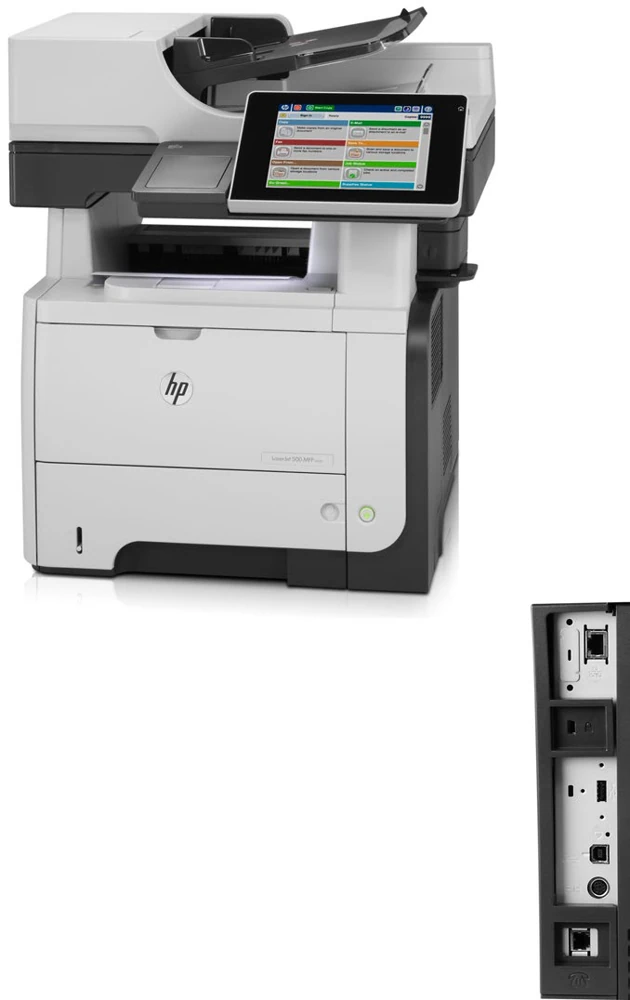
The HP LaserJet Enterprise 500 MFP M525f fits an office that needs black printing, color document capture, copying and an included analog fax. It provides 600 ordinary sheets across two inputs, automatic print duplex and a 50-sheet reversing document feeder. Its large touchscreen and configured network destinations suit shared paperwork more directly than a simple personal USB printer.
The deciding tradeoff is its earlier hardware and administrative setup. HP's exact US CF117A#BGJ page explicitly marks it discontinued and identifies it as an FCC Class A commercial device. This review concerns that documented US low-voltage configuration. It does not assume current stock, current driver compatibility or that the separate high-voltage edition can be used interchangeably.
The f scanner is automatic duplex, with a reversing feeder
The scanner is genuinely color-capable despite monochrome paper output. Its glass accepts up to 8.5 by 14 inches, and the separately specified feeder also accepts Letter, Legal and A4. The f model can scan both original sides automatically, but it reverses the sheet. It does not have the Flow c model's dual-head single-pass feeder.
That distinction affects a batch workflow: both sides are captured automatically, yet they are not captured in one pass. HP's exact comparison lists 50 feeder sheets for f and 100 for Flow c. The f also lacks the c model's pull-out keyboard and included embedded OCR. Optional Digital Sending Software is a separate route to advanced capture, not an included feature of this configuration.
For an individual original, place it face down on the glass. For a suitable loose batch, load face up in the feeder and adjust the guides. Use the actual job options and preview to check the destination, document sides and result. A color control screen does not create color printing, and double-sided print hardware does not explain how the scanner handles originals.
Set up the computer delivery route before scanning
Computer USB 2.0 and Gigabit Ethernet are included. Other USB sockets serve external devices and flash-drive jobs; the easy-access socket is not proof of direct computer scanning. Wireless print servers are optional accessories, so the included machine is not treated as a Wi-Fi or Wi-Fi Direct printer.
The established computer scanning arrangement uses Ethernet and Save to Network Folder. In the Embedded Web Server, an administrator enables the function under Scan/Digital Send and can create a Quick Set for a repeat destination. The shared computer or server must remain reachable, with a supported folder configuration and appropriate user access. A historical server list is not a promise that every current network will accept the same authentication.
At the panel, choose Save to Network Folder, sign in if requested, select the prepared Quick Set or enter the permitted path, and give the file a name. Review More Options and the preview, then start the save. Email delivery instead requires its outgoing mail server configuration. Direct USB computer scanning remains unconfirmed here, so it is not substituted for the configured network route.
AirPrint and Mopria are documented printing options on a suitable shared network. An Ethernet-attached printer may serve compatible mobile devices through that network without containing a Wi-Fi radio. Those print jobs remain separate from the desktop driver and scanner delivery plan.
Load the actual included inputs
The normal reserve is 100 sheets in Tray 1 plus 500 in Tray 2, with the original capacity basis of 75-g/m², 20-lb paper. Letter, Legal and A4 are explicitly supported in both inputs and in automatic print duplex. Two additional 500-sheet trays can raise capacity to 1,600, but they are separately purchased and excluded from the included figure.
Open Tray 1, extend its paper support and place stock below its tabs and height marks. Adjust the side guides to touch without bending it. For Tray 2, remove the tray, release and position the width and length guides, load the stack flat at all four corners and keep it below the maximum indicator. Confirm the real size and type when the panel prompts.
For preprinted paper in Tray 2, the normal simplex orientation is face down with the top edge at the front. Duplex and Alternative Letterhead Mode use face up with the bottom edge at the front. Windows Alternative Letterhead Mode also needs the corresponding driver setting and Letterhead media type. In an ordinary compatible Windows duplex job, use Finishing and select Print on both sides.
Envelopes go only through Tray 1, up to ten, face up with the short postage end leading. Choose the actual envelope size and type and use a one-sided job. The rear output offers a straighter route for suitable special media, but opening it disables the duplexer and top output bin. Change paths between appropriate jobs, not during printing.
Fax, held jobs and earlier supplies
The f includes analog fax hardware, but still needs a suitable telephone connection and the required location, date, company and fax-number setup. Analog, LAN and Internet fax modes are alternatives in the original instructions. Ethernet itself is not a telephone line.
A minimum 250-GB secure hard disk is included. The actual driver provides Personal Job with PIN protection, and the Mac procedure specifies a four-digit Use PIN to Print field. At the panel, select Retrieve from Device Memory, choose the job and enter its PIN before release. Optional badge and server pull-print services are separate products.
Supplies are CE255A, HP 55A, and CE255X, HP 55X. HP declares approximately 6,000 and 13,500 replacement pages under ISO/IEC 19752; the exact US box lists a full-capacity 55A. Earlier hardware's remaining toner is unknown. Maker printing rates are up to 42 one-sided Letter ppm or 40 A4 ppm, with 2,000–6,000 recommended monthly pages rather than the 75,000-page duty ceiling.
The body is about 20.3 by 21.6 by 22.7 inches and the f-model weight is 65.8 lb. Reserve additional lid, tray, cable and service access. Choose an explicitly single-pass scanner or included wireless configuration if either is essential to the intended office routine.
Key details at a glance
| Color printing | No |
|---|---|
| Scanner | Yes |
| Copying | Yes |
| Fax | Yes |
| Flatbed scanner | Yes |
| Automatic document feeder | Yes |
| Automatic two-sided printing | Yes |
| Automatic two-sided scanning | Yes |
| Single-pass two-sided scanning | No |
| Color scanning | Yes |
| Instructed envelope handling | Yes |
| Apple AirPrint | Yes |
| Mopria printing | Yes |
| Supported PIN-release printing | Yes |
| Recommended monthly minimum | 2000 pages |
| Recommended monthly maximum | 6000 pages |
| Maximum monthly duty | 75000 pages |
| Included ordinary-paper capacity | 600 sheets |
| Document-feeder capacity | 50 sheets |
| Declared one-sided mono Letter rate | 42 pages/min |
| Unit-body width | 20.3 in |
| Unit-body depth | 21.6 in |
| Unit-body height | 22.7 in |
| Unit weight | 65.8 lb |
| Imaging engine | laser |
Use the exact model’s instructions for operating limits, supplied equipment and version differences.
Paper, software and setup details
Print-rate conditions
Maker-declared one-sided printing is up to 42 Letter ppm or 40 A4 ppm. Recommended monthly printing is 2,000–6,000 pages, distinct from 75,000 maximum duty. Reversing feeder image rates and first-page time do not supply print ppm. No measured speed is claimed.
Paper handling
Included 100-sheet Tray 1 and 500-sheet Tray 2 total 600 ordinary 75-g/m², 20-lb sheets. Letter, Legal and A4 are positively marked for both inputs and automatic print duplex. Optional 500-sheet trays 3/4 do not count. Extend Tray 1 support, stay below tabs/fill marks and adjust guides without bending stock. Tray 2 loads flat at four corners below maximum marks. Confirm actual type/size. Preprinted Tray 2 simplex is face down/top at front; duplex and Alternative Letterhead Mode use face up/bottom at front. Windows Alternative Letterhead Mode needs panel and driver settings plus Letterhead media type. Up to ten envelopes use Tray 1 only, face up/short postage end first, appropriate size/type and one-sided job. Opening the rear straight-through output disables automatic duplex and top output; do not switch paths during printing.
Scanning arrangement
Actual f is color-scanning with 8.5 × 14-inch glass and a 50-sheet reversing automatic duplex feeder. Letter, Legal and A4 fit both reviewed routes. Single-pass scanning, 100-sheet feeder, pull-out keyboard and embedded OCR belong to Flow c and are excluded. Established computer delivery is administrator-enabled Ethernet Save to Network Folder, with a reachable compatible shared folder, correct path and access credentials. Direct USB computer scanning remains unknown; flash-drive host sockets do not prove it. Load glass face down or feeder face up and check actual job options/preview. Analog fax is included but needs its phone setup.
Computer and mobile connections
Included computer USB 2.0 and Gigabit Ethernet are distinct from easy-access and external-device USB host ports. Wireless print servers are separately purchased. No included Wi-Fi or Wi-Fi Direct plan is created. Exact current US page documents AirPrint and Mopria; use the supported shared network with the printer connected by Ethernet. Mobile jobs have no established exact paper/capacity/duplex/PIN or computer scan claims here.
Supplies and declared yields
Exact US CE255A / HP 55A and CE255X / HP 55X declarations are approximately 6,000 and 13,500 pages under ISO/IEC 19752. The exact original US box lists full-capacity 55A, while earlier hardware remaining toner is unknown. No retail claim, current cost-per-page, forced newer HP+ policy or Flow supply is adopted. Included convenience stapler is a walk-up feature, not an automatic finishing system.
Software and support
Included minimum 250-GB secure hard disk plus actual manual Personal Job/PIN procedures supports desktop held-job release. Mac instructions specify four-digit Use PIN to Print; panel Retrieve from Device Memory requires the job PIN. Optional badge, advanced DSS and cloud pull-print services are not included. Verify the actual current driver and compatible shared-folder setup; historical operating-system lists are not current guarantees. Standalone copying can coexist without computer scanning.
Electrical edition and setup
Exact HP US CF117A#BGJ explicitly discontinued and FCC Class A commercial; earlier opt-in applies. Exact US shop specifies a low-voltage 100–127-V, 50/60-Hz edition and warns separate voltage editions are not dual voltage. Current support has conflicting dual-voltage wording, so check the actual option and plate and do not assume universal mains. Body is 20.3 W × 21.6 D × 22.7 H inches, f-model weight 65.8 lb. The guide places an installed-cartridge weight qualifier in the neighboring M575 column, so no unproven M525 weight basis is added. Allow lid, tray, cable and service clearance. Original manual rear-bin capacity differs from US shop; no combined or increased input is inferred.
Sources for this assessment
Find a printer for your routine.
Match color output, scanning, connections and paper handling, then compare the exact models.