
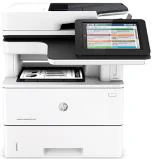
Your needs, this model
Does it fit your priorities?
Can an Ethernet office scan both sides of Legal originals in one pass, print duplex, use PIN release and handle 5,000 pages monthly?
Yes, in the documented compatible desktop and configured shared-folder arrangement, with 650 included ordinary input sheets.
Explore this need in the finder →Does a computer USB cable establish the same scan-to-computer route?
No. The reviewed file-delivery instructions require the network-folder arrangement; USB computer scanning remains unconfirmed.
Explore this need in the finder →Can it join my Wi-Fi network using its standard included connections?
No. Wireless networking is a separately purchased accessory route, outside the standard wired configuration assessed here.
Explore this need in the finder →Choose the f when fax belongs in a wired document station
The HP LaserJet Enterprise MFP M527f combines black-and-white printing with color scanning, copying and included analog fax. Its most useful role is a shared office station where a wired network already exists and someone can configure the scan destination. A stack of two-sided Legal originals is a reasonable starting requirement: the documented feeder captures both sides in one pass, and the glass also accommodates Legal pages.
The f sits between the simpler dn configuration and the Flow versions. It adds fax and secure disk storage without adding the Flow keyboard, embedded optical character recognition or EveryPage scanning features. That difference matters more than treating every M527 as one interchangeable machine.
Both sides can be captured without borrowing Flow features
The 100-page feeder uses two scanning heads for single-pass duplex capture. Letter, Legal and A4 originals are documented, with color scanning available even though the printed output is monochrome. Place feeder originals face up, set the guides and choose the appropriate Original Sides setting. A duplex mechanism cannot correct an incorrectly described original automatically.
For a delicate sheet or an original unsuitable for the feeder, use the flatbed within its 8.5-by-14-inch limit. The f has the scanning hardware needed for these jobs, but it lacks the Flow model’s embedded OCR and ultrasonic multi-feed detection. If those are essential to a searchable-document process, compare the exact Flow configuration rather than assuming a software setting can provide the missing feature.
Getting the scan onto a computer requires a destination
The reviewed computer-file workflow is Save to Network Folder. An administrator must enable it, identify a reachable shared folder and supply the required permissions and credentials. A Quick Set can turn that prepared destination into a convenient panel shortcut; merely connecting the Ethernet cable does not complete that preparation.
This is different from selecting a USB-connected scanner inside a desktop application. The reviewed instructions establish network-folder delivery, while direct USB computer scanning remains unconfirmed. Choose the Ethernet arrangement if that is the documented path you intend to use, and check compatibility with the actual computer, server and network policies before depending on it.
Printing capacity and paper handling suit a recurring office routine
HP specifies a recommended 2,000–7,500 printed pages per month. The much higher 150,000-page duty figure describes a different limit and should not replace that recurring-workload guidance. Declared speed is up to 45 Letter pages per minute for one-sided printing; the separate duplex rate is up to 36 Letter images per minute.
Included input consists of a 100-sheet multipurpose tray and a 550-sheet cassette, for 650 ordinary sheets. Letter, Legal and A4 are documented in the inputs and automatic print-duplex path. Extra 550-sheet feeders and the cabinet are options. Legal paper extends the cassette behind the printer, so the closed-body depth is not the whole operating-space requirement.
Envelopes use their own routine: Tray 1, the correct size and Envelope type, and the specified manual-feed setting. Its ten-envelope limit is unrelated to the ordinary-paper capacity. A diagram showing a tall, fully expanded configuration does not establish what an individual offer includes.
Private printing, fax and stapling remain separate choices
The original driver instructions describe stored jobs and optional PIN protection. With compatible controls, the user sends a Personal Job or suitable Stored Job, then retrieves it at the panel using the assigned PIN. That is a specific release workflow; general disk encryption and a touchscreen login are different features. Do not assume an AirPrint job exposes the same controls.
The included analog fax still needs an appropriate telephone connection and setup. The walk-up convenience stapler can handle up to twenty sheets of the specified ordinary paper, but it is not an automatic print finisher. These additions are useful when the office actually uses them; they do not make the f equivalent to a Flow scanning model.
Check the actual earlier unit and complete setup
This assessment covers the documented US low-voltage configuration. Verify the electrical plate, current software support and supplied accessories on the unit being considered. The closed body is approximately 18.98 by 19.52 by 19.55 inches and weighs 48.5 pounds with cartridges; leave room to open the scanner and handle paper.
The original supplies are HP 87A and 87X. Their published yields do not tell you how much toner remains in an offered earlier machine. Choose the M527f for a prepared wired office that needs its specific fax, paper and scanning capabilities, and assess condition and compatibility alongside the feature list.
Key details at a glance
| Color printing | No |
|---|---|
| Scanner | Yes |
| Copying | Yes |
| Fax | Yes |
| Flatbed scanner | Yes |
| Automatic document feeder | Yes |
| Automatic two-sided printing | Yes |
| Automatic two-sided scanning | Yes |
| Single-pass two-sided scanning | Yes |
| Color scanning | Yes |
| Instructed envelope handling | Yes |
| Apple AirPrint | Yes |
| Mopria printing | Yes |
| Supported PIN-release printing | Yes |
| Recommended monthly minimum | 2000 pages |
| Recommended monthly maximum | 7500 pages |
| Maximum monthly duty | 150000 pages |
| Included ordinary-paper capacity | 650 sheets |
| Document-feeder capacity | 100 sheets |
| Declared one-sided mono Letter rate | 45 pages/min |
| Unit-body width | 18.98 in |
| Unit-body depth | 19.52 in |
| Unit-body height | 19.55 in |
| Unit weight | 48.5 lb |
| Imaging engine | laser |
Use the exact model’s instructions for operating limits, supplied equipment and version differences.
Paper, software and setup details
Print-rate conditions
HP declares up to 45 Letter ppm and 43 A4 ppm for one-sided printing, separately 36 Letter / 34 A4 images per minute for duplex printing. The f feeder rates are up to 45 black / 40 color Letter images per minute for two-sided capture, distinct from the faster Flow specification. Recommended recurring printing is 2,000–7,500 pages monthly, not 150,000 duty.
Paper handling
The included 100-sheet multipurpose input and 550-sheet cassette total 650 ordinary sheets. Both support Letter, Legal and A4; automatic duplex also explicitly supports those sizes. Optional 550-sheet feeders and cabinet are excluded from the included count. Legal loading needs rear tray extension. Use Tray 1 only for up to 10 envelopes, face up with short postage edge first, actual Envelope type and Manual feed; this is a separate one-sided job.
Scanning arrangement
The exact f column has a 100-page dual-head single-pass duplex feeder and color scanning; Legal-size glass and Letter/Legal/A4 routes are explicit. Computer-file delivery is the enabled Save to Network Folder workflow on Ethernet with shared destination permissions and credentials. It is not proof of USB pull-scanning. Original Sides must be set correctly. Flow EveryPage, embedded OCR and physical keyboard are not included on f.
Computer and mobile connections
Standard Gigabit Ethernet and computer USB are separate from USB host ports. Infrastructure Wi-Fi and NFC/Wi-Fi Direct are optional additions on f. AirPrint/Mopria use a supported shared-network printing route, with no automatic inheritance of desktop PIN or scanning controls.
Supplies and declared yields
Original parts are HP 87A / CF287A and 87X / CF287X, with maker-declared approximately 9,000 / 18,000-page yields and 87A originally boxed. Remaining toner in an offered unit is unknown. The f includes a walk-up convenience stapler for up to 20 sheets of specified 75 g/m² paper; it does not automatically finish every print job.
Software and support
The US guide gives f an included minimum 320 GB secure disk. The original guide documents Personal Job / Stored Job with optional PIN protection and retrieval at the panel, including an explicit four-digit Use PIN to Print field in compatible OS X controls. This is driver- and configuration-dependent, not proof of equivalent controls in AirPrint. Current operating-system and network compatibility need checking.
Electrical edition and setup
Review covers the documented 100–127 VAC, 60 Hz US configuration, not every electrical option worldwide; check the actual unit plate. The 2015 reference establishes an earlier configuration, not current stock or an independently verified discontinuation notice. Closed body 18.98 × 19.52 × 19.55 in, 48.5 lb with cartridges; allow paper,scanner and cable access. FCC Class A equipment is specified.
Sources for this assessment
Find a printer for your routine.
Match color output, scanning, connections and paper handling, then compare the exact models.