
Your needs, this model
Does it fit your priorities?
Can a network computer automatically duplex Legal with 1,100 ordinary sheets and temporary PIN release?
Qualifies with earlier references enabled and a compatible driver. Exact x hardware includes both 500-sheet drawers and the duplexer; all inputs must contain Legal to provide that full ordinary-paper count. Personal jobs delete at power-off.
Explore this need in the finder →Does the standard x provide the advertised 1,600-sheet maximum without extra hardware?
Fails the 1,600-sheet minimum. The included configuration holds 1,100 ordinary sheets; the extra 500-sheet input is a separate accessory.
Explore this need in the finder →Does the x join an office Wi-Fi network and provide confirmed AirPrint as supplied?
Fails those requirements. Wireless networking needs optional hardware, and an exact supported AirPrint arrangement remains unconfirmed rather than being inferred from Bonjour or the x suffix.
Explore this need in the finder →The third input is the reason to choose this assembly
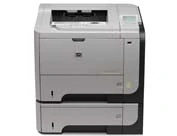
The HP LaserJet Enterprise P3015x suits a prepared computer-printing workgroup that wants 1,100 ordinary sheets and automatic duplex already included. Gigabit Ethernet, USB and temporary PIN-held jobs support its office role. The main tradeoff is the larger assembly, together with optional wireless hardware and unresolved exact depth and height between original sources.
The exact HP US record identifies CE529A#ABA and marks it discontinued. This review covers that documented earlier low-voltage configuration, without suggesting current availability or the condition of a particular used printer. It is the x with the additional drawer, not a refurbished CE529AR or a smaller n/dn renamed by a seller.
Count the paper that is actually included
The x has front Tray 1 for 100 sheets and two 500-sheet drawers. HP specifies their ordinary counts at 20 lb/75 g/m². The original size table confirms Letter, Legal and A4 in the front and 500-sheet paths, so a selected-size supply can total 1,100 when every input contains it.
This arrangement can also keep different stocks ready, although dividing paper types or sizes divides the available supply for one job. The advertised 1,600-sheet maximum requires another optional drawer. It is not the included count, and larger input does not change the maker's recommended monthly workload.
Set each drawer's side and rear guides using the release latches, keep the paper flat at all corners and below the height indicators, then return the drawer completely. Extend the front support and keep its stack under the tabs. HP warns against fanning paper or loading a tray while printing.
Make the driver and panel agree
The control panel's paper prompt accepts the current size/type with the back arrow and changes them with OK. Set the driver to the actual stock instead of leaving an accidental mismatch. A front tray configured Any Size and Any Type behaves differently and can suppress that prompt.
Choosing by paper type can protect special stock: a plain-paper job should not take forms from a tray configured for letterhead. The original guide uses the same 500-sheet loading method for the included third input. A second drawer does not excuse separate guide and configuration checks.
Use the included duplexer within its media limits
The exact configuration includes automatic duplex, and the actual media table separately supports Letter, Legal and A4 through the mechanism. The original Windows routine loads Tray 2 face up and selects Print on both sides under Finishing; Flip pages up changes the intended top-binding behavior.
The lower and duplex paths are limited to 60–120 g/m², while Tray 1 has a separate ordinary range up to 199 g/m². Being printable from the front does not make heavy or special material suitable for automatic turning. Platform-specific letterhead directions in the original Macintosh and general loading sections differ, so they should not be collapsed into a universal instruction.
Send a private computer job, then collect it
In the compatible Windows driver, open Job Storage, choose Personal Job and supply a four-digit PIN. At the printer, the folder button or menu opens Retrieve Job. Select the user and job, choose Print or Print and Delete, enter the code and select the copies you need.
The original explicitly deletes Personal, Proof and Hold and Quick Copy jobs at power-off. Names may gain a number or replace an existing file according to the driver's setting, and space pressure can remove older work. A printer queue is therefore not the only place to keep the document.
The optional encrypted EIO hard disk remains separate from this ordinary temporary PIN routine. Do not assume installed encrypted storage, permanent retention or an already completed secure erase simply because broader security features are advertised.
Separate the ports from unconfirmed mobile functions
The rear USB computer connection uses a separately purchased A-to-B cable no longer than two meters. Gigabit Ethernet supplies the normal shared-network route. Print a configuration page to find its address before setting up compatible software or the embedded Web interface.
The front host USB instead serves supported walk-up files. The original guide lists PDF, XPS, PCL and PS, while the older brochure gives a different abbreviated set. Verify the actual device and file support rather than expecting it to open every application document.
Wireless print servers are optional; the x's suffix does not add a standard radio. AirPrint and Mopria remain unconfirmed in the reviewed exact-model sources. Bonjour, IPP and a general trademark credit do not prove a mobile arrangement or transfer the computer driver's duplex, capacity and PIN features to a phone.
Plan envelopes, supplies and the physical site
Up to ten 75–90-g/m² envelopes use only Tray 1, face up with the short postage end entering first and the actual size/type selected. Opening and extending the rear output gives the straightest path and reverse output order. Close it for normal duplex work and do not move it during printing.
HP recommends 1,500–5,000 monthly pages, distinct from 100,000 maximum duty. Original speed is up to 42 one-sided Letter pages per minute, separately 40 A4. CE255A and optional CE255X yields follow ISO/IEC 19752 conditions and do not reveal current operating cost.
The agreed width is 17.6 inches; the brochure's 46.6-pound weight excludes the cartridge. Exact depth and height remain unresolved, so measure the actual assembly and all opening access. Verify the documented 100–127-V, 50/60-Hz plate. Follow the exact US record's commercial installation restriction despite the older brochure's different emissions class, and choose an actual multifunction printer if scanning, copying or fax is required.
Key details at a glance
| Color printing | No |
|---|---|
| Scanner | No |
| Copying | No |
| Fax | No |
| Flatbed scanner | No |
| Automatic document feeder | No |
| Automatic two-sided printing | Yes |
| Automatic two-sided scanning | No |
| Single-pass two-sided scanning | No |
| Color scanning | No |
| Instructed envelope handling | Yes |
| Supported PIN-release printing | Yes |
| Recommended monthly minimum | 1500 pages |
| Recommended monthly maximum | 5000 pages |
| Maximum monthly duty | 100000 pages |
| Included ordinary-paper capacity | 1100 sheets |
| Declared one-sided mono Letter rate | 42 pages/min |
| Unit-body width | 17.6 in |
| Unit weight | 46.6 lb |
| Imaging engine | laser |
Use the exact model’s instructions for operating limits, supplied equipment and version differences.
Paper, software and setup details
Print-rate conditions
Exact originals declare up to 42 one-sided Letter ppm, separately 40 A4. Recommended monthly volume is 1,500–5,000 pages, distinct from maximum duty 100,000. No test result or duplex-speed figure inferred.
Paper handling
Standard x includes front 100 plus two 500-sheet drawers, total 1,100 ordinary 20-lb/75-g/m² sheets. Actual Letter/Legal/A4 checkmarks establish the front and 500-sheet inputs and included duplex mechanism. Full selected-size supply assumes all three contain it. Set guides, keep corners flat below tabs/height marks, do not fan or refill during printing, and match panel and driver size/type. Original Windows routine loads Tray 2 face up and selects Finishing/Print on both sides, with Flip pages up for top binding. Generic loading-table and Mac automatic-letterhead directions differ; do not combine platform instructions. Lower and duplex paths 60–120 g/m²; front ordinary range 60–199. Up to ten 75–90-g/m² envelopes go only in front, face up/short postage end entering with correct size/type. Rear output open and extended provides the straightest face-up reverse-order path; close it for duplex and do not move it during printing. The 1,600-sheet maximum needs an optional fourth input.
Scanning arrangement
This is a monochrome print-only printer without a physical scanner, flatbed, document feeder, copy or fax function. The four-line text display and generic software names do not add scanning hardware.
Computer and mobile connections
Included Gigabit Ethernet and rear Hi-Speed USB 2.0 support a compatible computer driver. Original USB cable is A-to-B, at most 2 m, and purchased separately. Front host USB serves specified flash-drive files rather than the computer cable. Wireless print servers and parallel EIO card are optional, not included connections.
Supplies and declared yields
Original replacements are CE255A/55A and separately purchased high-capacity CE255X/55X, with declared average yields of 6,000 and 12,500 pages under ISO/IEC 19752. Original box lists a full-capacity approximately 6,000-page cartridge, not an included 55X. No installed remainder, current supply price, stock or cost per page inferred.
Software and support
Original Windows Job Storage offers Personal Job with a four-digit PIN. Use the folder button or Menu/Retrieve Job, choose user/job, select Print or Print and Delete, enter PIN and copies. The guide explicitly deletes Personal, Proof and Hold and Quick Copy jobs at power-off. Names may gain a number or replace an existing file according to driver selection; storage pressure may delete oldest jobs. Reviewed promise is the temporary Personal Job routine with available memory, not an installed encrypted hard disk, permanent archive or secure-erasure guarantee.
Electrical edition and setup
Exact US CE529A#ABA is discontinued and establishes the documented 100–127-V, 50/60-Hz edition. Verify actual plate and compatible driver; separate high-voltage edition is not convertible. Exact US commercial installation restriction differs from the older brochure’s Class B statement; retain the discrepancy and use the more restrictive guidance. Agreed body width is 17.6 inches. Exact depth and height remain unconfirmed: US/brochure depth 16.2 and height 18.9 differ from guide depth 15.7 and height 17.9. Brochure weight is 46.6 lb without cartridge, versus guide rounded 46.8 lb without a stated basis. Measure the actual assembly and allow full opening, tray, cable and service access.
Sources for this assessment
Find a printer for your routine.
Match color output, scanning, connections and paper handling, then compare the exact models.