
Your needs, this model
Does it fit your priorities?
Can my compatible USB computer print black Letter pages, copy and scan Letter originals in color, with 150 ordinary sheets loaded?
Qualifies with the complete compatible computer print/scan installation. Use the Letter/A4 flatbed and actual scanner software; the HP app requires Internet and an account for full functionality. The input holds 150 ordinary sheets, and no automatic duplex or original feeder is included.
Explore this need in the finder →Can the office Wi-Fi computer automatically print Letter on both sides?
Fails. The exact M140w has no automatic print duplexer. Its documented computer process returns the first-pass stack by hand, printed face down with the top edge entering first.
Explore this need in the finder →Can I scan a full Legal original on the flatbed over office Wi-Fi?
Fails. The glass maximum is 216 × 297 mm for Letter/A4, and there is no larger original feeder. Legal printing support does not establish Legal scanning.
Explore this need in the finder →Small black-and-white jobs with a flatbed beside them
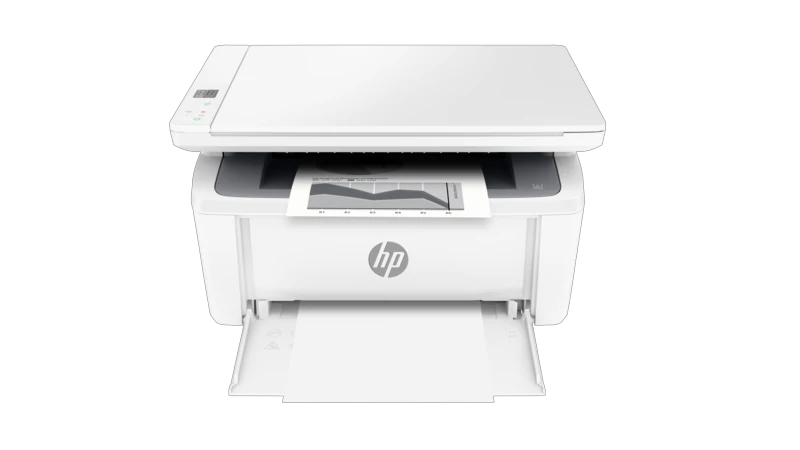
The HP LaserJet M140w is a monochrome printer, copier and color-capable flatbed scanner for a small desk. Its useful routine is straightforward: load ordinary paper, print short documents, and place individual originals on the glass when a copy or electronic file is needed. There is no original feeder, automatic print duplexer, Ethernet socket or hardware fax.
This review covers the exact US 7MD72F#BGJ configuration, with its documented 110–127-V, 50–60-Hz supply. The surviving US reference does not show an exact discontinued notice, but that does not establish stock. The separately reviewed M140we is a different edition; its e-model setup and lifetime conditions are not transferred to this M140w.
Published Letter output is up to 21 ppm. HP recommends 100–1,000 printed pages monthly, separate from the 8,000-page maximum duty figure. These are manufacturer declarations, not measured review results. The guide also explains that printing can pause during cooling under some operating conditions and resumes when the engine is ready.
Choose USB or the actual 2.4-GHz network
Included connections are a USB 2.0 device interface and 802.11b/g/n Wi-Fi at 2.4 GHz. Bluetooth Low Energy appears in setup material, but the manual explicitly says Bluetooth assists setup and does not carry print jobs. No 5-GHz radio or Ethernet option is counted.
The documented computer setup connects USB or joins the office wireless network, adds the actual printer in the HP application and follows its prompts. The manual uses the older HP Smart name; current product material calls it the HP app. Its full functionality requires an HP account and Internet access, and the setup routine asks for account registration when prompted. Verify the exact application and OS combination before relying on scanning features.
A compatible router can also establish wireless connectivity through WPS. Press its WPS button, then hold the printer's Wireless button for five seconds within two minutes. A steady wireless light confirms connection. For application setup, Bluetooth and location permissions may be requested on the phone; those permissions do not make this a Bluetooth printer.
Glass size limits the originals you can digitize
The flatbed reaches 216 × 297 mm, approximately 8.5 × 11.7 inches, covering Letter and A4. Independently documented color scanning reaches up to 600 ppi. Put the original face down against the rear-left alignment mark and close the lid. A Legal page can be printed on suitable input stock, but it does not fit this glass as a full-size scan.
With compatible computer software, HP Smart can use the printer scanner and save images locally or share them through applications. The guide separately documents HP Scan through Printer Assistant on Windows 7, and HP Easy Scan on macOS, where File and Save stores collected scans. These historical procedures establish distinct supported software arrangements, not a blanket guarantee for every present OS.
Choose the printer's scanner when a faithful original capture is intended. The application's camera capture is a separate workflow. Sharing a scan through email or cloud storage is also an application operation; it does not establish a printer-side SMTP server setup or a standalone fax line.
There is no feeder to process a stack, and no automatic or single-pass two-sided scanning. ID Copy instead captures one card side, prompts for the other side on the same glass section, and places both images on one printed sheet. The user turns the card.
One input and a manual second pass
The single input is specified for up to 150 ordinary sheets, with a separate 100-sheet output. Letter, Legal and A4 are supported printing sizes. Ordinary media weight is listed as 65–120 g/m²; do not apply the sheet count unchanged to every envelope or heavier material. A3 and 11 × 17-inch Tabloid are outside this path.
Remove existing media, load sound plain stock face up with the top forward, bring the guides to its edges and extend the output support. Do not fan the stack or add and remove sheets while printing. For labels, place the sheet centrally, printable face up with its top toward the back, then adjust the guides.
Envelopes use the same input, up to ten where the size is supported. Follow the manual's flap-dependent orientation: a short-edge flap faces up with the opposite short edge entering, while a long-edge flap faces down with the short postage end toward the printer. Set the actual size and type rather than assuming plain-paper settings.
Two-sided printing is manual. In the Windows Layout controls, select Print on Both Sides Manually. After the first pass, remove blank stock and return the output printed face down, top edge first, then confirm at the computer and press Start Copy/Resume if prompted. The Mac manual-duplex route similarly needs an installed HP driver and may be unavailable through AirPrint.
Direct printing has its own connection conditions
AirPrint and Mopria certification are expressly listed. For normal mobile printing, put the device and printer on the same Wi-Fi network. The original guide also explicitly permits AirPrint using Wi-Fi Direct: enable Direct, join the printer's signal and provide its password or requested confirmation. Some phones must reconnect to the office network afterward.
Those mobile print plans do not inherit confirmed desktop paper controls, scanning, input capacity or duplex behavior. The Wi-Fi Direct pairing PIN and web-server administration password are not proof of PIN-held document release.
Keep supply and setup promises specific
The US brochure declares approximately 300 pages for the supplied cartridge and approximately 950 pages for replacement 141A W1410A, using the stated ISO/IEC 19752 continuous-printing basis. Neither figure measures toner remaining in a particular unit. Dynamic security concerns the cartridge's HP chip and can block non-HP chips after updates; it does not by itself establish an HP+ lifetime agreement.
The US brochure says to purchase USB cable separately. It lists a 14.2 × 10.4 × 7.8-inch body and 11.86 lb, without a stated cartridge-weight basis. Maximum dimensions grow to 16.8 inches deep and 13.7 inches high. Allow for the open glass lid, paper supports, cable and maintenance access when fitting it into the desk.
Key details at a glance
| Color printing | No |
|---|---|
| Scanner | Yes |
| Copying | Yes |
| Fax | No |
| Flatbed scanner | Yes |
| Automatic document feeder | No |
| Automatic two-sided printing | No |
| Automatic two-sided scanning | No |
| Single-pass two-sided scanning | No |
| Color scanning | Yes |
| Instructed envelope handling | Yes |
| Apple AirPrint | Yes |
| Mopria printing | Yes |
| Recommended monthly minimum | 100 pages |
| Recommended monthly maximum | 1000 pages |
| Maximum monthly duty | 8000 pages |
| Included ordinary-paper capacity | 150 sheets |
| Declared one-sided mono Letter rate | 21 pages/min |
| Unit-body width | 14.2 in |
| Unit-body depth | 10.4 in |
| Unit-body height | 7.8 in |
| Unit weight | 11.86 lb |
| Imaging engine | laser |
Use the exact model’s instructions for operating limits, supplied equipment and version differences.
Paper, software and setup details
Print-rate conditions
Exact US source rates Letter monochrome output at up to 21 ppm. Recommended monthly printing is 100–1,000 pages, distinct from the 8,000 maximum duty figure. The guide says printing may pause during engine cooling and resume when ready. No published rate is presented as an editorial benchmark.
Paper handling
One input holds up to 150 ordinary sheets; output 100 is separate. Letter, Legal and A4 printing are supported; documented ordinary media weight is 65–120 g/m². No unverified capacity basis or extra tray is invented. Remove existing stock, do not fan, load face up/top forward, adjust guides and extend output support; do not replenish during printing. Labels load centrally, printable face up/top back. Up to ten supported envelopes use flap-dependent orientation: short-edge flap up/opposite short edge entering, or long-edge flap down/short postage end toward printer. Manual duplex requires first-pass output returned printed face down/top first after removing blank stock, then computer confirmation and Start Copy/Resume when prompted. Mac manual duplex needs the HP driver and may be unavailable with AirPrint; no automatic duplexer.
Scanning arrangement
Letter/A4 color flatbed capture is independently documented, maximum 216 × 297 mm or approximately 8.5 × 11.7 inches, up to 600 ppi. Original loads face down at rear-left alignment mark. No original feeder, Legal-size glass or automatic/single-pass duplex scanning. Compatible HP application can use the printer scanner and save locally; actual Windows HP Scan and macOS HP Easy Scan file-saving procedures are also documented. Phone-camera capture is separate. Application email/cloud sharing is not a native panel SMTP or hardware-fax route. ID Copy requires turning the card and prints both captures on one sheet.
Computer and mobile connections
Included USB 2.0 device interface and infrastructure Wi-Fi 802.11b/g/n at 2.4 GHz; no Ethernet. BLE helps application setup and does not carry print jobs. Compatible computer application setup explicitly supports USB and Wi-Fi. AirPrint/Mopria on the same local Wi-Fi have a separate mobile plan; exact guide also positively supports AirPrint through Wi-Fi Direct. Enable Direct, join its signal and provide the password/confirmation; some devices need reconnection afterward. Mobile protocols do not borrow desktop paper, capacity, duplex or capture guarantees. Pairing PIN and EWS admin password are not held-print PIN.
Supplies and declared yields
Exact US brochure declares approximately 300 pages for the supplied cartridge and replacement 141A W1410A at approximately 950 pages, under its ISO/IEC 19752 continuous-printing basis. These are declarations, not remaining toner or measured test results. Dynamic security uses new/reused HP chips and can block non-HP chips after firmware updates; this alone does not establish HP+ lifetime conditions. USB cable is separately purchased according to the exact US brochure, despite a broad regional cable field on the current product page.
Software and support
Original non-e M139–M142 guide uses HP Smart, while current exact product calls it HP app. Full app functionality requires an HP account and Internet access, and setup asks for registration when prompted. Verify actual compatible software and scanner selection. Actual Windows 7 HP Scan through Printer Assistant and macOS HP Easy Scan are historical alternatives, not current-OS guarantees. Bluetooth/location permissions can assist phone setup without making Bluetooth a print transport. App camera scanning, cloud/email sharing and optional send-only Mobile Fax are separate services and do not add hardware fax. No M140we lifetime conditions are borrowed.
Electrical edition and setup
Exact US identity is 7MD72F#BGJ with documented nominal 110–127 V, 50–60 Hz configuration. No exact discontinued notice observed, so current_reference does not imply current stock. Separate M140we/e manual and regional high-voltage editions are not substituted. US body is 14.2 W × 10.4 D × 7.8 H inches and 11.86 lb, cartridge-weight basis unspecified. Maximum dimensions are 14.2 × 16.8 × 13.7 inches; leave actual glass-lid, input/output, cable and service clearance. One icon/LED control panel uses physical copy/settings/ID/wireless buttons, not a touchscreen.
Sources for this assessment
Find a printer for your routine.
Match color output, scanning, connections and paper handling, then compare the exact models.