
Your needs, this model
Does it fit your priorities?
Can I scan and copy A4 originals using a computer on my home Wi-Fi network?
Qualifies through the compatible HP computer scanning software and A4 flatbed. Complete HP+ setup with an HP account, keep the printer online over its 2.4-GHz network and use Original HP toner. Each original is placed on the glass individually.
Explore this need in the finder →Can a USB computer automatically print both sides of Letter paper?
Fails automatic duplex. The original guide documents manual reloading only. USB also requires completed initial network setup and an ongoing independent printer internet connection; it is not an offline USB-only arrangement.
Explore this need in the finder →Does Legal paper support mean I can scan a full Legal original on the glass?
Fails. Legal is a supported print-input size, while the documented flatbed maximum is 8.5 by 11.7 inches, covering Letter/A4. There is no Legal-length feeder to provide another scan route.
Explore this need in the finder →A small multifunction laser with a lasting HP+ commitment
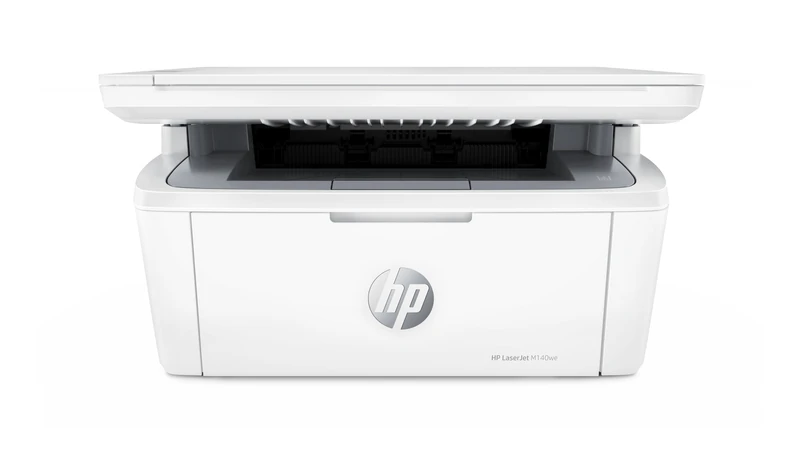
The HP LaserJet MFP M140we combines black-and-white printing and copying with a flatbed scanner. It suits modest document work when the owner accepts HP+: an HP account, an ongoing printer internet connection and exclusive Original HP toner for the life of the machine. Those conditions matter as much as its compact body or wireless printing.
This review follows HP's exact US M140we support identity and the HP-authored American 7MD72E brochure. It concerns the documented 110–127-V, 50–60-Hz configuration. Regional editions have different power supplies and toner numbers. Inspect the actual plate and option code; the two voltage ranges on a global page do not mean dual voltage.
The M140we is distinct from the M140w. Do not assume that dropping the final e in a listing leaves the account, internet and consumables requirements unchanged. The surviving US support page establishes this model, while its former shop URL now redirects. That redirect is not treated as a current-stock promise or an independent discontinuation notice.
Complete network setup before using a USB computer
Start with the supported HP setup app and a 2.4-GHz Wi-Fi network that provides internet access. The radio is 802.11b/g/n, not a documented 5-GHz connection. The original instructions use Bluetooth to help setup on a mobile device, explicitly not for Bluetooth printing.
Add the printer in the app, create or sign into the required HP account and complete registration. The original manual says not to start first-time setup using USB. After network setup, a compatible computer can use a separate USB cable, but the printer must retain its own internet connection. A USB-only offline desk therefore does not meet this model's operating arrangement.
WPS is an alternative supported router-connection step when the router has a WPS button. It does not remove account registration or ongoing internet requirements. There is no included Ethernet interface in the exact connection list.
One tray serves ordinary documents and occasional envelopes
The included input holds up to 150 ordinary sheets, with a separate 100-sheet output bin. Letter and Legal are explicit in the US specifications; the exact model's global specifications also establish A4. The full input capacity is a normal-paper limit, not a promise for an equally tall stack of thick cards or envelopes.
Before loading, remove remaining stock and use undamaged paper. The original instructions specifically say not to fan it. Place the stack print-side up with the top entering first, slide the guides against its edges and extend the output support. Do not add or remove sheets during printing. Select the actual size and type in the computer's print settings.
The US brochure permits up to ten envelopes. Use the actual supported envelope size and follow the flap-specific loading directions: short-edge flaps face up with the non-flap short edge toward the printer; long-edge flaps face down with the short postage end toward the back of the input. A paper-loading illustration is not a substitute for those envelope instructions.
Second sides require your return to the tray
There is no automatic print duplexer. The original Windows driver routine uses Layout and Print on Both Sides Manually. After the first side of the entire job prints, remove blank stock, return the output printed-side down and top edge first, then confirm at the computer. Press Start Copy/Resume if the Attention light requests it.
The original Mac routine also returns the printed stack face down and top first. It requires the HP print driver and warns that the manual-duplex control might be unavailable with AirPrint. Check the exact compatible driver's controls before depending on this workflow. A generic two-sided checkbox does not establish unattended automatic duplex.
Scan and copy one original at a time
The CIS flatbed is documented up to 8.5 by 11.7 inches, covering Letter and A4. Place an original face down against the rear-left glass marking, close the lid and use the supported computer scanning application. HP's original guide describes HP Smart scanning and saving locally, plus an HP Easy Scan routine on a compatible Mac. Current app and operating-system compatibility still need checking.
There is no automatic document feeder, automatic scan duplex or single-pass two-sided capture. A multipage document needs individual placements and page handling. A Legal print job can use the paper input, but a full Legal original exceeds the documented glass length.
For a panel copy, select quantity, darkness or reduction/enlargement and press Start Copy/Resume. ID Copy puts both sides of a small card on one side of the output sheet, with a manual turn between captures. That feature is not duplex scanning. Smartphone camera capture and app-based send-only mobile fax are also separate services, not an ADF or a built-in telephone fax.
Keep mobile jobs and supplies in their proper scope
AirPrint and Mopria are documented mobile printing services. Use a compatible client on the same Wi-Fi network; the original manual also permits AirPrint through Wi-Fi Direct. Direct printing still does not cancel the HP+ printer's internet requirement. These mobile routes do not inherit the desktop scanning application, confirmed paper controls or input capacity for combined requirement matching.
The American replacement cartridge is HP 141A, W1410A, declared at about 950 pages under ISO/IEC 19752 continuous printing. The manual separately assigns 142A to Europe. Do not substitute a foreign cartridge number because the exterior model name is similar. Original HP toner is a continuing HP+ requirement; the old Instant Ink promotion is not presented as a current offer or mandatory subscription.
HP rates black output up to 21 Letter ppm, separately 20 A4 ppm. Recommended volume is 100–1,000 monthly pages, distinct from the 8,000-page maximum duty. The current exact US body figures are approximately 14.2 inches wide, 10.4 deep and 7.8 high, weighing 11.9 lb. Leave room for paper and the scanner lid: the original manual's fully open drawing reaches 17.6 inches high, exceeding the brochure's differently stated maximum height.
Key details at a glance
| Color printing | No |
|---|---|
| Scanner | Yes |
| Copying | Yes |
| Fax | No |
| Flatbed scanner | Yes |
| Automatic document feeder | No |
| Automatic two-sided printing | No |
| Automatic two-sided scanning | No |
| Single-pass two-sided scanning | No |
| Instructed envelope handling | Yes |
| Apple AirPrint | Yes |
| Mopria printing | Yes |
| Recommended monthly minimum | 100 pages |
| Recommended monthly maximum | 1000 pages |
| Maximum monthly duty | 8000 pages |
| Included ordinary-paper capacity | 150 sheets |
| Declared one-sided mono Letter rate | 21 pages/min |
| Unit-body width | 14.2 in |
| Unit-body depth | 10.4 in |
| Unit-body height | 7.8 in |
| Unit weight | 11.9 lb |
| Imaging engine | laser |
Use the exact model’s instructions for operating limits, supplied equipment and version differences.
Paper, software and setup details
Print-rate conditions
Exact US brochure declares up to 21 one-sided Letter ppm in black. Exact model global page separately declares 20 A4 ppm. Recommended 100–1,000 monthly pages differs from maximum 8,000 duty. No tested speed, copy speed substitution or manually duplexed throughput claimed.
Paper handling
One included 150-sheet ordinary-paper input, separate 100-sheet output. Letter/Legal explicit US support and brochure; A4 positive exact global model page, all within documented input range. Capacity applies to ordinary paper and fill limits, not thick stock or ten-envelope capacity. Remove remaining media, do not fan, load print-side up/top first, guides against edges and output support extended; do not load during printing. Original Windows Layout manual-duplex routine returns printed stack down/top first after removing blank stock, confirms computer OK and Start Copy/Resume if prompted. Mac HP driver routine similarly reloads printed-down/top-first; manual control may be unavailable in AirPrint. No automatic duplex. Up to ten envelopes, actual size/type and flap-specific original loading instructions required.
Scanning arrangement
Exact original US brochure flatbed CIS maximum 8.5×11.7 inches supports Letter/A4 glass, not full Legal. Original physical 24 loads face down/rear-left mark;31–32 gives HP Smart scanner capture/local save and compatible Mac HP Easy Scan. No ADF in exact physical scope and glass-only procedures; no automatic or single-pass duplex scanning. ID Copy manually turns a card and puts both sides on one output face. Brochure says 24-bit depth/256 grayscale but does not explicitly name the color-mode route; scan_color remains unknown rather than being inferred from monochrome print or app-camera capability.
Computer and mobile connections
Exact US brochure USB 2.0 computer port plus 2.4-GHz 802.11b/g/n Wi-Fi/BLE, no Ethernet. Original physical 16–18 requires first setup through internet-connected network and HP account; USB is allowed after setup only while printer retains independent internet connection. USB cable separate under exact brochure footnote. Bluetooth is setup-only, explicitly not Bluetooth print. Compatible Wi-Fi computer app/driver scanning supported; original HP Utility also documents USB and TCP/IP access. AirPrint/Mopria confirmed exact US model, local-network mobile plan is separate from desktop scan/paper/capacity. Original AirPrint Direct route is documented while printer internet uplink remains mandatory; Direct is not an offline-HP+ exemption.
Supplies and declared yields
The original US 7MD72E brochure and North America supply table establish HP 141A, W1410A, as the replacement cartridge, declared at about 950 pages under ISO/IEC 19752 continuous printing. The manual separately assigns HP 142A to Europe. The original US box lists HP 141A without a numeric starter yield, so no introductory yield or actual remainder is claimed. HP+ requires Original HP toner for the life of the printer; optional historical Instant Ink enrollment, promotional free months and prices are not current offers.
Software and support
HP+ is mandatory for this exact we: HP account, ongoing printer internet and exclusive Original HP toner for its life. Original/refilled non-HP supplies are restricted. Original setup/print sections repeatedly retain internet even for USB. Historical OS lists require current exact software verification. PIN release is unknown; administrator or Wi-Fi Direct connection passwords/PIN are not held-job proof. App send-only mobile fax is separate from physical analog fax, which this print/copy/scan device lacks.
Electrical edition and setup
The exact US M140we support identity and HP-authored US low-voltage brochure establish the documented US configuration. No #BGJ or 2A130E option is invented as a verified US SKU. The brochure specifies 110–127 V at 50–60 Hz; the exact global page warns that supplies vary by option code and are not dual voltage. Check the actual plate. Current exact US body figures are 14.2 W × 10.4 D × 7.8 H inches and 11.9 lb, preferred over small legacy rounding differences. The brochure maximum is 14.2 W × 16.8 D × 13.7 H inches, while the manual fully open drawing is 14.2 W × 15.4 D × 17.6 H inches. Those different boundaries are retained; reserve lid and service space. Current reference means surviving exact US support, not a stock promise. The former shop URL redirects, and no explicit maker discontinuation was established. The M140w sibling and community claims are excluded.
Sources for this assessment
Find a printer for your routine.
Match color output, scanning, connections and paper handling, then compare the exact models.