
Your needs, this model
Does it fit your priorities?
Can an Ethernet computer print A4 duplex and scan A4 in color with 150 included sheets?
Qualifies with earlier references enabled, compatible desktop software, the actual flatbed and completed HP+ setup. The printer must remain online with an HP account and Original HP toner.
Explore this need in the finder →Can a USB computer use duplex and Letter flatbed scanning after network setup?
Qualifies only for the documented arrangement: compatible HP computer software and USB cable after network setup, while a separate printer network connection keeps it online. HP+ account and Original HP conditions remain.
Explore this need in the finder →Can it automatically scan both sides of Legal originals through a feeder?
Fails the feeder and document-size requirements. This dwe has a Letter/A4 flatbed without an ADF; automatic print duplex does not add a duplex scanner.
Explore this need in the finder →Choose this HP+ configuration only with its operating commitment understood
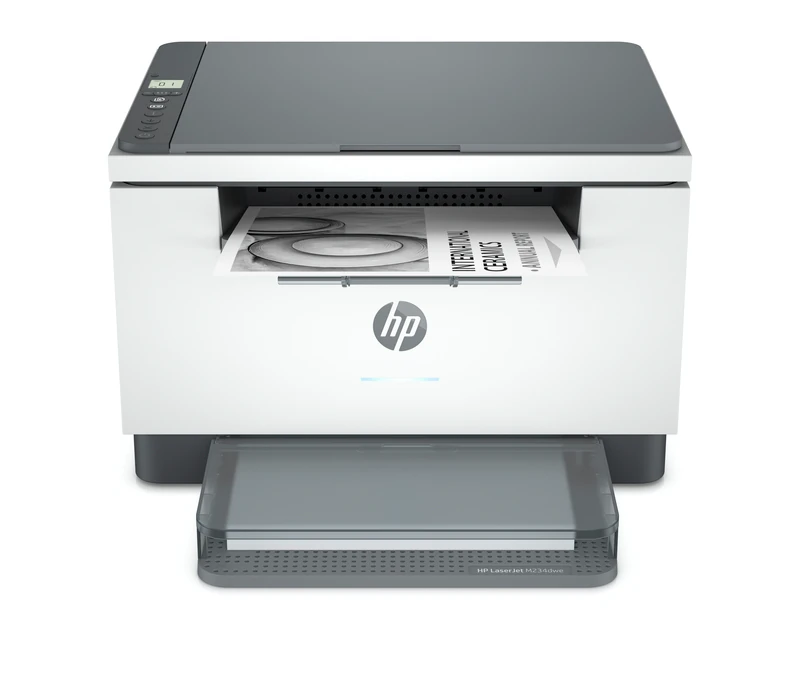
The HP LaserJet MFP M234dwe provides monochrome automatic duplex, a color flatbed and several computer connections in a compact 150-sheet machine. Its deciding condition is HP+: the printer requires an HP account, an ongoing internet connection and Original HP toner for its life. A USB cable does not remove those conditions.
HP identifies exact US 6GW99E#BGJ and explicitly marks it discontinued. This earlier-model review covers the documented 110–127-V, 50/60-Hz US edition. Check the plate and cartridge region. Neither an old promotional page nor an archived brochure establishes current stock, a remaining warranty or availability of a historical introductory offer.
Complete network setup before attempting USB
The original e-series manual requires initial setup through Wi-Fi or Ethernet. A label may cover the rear USB port. After network setup, that label can be removed and a computer connected, but the printer must remain connected to the internet. The guide repeats this condition for normal printing over Wi-Fi, Ethernet and USB.
For the documented USB computer arrangement, budget both the separate USB cable and a working network/internet path for the printer. Add the configured printer through the compatible HP app, called HP Smart in the original, and complete account registration. This is not an offline USB document station.
Ethernet uses 10/100Base-TX, while Wi-Fi supports 2.4 and 5GHz. The original automatically disables infrastructure Wi-Fi when Ethernet is connected. Its WPS sequence holds printer Wireless at least three seconds, then presses router WPS within two minutes. Bluetooth may assist app setup, but the guide expressly excludes Bluetooth printing.
Treat Instant Ink separately from the HP+ requirements
The exact US page calls the subscription optional and says cancellation can return the printer to ordinary Original HP standard or high-yield cartridges. That does not cancel the printer's HP+ account, connectivity or Original HP requirements.
The archived brochure's six-month promotion has historical enrollment dates, page limits and billing conditions. It is not promised as a benefit available now. Evaluate any actual offer's current terms separately before enrolling, especially when considering an earlier machine.
The e-series original specifically excludes refilled and non-Original HP cartridges from expected operation. A Cartridge Policy menu set to Off is not permission to substitute a refill; the model's express HP+ conditions still apply.
Manage the single print input and its automatic return path
The included input holds 150 ordinary sheets, with a separate 100-sheet output. Letter, Legal and A4 printing are supported. Keeping another type ready requires changing the same input; there is no second drawer to add to the count.
Remove remaining paper and straighten the stack before loading. Use one size at a time, printable side up with the top forward, snug guides and extended output support. Legal may need its input cover left raised. The 60–163-g/m² input range is not automatic-duplex approval for every material.
Automatic duplex is positively documented for ordinary Letter and A4. The US Letter print-speed row gives up to 30 one-sided ppm and 19 duplex ipm; the separate exact A4 sheet gives 29 ppm and 18 duplex ipm. Legal duplex remains unconfirmed here. These are paper-specific maker declarations, not measurements of a complex document or phone workflow.
Suitable envelopes use the same tray, up to ten, after plain stock is removed. Load centered and face up with the short postage end toward the back. Match envelope size/type in the computer job. Full label sheets load face up/top toward the back. Neither routine inherits automatic duplex by association.
Use the actual glass for scans and copies
The dwe has a flatbed without the feeder fitted to an sdwe configuration. Its 216×297-mm, approximately 8.5×11.7-inch glass supports Letter and A4, not a full Legal original. Stray ADF dimensions in a generic support record do not establish a feeder or enlarge this glass.
Place the original print side down at the rear-left marking and close the lid. The configured HP app can scan from the printer to the computer, edit, save locally or share. Select that physical scanner rather than the separate phone-camera option. Color scanning does not add color printing.
For a copy, choose count and darkness on the panel, then press Copy. ID Card Copy prompts a manual flip to obtain the other side. There is no automatic duplex scanner, single-pass feeder or analog fax. An app sending-fax promotion is a separate service.
Keep mobile settings, regional toner and working clearance explicit
Local-network AirPrint and Mopria form a separate mobile-printing arrangement. The original also permits AirPrint through Wi-Fi Direct. Enable Direct with the documented Information hold followed by Resume and Wireless together; its report provides the password/status, and up to five clients can connect. HP+ still requires the printer's ongoing internet connection.
Mobile paper size, input count, duplex controls and scanning-to-computer are not borrowed from the desktop arrangement. Direct authentication or the administrator PIN is not evidence of private-job release; that feature remains unestablished.
Use North American W1340A/134A or W1340X/134X, around 1,100 and 2,400 declared pages. The US supplied cartridge is declared around 700, under continuous-printing ISO/IEC 19752 conditions. European 135-series cartridges are distinct. No remaining yield, price or cost per page is promised.
Recommended monthly printing is 200–2,000 pages, versus maximum duty 20,000. The 16.76-lb body measures 14.49×11.76×9.52 inches closed and reaches about 16.52-inch depth/17.18-inch height opened. Allow scanner-lid and service room. For an offline workstation, choose a configuration whose actual operating terms permit it.
Key details at a glance
| Color printing | No |
|---|---|
| Scanner | Yes |
| Copying | Yes |
| Fax | No |
| Flatbed scanner | Yes |
| Automatic document feeder | No |
| Automatic two-sided printing | Yes |
| Automatic two-sided scanning | No |
| Single-pass two-sided scanning | No |
| Color scanning | Yes |
| Instructed envelope handling | Yes |
| Apple AirPrint | Yes |
| Mopria printing | Yes |
| Recommended monthly minimum | 200 pages |
| Recommended monthly maximum | 2000 pages |
| Maximum monthly duty | 20000 pages |
| Included ordinary-paper capacity | 150 sheets |
| Declared one-sided mono Letter rate | 30 pages/min |
| Unit-body width | 14.49 in |
| Unit-body depth | 11.76 in |
| Unit-body height | 9.52 in |
| Unit weight | 16.76 lb |
| Imaging engine | laser |
Use the exact model’s instructions for operating limits, supplied equipment and version differences.
Paper, software and setup details
Print-rate conditions
The exact US Letter print-speed row declares up to 30 simplex ppm and 19 duplex ipm. The separate exact 6GW99E A4 datasheet gives 29 ppm and 18 duplex ipm. Recommended 200–2,000 monthly printing is distinct from 20,000 maximum Letter duty. Generic ADF scan-rate footnotes do not establish a feeder or measured mobile speed.
Paper handling
One included 150-sheet ordinary input and separate 100-sheet output. Exact US supports Letter, Legal and A4 in that input; selected-size capacity assumes that ordinary stock. No separate capacity weight basis was established in the headline; the input range is 60–163 g/m². Remove remaining paper and straighten the stack, use one size at a time, load printable side up/top forward, snug guides, lower cover and extend output. Legal may require leaving the input cover raised; allow working clearance. Up to ten suitable envelopes use the same input, centered and face up with short postage end toward the back; remove plain stock first and select actual size/type. A full label sheet loads face up/top toward the back. Automatic duplex is confirmed for ordinary Letter and A4 by exact model speed sections; Legal duplex remains unconfirmed. Input media weight is not blanket duplex-media approval.
Scanning arrangement
Actual d/dw physical configuration has a scanner lid and glass, with no automatic document feeder; the separate sdn/sdw configuration is not borrowed. Exact model flatbed maximum is 216×297 mm or 8.5×11.7 inches, supporting Letter and A4, not Legal. Place the original print side down at the marked rear-left corner and close the lid. HP Smart/HP app can scan from the actual printer scanner to a computer and save locally or share; phone-camera scanning is a separate alternative. Color scan is supported separately from black-only printing. Panel Copy and ID Card Copy are manual glass routines; a two-sided ID requires flipping the card. No automatic duplex scan, single-pass feeder or analog fax. Stray ADF size/speed fields in generic support records do not add a feeder or Legal glass.
Computer and mobile connections
HP+ requires an account, Original HP toner and an ongoing printer internet connection. The actual e original requires initial Wi-Fi/Ethernet setup; USB must not be used for first setup. After setup, remove the USB label if present and connect the computer, while keeping the printer online through its separate network connection. Ethernet is 10/100Base-TX; Wi-Fi is dual-band 2.4/5 GHz. Ethernet disables infrastructure Wi-Fi. USB/Ethernet cables are separately purchased. Actual WPS holds printer Wireless at least three seconds, then presses router WPS within two minutes. Bluetooth helps setup, not printing.
Supplies and declared yields
Actual original regional supply table limits North America to HP 134A/W1340A and 134X/W1340X, distinct from European 135A/X and other 136/137 regions. Exact US declares approximately 1,100/2,400 replacement pages and approximately 700 supplied black pages, with continuous-printing ISO/IEC 19752 conditions. Maker declarations are not installed remainder, guaranteed real-document yield, current price or cost per page.
Software and support
Use compatible HP computer driver/app and the configured HP+ account. The actual USB/network setup and scanner-app workflow support the described configured desktop print/scan arrangement; USB does not make it offline. Actual e original printed13/30/50 expressly requires Original HP and excludes refill/non-Original cartridges from expected operation. Do not apply the non-e reuse policy. Instant Ink is optional; cancellation can return to ordinary Original HP standard/high-yield cartridges but does not remove HP+ lifetime conditions. Historical six-month promotional terms are not promised now. A Cartridge Policy Off menu does not override explicit HP+ requirements. Private-job PIN remains unknown; Direct authentication and administrator PIN are different.
Electrical edition and setup
Exact US configuration documents 110–127 VAC at 50/60 Hz, separate from 220–240-V editions. Match the actual plate and do not convert voltage. Closed US body is 14.49×11.76×9.52 inches and 16.76 lb, agreeing within source rounding with the d/dw original 368×298.62×241.9 mm and 7.6 kg. Opened working dimensions reach approximately 14.49×16.52×17.18 inches; allow additional cable, ventilation, scanner-lid and service access. The larger sdn/sdw feeder body is not borrowed. Inspect actual condition, included accessories and compatible current computer software.
Sources for this assessment
- HP original M232e–M237e English HP+ User Guide
- HP US exact M234dwe 6GW99E#BGJ HP+ conditions and discontinued notice
- HP exact US 6GW99E M234dwe original two-page datasheet, December 2020
- HP exact M234dwe 6GW99E A4 duplex and scanner datasheet, indexed maker text
- HP exact 6GW99E M234dwe flatbed scope and regional boundary
Find a printer for your routine.
Match color output, scanning, connections and paper handling, then compare the exact models.