
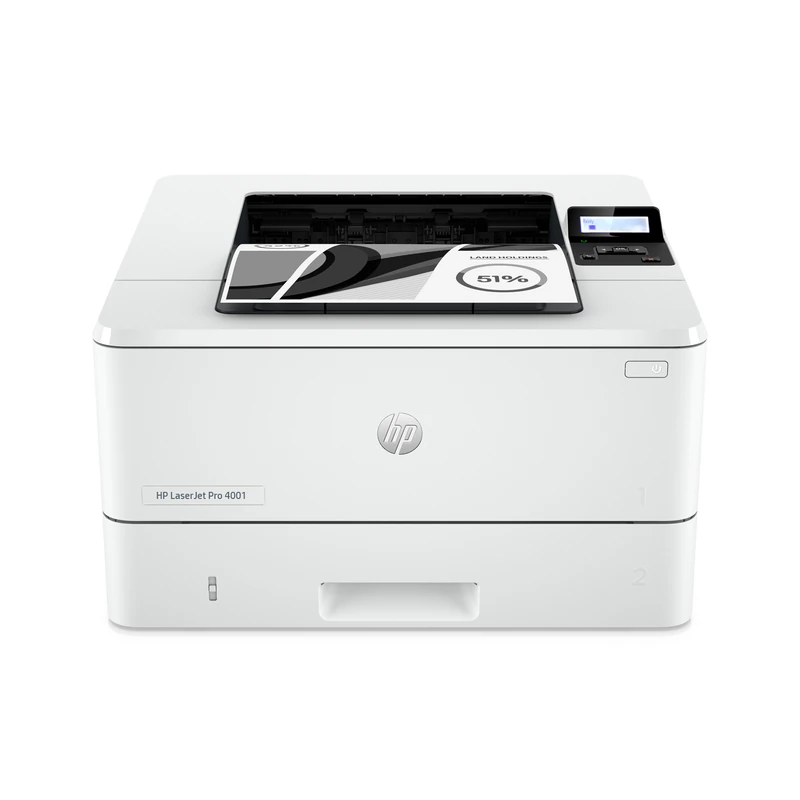
Your needs, this model
Does it fit your priorities?
Can a wired computer automatically print both sides of Legal monochrome documents with 350 ordinary sheets loaded?
Qualifies for the documented US configuration over USB or Ethernet with a compatible driver. Letter, Legal and A4 automatic duplex are positive in the exact paper table; use supported 60–120-g/m² stock. The 100- and 250-sheet inputs total 350 ordinary 75-g/m² sheets. Leave space for the Legal cassette extension behind the printer.
Explore this need in the finder →Can I use PIN release over USB with only the items included in the standard configuration?
Fails for the base configuration. HP explicitly requires a separately purchased dedicated USB 2.0 flash drive of at least 16 GB for job storage. The rear host port alone is not included storage, and setup formats the added device.
Explore this need in the finder →Can I scan and copy Letter originals through the USB cable?
Fails. The 4001dn is print only and has no glass or document feeder. App-based phone scanning does not add those hardware functions.
Explore this need in the finder →A dedicated monochrome printer for a wired workgroup
The HP LaserJet Pro 4001dn is a print-only machine for an office that wants automatic two-sided black-and-white documents over a computer cable or wired network. Its included inputs hold 100 and 250 ordinary sheets. It has neither a document scanner nor a copier, fax, glass or original feeder. An app's phone-camera scanning feature does not add capture hardware to the printer.
The exact US configuration is 2Z600F#BGJ. This review covers its documented low-voltage supply, rated at 110–127 V and 50/60 Hz with the stated tolerances. The separately documented 220–240-V supply is not a universal-voltage setting. Check the actual option code and electrical plate.
HP recommends 750–4,000 printed pages per month. Its 80,000-page maximum duty figure describes a different limit, rather than an appropriate everyday target. Declared one-sided speed is up to 42 ppm for Letter or 40 ppm for A4. The exact Canadian reference for the same option code separately lists 36 images per minute for two-sided Letter or 34 for A4; those image counts are not the same number of completed two-sided sheets.
The dn has Ethernet and USB, without the dw wireless hardware
Included interfaces are Hi-Speed USB 2.0 and Gigabit Ethernet. Use the computer USB interface for a direct cable connection, or configure the printer on the office Ethernet network with suitable software. HP specifies that the US computer USB cable is purchased separately.
The original feature table explicitly excludes wireless networking, Bluetooth Low Energy and Wi-Fi Direct from the dn column. The dw has a different arrangement. A shared family brochure's wireless headline or security-protocol list therefore should not be treated as proof of Wi-Fi in this model.
AirPrint and Mopria are documented for network printing. A phone can use the office wireless access point while the printer uses Ethernet, provided the network permits discovery and communication. HP's AirPrint instructions require the same network subnet. The mobile plan does not assume the full driver's paper-size, duplex or storage controls merely because the hardware has those features.
Use the included 350 sheets and allow room behind the cassette
The 100-sheet multipurpose tray and 250-sheet main cassette total 350 sheets of ordinary 75-g/m², 20-lb paper. Another 550-sheet cassette is optional, raising a separately equipped setup to 900 sheets. The 150-sheet output bin does not increase the amount of blank paper loaded.
Letter, Legal and A4 are explicitly supported in both included trays. They are also positively listed for automatic duplex in HP's paper compatibility table. This is not a wide-format A3 or 11 × 17-inch Tabloid machine. For ordinary duplex work, use supported 60–120-g/m² stock and match the actual paper size and type in the driver.
The main cassette extends out of the back for A4 or Legal, and the rear dust cover flips up. Leave space behind the printer rather than assuming the closed-body depth is the working footprint. Move the length and width guides to the appropriate markings, avoid squeezing the stack tightly and stay below the fill indicators. Do not open a tray while it is feeding.
For one-sided preprinted stock in Tray 2, load the printable face down with the page top toward the tray front. Automatic two-sided jobs use face up with the top toward the back. Tray 1 has its own instructions: face up and top edge first for one-sided output, or face down and bottom edge first for two-sided output. These orientations should not be borrowed from a different LaserJet engine.
Reserve the multipurpose tray for envelopes and labels
HP's original guide excludes envelopes and labels from the main cassette and optional lower tray. Use Tray 1. It holds up to ten suitable envelopes, printable face up with the short postage end entering first.
In a compatible Windows driver, select the actual envelope size, Envelope media type and Manual Feed source, then load the tray when required by the job. Envelopes and labels are not supported for duplexing. A supported envelope job does not establish that a heavy or unusual envelope will feed correctly on ordinary-paper settings.
PIN release needs a separately purchased storage device
The rear host USB port supports job storage rather than serving as another computer connection. HP explicitly requires a dedicated USB 2.0 storage device of at least 16 GB for this feature. It is not included, so the base configuration does not qualify when PIN printing is essential.
If that upgrade is deliberately installed, the printer warns that it will format the flash drive. Use a suitable dedicated device and confirm the driver exposes Job Storage. Select Personal Job and its PIN option for a document that must wait for release. At the two-line panel, press OK, open Job Storage, choose the folder and job, and enter the PIN before printing. Removing the storage device disables job storage. With the Universal Print Driver, HP specifies version 5.9.0 or later.
This optional local storage route is separate from licensed security-management or pull-print services. It also should not be confused with merely protecting access to the printer's administrative menus.
Check the exact supplies and the installed working space
The ordinary US replacements are 148A W1480A, rated at approximately 2,900 pages, and high-yield 148X W1480X, approximately 9,500 pages. HP's declared figures use continuous-printing ISO/IEC 19752 conditions. A 10,000-page contract cartridge is separately listed; it is not the ordinary retail cartridge or proof of toner remaining in a particular unit.
Dynamic security checks for a new or reused HP chip. Cartridge Policy and Cartridge Protection are separate administrator controls, both documented as off by default. Enabling protection permanently associates subsequently installed cartridges with the printer or fleet. The HP+ requirements of similarly named e variants are not assigned to this non-e model.
The exact US reference lists 15 × 14.06 × 8.5 inches and 18.87 lb, without specifying the cartridge-weight basis. The newer family guide gives different cartridge-inclusive weight and open-access depth. Check the actual assembly and leave space for the rear extension, multipurpose tray, toner access and cables.
Key details at a glance
| Color printing | No |
|---|---|
| Scanner | No |
| Copying | No |
| Fax | No |
| Flatbed scanner | No |
| Automatic document feeder | No |
| Automatic two-sided printing | Yes |
| Automatic two-sided scanning | No |
| Single-pass two-sided scanning | No |
| Color scanning | No |
| Instructed envelope handling | Yes |
| Apple AirPrint | Yes |
| Mopria printing | Yes |
| Supported PIN-release printing | No |
| Recommended monthly minimum | 750 pages |
| Recommended monthly maximum | 4000 pages |
| Maximum monthly duty | 80000 pages |
| Included ordinary-paper capacity | 350 sheets |
| Declared one-sided mono Letter rate | 42 pages/min |
| Unit-body width | 15 in |
| Unit-body depth | 14.06 in |
| Unit-body height | 8.5 in |
| Unit weight | 18.87 lb |
| Imaging engine | laser |
Use the exact model’s instructions for operating limits, supplied equipment and version differences.
Paper, software and setup details
Print-rate conditions
One-sided black output is up to 42 ppm for Letter or 40 ppm for A4. The exact same-option Canadian reference separately rates duplex at 36 ipm for Letter or 34 ipm for A4; image counts are not completed two-sided sheets. Recommended monthly volume is 750–4,000 pages, separate from 80,000 maximum duty.
Paper handling
Included inputs hold 100 plus 250 sheets of ordinary 75-g/m², 20-lb stock, totaling 350. The optional 550-sheet cassette and 150-sheet output bin are excluded. Exact HP compatibility table confirms Letter, Legal and A4 in both included inputs and automatic duplex. Supported ordinary duplex weight is 60–120 g/m². Main cassette extends behind the printer for A4 or Legal and rear dust cover flips up; no separate extension distance is invented. Adjust guides to size markings without squeezing, respect fill indicators and match actual driver size/type. Tray 2 preprinted stock is face down/top front for one-sided output or face up/top back for automatic duplex. Tray 1 uses face up/top first for one-sided or face down/bottom first for duplex. Envelopes and labels use Tray 1 only and never duplex; up to ten suitable envelopes load face up/short postage end first.
Scanning arrangement
The exact dn technical scope and complete original hardware identify a dedicated monochrome printer with no scanner, copier, fax, glass or document feeder. A phone-camera app feature does not provide printer capture hardware. No connection has a document scan route.
Computer and mobile connections
Included computer connections are Hi-Speed USB 2.0 and Gigabit Ethernet, with the US computer USB cable purchased separately. Rear host USB is a different port used for separately added job-storage media. Exact dn column excludes Wi-Fi, BLE and Wi-Fi Direct; shared family wireless headlines and protocol fields do not override it. AirPrint requires the same network subnet; Mopria is documented. A phone may use an office access point while the printer uses Ethernet. Mobile plans do not borrow desktop sizes, duplex, PIN or paper capacity.
Supplies and declared yields
US retail replacements are 148A W1480A at approximately 2,900 pages or 148X W1480X at approximately 9,500, declared under continuous-printing ISO/IEC 19752. The separately listed 10,000-page W1020XC is a contract cartridge. No remaining toner or tested yield is inferred. Dynamic security requires a new or reused HP chip. Administrator Cartridge Policy and Cartridge Protection are separate and off by default; protection permanently affects subsequently installed cartridges. No HP+ lifetime requirements from e variants are assigned to the non-e dn.
Software and support
Use a compatible exact-model print driver and actual size/type settings. Base PIN qualification is false because job storage explicitly requires a separately purchased dedicated USB 2.0 storage device of at least 16 GB. Setup formats that drive; removing it disables job storage. With the installed upgrade, confirm the Job Storage tab, select Personal Job/PIN and release the named folder/job through the two-line panel. UPD must be version 5.9.0 or newer. No optional drive or licensed pull-print service is assumed included. The newer guide lists 512-MB memory while the exact US/NA sheet lists 256 MB; no memory upgrade conclusion is invented.
Electrical edition and setup
Exact US identity is 2Z600F#BGJ with documented 110–127-V, 50/60-Hz supply and stated tolerances. The separate 220–240-V edition is not dual voltage. The exact surviving reference has no observed discontinued notice and does not establish current stock. US body is 15 × 14.06 × 8.5 inches, 18.87 lb with weight basis unspecified. Newer family guide gives 19.6 lb with cartridges and 30.8-inch open depth versus US 25 inches. Preserve this source variation and verify actual working space, rear cassette extension, front tray, toner access and cables.
Sources for this assessment
Find a printer for your routine.
Match color output, scanning, connections and paper handling, then compare the exact models.