
Your needs, this model
Does it fit your priorities?
Can a compatible USB computer make black Legal duplex prints, scan one-sided Legal originals in color and copy, with 260 ordinary sheets loaded?
Qualifies with earlier models enabled and the full compatible computer print/scan installation. The ten-sheet priority input adds to the 250-sheet main input, automatic print duplex is included, and Legal color originals use the 35-sheet simplex feeder. This does not provide automatic two-sided scanning or fax.
Explore this need in the finder →Can an Ethernet computer automatically scan both sides of a Letter feeder stack?
Fails. HP explicitly specifies no duplex ADF scanning. The automatic print duplexer does not read the reverse of originals, so an attended turn-over workflow is required for two-sided records.
Explore this need in the finder →Can this Wi-Fi model also send hardware faxes as part of the print, scan and copy routine?
Fails. Exact M148dw functions are print, copy and scan; the original two-model table marks its fax unavailable. M148fdw fax hardware and controls do not belong to this dw configuration.
Explore this need in the finder →A monochrome desk routine with color document capture
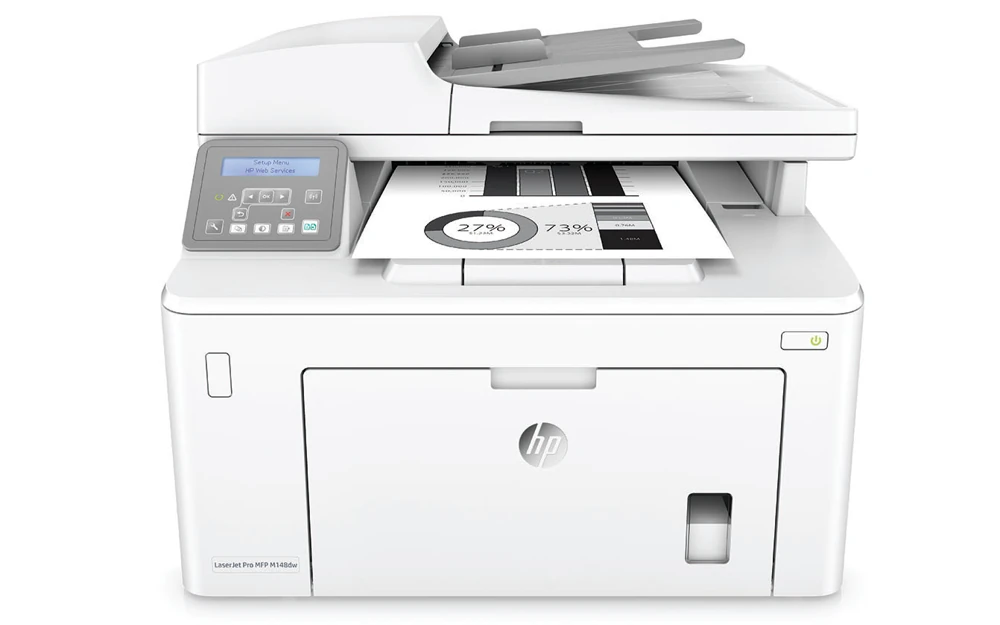
The HP LaserJet Pro MFP M148dw suits a small office that mainly prints black text, copies paperwork and scans occasional stacks. It includes automatic two-sided printing, a 35-sheet document feeder and both wired and wireless connections. Its scanner can capture color, even though the print engine and copies are monochrome.
The important limit is on the original side: the feeder scans one side of each sheet automatically. Automatic print duplex does not provide two-sided scanning. The M148dw also lacks the M148fdw's fax function and has a two-line LCD with physical buttons rather than the touchscreen found on some other models in the shared manual.
This review covers discontinued US 4PA41A#BGJ and the documented 110–127-V, 50/60-Hz electrical configuration. A separately listed 220–240-V version is not a universal-voltage setting. HP recommends 200–2,000 printed pages monthly, distinct from its 20,000-page maximum duty figure. Published output is up to 30 ppm for Letter or 28 ppm for A4; these are manufacturer specifications, not review benchmarks.
Install the scanning software for the connection you use
The included computer interfaces are USB 2.0, Ethernet and infrastructure Wi-Fi. The exact US product and original US brochure specify 10/100 Ethernet. A later short technical insert says 10/100/1000; this review keeps the US configuration's narrower network declaration rather than promising a faster link.
A compatible full computer installation provides HP Scan and scan drivers. The documented scan inputs include HP LaserJet scanning software, TWAIN and WIA. Use the actual printer's software entry and select a scan shortcut, output settings and destination. On Windows, the shared guide starts through Printer Assistant and Scan a Document or Photo; a print-only installation does not establish that the scan application is installed.
The original software footnote is particularly useful for an older printer: full Windows software was specified for Windows 7 and newer, while older Windows and server arrangements could receive print drivers only. That historical list is not a promise of current OS support. Check the exact full scan installation before relying on a surviving unit.
The two-line M148dw control panel uses arrows, OK, Setup and dedicated copy buttons. Do not expect the M227 touchscreen's Scan to Email, network-folder or front flash-drive menus simply because they appear elsewhere in the same manual. No configured panel SMTP or shared-folder delivery is added to this model's finder plans.
Choose the glass or feeder by the original
The flatbed reaches approximately 8.5 × 11.7 inches, covering Letter and A4. Legal originals belong in the feeder, whose maximum is 8.5 × 14 inches. The 35-sheet capacity concerns originals waiting to be scanned or copied; it is not part of the printer's blank-paper reserve.
Color capture is expressly documented for both paths. Published optical limits differ: up to 300 dpi for feeder scanning, up to 600 dpi for color on the glass, or up to 1,200 dpi for monochrome on the glass. Use the glass when its supported resolution or handling better suits the original rather than assuming the same specification applies to the feeder.
A selected duplex or single-pass scanning requirement fails because HP explicitly specifies no duplex ADF scanning. An attended process that turns originals over may still be useful, but its existence does not make the hardware a duplex scanner.
Count the genuine priority input with the main cassette
The included main input holds 250 ordinary sheets and the priority input holds ten. The guide bases those figures on 75-g/m², 20-lb paper, giving a combined 260-sheet ordinary reserve. That differs from the headline's main-tray-only 250 figure. The 150-sheet output is separate.
Letter, Legal and A4 are supported for ordinary computer printing and automatic print duplex. Load either input face up with the top entering the printer, adjust the guides without bending the stack and keep within its fill limit. Remove and straighten paper when replenishing; the original loading instructions advise against fanning it. A3 and 11 × 17-inch Tabloid are outside the supported width.
For special stock, set the actual size and media type in the driver. Supported envelopes can use the documented manual-feed arrangement, up to ten, face up with the short postage end entering first. Their capacity and one-sided route do not inherit the ordinary-paper duplex or combined-sheet figure.
Keep mobile printing on its documented route
AirPrint is supported on the same local subnet as the Apple device. The printer can use Ethernet while the phone uses the office access point. Mopria certification is also explicit in the exact US brochure. The mobile plan leaves exact paper controls, capacity, PIN release and automatic duplex unconfirmed rather than borrowing them from the computer driver.
Wi-Fi Direct is genuinely named for the M148dw, distinct from legacy Wireless Direct. A compatible mobile device joins the printer's direct signal and may need an app or driver. This separate peer-printing plan does not establish scanning to a computer or desktop duplex controls. Conflicting old radio-band footnotes are not turned into a 5-GHz guarantee.
Separate the starter toner, replacement toner and drum
The original box lists about 1,000 pages of introductory black toner and a separate 32A CF232A imaging drum. Replacement 94A CF294A is declared at about 1,200 pages or 94X CF294X at about 2,800, under the specified ISO/IEC 19752 basis. The drum has a separate approximately 23,000-page declaration with HP's stated usage assumptions. None is a measurement of toner remaining in a particular used unit.
The US body measures 15.9 × 16 × 12.3 inches and weighs 20.7 lb, without a cartridge-weight basis stated. Published maximum dimensions reach 24.6 inches deep and 17.9 inches high. Leave room for the inputs, scanner opening, original support, cables and service access. The historical box includes USB cable; verify actual contents and supplies when assessing an earlier unit.
Key details at a glance
| Color printing | No |
|---|---|
| Scanner | Yes |
| Copying | Yes |
| Fax | No |
| Flatbed scanner | Yes |
| Automatic document feeder | Yes |
| Automatic two-sided printing | Yes |
| Automatic two-sided scanning | No |
| Single-pass two-sided scanning | No |
| Color scanning | Yes |
| Instructed envelope handling | Yes |
| Apple AirPrint | Yes |
| Mopria printing | Yes |
| Recommended monthly minimum | 200 pages |
| Recommended monthly maximum | 2000 pages |
| Maximum monthly duty | 20000 pages |
| Included ordinary-paper capacity | 260 sheets |
| Document-feeder capacity | 35 sheets |
| Declared one-sided mono Letter rate | 30 pages/min |
| Unit-body width | 15.9 in |
| Unit-body depth | 16 in |
| Unit-body height | 12.3 in |
| Unit weight | 20.7 lb |
| Imaging engine | laser |
Use the exact model’s instructions for operating limits, supplied equipment and version differences.
Paper, software and setup details
Print-rate conditions
Exact US source rates Letter monochrome output at up to 30 ppm; the original M148 technical table separately confirms A4 at 28 ppm. Recommended monthly printing is 200–2,000 pages, distinct from 20,000 maximum duty. Color scanning does not imply color printing or color copies. No hands-on benchmark is claimed.
Paper handling
Included inputs hold ten plus 250 ordinary 75-g/m², 20-lb sheets, totaling 260 for Letter, Legal or A4. US headline 250 refers to the main input only; output 150 and original feeder 35 are separate. Shared exact-family paper instructions positively list Letter/Legal/A4 for automatic print duplex. Load face up/top entering in both inputs, guides light and no overfill; remove and straighten replenished stock without fanning. Up to ten supported envelopes use the documented manual-feed route, face up/short postage end first, matching actual size and Envelope type. Envelope jobs do not inherit ordinary duplex or combined capacity.
Scanning arrangement
Independent color capture is documented on Letter/A4 glass and the 35-sheet simplex Letter/Legal/A4 feeder. Glass maximum is 8.5 × 11.7 inches; feeder maximum 8.5 × 14. Exact maker duplex ADF field is No, so automatic and single-pass scan duplex are false. Published optical limits are up to 300 dpi for color/mono ADF, 600 dpi color glass and 1,200 dpi mono glass. Full compatible HP Scan/TWAIN/WIA computer software is required; print-only drivers do not establish capture. The M148dw two-line LCD does not inherit M227 touchscreen panel email/folder/flash-drive scan menus.
Computer and mobile connections
Included USB 2.0, Ethernet and infrastructure Wi-Fi are positively documented. Exact US product/brochure specify Ethernet 10/100, while a later short technical insert says 10/100/1000; the US narrower declaration controls, with no Gigabit promise. US box includes USB cable, subject to surviving-unit contents. Genuine Wi-Fi Direct peer printing is separately documented; a compatible device joins the direct signal and may need an app/driver. AirPrint uses the same subnet; Mopria is explicit. Mobile routes do not borrow computer scan, size, capacity, PIN or duplex guarantees. Conflicting old radio-band footnotes do not establish 5-GHz support.
Supplies and declared yields
US introductory black toner declares approximately 1,000 pages. Replacement 94A CF294A is approximately 1,200 or 94X CF294X approximately 2,800 under the exact ISO/IEC 19752 footnote. Separate 32A CF232A drum declares approximately 23,000 pages with HP internal-test and stated usage assumptions; do not treat drum life as toner yield or as guaranteed remaining life. No current cartridge price, measured yield or supplied-full-replacement assumption.
Software and support
A compatible full computer installation supplies HP Scan driver/application and documented HP LaserJet Scan, TWAIN or WIA inputs over the included computer arrangements. Shared Windows routine uses Printer Assistant and Scan a Document or Photo; Mac support requires its actual compatible software. Original US footnote limits the historical full Windows solution to Windows 7 and newer and older/server arrangements to print-only drivers. Historical OS lists are not current compatibility guarantees. Exact dw has no fax or fax keypad; system/admin passwords do not establish held-print PIN. No native panel SMTP/folder route or lifetime HP+ condition is inferred.
Electrical edition and setup
Exact US 4PA41A#BGJ is explicitly discontinued and documented for 110–127 V, 50/60 Hz; regional 220–240-V configuration is separate. The two-line LCD uses physical arrow/OK/Setup/copy/wireless buttons, not the M227 touchscreen. Body is 15.9 W × 16 D × 12.3 H inches and 20.7 lb, with cartridge-weight basis unspecified; maximum dimensions are 15.9 × 24.6 × 17.9 inches. Shared older family dimensions/weight differ and do not replace the exact US declaration. Allow actual input, scanner, original support, cable and maintenance clearance.
Sources for this assessment
- HP M148/M227 original User Guide, Edition 3 June 2018, existing preserved original
- HP exact US M148dw 4PA41A#BGJ discontinued technical reference
- HP US M148dw 4PA41A original datasheet, August 2018, preserved reproduction
- HP M148 original technical insert with separate dw/fdw columns
- HP M148dw exact detailed scanner specifications
Find a printer for your routine.
Match color output, scanning, connections and paper handling, then compare the exact models.