
Your needs, this model
Does it fit your priorities?
Can I scan one-sided Legal originals in color from a USB computer and print Legal duplex with 260 ordinary sheets included?
Qualifies with earlier references enabled and compatible full HP Scan software. Use the 35-sheet simplex feeder for Legal originals; the glass fits Letter/A4 only. The main 250 plus priority 10 ordinary inputs support Legal printing and its automatic duplex routine.
Explore this need in the finder →Will the M227fdn automatically capture both sides of a Letter batch because it prints both sides automatically?
Fails. Exact HP specifies no duplex ADF scanning. The 35-sheet feeder scans one side, and the original two-sided copy routine asks the user to supply each glass original; output duplex is a different function.
Explore this need in the finder →Can the included fdn join my Wi-Fi network and use the Wi-Fi Direct/NFC marketing claim?
Fails. The exact fdn original says Wireless Capability No and lists USB/Ethernet/phone ports. The common marketing block does not add fdw radios or touchscreen features to this two-line-LCD model.
Explore this need in the finder →A wired document MFP with automatic print duplex
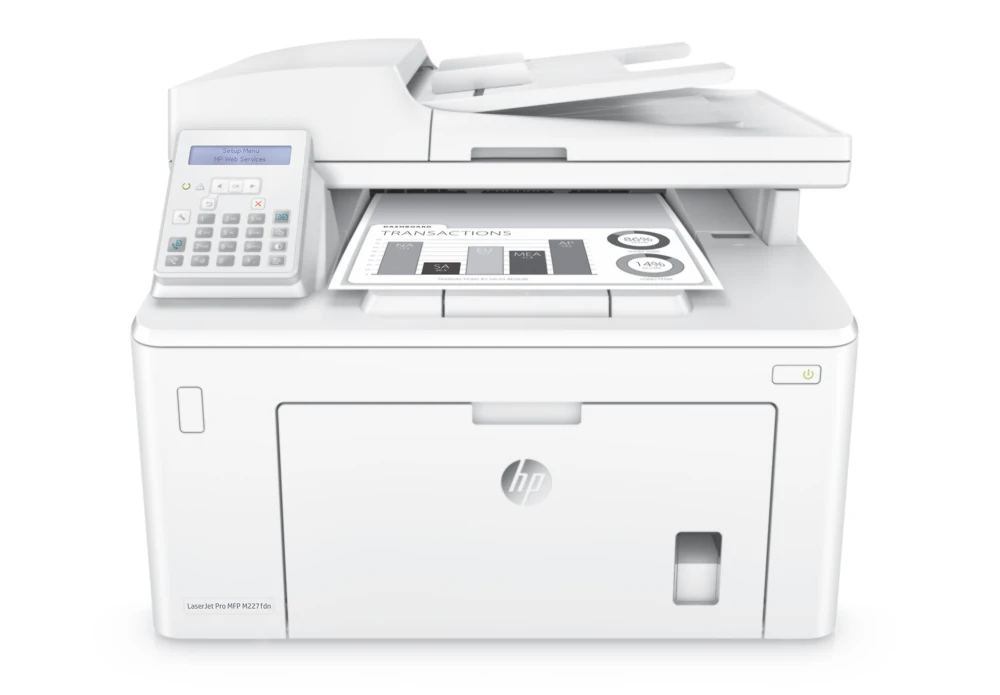
The HP LaserJet Pro MFP M227fdn fits a small desk or workgroup printing black documents and scanning through compatible computer software. It combines a 250-sheet main input, ten-sheet priority input, 35-sheet document feeder, copying and analog fax. Its automatic print duplex is useful for ordinary Letter, Legal and A4 jobs.
The deciding limitation is document capture: the feeder scans one side at a time. Automatic double-sided printing does not mean automatic double-sided scanning. Legal originals fit the feeder, while the glass stops at 8.5 by 11.7 inches. Choose a different scanner configuration if unattended capture of both sides or Legal-length glass is essential.
HP's exact US page identifies G3Q79A#BGJ and explicitly marks the printer discontinued. This review concerns the documented 110–127-V, 50/60-Hz US edition. Separate high-voltage editions are not a reason to assume universal power, and an earlier unit's actual option and electrical plate still need checking.
The fdn uses USB or Ethernet, with a two-line LCD
The included connections are computer USB 2.0 and 10/100 Ethernet, plus separate telephone-line input and output. The fdn has no included wireless capability. A shared marketing paragraph on the US page mentions Wi-Fi Direct and NFC, but the exact technical table and original fdn datasheet do not include those radios. They are not added to the reviewed configuration.
The two-line LCD has physical navigation, copy and fax controls. It is not the fdw touchscreen. The shared manual limits direct panel scan-to-email, network-folder and walk-up USB features to touchscreen models, so those workflows are not borrowed for fdn. A network port alone does not establish those panel menus.
With the compatible full HP computer software, open HP Printer Assistant, choose Scan, then Scan a Document or Photo, adjust the settings and start. The original Mac routine uses HP Easy Scan to scan and save the resulting file. Exact-model scanning specifications also name TWAIN and WIA software. Use the proper package for the intended USB or Ethernet computer arrangement, and verify current operating-system support before relying on historical instructions.
The original software footnote distinguishes full solutions from print-only installations for some older systems. Installing a print driver is not by itself a successful scanner setup. Computer software can save a document to a folder, but that is a different routine from a panel that independently sends to a network destination.
Handle originals according to the scanner route
The exact original specifies color and monochrome scanning through both glass and feeder. Printed pages and copies remain monochrome. The feeder accepts Letter, Legal and A4 loose originals, up to 35 sheets under its stated ordinary-paper conditions. The glass fits Letter and A4 within its 8.5-by-11.7-inch limit.
Use the loading indicators and adjust the document guides for the original. For a two-sided batch, scan the required sides manually with an appropriate software routine and check page order afterward. There is no reversing or single-pass automatic duplex scanner to handle that step for you.
The original two-line-panel copying procedure makes the distinction concrete: place the original face down at the upper-left glass corner, select the Two-sided copy option, start copying, and place the next original on the glass when prompted. The printer can make two-sided output while you still supply each original side. Review the final file or copy before treating the job as complete.
Count the main and priority inputs correctly
The included ordinary-paper total is up to 260 sheets: 250 in the main input and ten in the priority input. Both capacities use the original 75-g/m², 20-lb paper basis. The ten-sheet priority path is a real small input stack, not a single manual sheet. The 150-sheet output tray and document feeder do not increase blank-paper reserve.
Both inputs explicitly list Letter, Legal and A4 for normal printing and two-sided paper orientation. Remove existing stock and straighten the replacement stack without fanning it. Open the main tray door, adjust the width and length guides, then load below the limit with the guides touching lightly rather than bending the sheets.
For preprinted portrait sheets, both documented simplex and duplex orientations use face up with the top edge entering first. In the compatible Windows driver, choose Finishing and Print on both sides. Keep size and media type consistent with the supported duplex job. The main door closes for Letter, A4 or smaller paper; allow the operating space needed for longer stock.
For suitable envelopes, the original permits up to ten in either input. Select the actual envelope size, Envelope type and Manual feed, then load face up with the short postage end first. Use one-sided envelope printing rather than extending the ordinary-paper duplex permission to envelopes.
Separate toner, drum and fax setup
CF230A is the HP 30A black toner cartridge and CF230X the HP 30X. HP declares approximately 1,600 and 3,500 pages under ISO/IEC 19752. CF232A is a separate HP 32A imaging drum, declared around 23,000 pages. The original box lists a 1,600-page toner and drum; these declarations do not establish remaining supplies in earlier hardware.
The original manual describes Cartridge Policy and Cartridge Protection as separate, disabled-by-default controls. Policy can restrict which cartridges are accepted. Protection permanently associates subsequently installed cartridges with the printer or fleet; turning it off later does not unlock cartridges already protected. This is not treated as an HP+ lifetime supply commitment. Secure PIN release of computer print jobs remains unconfirmed.
Analog fax still needs the actual telephone connection, answer settings and time, date and header setup. AirPrint uses a supported shared network with the printer attached by Ethernet; it does not require an internal Wi-Fi radio. Mobile print controls remain separate from the desktop scanning and duplex plans.
Maker printing rate is up to 30 one-sided Letter ppm, distinct from 18 Letter duplex ipm. Recommended monthly printing is 250–2,500 pages rather than the 30,000-page duty ceiling. The body is about 15.9 by 16 by 12.3 inches and weighs 20.7 lb; allow tray, scanner, cable and service clearance beyond those body limits.
Key details at a glance
| Color printing | No |
|---|---|
| Scanner | Yes |
| Copying | Yes |
| Fax | Yes |
| Flatbed scanner | Yes |
| Automatic document feeder | Yes |
| Automatic two-sided printing | Yes |
| Automatic two-sided scanning | No |
| Single-pass two-sided scanning | No |
| Color scanning | Yes |
| Instructed envelope handling | Yes |
| Apple AirPrint | Yes |
| Recommended monthly minimum | 250 pages |
| Recommended monthly maximum | 2500 pages |
| Maximum monthly duty | 30000 pages |
| Included ordinary-paper capacity | 260 sheets |
| Document-feeder capacity | 35 sheets |
| Declared one-sided mono Letter rate | 30 pages/min |
| Unit-body width | 15.9 in |
| Unit-body depth | 16 in |
| Unit-body height | 12.3 in |
| Unit weight | 20.7 lb |
| Imaging engine | laser |
Use the exact model’s instructions for operating limits, supplied equipment and version differences.
Paper, software and setup details
Print-rate conditions
Exact US declaration is up to 30 one-sided Letter ppm; 18 Letter duplex ipm is separate. Recommended monthly printing is 250–2,500 pages, distinct from 30,000 maximum duty. Regional A4 rates and scan ppm are not substituted. No measured performance is claimed.
Paper handling
Included ordinary input is up to 260 sheets: main 250 plus priority 10, each with the original 75-g/m², 20-lb basis. Letter, Legal and A4 are explicitly supported in both inputs and the documented duplex subset. Priority is a genuine ten-sheet input. Output 150 and ADF 35 are separate. Remove existing stock, straighten without fanning, adjust guides lightly and keep below fill limits. Preprinted portrait simplex and duplex use face up with top entering first. Windows Finishing offers Print on both sides. Each input takes up to ten suitable envelopes, face up with the short postage end first, using actual size, Envelope type, Manual feed and a one-sided job.
Scanning arrangement
The exact original specifies color and monochrome scanning in both glass and feeder fields. Printed and copied output is monochrome. Glass measures 8.5 × 11.7 inches and supports Letter/A4; the 35-sheet simplex ADF supports Letter/Legal/A4. Exact current HP states Duplex ADF scanning: No. The original manual describes two-sided copying by supplying each glass original when prompted. Compatible full HP Scan software is the reviewed computer delivery route for USB or Ethernet. Direct panel email, network-folder and walk-up USB features in the shared manual are touchscreen-only and are not borrowed by the fdn LCD model.
Computer and mobile connections
Exact fdn includes computer USB 2.0 and 10/100 Ethernet plus line-in and line-out telephone ports. Original Wireless Capability: No excludes built-in Wi-Fi, Wi-Fi Direct and NFC, despite conflicting common US marketing text. AirPrint uses the supported same-subnet network with the printer attached by Ethernet. Mobile print jobs do not inherit exact desktop paper, capacity, duplex, scanning or PIN controls. Mopria remains unconfirmed; generic support links do not establish a model-specific capability.
Supplies and declared yields
Separate consumables are CF230A / HP 30A at approximately 1,600 pages, CF230X / HP 30X at approximately 3,500 pages, and CF232A / HP 32A imaging drum at approximately 23,000 pages. The original US brochure gives the ISO/IEC 19752 toner declaration and lists a 1,600-page toner and drum in the box; actual remaining supplies are unknown. The original manual says Cartridge Policy and Cartridge Protection are distinct and off by default. Protection permanently associates subsequently installed cartridges; switching it off does not unlock already protected cartridges. No newer HP+ lifetime policy is imposed.
Software and support
Documented computer scanning uses HP Scan through Printer Assistant on Windows and HP Easy Scan on Mac, with exact TWAIN/WIA input scope. Verify actual full software, current OS support and scanner access over the intended USB or Ethernet setup. Some historical legacy/server installations are print-only; a working print driver is not proof of installed scanner controls. The two-line fdn panel differs from the fdw touchscreen. Stored computer-job PIN release remains unknown; generic security management and numeral keys do not establish it.
Electrical edition and setup
Actual HP US G3Q79A#BGJ is explicitly discontinued, requiring earlier opt-in. The reviewed US configuration is 110–127 VAC at 50/60 Hz. High-voltage editions are separate; check actual option and plate. Body is 15.9 W × 16 D × 12.3 H inches and 20.7 lb, with larger operating space required for lid, paper, cables and service. Analog fax needs suitable line-in service, actual answer settings and time/date/header setup; phone-out is separate. Common Direct/NFC and panel-email marketing is rejected against exact fdn hardware scope.
Sources for this assessment
Find a printer for your routine.
Match color output, scanning, connections and paper handling, then compare the exact models.