
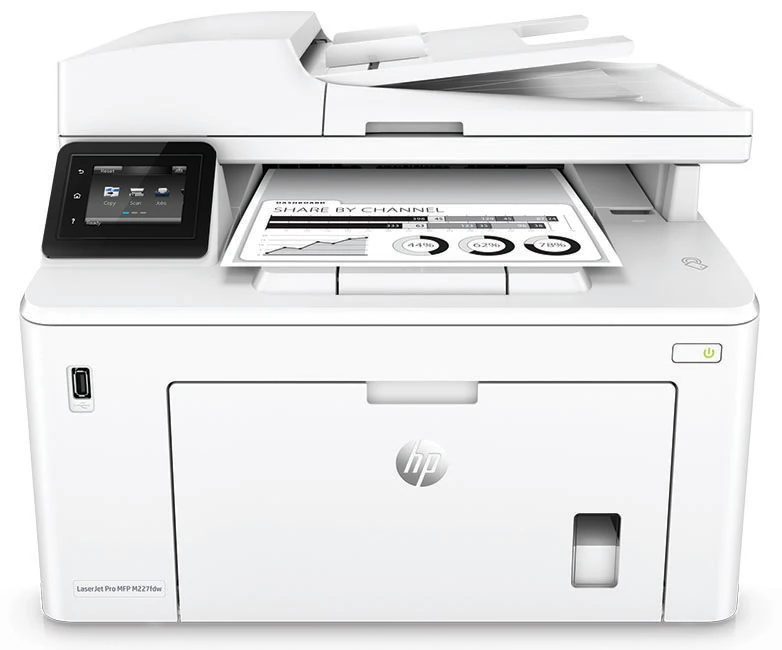
Your needs, this model
Does it fit your priorities?
Can a compatible Wi-Fi computer handle black Legal printing with automatic duplex, color Legal feeder scans, copying and fax, with 260 ordinary sheets?
Qualifies with earlier references enabled and the exact US edition. Use the full computer print/scan arrangement and simplex feeder capture. The ten-sheet priority input adds to the main 250-sheet input; fax additionally needs suitable telephone service.
Explore this need in the finder →Can it automatically scan both sides of Letter feeder originals to my Ethernet computer?
Fails. The exact M227fdw specifications say no duplex ADF scanning. Its automatic print duplex and prompted manual copying do not provide automatic two-sided or single-pass original capture.
Explore this need in the finder →Can a compatible Android Mopria plugin print through the documented Wi-Fi Direct peer route?
Qualifies with earlier references enabled, Wi-Fi Direct turned on and the compatible device connected to the printer signal. Exact paper, duplex, capacity and scanner requirements must remain flexible because they are not established for this mobile route.
Explore this need in the finder →The touchscreen configuration adds useful scan destinations
The HP LaserJet Pro MFP M227fdw is a monochrome printer, color scanner, copier and analog fax with a 2.7-inch touchscreen. The fdw configuration includes USB computer printing, 10/100 Ethernet, infrastructure Wi-Fi and Wi-Fi Direct. It is most useful when a small desk wants automatic two-sided print output and several ways to deliver scans.
The exact US page identifies G3Q75A#BGJ and explicitly marks it discontinued. This review concerns that earlier US 110–127-V, 50/60-Hz configuration. Check the actual electrical plate. Separately documented high-voltage versions are not interchangeable, and a support page does not establish new stock or unused supplies.
Its display and networking should not obscure the scanner's main limit: the 35-sheet document feeder scans one side at a time. Automatic print duplex does not provide automatic two-sided original capture.
Use Legal originals in the feeder
The flatbed supports approximately 8.5 by 11.7 inches, covering Letter and A4. The ADF reaches 8.5 by 14 inches for Legal originals. Color capture is independently documented for these routes even though printed and copied pages are black-and-white.
A compatible computer can initiate scans through HP Scan on Windows or HP Easy Scan on Mac. The original Windows routine opens Printer Assistant, selects Scan a Document or Photo, adjusts settings and starts capture. Install the required scan software and verify exact compatibility; a basic print driver and a historical operating-system list do not guarantee that workflow.
For two-sided originals, plan on manual handling. The copy instructions prompt the user to place the next original on the glass rather than feeding both sides automatically. A selected automatic duplex or single-pass scan requirement therefore fails, regardless of the network connection.
Configure a shared folder or email profile before using the panel
The touchscreen model has Scan to Network Folder and Scan to E-mail menus. They require an active network connection and configuration before use. These are useful alternatives to starting every scan from a desktop application, but each has its own dependencies.
For a network folder, first create the shared destination and obtain its network path and access credentials. Use the setup wizard where supported or the embedded web server, enable the feature, create the folder profile and choose file format, paper size, resolution and output color. Save and Test checks that arrangement before daily use.
Email delivery needs a working SMTP server, port and any required authentication or secure-connection settings. Create an outgoing profile and test it against the intended mail service. The optional four-digit profile PIN controls sending scans; it does not establish secure release of computer print jobs.
The reviewed panel folder and email procedures explicitly describe placing the original on the glass. Their finder plans therefore retain confirmed Letter/A4 glass delivery, while the computer-software plan separately includes Legal ADF capture. The front USB host route explicitly accepts glass or feeder originals and saves PDF or JPG in an HPSCANS folder on a flash drive. That socket differs from the rear USB computer connection.
Separate mobile printing from the desktop document routine
AirPrint is supported with the printer and Apple device on the same local network. The printer can reach that network by Ethernet or Wi-Fi. This review does not transfer the desktop plan's paper selections, scanning, input-capacity control or automatic duplex behavior into the mobile protocol.
Wi-Fi Direct is explicitly named for the fdw. On the touchscreen, open Connection Information, Wi-Fi Direct, Settings and the connection method. Enable the feature, select the printer's signal on a compatible device and provide the required password or confirmation. Some devices must reconnect to their ordinary network after printing.
The original guide specifically supports compatible Android devices using the HP Print Service or Mopria plugin on the Wi-Fi Direct route. NFC touch-to-print also needs a compatible NFC printing device; the logo does not make every phone compatible. No phone scanning or cloud-service availability is assumed from a generic mobile print claim.
Count both included inputs and choose the actual media
The main tray holds up to 250 sheets and the priority tray holds a genuine ten-sheet stack, both specified for 75-g/m², 20-lb paper. Together they provide 260 ordinary input sheets. The 35-sheet original feeder and 150-sheet output tray are separate from that reserve.
Letter, Legal and A4 are explicitly listed for ordinary input and two-sided print orientation. Load print-side up with the top edge entering the printer, adjust guides so they touch without bending the stack and avoid overfilling. The original instructions say to remove and straighten existing stock before loading and not to fan it.
In a compatible Windows driver, select Print on both sides in Finishing for automatic duplex. Set the actual paper size and type in Paper/Quality. Larger stock needs operating room beyond the closed tray arrangement; do not borrow another printer's Legal-extension distance.
For suitable envelopes, either input holds up to ten. Use a one-sided envelope job, select the correct size, Envelope type and Manual feed source, then follow the prompt. Load face up with the short postage end entering first. The ordinary 250-sheet paper capacity is not an envelope capacity.
Keep supplies, fax service and working clearance distinct
Toner replacements are CF230A, declared around 1,600 pages, or CF230X around 3,500 pages under ISO/IEC 19752. The separate CF232A imaging drum is declared around 23,000 pages. The US box lists a roughly 1,600-page toner cartridge and the drum; those declarations do not establish the remainder in an earlier unit.
The original manual says Cartridge Policy and Cartridge Protection are off by default. Enabling Protection permanently associates subsequent cartridges with the printer or fleet, and turning it off does not unlock already protected cartridges. These controls should not be confused with a mandatory HP+ lifetime enrollment.
Fax additionally needs suitable telephone service; HP recommends a dedicated analog line and appropriate configuration for digital environments. Maker speed is up to 30 Letter ppm, separately 28 A4 ppm, with duplex output separately rated up to 18 ipm. Recommended monthly volume is 250–2,500 pages versus a 30,000-page maximum duty. Exact US body figures are 15.9 by 16.0 by 12.3 inches at 20.7 lb; allow tray, scanner-lid, output and cable access.
Key details at a glance
| Color printing | No |
|---|---|
| Scanner | Yes |
| Copying | Yes |
| Fax | Yes |
| Flatbed scanner | Yes |
| Automatic document feeder | Yes |
| Automatic two-sided printing | Yes |
| Automatic two-sided scanning | No |
| Single-pass two-sided scanning | No |
| Color scanning | Yes |
| Instructed envelope handling | Yes |
| Apple AirPrint | Yes |
| Mopria printing | Yes |
| Recommended monthly minimum | 250 pages |
| Recommended monthly maximum | 2500 pages |
| Maximum monthly duty | 30000 pages |
| Included ordinary-paper capacity | 260 sheets |
| Document-feeder capacity | 35 sheets |
| Declared one-sided mono Letter rate | 30 pages/min |
| Unit-body width | 15.9 in |
| Unit-body depth | 16 in |
| Unit-body height | 12.3 in |
| Unit weight | 20.7 lb |
| Imaging engine | laser |
Use the exact model’s instructions for operating limits, supplied equipment and version differences.
Paper, software and setup details
Print-rate conditions
Exact US header explicitly rates one-sided Letter output up to 30 ppm, separately 28 A4 ppm in the original brochure. Duplex is a separate up-to-18-ipm declaration for Letter/A4. Recommended volume is 250–2,500 monthly pages versus a 30,000-page maximum duty. Scan ppm, first-page time and copy rates are not substituted for ordinary print speed; no measured results are claimed.
Paper handling
The genuine ten-sheet priority input and 250-sheet main input both use 75-g/m², 20-lb ordinary capacity in the original guide, totaling 260 included sheets. ADF originals and the 150-sheet output do not add blank input. Letter, Legal and A4 are positively listed in both one-sided and two-sided input orientation tables. Load face up/top entering, adjust guides lightly, avoid overfill, remove and straighten previous stock and do not fan. Automatic Windows print duplex is Finishing Print on both sides; Paper/Quality selects actual size/type. Legal needs operating clearance, but no extension distance from a different model is borrowed. Up to ten suitable envelopes use either input, face up with short postage end entering; choose actual size, Envelope and Manual feed for a one-sided job.
Scanning arrangement
Exact current M227fdw specifications positively say no duplex ADF scanning. The feeder is 35 sheets and supports Letter, Legal and A4; the glass is approximately 8.5 × 11.7 inches for Letter/A4, not Legal. Color capture is independently positive, while print/copy output is monochrome. Automatic print duplex and prompted manual two-sided copying do not establish automatic original reversal or single-pass capture. Compatible computer HP Scan/Easy Scan routes support glass and simplex feeder capture. Reviewed network-folder/email panel procedures explicitly load glass, so those separate plans retain confirmed Letter/A4 glass delivery rather than borrowing Legal feeder support. Front USB host scanning explicitly accepts glass or ADF and saves PDF/JPG; it is not computer USB.
Computer and mobile connections
Exact US fdw has USB 2.0 computer, USB host, 10/100 Ethernet, 802.11b/g/n Wi-Fi, genuine Wi-Fi Direct and NFC. It does not borrow the fdn two-line panel. Compatible desktop software over USB/Ethernet/Wi-Fi supplies the main print/scan routine. Shared-folder delivery over Ethernet/Wi-Fi requires a configured shared path, credentials and successful setup; SMTP email needs its own tested server/port/authentication arrangement. AirPrint uses the same subnet over printer Ethernet or Wi-Fi. Original Wi-Fi Direct instructions positively include Android HP Print Service or Mopria plugin devices. This supports a separate Mopria peer print plan; no unsupported infrastructure Mopria or desktop capability is borrowed into that plan.
Supplies and declared yields
Exact US replacements are HP 30A CF230A around 1,600 pages and HP 30X CF230X around 3,500 pages, with ISO/IEC 19752 toner-yield declarations. HP 32A CF232A imaging drum is a separate roughly 23,000-page supply. The US box lists roughly 1,600-page toner and the drum; actual remainder is unknown. Do not borrow HP 31A or M148-only HP 94A/X from the shared manual. Original Cartridge Policy and Cartridge Protection are off by default. Protection, if enabled, permanently binds subsequent installed cartridges to the printer/fleet; disabling it does not unlock already protected cartridges. No mandatory HP+ lifetime policy is inferred.
Software and support
The original identifies M227fdw as a touchscreen model. HP Scan/Easy Scan and the required full desktop software differ from a basic printer driver; verify current exact compatibility. Network-folder/email wizards are not present on every operating system, with EWS setup provided as an alternative. Email and folder access PINs, Wi-Fi Direct connection PINs, private incoming fax and administrator passwords are not held-print release, which remains unknown. Mobile plans retain unknown exact paper, duplex, capacity and capture controls. Original cloud/app names are historical, not promises of present service availability.
Electrical edition and setup
Exact HP US G3Q75A#BGJ is explicitly discontinued and requires earlier opt-in. US power is 110–127 VAC at 50/60 Hz; separately listed 220–240-V editions are not interchangeable. Check the actual plate. Exact US body is 15.9 W × 16.0 D × 12.3 H inches at 20.7 lb, agreeing with the later exact brochure 403 × 407.4 × 311.5 mm and 9.4 kg. No cartridge-weight basis is borrowed from the older family manual, which gives different width/weight. The US maximum is 15.9 W × 24.6 D × 17.9 H inches; reserve actual input, lid, service, output and cable access. Fax needs suitable telephone service in addition to computer connections; the original recommends an analog line and proper filters/configuration for digital services.
Sources for this assessment
Find a printer for your routine.
Match color output, scanning, connections and paper handling, then compare the exact models.