
Your needs, this model
Does it fit your priorities?
Can I print monochrome Legal duplex documents over Wi-Fi at 5,000 pages monthly, with 350 included sheets and AirPrint?
Yes, with earlier references enabled and suitable shared networking. Both supplied sources support Legal, included Wi-Fi is documented and the recommended monthly maximum is 6,000 pages.
Explore this need in the finder →Can I print 8,000 monthly pages within its recommended range because the duty ceiling is 50,000?
No for that selected requirement. The recommendation ends at 6,000 monthly pages; the separate maximum duty cycle cannot replace it.
Explore this need in the finder →Can I scan originals to my USB-connected computer?
No. The documented USB computer connection is for printing, and the exact B2338 hardware is explicitly print-only.
Explore this need in the finder →Wireless mono printing with a distinct supply limit
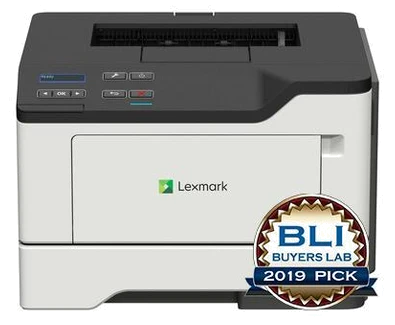
The Lexmark B2338dw fits a small workgroup that wants monochrome documents with Wi-Fi already included. It combines a 250-sheet main tray and a useful 100-sheet multipurpose feeder with automatic print duplex. The deciding longer-term distinction is the exact cartridge family: its documented replacement toner reaches 3,000 pages, so a similar MS321's larger toner option should not be included in this model's comparison.
This is an earlier reference for US part 36SC120. The canonical maker page marks it discontinued, although an older origin-US page retains offer-style content. Those pages establish specifications rather than current stock, warranty or the condition of an individual printer. Check the actual regional unit, software and accessories when considering a particular package.
Workload and output modes
Lexmark recommends 500–6,000 printed pages monthly, separately from a 50,000-page maximum duty cycle. Use the recommended range for ordinary planning. Wireless convenience does not raise that recommendation or remove the need to refill paper and replace the exact compatible toner.
The declared one-sided Letter rate is up to 38 black pages per minute. Automatic print duplex is separately 19 Letter sides per minute. These are manufacturer mode specifications, not measured results from this article. Application processing, a sequence of short files and the paper being used can change real job time. A duplex requirement and a minimum one-sided Letter rate therefore deserve separate checks.
Two supplied paper sources and optional expansion
Standard input totals 350 sheets at the specified 20-pound or 75-gsm paper basis. That combines the main 250-sheet drawer and the 100-sheet multipurpose feeder. Letter, Legal and A4 are positively supported in both sources and the automatic duplex path. Loading alternate stock in the multipurpose input naturally changes how much ordinary paper is ready for a single run.
The original guide gives separate weight limits: 60–120 gsm in the tray, 60–216 gsm in the multipurpose feeder and 60–90 gsm in duplex. Envelopes use the alternate input's one-sided routine with the correct size and type settings. A heavier sheet accepted in the feeder is not automatically suitable for automatic two-sided output.
One optional 550-sheet drawer raises maximum input to 900 sheets. Confirm that drawer is actually supplied, properly installed and available in the driver before depending on expansion. The original instructions describe linking same-size, same-type sources with the appropriate settings; the maximum capacity should not be priced as base hardware.
Connect a computer or share the printer
The exact model documents standard gigabit Ethernet and 802.11b/g/n Wi-Fi. Its original cable guide also identifies a USB computer port, consistent with exact marketing text despite the web standard-port row omitting it. Keep that host-computer interface separate from any unestablished front flash-drive function.
AirPrint and Mopria use a suitable shared network, with the printer on Ethernet or infrastructure Wi-Fi. A direct USB cable does not supply that shared mobile arrangement. Check current application and driver compatibility. The read operating sections do not establish a complete confidential PIN submission and panel-release workflow, so confirm that separately if protected job collection is essential.
Print-only scope, toner and placement
Lexmark explicitly classifies B2338 as print-only black-and-white laser hardware. It has no scanner, copier, document feeder or fax. The two-line monochrome OLED panel supplies settings and status, while generic software names mentioning scanning do not add document-capture hardware.
Supplied toner is declared at 1,500 standard pages under ISO/IEC 19752. Exact US B231000 Return Program and B2300A0 regular replacements are each rated at 3,000. Match geographical compatibility and Return Program terms. The imaging unit is a separate component with its own estimate and usage basis; toner yield alone is not a current running-cost calculation.
The body measures 15.7 inches wide, 14.7 deep and 10.2 high at 30.6 pounds, before paper extensions and access clearance. Check the actual electrical label and correct cord. Choose it for the documented wireless mono routine, while comparing higher-volume toner needs, scanning and extra supplied paper as separate requirements.
Key details at a glance
| Color printing | No |
|---|---|
| Scanner | No |
| Copying | No |
| Fax | No |
| Flatbed scanner | No |
| Automatic document feeder | No |
| Automatic two-sided printing | Yes |
| Automatic two-sided scanning | No |
| Single-pass two-sided scanning | No |
| Color scanning | No |
| Instructed envelope handling | Yes |
| Apple AirPrint | Yes |
| Mopria printing | Yes |
| Recommended monthly minimum | 500 pages |
| Recommended monthly maximum | 6000 pages |
| Maximum monthly duty | 50000 pages |
| Included ordinary-paper capacity | 350 sheets |
| Declared one-sided mono Letter rate | 38 pages/min |
| Unit-body width | 15.7 in |
| Unit-body depth | 14.7 in |
| Unit-body height | 10.2 in |
| Unit weight | 30.6 lb |
| Imaging engine | laser |
Use the exact model’s instructions for operating limits, supplied equipment and version differences.
Paper, software and setup details
Print-rate conditions
Declared maximum 38 one-sided Letter pages/minute in black; automatic print duplex separately 19 Letter sides/minute. Manufacturer specifications, not measured throughput.
Paper handling
Included 250-sheet main tray plus 100-sheet multipurpose feeder, combined 350 at 20 lb/75 gsm. Both inputs support Letter, Legal and A4; all three sizes support automatic print duplex. One optional 550-sheet drawer raises maximum to 900, but is not included. Envelopes use the multipurpose feeder in a separate one-sided routine.
Scanning arrangement
Explicitly print-only monochrome laser hardware. No paper scanner, copier, fax or document feeder; generic driver or software lists do not add hardware.
Computer and mobile connections
Included gigabit Ethernet and 802.11b/g/n Wi-Fi. Original exact-model guide page 12 identifies the USB computer port, also positively named in exact marketing, despite its omission from the web standard-port row. Front flash-drive printing is not established. AirPrint/Mopria use suitable shared networking.
Supplies and declared yields
Supplied toner declared at 1,500 pages under ISO/IEC 19752. Exact US B231000 Return Program and B2300A0 regular replacements are each 3,000 pages; MS321 15,000-page toner is not substituted. Separate 56F0Z00/56F0ZA0 imaging unit estimate is 60,000 pages on its stated three-page-job/coverage basis. Match geographical and Return Program conditions.
Software and support
Original exact-model guide documents AirPrint and Mopria through suitable shared networking. Check current drivers and applications. Confidential PIN release is not established by the read operative sections, so verify the exact protected-job workflow before relying on it.
Electrical edition and setup
Exact US part and body measurements established. Nominal mains input is not established in the read sources; inspect the actual rating label and correct cord. Body measurements exclude working access and any extended paper guides.
Sources for this assessment
Find a printer for your routine.
Match color output, scanning, connections and paper handling, then compare the exact models.