
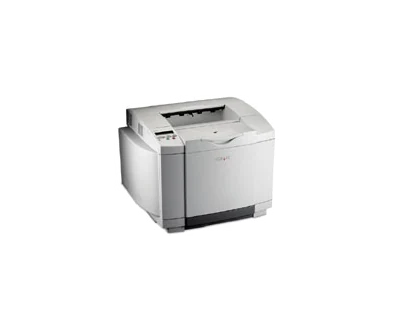
Your needs, this model
Does it fit your priorities?
Can the base USB configuration print color Letter pages with PIN release and 250 included ordinary sheets?
Yes with compatible Lexmark custom software and correct tray settings. The documented confidential routine uses a four-digit PIN with digits 1–6. The 250-sheet ordinary drawer is included.
Explore this need in the finder →Does the base package meet a Legal automatic-duplex requirement?
No. Legal requires a replacement tray 1 and duplex requires its optional unit. Those two options are not included in the base arrangement.
Explore this need in the finder →Can I select native Ethernet for this base C510 because the family includes a network model?
No. The exact base 20K1100 includes USB and parallel; the listed Ethernet arrangements need optional hardware. The C510n has a different standard port configuration.
Explore this need in the finder →A base color printer whose options change the job it can do
The Lexmark C510 is an earlier print-only color laser for direct computer output. US part 20K1100 includes USB and a parallel interface, a 250-sheet ordinary-paper drawer and a 250-sheet output bin. Its useful role is a compatible existing setup that needs color pages without assuming the network or duplex equipment fitted to other configurations.
The deciding tradeoff is optional hardware. Ethernet, a Legal-size replacement tray and an automatic-duplex unit are separate additions. The C510n is a distinct network configuration. A family specification or photograph cannot establish that a particular base C510 has those parts installed.
Check the actual tray before choosing Legal paper
The standard 250-sheet tray accepts ordinary Letter and A4 pages. The capacity declaration uses 75-gsm or 20-pound paper. Adjust the width and length guides, load the stack with its recommended print side up and keep it below the load line. For ordinary letterhead simplex printing, the guide places the header toward the rear of the tray.
Legal and Folio need the optional longer tray 1. That tray replaces the standard Letter-size tray; it is not another 250 sheets added beside it. The optional 530-sheet drawer does not accept Legal either. These details prevent the tempting but incorrect assumption that a 780-sheet maximum applies to every size.
Automatic duplex additionally needs its optional unit. The manual lists supported sizes for that installed arrangement, but those instructions do not turn a base unit into an automatic-duplex printer. Confirm both the paper source and duplex hardware before planning two-sided Legal jobs.
Treat envelopes as a separate tray load
Supported envelopes feed from tray 1 rather than a separate included multipurpose feeder. The guide recommends a stack of 10, reducing that to seven in high heat or humidity. Remove ordinary stock, adjust the guides and engage the envelope stack-aid tabs before loading.
Load envelopes flap down with the stamp area and flap on the right, leading with the stamp-area end. The guide notes that some envelopes may feed better with the flap left, so try a small sample. Stamps in an illustration indicate direction only; stamped envelopes and unsuitable windows, clasps, coated linings or exposed adhesives are prohibited.
This special-media routine replaces the normal paper stack. Envelope support does not add another simultaneous input load or establish duplex printing for envelopes. Check the application size and media type as well as the physical guides.
Use the documented computer and confidential-release path
The base unit's direct USB connection is different from its parallel interface and from an optional network server. Match the actual cable and compatible driver to the chosen computer. The product's PCL and PostScript emulations do not by themselves establish support for a current operating system.
The manual documents confidential printing through the Lexmark custom driver. Assign a four-digit PIN using digits 1–6, then choose the user and confidential job at the operator panel and enter the same PIN. The job is held in printer memory until release or deletion and is removed after printing.
The guide describes the hard disk as an option for other resource, spooling and collation tasks. It is not identified as a requirement for this ordinary memory-based PIN routine. Check the actual driver controls before relying on confidential release, and remember that job settings from the computer may override panel defaults.
Keep speed, supply yield and maintenance separate
Lexmark declares up to 30 one-sided Letter pages per minute in black and eight in color. Those are different modes. They do not imply equally fast color work or establish a recommended recurring monthly volume, which remains unconfirmed here.
The original US starter toner set declares 1,500 pages per color. Replacements declare 5,000 or 10,000 black pages and 3,000 or 6,600 CMY pages at approximately 5% coverage per color. That basis differs from a later ISO/IEC 19798 declaration. The photodeveloper, waste bottle and voltage-specific fuser are separate service items.
This discontinued 67-pound printer needs suitable support, tray and maintenance access, a verified electrical label and compatible supplies. Choose a separately documented network or duplex configuration when those functions are essential, and inspect the offered unit instead of budgeting around unconfirmed options.
Key details at a glance
| Color printing | Yes |
|---|---|
| Scanner | No |
| Copying | No |
| Fax | No |
| Flatbed scanner | No |
| Automatic document feeder | No |
| Automatic two-sided printing | No |
| Automatic two-sided scanning | No |
| Single-pass two-sided scanning | No |
| Color scanning | No |
| Instructed envelope handling | Yes |
| Supported PIN-release printing | Yes |
| Included ordinary-paper capacity | 250 sheets |
| Declared one-sided mono Letter rate | 30 pages/min |
| Declared one-sided color Letter rate | 8 pages/min |
| Unit-body width | 19.5 in |
| Unit-body depth | 16.5 in |
| Unit-body height | 15.2 in |
| Unit weight | 67 lb |
| Imaging engine | laser |
Use the exact model’s instructions for operating limits, supplied equipment and version differences.
Paper, software and setup details
Print-rate conditions
Maker maximum 30 one-sided Letter pages per minute in black and 8 in color. These are distinct output modes, not equal color and monochrome rates. No recommended monthly range or duty figure is established.
Paper handling
The included Letter-size drawer holds 250 ordinary sheets at 75 gsm/20 lb and supports Letter and A4. Legal requires an optional replacement tray 1; the optional 530-sheet drawer does not accept Legal. Included automatic duplex is absent; a duplex unit is optional. Maximum 780 input requires additional hardware. Envelopes use a separate one-sided load in tray 1, with 10 recommended or 7 under high heat/humidity; output is 250 sheets.
Scanning arrangement
The C510 is a print-only color laser, with no scanner, copier, fax, scanner glass or document ADF.
Computer and mobile connections
The base 20K1100 includes USB Type-B and IEEE1284 parallel. Ethernet and other listed network servers require optional hardware; the C510n is a different included-network configuration. Native Wi-Fi, AirPrint and Mopria are unestablished for the base arrangement.
Supplies and declared yields
US supplied toner declares 1,500 pages each in black and CMY. Replacements declare 5,000 or 10,000 black and 3,000 or 6,600 CMY at approximately 5% coverage per color; no ISO/IEC 19798 basis is asserted. The separate photodeveloper is 20K0504 and waste bottle 20K0505. Fusers 20K0506 and 20K0507 serve different voltage versions; check the installed edition.
Software and support
Compatible Lexmark custom drivers provide confidential printing with a four-digit PIN using digits 1–6; the job is held in printer memory and locally released or deleted. The guide lists a hard disk as optional for other storage/spooling work, not as required by this ordinary memory PIN routine. Verify the actual legacy driver and selected source; driver settings can override panel defaults.
Electrical edition and setup
Earlier discontinued model. Body is 67 lb and measures 19.5 inches wide, 16.5 deep and 15.2 high, with additional loading and service clearance needed. Confirm actual voltage label, supplied options, component condition and compatible software. Nominal mains input and recommended monthly workload are unknown.
Sources for this assessment
Find a printer for your routine.
Match color output, scanning, connections and paper handling, then compare the exact models.