
Your needs, this model
Does it fit your priorities?
Can Ethernet combine color Letter duplex, 250-sheet input and 1,000 monthly pages?
Yes with compatible computer-print software and suitable ordinary paper. Letter duplex is explicit, and the recommended range reaches 1,500 pages.
Explore this need in the finder →Can USB print A4 color documents and occasional envelopes?
Yes. A4 fits the ordinary drawer, and suitable envelopes use the separate single-sheet manual feeder without duplex.
Explore this need in the finder →Can its 35,000-page duty rating justify 2,000 printed pages every month?
That requirement exceeds the maker’s 1,500-page recommended monthly maximum. The larger duty rating is a different measure.
Explore this need in the finder →Automatic Letter duplex at a modest workload
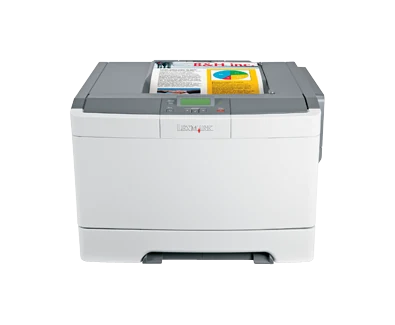
The Lexmark C543dn adds integrated two-sided printing to a small wired color-laser arrangement. Exact US part 26B0000 includes USB Type-B and 10/100BaseTX Ethernet, with a recommended monthly range of 500–1,500 pages. It suits routine Letter reports that need color and automatic duplex without requiring a scanner or built-in radio.
This is an earlier, discontinued model. Its documented supplies also differ from the faster C544 family: do not treat similar-looking cartridges or neighboring model names as interchangeable. If a much larger regular queue is the objective, assess the recommended volume and supply choices before the color-speed headline.
Prepare a wired computer printing routine
USB connects one computer through the Type-B interface, while Fast Ethernet supports a conventional shared network arrangement. The separately listed external wireless print server is an option. It does not make the base C543dn a Wi-Fi printer, and the optional gigabit server is not the supplied Ethernet interface.
The original guide supplies Windows and Mac document-printing procedures. Match panel paper size and type with the load, then choose the appropriate settings in the application's print dialog. Confirm a compatible current driver or printing path on the intended computer; historical software listings cannot guarantee every newer operating system.
The printer is print-only. It has no scanning glass, automatic document feeder, copying or fax. Its network protocol list is also not enough to promise AirPrint or Mopria. A panel-protection PIN is different from a documented protected-job submission and release routine, so verify that separate capability if confidential output is essential.
Load the tray and select sides deliberately
The base arrangement is a 250-sheet drawer plus a manual feeder accepting one sheet at a time. Lexmark's 250+1 total uses a 20-pound or 75-gsm basis; it does not mean a second stack of paper. Letter, Legal and A4 fit the ordinary drawer. Extend the tray for longer sheets as instructed, adjust guides and update size/type settings after a change.
Letter automatic duplex is positively documented. The guide explains selecting two sides and choosing long-edge or short-edge binding from suitable Windows or Mac software. A landscape handout needs the correct binding choice to avoid an upside-down reverse face. Confirm another essential paper size's duplex routine rather than assuming that every printable special size supports two-sided output.
Duplex media is restricted to suitable 60–105-gsm grain-long bond paper. Card stock, transparencies, labels and envelopes are excluded from that automatic two-sided route. For a suitable envelope, use the manual feeder separately, set Envelope and the exact size, and avoid windows, clasps, damaged edges or exposed adhesive.
The optional Duo Drawer adds a 550-sheet tray and 100-sheet multipurpose feeder, bringing maximum input to 900+1. Check for that actual hardware on an offered printer. The base machine's 100-sheet output bin remains distinct from its input capacity, so collecting finished work is still part of a longer run.
The speed modes and monthly recommendation
Lexmark declares up to 21 one-sided Letter pages per minute in black or color. Duplex is separately listed at up to 10 black Letter sides per minute. The black duplex rate is not a separately established color duplex rate, and neither figure represents a measured application completion time.
The recommended monthly ceiling is 1,500 pages. The 35,000-page maximum duty rating is a different comparison measure, not permission to plan a routine near that larger number. Frequent replenishment or regular volume above the recommendation is a reason to compare another configuration.
Its cartridge range is smaller than the C544 range
The original US package declares 2,500-page black and 2,000-page cyan, magenta and yellow Return Program cartridges. Listed high-yield replacements use the same declared capacities under ISO/IEC 19798, alongside standard 1,000-page choices. Do not borrow the C544's 6,000-black and 4,000-color options.
Inspect imaging, developer and waste-toner components separately, and match regional supply terms. Allow ventilation, tray extension and service access around the 46.2-pound body, and check the electrical label. Choose a scanner-equipped MFP for original capture, or a documented wireless variant when a network cable is impractical.
Key details at a glance
| Color printing | Yes |
|---|---|
| Scanner | No |
| Copying | No |
| Fax | No |
| Flatbed scanner | No |
| Automatic document feeder | No |
| Automatic two-sided printing | Yes |
| Automatic two-sided scanning | No |
| Single-pass two-sided scanning | No |
| Color scanning | No |
| Instructed envelope handling | Yes |
| Recommended monthly minimum | 500 pages |
| Recommended monthly maximum | 1500 pages |
| Maximum monthly duty | 35000 pages |
| Included ordinary-paper capacity | 251 sheets |
| Declared one-sided mono Letter rate | 21 pages/min |
| Declared one-sided color Letter rate | 21 pages/min |
| Unit-body width | 16.7 in |
| Unit-body depth | 15.7 in |
| Unit-body height | 11.5 in |
| Unit weight | 46.2 lb |
| Imaging engine | laser |
Use the exact model’s instructions for operating limits, supplied equipment and version differences.
Paper, software and setup details
Print-rate conditions
Maker maximum 21 one-sided Letter pages/minute black or color; duplex separately 10 black Letter sides/minute. No color duplex rate borrowed from black mode.
Paper handling
Included 250-sheet drawer plus single-sheet manual feed, declared 250+1 at 20 lb/75 gsm; ordinary Letter/Legal/A4 stack of 250. Integrated duplex with Letter positively confirmed by the exact US mode; other exact duplex-size limits remain unestablished. Manual envelopes are one-sided; optional 650-sheet Duo Drawer raises maximum input to 900+1.
Scanning arrangement
Print-only C54x hardware has no glass, document feeder, copying or fax. Choose separate scanning hardware for original capture.
Computer and mobile connections
Included USB Type-B and 10/100BaseTX Ethernet; N4050e external wireless and N7020e gigabit servers are optional. No standard Wi-Fi/peer or mobile protocol arrangement is qualified.
Supplies and declared yields
Original US supplied Return Program toner 2,500 black and 2,000 each CMY. C540H1KG/C540H2KG black 2,500 and C540H1/H2 C/M/Y color 2,000; standard A1 1,000 options under ISO/IEC 19798. No C544 6,000-black/4,000-color option borrowed; separate imaging/developer/waste parts need inspection.
Software and support
Original guide 53 gives Windows/Mac computer-print routines; current compatible software must be checked. Network IPP/Bonjour naming alone does not establish AirPrint or Mopria. Panel PIN protection is not evidence of confidential-job release.
Electrical edition and setup
Inspect the actual electrical label and correct cord. Body measurements exclude extended long-paper tray, ventilation and service clearance. Historical supply-price, Rewards and warranty promotions are not current purchase promises.
Sources for this assessment
Find a printer for your routine.
Match color output, scanning, connections and paper handling, then compare the exact models.