
Your needs, this model
Does it fit your priorities?
Can included Wi-Fi combine color Letter duplex and 2,800 monthly pages with a 250-sheet stack?
Yes with compatible computer-print software and suitable media. The exact dw configuration includes the radio and Letter duplex, within the recommended 3,000-page monthly maximum.
Explore this need in the finder →Can Ethernet print Legal color documents and occasional manual-feed envelopes?
Yes through the documented ordinary-paper and separate one-sided envelope routines. This does not establish Legal automatic duplex.
Explore this need in the finder →Does the base dw package include 900 sheets of ordinary input?
No. Its included hardware is the 250-sheet drawer plus one-sheet manual feed. The larger 900+1 figure requires an optional Duo Drawer.
Explore this need in the finder →Included wireless networking and Letter duplex
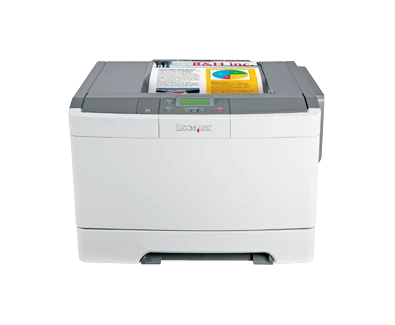
The Lexmark C544dw is the C544 configuration with both an included wireless radio and integrated automatic duplex. Exact US part 26C0150 supports 802.11b/g/n Wi-Fi, USB Type-B and 10/100BaseTX Ethernet. It suits an office that wants color computer printing and two-sided Letter documents within the maker's recommended 800–3,000-page monthly range.
The radio removes the need for the separate external wireless print server associated with wired siblings. It does not increase base paper capacity or add document capture. This is a print-only color laser with a two-line LCD, not a scanner-equipped MFP. Lexmark marks the model discontinued, so the actual unit and software path need checking.
Set up the network before relying on wireless convenience
The original guide's normal wireless routine requires the correct network name, security settings and credentials. The setup computer should reach the intended network, and installation cables should be connected when the software requests them. Check current compatible software and network requirements rather than assuming the original disc remains suitable.
Ethernet provides another supported computer arrangement when a wired installation is more practical. USB Type-B connects directly to a computer. These are separate choices from the front USB host port used for supported flash-drive files.
Historical ad hoc support should not be renamed Wi-Fi Direct. The read network protocol list also does not independently establish AirPrint or Mopria. If a particular mobile print application defines the purchase, verify that exact supported route instead of assuming every Wi-Fi printer implements it.
Two-sided reports need the right paper and settings
Letter automatic duplex is explicit in the US specification. Through suitable Windows or Mac printing software, choose two sides and the appropriate long-edge or short-edge binding. The binding setting determines how the reverse page is oriented. Confirm another essential size's duplex routine separately; ordinary paper-size support is not itself an exact duplex-size table.
The guide permits suitable 60–105-gsm grain-long bond paper for duplex and excludes envelopes, card stock, transparencies and labels. Use the appropriate separate one-sided routine for those supported media. A driver setting cannot make unsuitable stock appropriate for the duplex path.
Letter, Legal and A4 fit the ordinary drawer. Extend it for longer paper as instructed, adjust guides and match panel and software size/type settings. Allow the extra room needed by an extended tray. Keep different sizes and types in separate loads rather than combining them in one stack.
Paper expansion and walk-up files are conditional conveniences
The supplied 250-sheet drawer plus single-sheet manual feed total 250+1 at the stated 20-pound or 75-gsm basis. The manual slot is not another paper stack. Suitable envelopes feed one at a time with the correct Envelope setting, flap up and guides adjusted; avoid windows, clasps and exposed adhesive.
The optional Duo Drawer adds a 550-sheet tray and 100-sheet multipurpose feeder, raising maximum input to 900+1. Inspect actual installed hardware rather than assuming the maximum is standard. The output bin separately holds 100 sheets, so collecting pages remains part of a long job.
For front USB printing, the guide requires FAT-formatted storage and supported file formats. NTFS is excluded, printing permissions matter and encrypted PDFs require their file password. PictBridge printing likewise needs a suitable camera in the correct USB mode. These functions do not add a scanner or establish confidential-job PIN release.
Evaluate the workload and all supply components
Lexmark declares up to 25 one-sided Letter pages per minute in black or color. Duplex is separately up to 12 black Letter sides per minute, without a separately established color duplex rate here. These are manufacturer modes, not measured application results. The 55,000-page maximum duty figure does not replace the recommended monthly ceiling.
The original US supplied toner declares 2,500 black and 2,000 each cyan, magenta and yellow. C544 extra-high-yield replacements reach 6,000 black and 4,000 each color under ISO/IEC 19798. Inspect imaging, developer and waste-toner components separately, and match region and Return Program terms.
Check condition, the electrical label and operating clearance around the 46.2-pound body. Historical supply-price promotions are not current cost promises. Compare an explicitly supported mobile-print model or an MFP when those workflows matter more than conventional wireless computer output.
Key details at a glance
| Color printing | Yes |
|---|---|
| Scanner | No |
| Copying | No |
| Fax | No |
| Flatbed scanner | No |
| Automatic document feeder | No |
| Automatic two-sided printing | Yes |
| Automatic two-sided scanning | No |
| Single-pass two-sided scanning | No |
| Color scanning | No |
| Instructed envelope handling | Yes |
| Recommended monthly minimum | 800 pages |
| Recommended monthly maximum | 3000 pages |
| Maximum monthly duty | 55000 pages |
| Included ordinary-paper capacity | 251 sheets |
| Declared one-sided mono Letter rate | 25 pages/min |
| Declared one-sided color Letter rate | 25 pages/min |
| Unit-body width | 16.7 in |
| Unit-body depth | 15.7 in |
| Unit-body height | 11.5 in |
| Unit weight | 46.2 lb |
| Imaging engine | laser |
Use the exact model’s instructions for operating limits, supplied equipment and version differences.
Paper, software and setup details
Print-rate conditions
Maker maximum 25 one-sided Letter pages/minute in black or color. Automatic duplex separately reaches 12 black Letter sides/minute; a separate color duplex rate is unestablished.
Paper handling
Included 250-sheet drawer plus one-sheet manual feed, declared 250+1 at 20 lb/75 gsm. Letter/Legal/A4 ordinary stack capacity is 250; exact Letter duplex mode is confirmed, other duplex sizes remain unknown. Envelopes use separate one-sided manual feed. Optional Duo Drawer raises maximum input to 900+1.
Scanning arrangement
Print-only C54x hardware has no glass, document feeder, copying or fax. Choose separate scanning hardware for original capture.
Computer and mobile connections
Included 802.11b/g/n Wi-Fi, USB Type-B, 10/100BaseTX Ethernet, front Type-A and PictBridge port. Guide gives same-network wireless computer setup; historical ad hoc is not a confirmed Wi-Fi Direct arrangement. No AirPrint/Mopria protocol is inferred from Bonjour or IPP.
Supplies and declared yields
US supplied Return Program toner: 2,500 black and 2,000 each CMY. C544X1KG/C544X2KG declare 6,000 black; C544X1/X2 C/M/Y declare 4,000 each under ISO/IEC 19798. C540H and A1 choices are also listed. Imaging/developer/waste components are separate from toner.
Software and support
Guide 24–25 describes supported network setup, 53 computer printing and 82 sides/binding. Guide 58–59 describes FAT-format flash-drive and PictBridge printing for the equipped C544. Current software, file permissions and formats matter. Protected-job PIN release remains unestablished; panel protection is a separate function.
Electrical edition and setup
Inspect the actual electrical label and correct cord. Body measurements exclude extended long-paper tray, ventilation and service clearance. Historical supply-price, Rewards and warranty promotions are not current purchase promises.
Sources for this assessment
Find a printer for your routine.
Match color output, scanning, connections and paper handling, then compare the exact models.