
Your needs, this model
Does it fit your priorities?
Can I share color Letter printing over Ethernet for 4,000 pages monthly with a 250-sheet main stack?
Yes with earlier references enabled and a suitable supported computer or shared-network mobile setup. That fits the exact input and recommended-volume range.
Explore this need in the finder →Can the CS310n automatically print both sides of Legal paper?
No. This exact n configuration explicitly has no automatic duplex; the related dn model is a separate configuration.
Explore this need in the finder →Can I scan paper documents over its USB computer cable?
No. USB supports the printer connection, but this is explicitly print-only hardware with no document scanner.
Explore this need in the finder →Color output when one-sided documents are sufficient
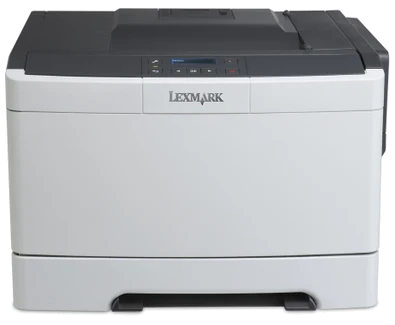
The Lexmark CS310n is an earlier color laser reference for a small workgroup whose documents do not require automatic double-sided printing. The exact US part is 28C0000. Its modest main paper stack and wired connections suit a relatively straightforward shared printing arrangement, while the separate manual feeder handles occasional suitable specialty media.
Lexmark marks this model discontinued. Check the actual machine, software availability and regional supplies before treating an offer as usable. The analysis here concerns the manufacturer's documented configuration; it does not establish current inventory, remaining consumable life, measured color quality or service coverage on a particular unit.
The n configuration has no automatic duplex
The US features and detailed Duplex field both say that automatic two-sided printing is not available. A family manual also describes duplex-capable configurations, but that does not add the mechanism to CS310n. If everyday documents need automatic printing on both sides, this exact variant misses that requirement even though a related CS310dn exists.
Maximum one-sided Letter output is declared at 25 pages per minute in black or color. These are manufacturer mode ratings, not a claim of identical completion time for every document. Short jobs, processing and changes of media can influence the workflow. The guide also notes reduced speeds for specialty media, so ordinary-paper output is not a useful promise for a batch of envelopes or labels.
A real 250-sheet drawer, plus one manual sheet
Standard input is described as 250+1 sheets at the stated 20-pound or 75-gsm basis. That is a 250-sheet drawer and a one-sheet manual feeder, rather than two ordinary stack-fed sources. Letter, Legal and A4 have positive support in the main drawer. The guide requires the paper size and type settings to match the loaded media, and longer sheets require the appropriate extension and guide positions.
The main drawer is not the envelope source. Suitable envelopes use the separate one-sided manual-feed routine with the correct orientation, without forcing them into the feeder. The guide's table explicitly distinguishes that path from the drawer. Test the intended envelope stock before buying a large quantity; this is a maker instruction, rather than evidence that any particular envelope was tested for this article.
An optional duo assembly combines a 550-sheet drawer and 100-sheet multipurpose feeder. It can raise input to 900+1 sheets, but is not included in the base CS310n. Confirm both the accessory and the driver's installed-options setting if an offered machine relies on that larger arrangement. The 125-sheet output bin is a separate capacity.
USB and Ethernet have different sharing roles
The standard USB Type-B port connects the printer to a computer. The page's separate Direct USB entry says No, which does not erase that explicit computer interface. Ethernet is 10/100BaseTX and is described as working with a 1000Base-T network; that is not a gigabit printer-port rating. Wireless requires an optional MarkNet adapter, so included Wi-Fi should not be assumed.
The scoped guide documents AirPrint and Mopria for a suitable shared-network mobile arrangement, with compatible applications and devices. Keep the printer and mobile device appropriately connected to that network. Those functions do not come from a lone USB computer cable. A protected PIN-release workflow is not established by the read CS310 operative sections, so verify that precise requirement separately rather than borrowing a feature from CS410 or CS510.
Workload and supplies define the practical comparison
The recommended monthly range is 500–5,000 printed pages, separate from the 60,000-page maximum duty figure. Supplied US toner is declared at 750 pages for black and each color. Specific higher-yield replacements include 70C1HK0 black at 4,000 pages and 70C1HC0, 70C1HM0 and 70C1HY0 colors at 3,000 each under ISO/IEC 19798. Respect geographical compatibility and Return Program terms; yields alone do not establish current printing costs.
The printer is explicitly print-only, with no scanner, copier or fax. Its body measures 17.4 inches wide, 16.0 deep and 11.5 high at 44.3 pounds, before working clearance. Allow room for loading and extended guides, inspect the actual electrical label and cord, and choose it only when its one-sided color arrangement fits the task.
Key details at a glance
| Color printing | Yes |
|---|---|
| Scanner | No |
| Copying | No |
| Fax | No |
| Flatbed scanner | No |
| Automatic document feeder | No |
| Automatic two-sided printing | No |
| Automatic two-sided scanning | No |
| Single-pass two-sided scanning | No |
| Color scanning | No |
| Instructed envelope handling | Yes |
| Apple AirPrint | Yes |
| Mopria printing | Yes |
| Recommended monthly minimum | 500 pages |
| Recommended monthly maximum | 5000 pages |
| Maximum monthly duty | 60000 pages |
| Included ordinary-paper capacity | 251 sheets |
| Declared one-sided mono Letter rate | 25 pages/min |
| Declared one-sided color Letter rate | 25 pages/min |
| Unit-body width | 17.4 in |
| Unit-body depth | 16 in |
| Unit-body height | 11.5 in |
| Unit weight | 44.3 lb |
| Imaging engine | laser |
Use the exact model’s instructions for operating limits, supplied equipment and version differences.
Paper, software and setup details
Print-rate conditions
Up to 25 one-sided Letter pages/minute in black or color. Automatic print duplex is explicitly unavailable on this n variant. Manufacturer ratings are not measurements from this article.
Paper handling
Included 250-sheet main drawer plus a one-sheet manual feeder: 250+1 headline sheets at 20 lb/75 gsm, with a 250-sheet ordinary main stack. Letter/Legal/A4 support the drawer. Suitable envelopes use the separate one-sided manual-feed routine. Optional input is not included. One optional 650-sheet duo assembly adds a 550-sheet drawer and 100-sheet multipurpose feeder, raising the maximum to 900+1; none is supplied.
Scanning arrangement
Explicitly print-only color laser hardware. No paper scanner, document feeder, copier or fax. A control screen and generic print/scan software names do not supply capture hardware.
Computer and mobile connections
Included USB Type-B computer interface and wired Ethernet. Wireless requires a separate MarkNet option; no included Wi-Fi Direct arrangement is established. AirPrint/Mopria use the documented suitable shared-network arrangement, not a USB-only computer cable.
Supplies and declared yields
Supplied US black, cyan, magenta and yellow toner each declared at 750 pages. US replacements include 70C1HK0 black at 4,000 pages and 70C1HC0/70C1HM0/70C1HY0 cyan/magenta/yellow at 3,000 each. Declared continuous black/composite-color yields under ISO/IEC 19798, not measured costs. Match the geographical cartridge restriction and Return Program terms. Imaging/developer components are separate, with estimates depending on stated job and coverage assumptions.
Software and support
The exact scoped guide documents network AirPrint/Mopria and compatible applications. Check current drivers and firmware; no retired cloud service is promised. Confidential PIN release is not established for this exact configuration by the read operative sections.
Electrical edition and setup
Earlier US reference; verify actual regional part, included hardware and current software. Nominal mains input is unestablished, so inspect the actual electrical label and proper cord. Body dimensions exclude loading/service access and extended paper guides.
Sources for this assessment
Find a printer for your routine.
Match color output, scanning, connections and paper handling, then compare the exact models.