
Your needs, this model
Does it fit your priorities?
Can I print color Legal reports on both sides over Ethernet at 2,000 monthly pages, with 250 included sheets and AirPrint on the shared network?
Yes, with suitable network access and software. Legal automatic duplex, 250-sheet stack capacity, AirPrint and the 2,500-page recommended maximum fit the standard arrangement.
Explore this need in the finder →Can I scan paper originals because a generic setup article mentions scanning to a computer?
No. Lexmark explicitly identifies CS331 as print-only color hardware. A shared installer description does not add a scanner.
Explore this need in the finder →Does the ordinary Letter configuration include 500 sheets?
No. Included and maximum input are 250 sheets plus one-sheet manual feed; a larger family tray is not assigned to CS331dw.
Explore this need in the finder →A small color printer with ordinary network sharing
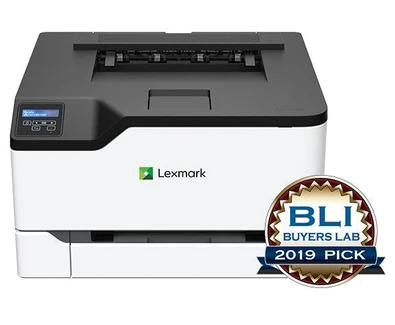
The Lexmark CS331dw is a US color printer reference for a small office that needs shared reports and automatic two-sided output without a scanner body. Gigabit Ethernet, Wi-Fi and a USB computer connection are included. Its practical limits are the two-line panel and fixed paper supply: it has no touchscreen, document feeder or larger included stack.
The exact US manufacturer reference is part 40N9020. Confirm that identity, the actual regional unit, compatible software and supplied consumables when evaluating a machine or offer. A current manufacturer reference is not a guarantee of current stock or a new warranty. Similar-looking MC and CX models add document-capture hardware or use different supply codes.
The print job has a mode and a paper size
Lexmark declares up to 26 one-sided Letter pages per minute in black or color. Automatic duplex has a separate 13 Letter sides-per-minute rating. These are maker specifications, not measured results from testing for this article. A two-sided color report should not be described as running at the larger one-sided engine figure.
Letter, Legal and A4 are positively supported in the main tray and automatic duplex path. The one-sheet manual feeder is useful for an occasional alternate item rather than a second substantial stack. Envelopes follow the instructed one-sided media routine and their own size and weight limits. Support for an envelope does not establish automatic two-sided envelope printing.
Choose the connection rather than just the wireless label
Included interfaces are USB Type-B, gigabit Ethernet and 802.11b/g/n Wi-Fi. The Type-B socket is the computer connection. A separate Direct USB field does not remove that explicitly listed port. For shared office printing, choose the appropriate wired network or infrastructure Wi-Fi arrangement with compatible software and reachable devices.
The exact US page supports AirPrint and Mopria for network printing. The original guide also documents a Wi-Fi Direct computer connection, which is a separate peer setup. This reference does not assume every mobile protocol works through every peer route. A USB desktop connection likewise does not inherit the shared network's mobile capabilities.
A print-only unit and a small operator panel
Lexmark's support page explicitly identifies CS331 as print-only color hardware. Some generic software instructions mention scanning, but they do not establish a scanner, copier, fax or document feeder in this model. If paper originals must be captured, compare actual multifunction hardware with the right feeder and glass sizes.
The two-line monochrome LCD is an operator display; the printer still produces color documents. The original guide describes compatible-driver Print and Hold confidential jobs and PIN release, including directions for non-touchscreen panels. Check the actual driver and release sequence rather than assuming every application supports protected submission. Historical cloud-service listings are not a guarantee of present service availability.
Paper, consumables and the useful upgrade
Included and maximum input are both 250+1 on the stated 20-pound or 75-gsm basis: a 250-sheet tray and one-sheet manual feed. No CS431 expansion option is assigned to this exact model. Lexmark recommends 600–2,500 pages monthly, separate from its 50,000-page maximum duty ceiling. Workload and refilling should be assessed against those ordinary limits rather than the larger duty number.
Supplied toner is declared at 750 black pages and 500 for each color under ISO/IEC 19798. Exact US high-yield replacements 20N1HK0, 20N1HC0, 20N1HM0 and 20N1HY0 are each rated at 4,500 pages. Geographic compatibility and Return Program terms matter; an MC-branded cartridge is not an assumed substitute. Yields alone do not establish today's running cost.
The body is 16.2 inches wide, 15.5 deep and 9.6 high at 35.5 pounds, before paper access and service clearance. Verify the actual electrical label and cord. This reference is coherent for modest shared color printing. Compare a verified touchscreen and expandable-input configuration if those change daily operation, or an actual multifunction model when scanning is essential.
Key details at a glance
| Color printing | Yes |
|---|---|
| Scanner | No |
| Copying | No |
| Fax | No |
| Flatbed scanner | No |
| Automatic document feeder | No |
| Automatic two-sided printing | Yes |
| Automatic two-sided scanning | No |
| Single-pass two-sided scanning | No |
| Color scanning | No |
| Instructed envelope handling | Yes |
| Apple AirPrint | Yes |
| Mopria printing | Yes |
| Supported PIN-release printing | Yes |
| Recommended monthly minimum | 600 pages |
| Recommended monthly maximum | 2500 pages |
| Maximum monthly duty | 50000 pages |
| Included ordinary-paper capacity | 251 sheets |
| Declared one-sided mono Letter rate | 26 pages/min |
| Declared one-sided color Letter rate | 26 pages/min |
| Unit-body width | 16.2 in |
| Unit-body depth | 15.5 in |
| Unit-body height | 9.6 in |
| Unit weight | 35.5 lb |
| Imaging engine | laser |
Use the exact model’s instructions for operating limits, supplied equipment and version differences.
Paper, software and setup details
Print-rate conditions
Maker maximum 26 one-sided Letter pages/minute black or color; automatic print duplex separately 13 Letter sides/minute. These are declared specifications, not measured throughput.
Paper handling
Included and maximum input both 250+1 at 20 lb/75 gsm: 250-sheet main tray plus one-sheet manual feed. Letter, Legal and A4 support automatic print duplex; per-size stack 250. No optional paper expansion from CS431 is assigned. Envelopes use the instructed simplex routine.
Scanning arrangement
Explicitly print-only color laser. Generic app/driver text mentioning document capture or scanning does not establish scanner, copier, fax or feeder hardware.
Computer and mobile connections
Included USB Type-B, gigabit Ethernet and 802.11b/g/n Wi-Fi. Direct USB:No does not deny the separately listed Type-B computer interface. Shared guide documents Wi-Fi Direct computer setup. AirPrint/Mopria belong to the shared-network plan; no scanner route is created by the software installer.
Supplies and declared yields
Supplied toner declared 750 black and 500 each CMY ISO/IEC 19798 pages. Exact US 20N1HK0/20N1HC0/20N1HM0/20N1HY0 high-yield replacements each 4,500; 20N10K0/C0/M0/Y0 standard each 1,500. Match geographic and Return Program conditions; MC/C cartridge codes are not substituted.
Software and support
Exact model page supports AirPrint and Mopria network printing. Original guide pages 37–38 supports compatible-driver Print and Hold confidential PIN jobs, including panel release directions for non-touchscreen models. Verify compatible current software; retired cloud listings are not service guarantees.
Electrical edition and setup
Exact US part and regional reference established. Nominal electrical input is not directly established in the read print-only sources; check the actual unit label and correct cord. Body measurements exclude operating and service clearance.
Sources for this assessment
Find a printer for your routine.
Match color output, scanning, connections and paper handling, then compare the exact models.