
Your needs, this model
Does it fit your priorities?
Can I print color Legal duplex, copy and scan one-sided Legal originals over Ethernet with 250 included Legal sheets?
Yes with earlier references enabled and suitable computer software. Legal supports the main drawer, print duplex and simplex ADF, while the Ethernet plan explicitly supports computer scanning.
Explore this need in the finder →Does included print duplex also let the ADF scan both sides automatically?
No. The exact ADF is simplex; automatic two-sided printing and two-sided scanning are different functions.
Explore this need in the finder →Can it meet a print, scan, copy and fax requirement?
No. The exact hardware functions are print, scan and copy; fax is not part of this CX310dn configuration.
Explore this need in the finder →Automatic duplex on the output side
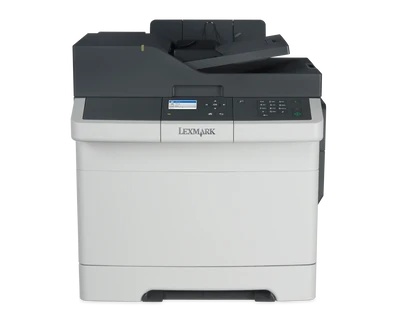
The Lexmark CX310dn is the duplex-printing member of this color MFP pair. Its exact US part is 28C0550, with printing, scanning and copying documented in the original manufacturer record. The most important qualification is that duplex applies to printing: its included 50-sheet automatic document feeder scans one side of an original at a time.
Lexmark marks the model discontinued. Verify the actual regional part and supplied accessories when comparing an earlier machine. The US marketing paragraph confusingly calls it a CX310n with two-sided printing, but the exact heading, box identity, integrated-duplex field and original brochure's dn column identify this configuration. That wording is not a reason to merge the two variants or ignore their different starter supplies.
Match each document size to its real route
Letter, Legal and A4 support ordinary printing from the included main drawer and automatic two-sided output. The ADF also accepts supported originals in those sizes. The scanner glass has a shorter limit, with positive Letter and A4 support and an explicit exclusion for Legal. A Legal feeder specification therefore should not be described as a Legal flatbed.
For suitable one-sided stacks, the 50-sheet ADF can reduce manual placement. Two-sided originals still need an appropriate manual routine because the feeder does not automatically reverse or scan both faces. Books, photos, small items and thin originals use the glass according to the instructions. A color scan setting does not change these physical paper limits.
Printing and scanning use separate rate declarations
Lexmark declares up to 25 one-sided Letter pages per minute in black or color, while automatic print duplex is separately 12 Letter sides per minute. Simplex scanning is another mode: up to 32 Letter sides per minute or 30 A4 sides per minute for black or color. Do not use the scan rate as print speed or treat the one-sided print rating as duplex throughput.
The recommended monthly print range is 500–5,000 pages, distinct from the 60,000-page maximum duty figure. These maker declarations help compare capacity but are not performance measurements from this article. Job complexity, rendering and repeated small submissions can change the timing of a real work queue.
Computer scanning is documented over the actual connections
The exact US specification explicitly names a USB or network-connected computer as a scanning destination. USB Type-B connects to the computer, and gigabit Ethernet supports shared networking. The guide also documents a network scan profile with a selected output location and shortcut used at the printer. Confirm the current driver, browser and application environment needed for the intended route.
AirPrint and Mopria use a suitable shared network and compatible devices. Included Ethernet does not mean included Wi-Fi: a MarkNet radio is optional. A lone USB computer connection also does not borrow the network mobile functions. Confidential printing is separately documented through compatible Print and Hold submission, a computer-set four-digit PIN and panel release using memory; ordinary protected jobs do not require an optional disk.
Base paper capacity and the exact CX supplies
Included input is a 250-sheet drawer and one-sheet manual feeder at the stated 20-pound or 75-gsm basis. The 250+1 headline does not provide two normal stacks. Suitable envelopes use a separate one-sided manual routine, and optional input should be counted only if the physical accessory is supplied. The duo assembly adds a 550-sheet drawer and 100-sheet multipurpose feeder for maximum 900+1 input, while the output bin remains separately 150 sheets.
The US dn starter set is declared at 1,400 pages for black and each color. Replacement identifiers include 80C1SK0 black at 2,500 pages and 80C1SC0, 80C1SM0 and 80C1SY0 colors at 2,000 each under ISO/IEC 19798. Check geographical compatibility and Return Program conditions, keeping imaging/developer components separate. The similarly named CS310 supplies should not be substituted from a shared family description.
Fax is not part of the exact print/scan/copy function set. The body measures 17.48 inches wide, 21.99 deep and 18.44 high at 60.25 pounds before operating access. Inspect the actual electrical label and cord, and allow room for the scanner and extended guides when judging physical fit.
Key details at a glance
| Color printing | Yes |
|---|---|
| Scanner | Yes |
| Copying | Yes |
| Fax | No |
| Flatbed scanner | Yes |
| Automatic document feeder | Yes |
| Automatic two-sided printing | Yes |
| Automatic two-sided scanning | No |
| Single-pass two-sided scanning | No |
| Color scanning | Yes |
| Instructed envelope handling | Yes |
| Apple AirPrint | Yes |
| Mopria printing | Yes |
| Supported PIN-release printing | Yes |
| Recommended monthly minimum | 500 pages |
| Recommended monthly maximum | 5000 pages |
| Maximum monthly duty | 60000 pages |
| Included ordinary-paper capacity | 251 sheets |
| Document-feeder capacity | 50 sheets |
| Declared one-sided mono Letter rate | 25 pages/min |
| Declared one-sided color Letter rate | 25 pages/min |
| Unit-body width | 17.48 in |
| Unit-body depth | 21.99 in |
| Unit-body height | 18.44 in |
| Unit weight | 60.25 lb |
| Imaging engine | laser |
Use the exact model’s instructions for operating limits, supplied equipment and version differences.
Paper, software and setup details
Print-rate conditions
Maker maximum 25 one-sided black/color Letter print pages/minute; automatic print duplex separately 12 Letter sides/minute. Simplex scanning separately 32 Letter or 30 A4 sides/minute, black/color. No automatic two-sided scanning follows from print duplex.
Paper handling
Base input is a 250-sheet drawer plus one-sheet manual feed, quoted as 250+1 at 20 lb/75 gsm. Letter/Legal/A4 support the main drawer; per-size ordinary stack is 250. Suitable envelopes use a separate one-sided manual routine. Optional paper hardware is not included. Included automatic print duplex supports Letter, Legal and A4. Optional 650-sheet duo assembly raises maximum to 900+1; not included.
Scanning arrangement
Included 50-sheet simplex ADF supports Letter/Legal/A4 originals but scans one side only. Glass supports Letter/A4, not Legal, with separate 8.5 x 11.69-inch limit. Exact US specification positively names USB or network computer scanning. Exhaustive functions and original brochure list print/scan/copy without fax hardware.
Computer and mobile connections
Included USB Type-B computer connection and gigabit Ethernet, with USB or network computer scanning explicitly named in the exact US specification. Wireless requires a separate MarkNet option. AirPrint/Mopria use a suitable shared network; a USB-only computer cable does not borrow mobile networking. No included Wi-Fi Direct arrangement is established.
Supplies and declared yields
Supplied US black/cyan/magenta/yellow toner each declared at 1,400 pages, distinct from the n starter set. US replacements include 80C1SK0 black at 2,500 pages and 80C1SC0/80C1SM0/80C1SY0 cyan/magenta/yellow at 2,000 each. Declared continuous black/composite-color yields follow ISO/IEC 19798. Respect geographical compatibility and Return Program terms; imaging/developer components are separate. Do not substitute the similarly named CS310 cartridge range.
Software and support
The exact scoped guide documents compatible Print and Hold, a computer-set four-digit PIN and Held Jobs panel release. Ordinary protected jobs use memory; an optional disk is not required for that routine. Check current driver/application/firmware support, since a generic mobile print button need not submit an equivalent protected job.
Electrical edition and setup
Earlier exact US reference. Verify actual part, regional supplies and current compatible software. Nominal mains input is not established; inspect the real electrical label and proper cord. Body measurements exclude scanner access, loading/service clearance and extended guides.
Sources for this assessment
Find a printer for your routine.
Match color output, scanning, connections and paper handling, then compare the exact models.