
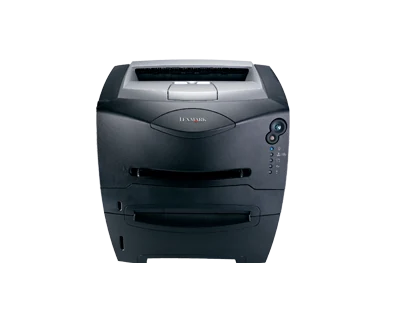
Your needs, this model
Does it fit your priorities?
Can USB supply 250 ordinary A4 sheets and a 25-ppm Letter declaration?
Yes with compatible printing software. The original media table establishes 250 A4 sheets; the 25-ppm declaration specifically refers to one-sided Letter output.
Explore this need in the finder →Can the E234 automatically turn Legal sheets for two-sided printing?
No. Legal printing is supported, but the documented duplex process prints alternate pages and requires manual reloading into Tray 1.
Explore this need in the finder →Does the supplied E234 provide direct Ethernet printing?
No included Ethernet arrangement is established. This exact model lists USB and parallel; the network E234n and optional external print servers are separate configurations.
Explore this need in the finder →A straightforward local document printer
The Lexmark E234 is a monochrome laser printer with a supplied 250-sheet drawer and local USB and parallel ports. US part 22S0502 suits a computer station producing ordinary black-and-white pages, with a maker declaration of up to 25 one-sided Letter pages per minute. An A4 speed is not established in the reviewed exact specification.
It asks the user to handle tasks that a more equipped printer could automate. There is no included Ethernet arrangement or automatic print duplex. Scanning, copying and fax also need other hardware. It therefore makes most sense when the work begins as computer files and one-sided output is sufficient.
Confirm the software and exact variant
The E234 lists PCL 6, USB and parallel connections. The original local-installation sections explain computer printing through the appropriate software and port. Check the actual operating system, available driver and representative application files before relying on an earlier printer. Historical compatibility statements are not a promise about present software.
The family guide also covers the E234n, but that does not give the E234 its network interface. External print servers are listed as optional equipment. Similarly, a limited Macintosh PostScript font listing does not establish full PostScript 3 emulation for this exact model. Match important software requirements to the actual variant.
The panel uses five lights and two buttons. Keep its status-sequence reference available for paper prompts, toner, photoconductor and error conditions. Use compatible computer software and the local setup utility for supported settings. AirPrint, Mopria and confidential-job PIN release are unestablished here.
Use the ordinary drawer for ordinary stacks
The original media table supports 250 Letter, Legal or A4 sheets in the included drawer at its 20-pound paper basis. Set the guides to the actual load and match the software's paper size and type. Avoid mixing stocks within a drawer, since a single setting cannot describe different sheets accurately.
Legal loading requires extending the tray. Leave clearance behind the closed body and check the extension and guides before pushing the tray back into position. The listed depth does not account for every loading position, open rear path or maintenance task.
The manual feeder accepts one suitable item at a time, including an envelope. Select the correct source, size and media type and follow the paper prompt. Use the instructed rear exit where appropriate for the material. Envelopes are a separate one-sided routine rather than part of a normal duplex stack.
The optional 550-sheet drawer raises maximum input to 800 sheets. That addition must actually be present before its capacity counts. The output bin's separate 150-sheet figure means that a large input load does not eliminate the need to collect printed pages.
Plan time for the manual second pass
The documented duplex process prints alternate pages first, then signals for the paper to be reloaded. Tray 1 supplies the second pass even if an optional drawer supplied the first. Follow the specified printed-side orientation and select the appropriate long-edge or short-edge binding direction.
This process is manual. Someone must remain available to move the stack, and the intended driver must provide the routine. Check a short document for page order and orientation before running a longer bundle. A software option for two-sided output does not establish an internal sheet-turning mechanism.
Inspect the toner and separate photoconductor
The exact US page declares 1,500 pages for the supplied toner and 2,500 for replacements under ISO/IEC 19752. Confirm the precise compatible supply, region and Return Program terms. A similar model name or cartridge shape is not enough to establish compatibility.
The original guide identifies a separate photoconductor kit with a 30,000-page declaration at approximately 5% coverage. This is a different component and measurement basis from the toner declaration. Inspect both and consider the offered printer's condition rather than treating declared yields as remaining life.
The 15,000-page maximum monthly figure does not establish a recommended recurring workload. Lexmark marks this 22-pound model discontinued. Verify its electrical label, proper cord, supplies and software, with room for paper access. A documented automatic-duplex or network model is a useful comparison if either feature would remove repeated manual steps.
Key details at a glance
| Color printing | No |
|---|---|
| Scanner | No |
| Copying | No |
| Fax | No |
| Flatbed scanner | No |
| Automatic document feeder | No |
| Automatic two-sided printing | No |
| Automatic two-sided scanning | No |
| Single-pass two-sided scanning | No |
| Color scanning | No |
| Instructed envelope handling | Yes |
| Maximum monthly duty | 15000 pages |
| Included ordinary-paper capacity | 250 sheets |
| Declared one-sided mono Letter rate | 25 pages/min |
| Unit-body width | 15.6 in |
| Unit-body depth | 13.9 in |
| Unit-body height | 9.8 in |
| Unit weight | 22 lb |
| Imaging engine | laser |
Use the exact model’s instructions for operating limits, supplied equipment and version differences.
Paper, software and setup details
Print-rate conditions
Maker maximum 25 one-sided Letter pages per minute. A4 and automatic two-sided rates are unestablished; first-page time is a separate measure.
Paper handling
Included 250-sheet ordinary-paper drawer supports Letter, Legal and A4 at the 20 lb basis. Separate manual feed takes one suitable item, including an envelope. Maximum 800 requires the optional 550-sheet drawer; the output bin has its own 150-sheet figure.
Scanning arrangement
Print-only monochrome laser printer has no scanner glass, document-capture feeder, copying or fax. A paper input feeder does not scan originals.
Computer and mobile connections
Included USB Type-B and parallel local interfaces with PCL 6. External network servers are optional; E234n networking is a different variant. The Mac font listing does not establish full PostScript 3 emulation.
Supplies and declared yields
Exact US supplied toner declares 1,500 pages and replacement toner 2,500 under ISO/IEC 19752. The guide identifies a separate photoconductor kit with a 30,000-page declaration at approximately 5% coverage. Confirm exact model, supply region and Return Program conditions.
Software and support
Five lights and two buttons signal status. Compatible computer software provides the documented manual-duplex reload routine and local settings. Current OS, AirPrint, Mopria and confidential PIN-release support are unestablished.
Electrical edition and setup
Check the actual electrical label, proper cord, consumables and physical condition; nominal mains input is unestablished. Leave room for the Legal tray extension and rear path. The 15,000-page maximum is not a recommended monthly range.
Sources for this assessment
Find a printer for your routine.
Match color output, scanning, connections and paper handling, then compare the exact models.