
Your needs, this model
Does it fit your priorities?
Can Ethernet supply 250 ordinary A4 sheets, envelopes and a 27-ppm Letter minimum?
Yes with compatible computer software on a suitable wired network. A4 capacity is 250 sheets; Letter speed is separately declared at 27 ppm. Suitable envelopes follow the separate manual-feed routine.
Explore this need in the finder →Can an Ethernet report finish automatic two-sided Legal pages?
No. Legal is supported for printing, but this exact model requires manual reloading for back sides. Its network connection does not add an automatic-duplex unit.
Explore this need in the finder →Does its network interface also scan a paper original to the computer?
No. The E240n is a print-only monochrome printer with no scanner or document-capture feeder. Network printing does not supply scan hardware.
Explore this need in the finder →A wired printer that still needs manual attention
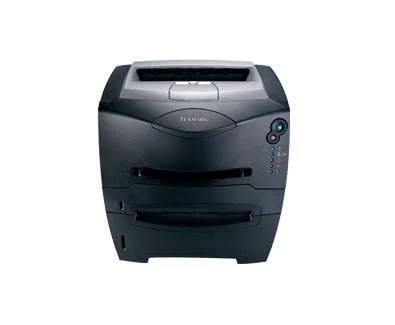
The Lexmark E240n adds included 10/100 Ethernet to a compact monochrome printer with USB and parallel interfaces. US part 28S0400 suits a wired computer network producing ordinary black-and-white documents from a supplied 250-sheet drawer. Its maker declaration reaches up to 27 one-sided Letter pages per minute, separately 26 A4.
The network connection is the main distinction from the local E240. Automatic duplex remains absent, and the E240n has no scanner, copier or fax. It can share printing through a suitable wired setup, but someone must still handle a manual second pass or an envelope at the feeder.
Set up the network and software deliberately
The original guide describes printing a network setup page, checking connection status and establishing the printer's IP address. Use the appropriate network port and compatible driver on each intended computer. A resident web page provides supported settings access once the printer is reachable.
The exact model lists PCL 5e/6 and PostScript 3 emulation, with 32 MB of standard memory. Those features distinguish it from the E240, but they do not guarantee every current application or operating system. Try the actual document formats and intended software environment before relying on an earlier unit.
Included Ethernet does not establish a built-in Wi-Fi radio, AirPrint or Mopria. A router's wireless connection for a laptop also does not by itself prove a supported mobile printing protocol at the printer. Confidential-job PIN release is unestablished here; the network interface alone is not evidence of secure job storage.
Load ordinary paper and special items separately
The media table supports 250 ordinary Letter, Legal or A4 sheets in the standard drawer at its 20-pound paper basis. Adjust the guides and select the loaded size and type in the software. Legal loading extends the drawer, so leave room behind the closed printer and check that the extension is properly positioned.
The separate manual feeder accepts one item at a time, including a suitable envelope. Choose its source and media settings, send the job and follow the paper prompt. Use the instructed rear path where appropriate for the stock. This is a different routine from loading a full drawer and does not make envelopes suitable for two-sided printing.
The optional 550-sheet drawer raises maximum input to 800 sheets only when that hardware is installed. The supplied printer remains a 250-sheet configuration. Its 150-sheet output figure is another limit, so even ordinary longer runs may need someone to collect the stack.
Understand the manual duplex sequence
The guide's two-sided routine prints alternate pages first, then signals for the stack to be reloaded. Tray 1 supplies the second pass even if another drawer supplied the first. Follow the specified printed-side and top-edge orientation and choose the correct long-edge or short-edge binding direction.
This workflow needs user attendance. It is not automatic duplex, and the guide explicitly excludes Macintosh from its manual-duplex routine. Check whether the actual compatible software provides the required process and verify a short example before a large document. An automatic-duplex printer is the better comparison when reports must finish unattended.
Budget attention for toner and the photoconductor
The exact US page declares 1,500 pages for the supplied toner cartridge and 2,500 for replacements under ISO/IEC 19752. The original regional table identifies US/Canada 24035SA regular and 24015SA Return Program toner. Confirm the exact supply and program conditions instead of treating a similar cartridge number as interchangeable.
The separate 12A8302 photoconductor has a 30,000-page declaration at approximately 5% coverage. That basis differs from the toner declaration. Inspect both components and remember the guide's warning that the Toner Low indication does not appear with the starter cartridge.
The 15,000-page monthly maximum does not supply a recommended monthly range. Lexmark marks the 22-pound E240n discontinued. Check its electrical label, proper cord, software, supplies and physical condition, with enough space for rear access. Choose a documented duplex or multifunction network model if back-side handling or paper capture would otherwise remain a daily obstacle.
Key details at a glance
| Color printing | No |
|---|---|
| Scanner | No |
| Copying | No |
| Fax | No |
| Flatbed scanner | No |
| Automatic document feeder | No |
| Automatic two-sided printing | No |
| Automatic two-sided scanning | No |
| Single-pass two-sided scanning | No |
| Color scanning | No |
| Instructed envelope handling | Yes |
| Maximum monthly duty | 15000 pages |
| Included ordinary-paper capacity | 250 sheets |
| Declared one-sided mono Letter rate | 27 pages/min |
| Unit-body width | 15.6 in |
| Unit-body depth | 13.9 in |
| Unit-body height | 9.8 in |
| Unit weight | 22 lb |
| Imaging engine | laser |
Use the exact model’s instructions for operating limits, supplied equipment and version differences.
Paper, software and setup details
Print-rate conditions
Maker maximum 27 one-sided Letter pages per minute versus 26 A4. The manual duplex routine requires reloading; neither rate is an automatic two-sided speed.
Paper handling
Included drawer supports 250 ordinary Letter, Legal or A4 sheets at the 20 lb paper basis. Separate manual feed takes one suitable item, including an envelope. Maximum 800 requires the optional 550-sheet drawer; output capacity is a separate 150-sheet figure.
Scanning arrangement
Monochrome print-only printer has no scanner glass, document-capture feeder, copying or fax. The paper drawer and manual input are printing paths.
Computer and mobile connections
Included 10/100 Ethernet, USB Type-B and parallel ports; PCL 5e/6 and PostScript 3 emulation. Ethernet needs a suitable wired network and compatible computer printing setup; built-in Wi-Fi is not established.
Supplies and declared yields
Exact US supplied toner declares 1,500 pages and replacements 2,500 under ISO/IEC 19752. Guide US/Canada parts are 24035SA regular and 24015SA Return Program toner. Separate 12A8302 photoconductor declares 30,000 pages at approximately 5% coverage.
Software and support
Five lights and two buttons provide status. The guide documents network setup/IP and a resident web page as well as local software. Its manual-duplex routine excludes Macintosh. Current OS, mobile protocols and PIN-release support are unestablished.
Electrical edition and setup
Confirm actual electrical label, proper cord and physical condition; nominal mains input is unestablished. Allow clearance for Legal tray extension, rear output and supplies. The 15,000-page maximum does not establish a recommended monthly range.
Sources for this assessment
Find a printer for your routine.
Match color output, scanning, connections and paper handling, then compare the exact models.