
Your needs, this model
Does it fit your priorities?
Can a wired team print A4 duplex with 250 sheets supplied and occasional envelopes at 2,000 pages per month?
Yes with compatible printer software. A4 automatic duplex and the included 250-sheet A4 drawer are explicit; envelopes use a separate one-sided manual-feed routine.
Explore this need in the finder →Can it connect to a computer by USB for automatic Legal duplex at the declared 30-ppm Letter minimum?
Yes. The USB setup supports Legal automatic duplex, while the selected speed checks the separate one-sided Letter declaration of 30 ppm, not Legal or duplex throughput.
Explore this need in the finder →Will its built-in Ethernet also provide scanning to a computer?
No. The E250dn is a print-only monochrome printer; a network interface does not add scanner hardware.
Explore this need in the finder →Sharing is the reason to choose the dn
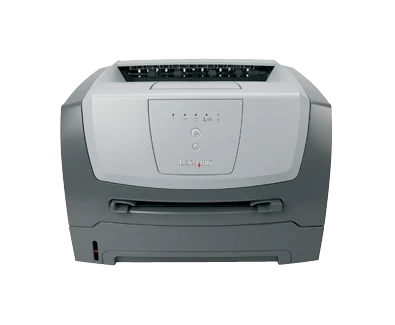
The Lexmark E250dn is a compact monochrome laser printer with integrated automatic duplex and included 10/100 Ethernet. US part 33S0300 also provides USB Type-B and parallel computer interfaces. It suits a small wired team whose work consists of ordinary black-and-white documents within the maker's recommended 250–2,200 printed pages per month.
The added network connection distinguishes it from the local E250d. The dn specification also lists PostScript 3 emulation alongside PCL 5e and PCL 6. These differences can matter to computer setup and application output, but they do not add a scanner, fax or wireless radio. This remains a printer for digital documents already on the computer.
Confirm the network before diagnosing print jobs
Use the included Ethernet interface for a normal wired-network arrangement and compatible printer software on each intended computer. The guide describes printing menu-settings and network information from the Ready state. Those pages are useful for checking the actual installed hardware, memory, tray setup and network information before investigating a failed application job.
A printer found on the network still needs a suitable queue and driver. Test an ordinary document and any important application-specific file, especially when moving an earlier printer into a different operating-system environment. Historical support lists are not a guarantee of compatibility with every current computer.
USB offers a separate local arrangement. Optional external gigabit and wireless print servers should not be counted as supplied hardware, and Ethernet alone does not establish AirPrint or Mopria. If a modern phone or tablet is the main source of documents, select a printer with that exact mobile workflow explicitly supported.
Automatic duplex for the normal office sizes
The original E250 guide specifically identifies Letter, Legal, A4 and Folio as supported automatic-duplex sizes. For a two-sided job, select the paper source and size, enable two-sided printing in compatible software and choose long-edge or short-edge binding. Check the orientation on a short example, particularly for letterhead or landscape pages.
The maker declares up to 30 one-sided Letter pages per minute and separately 14 Letter sides per minute in print duplex. The A4 simplex figure is 28 pages per minute. Keeping those modes separate is useful when estimating a real routine: a quoted 30-ppm engine figure is not a promise that a two-sided bundle finishes at the same rate.
Do not substitute the 50,000-page maximum monthly duty figure for the recommended workload. The latter stops at 2,200 pages per month and is the more relevant declaration for recurring use. None of these figures measures the condition or remaining service life of a particular secondhand unit.
Paper loading and occasional envelopes
The supplied drawer holds 250 ordinary sheets at the stated 20-pound or 75-gsm basis. Letter, Legal and A4 each fit that stack. Extend the tray for Legal or Folio paper and leave space for the extension and dust cover. Match the physical guides, selected size and media type instead of relying on an old queue's saved defaults.
The one-sheet manual slot handles an occasional different sheet or suitable envelope. Send the job with the correct manual source and settings, then feed the item as instructed without forcing it. Envelopes use a separate one-sided routine. The rear exit provides a straighter path for certain specialty media and needs clear space behind the printer.
The advertised 800-sheet maximum requires the optional 550-sheet drawer. The supplied capacity remains 250 sheets, with the manual path serving a different purpose. The top output bin's 150-sheet capacity is also separate from input capacity.
Read the lights and check both supply components
The five-light, two-button panel uses combinations to identify paper, toner, photoconductor and other conditions. Keep the guide available and use the Local Printer Settings Utility for supported configuration tasks. A complete confidential-job PIN-release routine is not established here.
The original US starter declares 1,500 pages; regional E250A11A or E250A21A replacements declare 3,500 under ISO/IEC 19752. The separate E250X22G photoconductor uses a 30,000-page declaration at about 5% coverage. The normal Toner Low light sequence does not appear with the starter cartridge, so inspect output and installed supplies directly.
Lexmark marks this 25-pound model discontinued. Check software, supply region, the electrical label and actual condition, with space for rear access and tray extension. A wireless or multifunction model is the sensible alternative when those functions are essential to the office.
Key details at a glance
| Color printing | No |
|---|---|
| Scanner | No |
| Copying | No |
| Fax | No |
| Flatbed scanner | No |
| Automatic document feeder | No |
| Automatic two-sided printing | Yes |
| Automatic two-sided scanning | No |
| Single-pass two-sided scanning | No |
| Color scanning | No |
| Instructed envelope handling | Yes |
| Recommended monthly minimum | 250 pages |
| Recommended monthly maximum | 2200 pages |
| Maximum monthly duty | 50000 pages |
| Included ordinary-paper capacity | 250 sheets |
| Declared one-sided mono Letter rate | 30 pages/min |
| Unit-body width | 15.6 in |
| Unit-body depth | 14.1 in |
| Unit-body height | 10.2 in |
| Unit weight | 25 lb |
| Imaging engine | laser |
Use the exact model’s instructions for operating limits, supplied equipment and version differences.
Paper, software and setup details
Print-rate conditions
Maker maximum 30 one-sided Letter pages/minute versus 28 A4; separately 14 Letter sides/minute in automatic print duplex. These are declared modes, not measured complete-job results.
Paper handling
Supplied 250-sheet drawer at 20 lb/75 gsm plus a separate one-sheet manual slot. Letter, Legal and A4 each fit the 250-sheet ordinary stack and automatic duplex. Maximum 800 needs the optional 550-sheet drawer. Envelopes are one-sided, one at a time through manual feed.
Scanning arrangement
Print-only monochrome hardware: no scanner glass, document feeder, copying or fax. Paper input is not an original-scanning feeder.
Computer and mobile connections
Included USB Type-B, parallel and 10/100 Ethernet. Exact E250dn adds PostScript 3 emulation alongside PCL 5e/PCL 6. External gigabit and wireless print servers are optional; included Ethernet does not establish a Wi-Fi radio or mobile protocol.
Supplies and declared yields
US supplied 1,500-page Return Program starter toner; E250A11A or E250A21A replacements declare 3,500 pages under ISO/IEC 19752. Separate E250X22G photoconductor declares 30,000 at about 5% coverage. Starter cartridge does not trigger the normal Toner Low light sequence.
Software and support
Computer printing and duplex settings require compatible driver software. The five-light/two-button panel uses light sequences and a Local Printer Settings Utility. Current OS, AirPrint/Mopria and job PIN-release compatibility are unestablished.
Electrical edition and setup
Check the offered unit’s electrical label and correct cord; nominal mains input is unestablished. Leave room for the extended Legal tray, rear exit, ventilation and servicing.
Sources for this assessment
Find a printer for your routine.
Match color output, scanning, connections and paper handling, then compare the exact models.