
Your needs, this model
Does it fit your priorities?
Can a wired team print Legal pages from the included 250-sheet drawer and occasional envelopes?
Yes with compatible network printer software. Legal capacity is 250 ordinary sheets; suitable envelopes use the separate one-sided manual-feed path.
Explore this need in the finder →Will the manual two-pass printing option satisfy automatic duplex?
No. The documented procedure prints alternate pages and requires reloading the first pass into Tray 1. It does not establish an automatic sheet-turning mechanism.
Explore this need in the finder →Can its Letter engine meet a selected 30-page-per-minute minimum?
No. The exact E332n declares up to 27 one-sided Letter pages per minute. The E342n’s 30-ppm figure belongs to a different model.
Explore this need in the finder →A network printer with a basic local interface
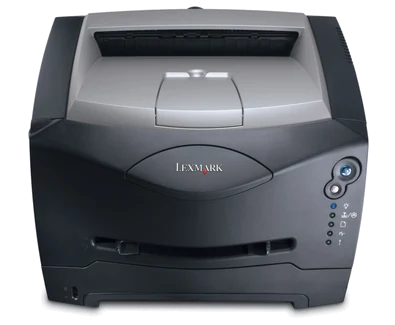
The Lexmark E332n is a monochrome laser printer with included 10/100 Ethernet, USB Type-B and parallel interfaces. US part 22S0600 supplies a 250-sheet drawer and uses five lights with two buttons for local status. It suits a wired group producing ordinary black-and-white documents when a basic panel and compatible computer software are sufficient.
Its limits matter more than the network suffix might suggest. The E332n does not scan, copy or fax, and its documented two-sided printing routine requires manual reloading. The declared Letter simplex rate is up to 27 pages per minute, compared with 26 on A4. Those figures should not be replaced with the E342n's higher Letter declaration.
Verify network setup with the printer's own pages
The original guide instructs the user to print menu-settings and network pages from the Ready state. Use those pages to confirm installed options, memory, loaded-paper settings and a Connected network status. If the network status is wrong, resolve the cable or LAN connection before repeatedly resending application jobs.
On a suitable DHCP network, the printer can receive its IP address automatically. The guide then describes checking the address and installing the network printer driver and port on each intended computer. A network model also has a resident Web page for status and configuration. These are setup tools, not evidence that any current computer will work without suitable software.
USB provides a separate local printing route. External wireless equipment is optional; an Ethernet connection does not mean that a radio is inside the supplied printer. AirPrint and Mopria are not established in this assessment. Check the intended operating system and important application files before buying an earlier unit for a new environment.
Know what the lights and manual duplex require
The panel communicates conditions through light combinations rather than a text display. The guide distinguishes primary signals and secondary codes for paper, toner, photoconductor and other conditions. Keep the relevant reference accessible and confirm that the people using the machine can recognize the normal reload and attention prompts.
For manual duplex, compatible computer software prints alternate pages first. The user then returns the first-pass output to Tray 1 in the instructed orientation. The second pass uses Tray 1 even when an optional drawer supplied the first pass. This is a hands-on sequence, not automatic sheet turning inside the printer.
Check page order and long-edge or short-edge binding on a small example before attempting a larger bundle. If unattended two-sided reports are routine, an explicitly documented automatic-duplex printer is the more suitable comparison. A menu option named two-sided does not remove the need to handle the stack.
Ordinary paper and occasional special items
The original media table supports Letter, Legal and A4 in the 250-sheet drawer at the ordinary 20-pound or 75-gsm basis. Extend the tray for Legal or Folio paper and use the dust cover if supplied. Leave room at the rear and match both the physical guides and computer paper settings to the load.
The one-sheet manual feeder handles an occasional different sheet or suitable envelope. Send the job with the selected manual source, size and type, then load the item at the prompt. Position it as instructed and allow the mechanism to engage without forcing it. Envelopes use the separate one-sided routine and appropriate laser-compatible stock.
The rear exit offers a straighter path for certain specialty media. An optional 550-sheet drawer is required to reach the 800-sheet input maximum; the base system remains 250 sheets with a separate manual path. The top bin's 150-sheet output declaration is a different capacity.
Workload and supplies need separate judgment
Lexmark gives a maximum monthly volume of 15,000 pages, but the reviewed exact material does not establish a recommended monthly range. That maximum cannot substitute for a recurring-workload recommendation or indicate the remaining life of an offered printer.
The exact US configuration declares supplied 2,500-page Return Program toner. Replacement choices include 2,500 and 6,000-page toner under ISO/IEC 19752. The separate photoconductor's 30,000-page declaration uses approximately 5% coverage in the original guide. Inspect both components and match supply compatibility rather than treating all yield numbers as interchangeable.
This discontinued machine weighs 22 pounds. Check its electrical label, proper cord, current software and physical condition, and leave operating access beyond the closed body. A text-panel model can make local messages clearer, while a documented duplex or multifunction printer addresses the larger workflow limitations.
Key details at a glance
| Color printing | No |
|---|---|
| Scanner | No |
| Copying | No |
| Fax | No |
| Flatbed scanner | No |
| Automatic document feeder | No |
| Automatic two-sided printing | No |
| Automatic two-sided scanning | No |
| Single-pass two-sided scanning | No |
| Color scanning | No |
| Instructed envelope handling | Yes |
| Maximum monthly duty | 15000 pages |
| Included ordinary-paper capacity | 250 sheets |
| Declared one-sided mono Letter rate | 27 pages/min |
| Unit-body width | 15.6 in |
| Unit-body depth | 13.9 in |
| Unit-body height | 9.8 in |
| Unit weight | 22 lb |
| Imaging engine | laser |
Use the exact model’s instructions for operating limits, supplied equipment and version differences.
Paper, software and setup details
Print-rate conditions
Maker maximum 27 one-sided Letter pages/minute versus 26 A4. The guide supplies a manual two-pass printing routine with reloading; no automatic-duplex mechanism or duplex throughput is established.
Paper handling
Included 250-sheet drawer at 20 lb/75 gsm; Letter, Legal and A4 each fit the ordinary 250-sheet stack. Separate manual feed handles one item at a time. Maximum 800 needs an optional 550-sheet drawer. Suitable envelopes are one-sided manual-feed jobs.
Scanning arrangement
Print-only monochrome laser with no glass, document-scanning feeder, copying or fax. The paper drawer and manual slot are output-media paths, not original-capture hardware.
Computer and mobile connections
Included USB Type-B, parallel and 10/100 Ethernet. Original guide documents USB computer queues and direct network printing with setup-page/IP verification. External 802.11b wireless is optional; no included radio or mobile protocol is inferred.
Supplies and declared yields
Exact US supplied Return Program toner declares 2,500 pages; replacements include 2,500 and 6,000-page choices under ISO/IEC 19752. The separate photoconductor is declared at 30,000 pages on the guide’s approximately 5% coverage basis. Inspect both components and compatible supply region.
Software and support
Five lights and two buttons communicate status through combinations. Compatible computer drivers provide media and manual second-pass settings; current OS, AirPrint/Mopria and protected-job PIN release remain unestablished.
Electrical edition and setup
Inspect actual electrical label, proper cord and offered condition; nominal mains input is unestablished. Leave room for extended Legal tray, rear exit and servicing. Maximum monthly duty is not a recommended recurring workload.
Sources for this assessment
Find a printer for your routine.
Match color output, scanning, connections and paper handling, then compare the exact models.