
Your needs, this model
Does it fit your priorities?
Can Wi-Fi combine fax, A4 glass scans, A4 duplex printing and PIN release with a 250-sheet stack?
Yes with compatible print/scan software, local PIN release and a suitable separate fax line. Set the duplex unit to A4 for A4 stock.
Explore this need in the finder →Can Ethernet provide AirPrint and Mopria while keeping the printer on a cable?
Yes on appropriate shared networking. Both protocols are explicitly named for this exact US package; an Ethernet connection can coexist with mobile devices using the same reachable network.
Explore this need in the finder →Does the touchscreen upgrade include automatic two-sided feeder scanning?
No. The exact adwe specification still identifies a simplex feeder; touchscreen controls and automatic print duplex do not change that hardware.
Explore this need in the finder →The touchscreen version keeps the same simple feeder
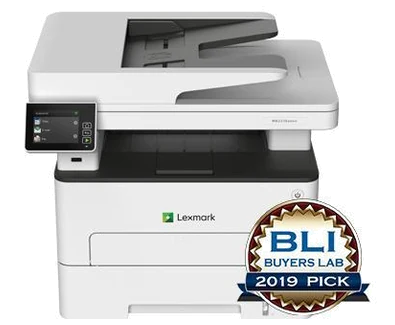
The Lexmark MB2236adwe gives a small office a 2.8-inch color touchscreen and a front USB port alongside monochrome printing, copying, color scanning and analog fax. Exact US part 18M0700 includes Wi-Fi, 10/100 Ethernet and USB Type-B. It suits a modest document routine where clearer local controls and computer connectivity matter more than a large paper expansion system.
The touchscreen is not an automatic duplex scanner upgrade. This model still has a one-sided 50-sheet feeder, while automatic duplex applies to printed output. The maker recommends 250–2,500 pages per month, separate from its 30,000-page maximum duty cycle. Lexmark marks it discontinued, so confirm the actual offered machine's condition, software and supplies.
Choose the correct route for originals
Letter, Legal and A4 originals are documented through the feeder. Place appropriate sheets faceup and adjust the guides. The glass supports Letter and A4 but not a complete Legal original. It is the right surface for books, photos, small items and thin or fragile paper that should not pass through rollers.
One-sided Legal contracts therefore have a supported feeder workflow, while full-length delicate Legal material calls for another flatbed configuration. For recurring two-sided batches, compare a genuinely automatic duplex feeder. General common-guide wording about two-sided documents should not override the exact specification naming this scanner simplex.
The product explicitly lists scanning to USB- or network-connected computers. The original guide covers ScanBack profiles, Windows Fax and Scan, and Mac Image Capture. Check the intended operating system, scanner software and destination permissions. A working network print connection does not by itself configure those scan destinations.
Network protocols and local job controls
AirPrint and Mopria are explicitly named for this US package. Suitable shared networking allows compatible mobile devices to reach the printer, whether its ordinary network connection uses Ethernet or Wi-Fi. For wireless setup the guide calls for Ethernet to be disconnected and the active adapter set to Auto.
Wi-Fi Direct computer printing is separately documented. Treat that peer path as its own setup, rather than assuming every network scan, named mobile protocol or confidential-job control is automatically available there. The Type-B port attaches a workstation; the front Type-A port supports the documented flash-drive functions and file restrictions.
Confidential computer jobs use actual protected-output controls. Windows software provides Print and Hold, while Mac software can use AirPrint PIN Printing or the driver option. Submit a four-digit PIN and release the job at the printer. Confirm those controls on the chosen software and firmware before making protected documents part of the daily routine.
The touchscreen's historical Cloud Connector description mentions a firmware availability condition. That is a reason to check current firmware, account and cloud-provider compatibility, not a promise that every old integration remains available. Basic local scanning and printing are separate from those services.
Ordinary paper capacity and separate fax setup
The included 250-sheet drawer and one-sheet manual slot produce the maker's 251-sheet total at the stated 20-pound or 75-gsm basis. The normal Letter, Legal or A4 stack is 250 sheets. The manual slot handles a sheet or suitable envelope individually rather than adding another stack of paper.
Letter, Legal and A4 support automatic print duplex. Set the duplex unit to A4 for A4 paper and Letter for Letter or Legal, then match size and type settings to the load. Envelopes use a separate one-sided manual-feed routine. The declared print modes are up to 36 one-sided Letter pages per minute and separately 18 Letter sides per minute in duplex.
Analog fax requires station information and a suitable separate phone-line arrangement. Ethernet or Wi-Fi does not replace that telephone path. Confirm any service adapter for the actual installation.
Supplies and the compact body
The original US toner declares 700 pages. Listed replacements are B221000 at 1,200, B221H00 at 3,000 and B221X00 or B220XA0 at 6,000 under ISO/IEC 19752. The separate B220Z00 imaging unit uses a different job and coverage basis for its 12,000-page declaration. Match regional and Return Program terms, inspect the electrical label and leave loading and service room around the 22-pound body.
Key details at a glance
| Color printing | No |
|---|---|
| Scanner | Yes |
| Copying | Yes |
| Fax | Yes |
| Flatbed scanner | Yes |
| Automatic document feeder | Yes |
| Automatic two-sided printing | Yes |
| Automatic two-sided scanning | No |
| Single-pass two-sided scanning | No |
| Color scanning | Yes |
| Instructed envelope handling | Yes |
| Apple AirPrint | Yes |
| Mopria printing | Yes |
| Supported PIN-release printing | Yes |
| Recommended monthly minimum | 250 pages |
| Recommended monthly maximum | 2500 pages |
| Maximum monthly duty | 30000 pages |
| Included ordinary-paper capacity | 251 sheets |
| Document-feeder capacity | 50 sheets |
| Declared one-sided mono Letter rate | 36 pages/min |
| Unit-body width | 16.4 in |
| Unit-body depth | 14.2 in |
| Unit-body height | 13.9 in |
| Unit weight | 22 lb |
| Imaging engine | laser |
Use the exact model’s instructions for operating limits, supplied equipment and version differences.
Paper, software and setup details
Print-rate conditions
Manufacturer maximum 36 one-sided Letter pages/minute; automatic print duplex separately 18 Letter sides/minute. Letter simplex scanning separately 25 black/8 color sides/minute; not measured application results.
Paper handling
250-sheet main drawer plus single-sheet manual feed: maker total/max 251 at 20 lb/75 gsm, not a 251-sheet stack. Per-size ordinary Letter/Legal/A4 main load is 250. All three support automatic print duplex; set duplex unit to A4 for A4, Letter for Letter/Legal. Suitable envelopes use manual feed one at a time, one-sided.
Scanning arrangement
Exact US specification: 50-sheet simplex-only feeder. Letter/Legal/A4 feeder and Letter/A4 glass are positively mapped in original 20–21; Legal glass is unsupported. Generic two-sided-original wording in the common guide does not supply an automatic duplex scanner.
Computer and mobile connections
Included USB Type-B, 10/100 Ethernet, 802.11b/g/n Wi-Fi and front Type-A flash port. USB/network computer scanning is explicit; front flash and computer attachment are different paths. Configure Wi-Fi with Ethernet disconnected and Active Adapter Auto. Wi-Fi Direct computer printing is documented; peer scan/PIN/named mobile protocol support remains unestablished.
Supplies and declared yields
US supplied Return Program toner 700 pages. Replacements B221000 1,200; B221H00 3,000; B221X00/B220XA0 6,000 under ISO/IEC 19752. Separate B220Z00 imaging unit 12,000 has its own job/coverage basis. Match regional cartridge and Return Program terms.
Software and support
Exact US marketing names AirPrint and Mopria; scoped guide 69 gives shared-network routines. Guide 72–73 supplies actual compatible Windows Print and Hold and Mac AirPrint PIN Printing with four-digit PIN and local release. Front flash has supported-file restrictions. Historical Cloud Connector language requires checking current firmware, account and provider availability.
Electrical edition and setup
Check the actual electrical label and compatible current print/scan software. Body dimensions exclude feeder, scanner-cover, cable and service access.
Sources for this assessment
Find a printer for your routine.
Match color output, scanning, connections and paper handling, then compare the exact models.